
computer Crossword Puzzles
Digital literacy 2022-10-19

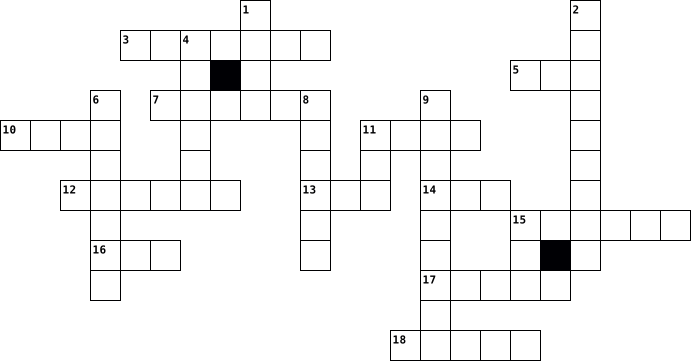
Across
- creates a safe link for you and the internet.
- without using a mouse, changes between application-level windows
- Mouse and keyboards are examples of what?
- process numerous data sets at once.
- the process of creating, editing, saving, and printing documents using a computer.
- a computer program made to run the hardware and software of a computer.
- output device that shows text or graphic information.
- copies highlighted texts.
- There are just two potential values for each digit in this numbering system: 0 or 1.
- To reverse your last action.
Down
- programs that control how computer hardware and software operate.
- use of snipping tool.
- Supply power to the components of your computer.
- is hardware. Loading data into your computer, including letters, words, and numbers.
- the computer's main printed circuit board.
- generally composed of the main memory.
- A monitor and speaker are examples of what?
- a moveable tool that allows a wide range of computer controls.
- a Bluetooth wireless signal transmitter and receiver with a USB base.
- copies the contents of the clipboard to the spot where the cursor is now located.
20 Clues: use of snipping tool. • copies highlighted texts. • To reverse your last action. • process numerous data sets at once. • generally composed of the main memory. • Mouse and keyboards are examples of what? • the computer's main printed circuit board. • A monitor and speaker are examples of what? • creates a safe link for you and the internet. • ...
McKenzie Chouinard-crossword-7th period 2016-10-24

Across
- type of technology that connects the user to high speed Internet
- context of computer security
- a device that forwards data packets with computer networks
- cellular phone that works as a computer
- a space for work
- a person information system to engage in society
- the practice of using a network
- the activity of defrauding an online account holder of financial information by posing as a legitimate company
- internet address
- when two or morePCs are connected and share resource through a separation server computer
- computer that is portable and suitable for use while traveling
Down
- software that automatically displays material
- a system for connecting a number of computer systems to form a network
- a computer device that connects other devices together
- device that allows a WiFi compliant device to connect to a wired network
- the study or use of systems
- a message sent to a large number of recipients
- a common connection point for devices
- type of malicious software program
- A mini replica of a page or image that is used to identify a file
20 Clues: a space for work • internet address • the study or use of systems • context of computer security • the practice of using a network • type of malicious software program • a common connection point for devices • cellular phone that works as a computer • software that automatically displays material • a message sent to a large number of recipients • ...
Surface Pro Rollout Contest 2019-07-09

Across
- The entire screen area that is displayed after you log in
- Physical components of a computer
- Microsoft spreadsheet software
- Project leading the recharge of the Potomac Aquifer
- HRSD traces its early beginning to these marine creatures
- Display allowing the user to interact with the screen
- Application components of a computer
- The Information __________ Department issues new computers to HRSD employees
- Wireless portable computer, usually hand held
- Microsoft slide presentation software
- Who to call when you have an issue with your computer equipment
- Find files and applications on your computer by using the _______ button
- Air ____ Avenue
- Microsoft software used to send and receive emails
Down
- Location where water is treated
- Used to point and click on a computer
- Microsoft word processing software
- Company that focuses on the development and implementation of software, such as Windows 10
- Surface ___
- Watch these training ______ learn about the Surface Pro Rollout
- Navigate to your ____ Menu to find your applications
- Panel of keys that operates a computer
- Deleted files go to the _______ bin
- Created in 1940
24 Clues: Surface ___ • Created in 1940 • Air ____ Avenue • Microsoft spreadsheet software • Location where water is treated • Physical components of a computer • Microsoft word processing software • Deleted files go to the _______ bin • Application components of a computer • Used to point and click on a computer • Microsoft slide presentation software • ...
jose 2023-11-02

Across
- a simple click of a mouse
- a computer file that contains an encoded sequence of instructions
- An icon that points to a website
- the position indicator on a computer
- the act of pressing a computer mouse button twice quickly
- a group of data
- a computer display area
- the access point for programs displayed on the desktop
- a computer program that can capture, display and manipulate data
- to load an operating system
Down
- devices that control, regulate, monitor, collect data, communicate, and diagnose
- a set of options presented to the user of a computer application to help them find information or execute a function
- tools used to assist in conveying information during a presentation
- repents its app
- to move up and down or side to side
- holds one or more files
- writing data to a storage medium
- a force acting opposite to the relative motion of any object moving
- a separate viewing area on a computer display screen in a system that allows multiple viewing
- a form of information
20 Clues: repents its app • a group of data • a form of information • holds one or more files • a computer display area • a simple click of a mouse • to load an operating system • An icon that points to a website • writing data to a storage medium • to move up and down or side to side • the position indicator on a computer • the access point for programs displayed on the desktop • ...
Inside the system 2018-11-27

Across
- Not using wires to send and receive electronic signals.
- A large and very fast computer that can do many jobs at once.
- A unit of computer information that is equal to eight bits.
- A machine that is used for printing documents, photographs, etc.
- The main circuit board of a computer.
- Brain and the main part of a computer system which can process data represented in binary code.
- A mobile telephone that can be used to send and receive e-mail, connect to the Internet, take photographs, etc.
- Designed to be used while being held in your hands.
- The programs that run on a computer and perform certain functions.
Down
- Electronic components of a computer.
- Unit of measuring processor clock speed.
- A small computer that is designed to be easily carried.
- Finding and fixing problems in machinery and technical equipment (such as computers).
- Devices used to input or output data into and out of a computer.
- A mark on a computer screen that shows the place where information is being entered or read.
- Quickly accessible location available to a computer's central processing unit.
- The part of a computer in which information that cannot be changed is stored.
17 Clues: Electronic components of a computer. • The main circuit board of a computer. • Unit of measuring processor clock speed. • Designed to be used while being held in your hands. • Not using wires to send and receive electronic signals. • A small computer that is designed to be easily carried. • A unit of computer information that is equal to eight bits. • ...
6M Voc 2019-09-16

Across
- a list of all the information and websites that someone has looked for on the internet
- a piece of equipment that does a particular thing
- a written remark giving an opinion
- send a piece of information by email or text
- large letters like those at the beginning of a sntence or name
- pictures or shapes used to represent something on a computer program
- a safe way of using a computer or the internet
- send a written message to someone over the internet
- a website where one or more people can write about opinions, interests, and experiences
- make a computer keep information about your favorite websites
- the ability to be connected to the internet without other people watching you or knowing what you are doing
- move information to your computer from another computer system or the internet
Down
- put your name and other information on a website for the first time
- send items, like photos or videos, from your computer to another computer system using the internet
- small letters like those in the middle of words or sentences
- the numbers or letters that you have to put into a computer to be able to use the system
- the name used by someone for using a computer program
- knowledge or facts about yourself
- safe,protected
- a piece of writing that is published on a blog
- put personal details about yourself on a social media website
- suddenly stop working
22 Clues: safe,protected • suddenly stop working • knowledge or facts about yourself • a written remark giving an opinion • send a piece of information by email or text • a safe way of using a computer or the internet • a piece of writing that is published on a blog • a piece of equipment that does a particular thing • send a written message to someone over the internet • ...
Unit1 Vocabulary Review 2019-09-22

Across
- a piece of equipment that does a particular thing
- put personal details about yourself on a social media website
- a list of all the information and websites that someone has looked for on the internet
- send a piece of information by email or text
- a written remark giving an opinion
- knowledge or facts about yourself
- move information to your computer from another computer system or the internet
- the ability to be connected to the internet without other people watching you or knowing what you are doing
- safe,protected
- the name used by someone for using a computer program
- send items, like photos or videos, from your computer to another computer system using the internet
- a website where one or more people can write about opinions, interests, and experiences
Down
- small letters like those in the middle of words or sentences
- put your name and other information on a website for the first time
- pictures or shapes used to represent something on a computer program
- large letters like those at the beginning of a sntence or name
- suddenly stop working
- make a computer keep information about your favorite websites
- a piece of writing that is published on a blog
- a safe way of using a computer or the internet
- the numbers or letters that you have to put into a computer to be able to use the system
- send a written message to someone over the internet
22 Clues: safe,protected • suddenly stop working • knowledge or facts about yourself • a written remark giving an opinion • send a piece of information by email or text • a piece of writing that is published on a blog • a safe way of using a computer or the internet • a piece of equipment that does a particular thing • send a written message to someone over the internet • ...
Intro to Computer Science 2021-01-09

Across
- It represents a connection to another page
- Often built into the CPU that uses high speed circuitry to provide fast access to data and stores memory temporarily
- A collection of 8 bits
- An international network of computers connected by cables
- Programs that allow people to create and manage applications
- Converts AC power to DC power in order to power the computer
- A separate memory chip
- These let the computer receive data instructions from internal sources
- A unit of data that corresponds to one of two values
- Programs that run on a computer and carry out tasks
- Stores data as electrical charges in a series of memory cells
- Carry out tasks in specific areas like word processing or graphic design
Down
- A devices that receives, stores, and processes information
- Metal disk that stores data
- The brains which controls the innerworkings of a computer and processes data
- Interprets HTML formatting in order to display the page
- A collection of programs which control the way CPU, memory, and input/output devices work
- A circuit board with the main components of the computer such as the CPU along with connectors to attach to other circuit boards
- Allows the computer to display and broadcast results
- Collection of files organized together and divided into folders
- It makes computer interactions easier for the user
- A collection of software that allows the interlinking of documents and resources
- A web address
- The physical components of a computer
24 Clues: A web address • A collection of 8 bits • A separate memory chip • Metal disk that stores data • The physical components of a computer • It represents a connection to another page • It makes computer interactions easier for the user • Programs that run on a computer and carry out tasks • Allows the computer to display and broadcast results • ...
Computer class crossword 2012-09-20

Across
- Way to send messages over the internet
- Another word for surf
- Mr. McCormick is the ____ teacher
- Do this to protect your data
- Leave a program
- A computer's answer to life, the universe and everything
- The World Wide Web and e-mail are parts of this.
- Outdated way to move information from one computer to another
- Where you save your files at the school
- Software is a type of ______
- You shouldn't tell anyone this
- Your data is stored here
- Connects a computer to a telephone.
- Sound and video are parts of this
- The language of web pages
- Program that manages information
- Short for uniform resource locater
- Buzz word for internet based services
- Input device with a tail
- Short for random access memory
Down
- Central computer in a network
- Short for a company that provides your internet connection
- Many computers connected together
- You listen to sound on this
- The brain of a computer
- Many mouses
- To start a computer
- The unit of computer information
- Computer from "The Hitchhikers Guide to the Galaxy"
- Instant Message
- Device that reads papers into computers
- You should do this often
- Monitors and printers are ____ devices
- Short for read only memory
- Mice and keyboards are ___ devices
- The computer from 2001
- Drive sometimes confused with a cup holder.
- The first computer
38 Clues: Many mouses • Leave a program • Instant Message • The first computer • To start a computer • Another word for surf • The computer from 2001 • The brain of a computer • You should do this often • Your data is stored here • Input device with a tail • The language of web pages • Short for read only memory • You listen to sound on this • Do this to protect your data • Software is a type of ______ • ...
computer application technology 2018-09-04

Across
- it infect the computer
- it manipulates data
- generates control signals that direct the operation of memory and the datapath
- physical component of computer
- is used for observing,checking or keeping a continuous record of something
- spreedsheet developed by microsoft
- the brain of a computer
- fraudulent practice of sending emails
- a computer device
- operate a computer or typewriter
- it defines different structures in a database
- personal area network
- short last name or street name
- monetary
- paste images
- tool used to manipulate data in the database
- electronic device
- to put information on it and use it later
Down
- the programs and operating information
- a type of browser
- display either a list of values that is retrieved from a table or query
- local area network
- text or combination of text and numbers stored as text
- a computer program with a graphical user interface for displaying HTML files, used to navigate the World Wide Web.
- long blocks of text
- all the components of computer attached to it
- to move or position cursor
- external devices such as keyboards, mice, disks, and networks that provide input to the processor
- global computer network
- a collection of interrelated data
- facts and statistics collected together for reference or analysis
- liquid crystal display
- hypertext markup language
- africa an african country
- a contraction of malicious software
- holds instructions and most of the data for currently executing programs
36 Clues: monetary • paste images • a type of browser • a computer device • electronic device • local area network • it manipulates data • long blocks of text • personal area network • it infect the computer • liquid crystal display • the brain of a computer • global computer network • hypertext markup language • africa an african country • to move or position cursor • physical component of computer • ...
Technisch met de computer 2015-02-08

Across
- Hiermee kan je documenten, foto's en tekeningen afdrukken
- Kabel om het scherm aan te sluiten
- Dit soort geheugen bevindt zich op het moederbord
- Deze printer gebruikt inkt om te printen
- Brein van de computer, het voert alle berekeningen uit
- Zorgt ervoor dat de computer niet oververhit raakt
- Dit soort kabel kan je computer verbinden met andere computers en een modem
- De basis van de computer waar alle onderdelen op zijn ingesloten
- Verbindt een computer of netwerk met het internet
Down
- Krachtige computer die bestanden bijhoudt en verdeelt in een computernetwerk
- Dit bedrijf zorgt ervoor dat jij met het internet aangesloten bent
- GB
- Hiermee kan je gegevens en tekst ingeven op je computer
- Werkgeheugen van de computer
- Dit gebruikt een laserprinter om af te drukken
- Permanent geheugen van de computer dat alleen gelezen kan worden
- Bepaalt welke informatie naar welke computer gestuurd wordt in een computernetwerk
17 Clues: GB • Werkgeheugen van de computer • Kabel om het scherm aan te sluiten • Deze printer gebruikt inkt om te printen • Dit gebruikt een laserprinter om af te drukken • Dit soort geheugen bevindt zich op het moederbord • Verbindt een computer of netwerk met het internet • Zorgt ervoor dat de computer niet oververhit raakt • ...
Kaosiso Vocab 2014-11-12

Across
- type of high speed internet
- physicality of a computer
- a box that displays information
- an internet service provider
- rules that apply when communicating over internet
- a large computer network linking smaller computer networks worldwide
- text used for computers
- associate amongst other peeple
Down
- to transfer data
- a computer that allows people to use a computer as a tool
- initial site on the web
- extra function
- amount of computer memory
- maximum number of pixels on a computer
- being on the internet
15 Clues: extra function • to transfer data • being on the internet • initial site on the web • text used for computers • physicality of a computer • amount of computer memory • type of high speed internet • an internet service provider • associate amongst other peeple • a box that displays information • maximum number of pixels on a computer • rules that apply when communicating over internet • ...
Keenan Young 2016-02-16

Across
- Plug in's for my headphones to listen to muh jams
- Pink colored plug in so I can show my friends my pictures off the internet
- Uses the numbers 1-0 as language
- Controls all in the computer. May also put you to bed at night and make you supper
- Random Accessing Unit
- also know as the tower
- cools off the computer(not fan)
- Socket that converts power for the computer
- Plug in that is also know as the Video Graphic Array
Down
- Plug in for mouses or keyboards
- Keeps the computer cool(not heatsink)
- Windows is an example
- Turns off the computer
- The brains of the computer
- Place to put special cards for video and sound
- Is an example of an input device
- cord that allows you to connect to the internet
- Cd is inserted
- Is both an output and hardware device
- Is were the permanent data stored
20 Clues: Cd is inserted • Windows is an example • Random Accessing Unit • Turns off the computer • also know as the tower • The brains of the computer • Plug in for mouses or keyboards • cools off the computer(not fan) • Uses the numbers 1-0 as language • Is an example of an input device • Is were the permanent data stored • Keeps the computer cool(not heatsink) • ...
bormolini andrea 2019-05-29

Across
- istruzioni che danneggiano il dispositivo
- percorso a schema d'albero in una cartella
- documento precompilato
- programmi che aprono le pagine web
- app dove si possono assegnare i compiti
- componenti esterni hai calcolatori
- chi decide di seguire una persona
- parte fisica di un computer
- tablet computer dispostivo elettronico
- cancellare quello che c'è sul dispositivo
- programmi che si possono sostituire
- rappresentazione grafica di una director
- dove si naviga
- procedura di salvataggio di dati
- ciò che ti da il computer
Down
- schermo del computer
- errore di una procedura informatica
- sistema o canale di connessione
- codice per entrar nell'account
- personal computer
- luogo in cui vengono salvati i file
- unità di elaborazione
- ci dice che tipo di file è
- app messe a disposizione da bill gates
- strumento per scrivere
- ciò che tu dai al computer
- finestra principale
- chiamato anche username
- programma per fare i calcoli
29 Clues: dove si naviga • personal computer • finestra principale • schermo del computer • unità di elaborazione • documento precompilato • strumento per scrivere • chiamato anche username • ciò che ti da il computer • ci dice che tipo di file è • ciò che tu dai al computer • parte fisica di un computer • programma per fare i calcoli • codice per entrar nell'account • ...
Computer Tech CrossWord 2020-10-14

Across
- machine to make copys
- a computer that is used on a desk
- the main circuit board
- When a computer sends data
- the main part of equiment for the Computer
- a device that is mobile
- a piece of equitment that sends sound waves
- a device were info can be stored
- the computer case
Down
- buttons to write words
- the piece that contains the parts
- a plug in to charge
- when a computer receives data
- a place to store your files
- a computer that is able to go with you
- to recive input and give output
- Power source to the system
- a card that outputs images on devices
- a screen to work on
- to connect keyboards and mice
- a device used to move the cursor
- the video connecter
- a device made to communicate with
- makes sound louder
24 Clues: the computer case • makes sound louder • a plug in to charge • a screen to work on • the video connecter • machine to make copys • buttons to write words • the main circuit board • a device that is mobile • Power source to the system • When a computer sends data • a place to store your files • when a computer receives data • to connect keyboards and mice • to recive input and give output • ...
Grade 5 Computer Studies Revision Puzzle 2021-05-26

Across
- used to work with rows and columns
- when the computer is changing instructions into information
- used to type letters and stories
- another name for microcomputer
- used to print large designs
- when we put data into the computer
- upright design of the processor
- used to do research
- used to keep records
- to have video conversations
- type of alignment
- largest computer
- combines videos and sounds
- used to play electronic games
- smallest computer
Down
- part of a letter
- a type of letter
- used to write on a touchscreen
- used to give the computer voice commands
- devices that are attached to the system unit
- Processed information that we get from the computer
- used in cellphones
- used to project on surfaces
- used to store high quality files
- a box in which we do our work
25 Clues: part of a letter • a type of letter • largest computer • type of alignment • smallest computer • used in cellphones • used to do research • used to keep records • combines videos and sounds • used to print large designs • used to project on surfaces • to have video conversations • used to play electronic games • a box in which we do our work • used to write on a touchscreen • ...
Tech brain twister 2025-02-23

Across
- : A secret word to access an account
- : The process of converting data into a secure format
- : The global network that connects computers
- : A portable storage device
- : A structured collection of data stored electronically
- : The physical parts of a computer
- : The most widely used search engine
- : The component responsible for displaying images on a screen
- : A branch of AI focused on training machines
- : A set of instructions executed by a computer
- : A temporary memory that stores active data
Down
- : A system that protects computers from viruses
- : A software that controls the hardware of a computer
- : A device used to enter text into a computer
- : A language that web browsers interpret
- : The main page of a website
- : The brain of the computer
- : A place where deleted files go
- : The main circuit board of a computer
- : A high-level programming language commonly used for web development
20 Clues: : The brain of the computer • : A portable storage device • : The main page of a website • : A place where deleted files go • : The physical parts of a computer • : A secret word to access an account • : The most widely used search engine • : The main circuit board of a computer • : A language that web browsers interpret • : The global network that connects computers • ...
Networking Concepts & Cyber Ethics 2025-06-03

Across
- : We use this to type on computer
- : We do this to find things on internet
- : A machine we use to study and play
- : A saved document, photo or game
- : We watch this on YouTube
- : Sending and receiving messages online
- : A place on the internet with pages and information
- : Do not share this with people you don’t know
- : We must be this on the internet
- : We use this to click and move cursor
Down
- : We look at this part of a computer
- : A word for things on internet
- : Keep this secret, do not share it
- : We must follow these while using computer
- : We should only chat with real ____ online
- : It helps phone or laptop to connect to internet
- : We should not post too many of these online
- : Talking to friends using computer or phone
- : We use this to open websites
- : Fun thing we play on computer or phone
20 Clues: : We watch this on YouTube • : We use this to open websites • : A word for things on internet • : We use this to type on computer • : A saved document, photo or game • : We must be this on the internet • : Keep this secret, do not share it • : We look at this part of a computer • : A machine we use to study and play • : We use this to click and move cursor • ...
Understanding Computers - 2022-10-17 2022-10-20

Across
- – the best operating system for gamers
- – the storage device in your computer
- – what is 1024 gigabytes?
- – the screen for your computer
- – spreadsheet software from Microsoft
- – software that makes copies of itself and spreads to other computers
- – a programming language that is also a hot beverage
- – the company founded by Steve Jobs
- – action taken by someone to gain unauthorized access to your computer
- – cloud-based software company and a synonym for search
Down
- – company that creates the most popular graphics software
- – a programming language that is also the name of a snake
- – what does the shortcut Ctrl + S do?
- – binary state for 0
- – binary state for 1
- – a computer program that is installed on hardware
- – the computer processor
- – temporary on-board memory in a computer
- – software that collects personal information without you knowing
- – maker of the most popular central processing unit
20 Clues: – binary state for 0 • – binary state for 1 • – the computer processor • – what is 1024 gigabytes? • – the screen for your computer • – the company founded by Steve Jobs • – what does the shortcut Ctrl + S do? • – the storage device in your computer • – spreadsheet software from Microsoft • – the best operating system for gamers • – temporary on-board memory in a computer • ...
Glossary 2022-01-21

Across
- the highest level or value of something
- unwanted email, usually sent in bulk
- the person to whom an email is sent
- to arrange icons or files into a logical order
- a powerful computer for processing difficult tasks
- a mistake made when typing
- a small computer that can be carried
- to send an email in response
- a service or company that provides a chat program
- a person operating a computer
Down
- a scanner with a large horizontal piece of glass
- one million pixels
- a central computer that provides services
- to mark the surface of a piece of paper with ink
- a graphic symbol that denotes a file or program
- a mobile computer for use in many places
- a powdered ink that is used in laser printers
- the central circuit board of a computer
- a measure of how fast a printer prints
- a program for accessing and creating email
20 Clues: one million pixels • a mistake made when typing • to send an email in response • a person operating a computer • the person to whom an email is sent • unwanted email, usually sent in bulk • a small computer that can be carried • a measure of how fast a printer prints • the highest level or value of something • the central circuit board of a computer • ...
tech terms 2022-11-28

Across
- Ctrl p, ctrl c, ctrl v
- A way to store memory on a computer
- Connects home network to the internet
- 0 or 1 in binary
- Mouse, mic, keyboard
- Software design to destroy or disrupt computers
- The software that lets a user do things
- Copying data from one computer to another
- The central processing unit in a computer
- An address of where to find something online
- A forceful reset
- Yahoo, google
Down
- Projectors, speakers
- The standard language for making web pages
- A unique string of characters for
- A format for files
- The programming that a computer can use
- A group of bits(usually 8)
- It receives and sends data through a computer
- Around 1 million bytes
- A device that blocks network traffic
- Safari, firefox
- Files created by websites you visit
- Directly connecting the computer to a router
24 Clues: Yahoo, google • Safari, firefox • 0 or 1 in binary • A forceful reset • A format for files • Projectors, speakers • Mouse, mic, keyboard • Ctrl p, ctrl c, ctrl v • Around 1 million bytes • A group of bits(usually 8) • A unique string of characters for • A way to store memory on a computer • Files created by websites you visit • A device that blocks network traffic • ...
TECHNOLOGY 2025-08-19

Across
- Digital message sent electronically.
- To transfer files from the internet to your device.
- Device with keys used for typing.
- Organized collection of digital information.
- A location on the internet with pages of information.
- Secret code used to access systems.
- A phone with advanced computer features.
- Programs that run on a computer or device.
- Global network that connects millions of computers.
- Device that directs internet traffic between devices.
Down
- Service that stores files online, not on your device.
- To transfer files from your device to the internet.
- Small device used to control a pointer on the screen.
- Screen used to display computer output.
- Flat panel you look at while using technology.
- An electronic device used to process data.
- Portable device with a touch screen.
- The physical components of a computer.
- Harmful program that damages a computer.
- A machine that produces a paper copy of documents.
20 Clues: Device with keys used for typing. • Secret code used to access systems. • Digital message sent electronically. • Portable device with a touch screen. • The physical components of a computer. • Screen used to display computer output. • Harmful program that damages a computer. • A phone with advanced computer features. • An electronic device used to process data. • ...
PLTW END OF COURSE CROSSWORD 2026-05-13

Across
- Information entered into a computer system.
- A computers that communicate together.
- A machine commonly programmed in PLTW activities.
- A visual representation of steps in a process.
- The programs and applications used on a computer.
- software program commonly created for phones or tablets.
- Step-by-step instructions used to solve a problem.
- The process of finding and fixing errors in code.
- An error in a program.
- The worldwide system of connected networks.
Down
- A decision-making structure in programming.
- Information produced by a computer system.
- A unit of digital information.
- The physical parts of a computer.
- A collection of web pages available online.
- Written instructions for a computer.
- A repeating sequence in programming.
- Information collected and analyzed by computers.
- A named storage location for information in programming.
- A barrier that protects a network from threats.
- Instructions a computer can understand and execute.
21 Clues: An error in a program. • A unit of digital information. • The physical parts of a computer. • Written instructions for a computer. • A repeating sequence in programming. • A computers that communicate together. • Information produced by a computer system. • A decision-making structure in programming. • Information entered into a computer system. • ...
ICT-Begrippen 2017-10-06

Across
- software foutje
- een reserve harde schijf waar data op bewaard kan worden
- camera in of aan de computer waarmee anderen je via internet, jou of je omgeving kunnen zien
- apparaat waarmee fysieke afdrukken van documenten kunnen worden gemaakt
- virus
- draadloze verbinding op korte afstand
- digitaal
- Acces Point(WAS): draadloos netwerk toegangspunt
- apparaat dat computer netwerken met elkaar kan verbinden
- (vaste) onderdelen van de computer
- apparaat waarmee fysieke documenten en/of afbeeldingen digitaal omgezet worden
- virtuele munteenheid
- schijf extern geheugen van de computer waar gegevens op bewaard kunnen worden
Down
- externe opslag
- het toetsenbord
- systeem dat beschermt tegen misbruik of inbraak van buitenaf
- computer en/of programma die diensten verleend
- systeembord of elektronische printplaat
- internet(pagina)
- computerprogramma's
- actualiseren
- apparaat waarmee je specifieke dingen op een computer kan aanwijzen of aanklikken
- online opslag
23 Clues: virus • digitaal • actualiseren • online opslag • externe opslag • software foutje • het toetsenbord • internet(pagina) • computerprogramma's • virtuele munteenheid • (vaste) onderdelen van de computer • draadloze verbinding op korte afstand • systeembord of elektronische printplaat • computer en/of programma die diensten verleend • Acces Point(WAS): draadloos netwerk toegangspunt • ...
Computer Puzzle 2022-09-22

Across
- supports the computers basic functions
- The coding inside a computer
- a bunch of devises that connect with each other when in the same place
- Small files that send websites to browser
- The time and event that the computer records
- connects the mouse to your computer
- Output device that shows information on a screen
- helps you look thing up online faster
- allows you to type
- address for a web page
- electronic device that you play games on
Down
- where everything is stored on the computer
- a network that connects devices througout the world
- Designed to block unauthorized access
- type of memory that makes your device faster
- the physical device
- Allows you to play games online
- the part of a computer in which operations are controlled and executed.
- the ability to read and write online
- basicly a box of data
20 Clues: allows you to type • the physical device • basicly a box of data • address for a web page • The coding inside a computer • Allows you to play games online • connects the mouse to your computer • the ability to read and write online • Designed to block unauthorized access • helps you look thing up online faster • supports the computers basic functions • ...
Computer Science 2023-04-13

Across
- An electronic device that transforms data
- An example is B1 or C2
- Mouse and keyboard are___devices
- Windows and Apple are this type of software
- physical parts of the computer
- In a spreadsheet, numbers identify a ___
- a chart with slices that represent percentages
- The best software to create a chart or graph
- The best software to type a letter or report
Down
- What comes from the computer
- Google docs, Google slides, Google sheets are this type of software
- means the % of correct words you type
- the brains of the computer
- The best software type to make a slideshow
- In a spreadsheet, the little rectangular box you type in
- In a spreadsheet, letters identify a ___
- instructions for the computer
- save data for use later
- means how fast you type
- Example of an input device
- what the computer does with data that was input
21 Clues: An example is B1 or C2 • save data for use later • means how fast you type • the brains of the computer • Example of an input device • What comes from the computer • instructions for the computer • physical parts of the computer • Mouse and keyboard are___devices • means the % of correct words you type • In a spreadsheet, letters identify a ___ • ...
Cruciverba di ripasso 2025-09-18

Across
- Insieme dei programmi che fanno funzionare un computer.
- codice che utilizza soltanto due simboli, 0 e 1
- Programma di videoscrittura della suite Office.
- Parte fisica del computer
- Dispositivo di input usato per muovere il cursore.
- Unità centrale di elaborazione, il “cervello” del computer.
- Memoria permanente, contiene istruzioni di base.
- Disciplina che studia come migliorare comfort e sicurezza al computer.
- Messaggio inviato tramite la rete con mittente e destinatario.
- Programma dannoso che infetta il computer.
- Dispositivo di output che mostra immagini e testo.
- File aggiunto a una mail.
Down
- L’unità di misura minima dell’informazione, può valere 0 o 1.
- Codice segreto che protegge l’accesso agli account.
- Software distribuzione gratuitamente per un periodo di prova
- Descrive in poche parole il contenuto di una mail
- Dispositivo che permette la comunicazione multimediale tra macchina e utente
- Memoria principale, volatile, si svuota allo spegnimento.
- Rete GAN che collega milioni di computer.
- email indesiderate
20 Clues: email indesiderate • Parte fisica del computer • File aggiunto a una mail. • Rete GAN che collega milioni di computer. • Programma dannoso che infetta il computer. • codice che utilizza soltanto due simboli, 0 e 1 • Programma di videoscrittura della suite Office. • Memoria permanente, contiene istruzioni di base. • Descrive in poche parole il contenuto di una mail • ...
GRADE 10 D QUIZ 1 2022-06-09

Across
- The process of starting or restarting a computer is called...............................
- A............ produces a hardcopy-physical copy-of text and graphics.
- A................. is a pointing device that fits under the palm of your hand.
- A................ printer many functions
- Hardware refers to the................components of a computer that you can see and touch.
- A user............ is an instruction given by the user to a particular question displayed by the program.
- A...............is an input device that contains keys (buttons) that the user presses to enter data and instructions into a computer
- The.................Logic Unit performs arithmetic operations such as addition and subtraction.
Down
- A.............ink character recognition (MICR) reader reads the magnetic ink characters that are printed at the bottom of each cheque.
- The most commonly used operating system on a computer is any version of Microsoft...............
- ........................captures human-marked data from printed forms, such as surveys, test forms or questionnaires.
- The....................system is the main software that controls all the operations that take place in a computer and manages the computer hardware.
- The BIOS performs the................to ensure that the computer hardware connected to the computer is correctly installed and is fully functional.
- A.............is a device that displays text, graphics and video, and is a visual window for the user.
- printing enables you to print on both sides of a page thus saving on paper costs.
- You interact with the computer using a series of windows and clicking on.........., menus buttons (WIMP).
- A.................is the smallest unit of a digital image.
- A well-designed user.............is essential for an operating system to be popular.
- The operating system is responsible for managing......................
- A................is an instruction that causes the computer to perform a particular action.
20 Clues: A................ printer many functions • A.................is the smallest unit of a digital image. • A............ produces a hardcopy-physical copy-of text and graphics. • The operating system is responsible for managing...................... • A................. is a pointing device that fits under the palm of your hand. • ...
GRADE 10 D QUIZ 1 2022-06-09

Across
- The process of starting or restarting a computer is called...............................
- A............ produces a hardcopy-physical copy-of text and graphics.
- A................. is a pointing device that fits under the palm of your hand.
- A................ printer many functions
- Hardware refers to the................components of a computer that you can see and touch.
- A user............ is an instruction given by the user to a particular question displayed by the program.
- A...............is an input device that contains keys (buttons) that the user presses to enter data and instructions into a computer
- The.................Logic Unit performs arithmetic operations such as addition and subtraction.
Down
- A.............ink character recognition (MICR) reader reads the magnetic ink characters that are printed at the bottom of each cheque.
- The most commonly used operating system on a computer is any version of Microsoft...............
- ........................captures human-marked data from printed forms, such as surveys, test forms or questionnaires.
- The....................system is the main software that controls all the operations that take place in a computer and manages the computer hardware.
- The BIOS performs the................to ensure that the computer hardware connected to the computer is correctly installed and is fully functional.
- A.............is a device that displays text, graphics and video, and is a visual window for the user.
- .......................printing enables you to print on both sides of a page thus saving on paper costs.
- You interact with the computer using a series of windows and clicking on.........., menus buttons (WIMP).
- A.................is the smallest unit of a digital image.
- A well-designed user.............is essential for an operating system to be popular.
- The operating system is responsible for managing......................
- A................is an instruction that causes the computer to perform a particular action.
20 Clues: A................ printer many functions • A.................is the smallest unit of a digital image. • A............ produces a hardcopy-physical copy-of text and graphics. • The operating system is responsible for managing...................... • A................. is a pointing device that fits under the palm of your hand. • ...
Computer Vocabulary 2014-08-26

Across
- – giving force to words or actions.
- – the retention of data on a computer or electronic system.
- - a book that lists words in groups of synonyms and related concepts.
- checker – attempts to verify written text for grammatical correctness.
- - marked by a good or legitimate reason.
- Page – the names of the author and publisher and other publication information.
- – device that scans documents and changes them into digital data.
- – a panel of keys that operate a computer.
- – a group of people or things.
- processing - storage of text on a computer.
- row keys - which four fingers of each hand return as a base.
- address - explicit inclusion of the address of the person sending the message. Provides the recipient.
- – operate on computer data by means of a program.
- - The head or dispatch of a article showing when was printed and written.
- – system of rules governing affairs.
Down
- disk/drive – self-contained storage device.
- checker – a program which checks the spelling of words in a text.
- - programs and other information used by a computer.
- - determination of the relative position of something or someone.
- – facts collected together for analysis.
- Size - size of a typeface measured from line to line.
- - electronic device for storing data.
- letter - A letter from one company to another.
- – a powerful mainframe computer.
- - A folder or box for holding loose papers that are typically arranged in a particular order for easy reference.
- - A flat paper used to enclose a letter or document.
- software - computer software designed to operate and control the computer hardware.
- – a place where power leaves a system.
- – central processing unit is the brain in your computer which follows all instructions.
- spacing - Line spacing is the vertical distance between lines of text.
30 Clues: – a group of people or things. • – a powerful mainframe computer. • – giving force to words or actions. • – system of rules governing affairs. • - electronic device for storing data. • – a place where power leaves a system. • – facts collected together for analysis. • - marked by a good or legitimate reason. • – a panel of keys that operate a computer. • ...
crossword puzzle vocab. 2017-06-21

Across
- - the working surface of a desk.
- - copy (data) from one computer system to another
- - a packet of data sent by an Internet server to a browser
- - is a tool for displaying related resources under the server
- - a panel of keys that operate a computer or typewriter
- - a high-capacity
- - a combined device for modulation and demodulation
- - a folder or box for holding loose papers that are typically arranged in a particular order for easy reference.
- - a small handheld device that is dragged across a flat surface to move the cursor on a computer screen
- - almost or nearly as described
- - an act or instance of booting a computer system again.
- - an electronic device for storing and processing data
- - a piece of code that is capable of copying itself and typically has a detrimental effect
Down
- - an external flash drive
- - an information system on the Internet that allows documents to be connected to other documents by hypertext links
- - an instrument or device used for observing
- - a folding cover or holder
- - a sudden failure which puts a system out of action.
- - the software that supports a computer's basic functions
- - a global computer network providing a variety of information and communication facilities
- - a wall or partition designed to inhibit or prevent the spread of fire.
- - a printed version on paper of data held in a computer.
- - a computer or computer program that manages access to a centralized resource or service in a network.
- - an arrangement of intersecting horizontal and vertical lines
- - irrelevant or inappropriate messages sent on the Internet to a large number of recipients.
- - is the brains of the computer where most calculations take place.
- - graphic representation on a screen of a program
27 Clues: - a high-capacity • - an external flash drive • - a folding cover or holder • - almost or nearly as described • - the working surface of a desk. • - an instrument or device used for observing • - copy (data) from one computer system to another • - graphic representation on a screen of a program • - a combined device for modulation and demodulation • ...
computer studies crossword 2022-02-09

Across
- operate on (data) by means of a program.
- a device that scans documents and converts them into digital data.
- an apparatus for recording sound pictures or data
- the part of a computer in which data or program instructions can be stored for retrieval.
- Allows user to interact with a computer.
- a person who utilizes a computer or network service
- Used to print graphical output on paper
- a collection of data, programs, etc. stored in a computer's memory or on a storage device under a single identifying name
- a place where, or a device through which, energy or information enters a system.
- a group of binary digits or bits operated on as a unit.
- a grid placed between the control grid and the anode of a valve to reduce the capacitance between these electrodes
- a sequence of instructions in a programming language
- converts data to a signal
- a place where power or information leaves a system.
- drawing
- a small handheld device which is moved across a mat or flat surface to move the cursor on a computer screen.
Down
- a machine for printing text or pictures, especially one linked to a computer.
- Outside devices for a computer
- Random access memory
- Read-Only Memory
- on-demand availability of computer system resources
- The smallest unit of data in a computer
- a directory containing related files or documents.
- short for loudspeaker.
- deals with generating images with the aid of computers
- a device or program enabling a user to communicate with a computer.
- a statement of the exact meaning of a word especially in a dictionary
- refers to computers or nodes working together
- a panel of keys that operate a computer or typewriter.
29 Clues: drawing • Read-Only Memory • Random access memory • short for loudspeaker. • converts data to a signal • Outside devices for a computer • The smallest unit of data in a computer • Used to print graphical output on paper • operate on (data) by means of a program. • Allows user to interact with a computer. • refers to computers or nodes working together • ...
Computer Skills 2022-04-19

Across
- A program used to find and view pages on the world wide web/internet
- to turn off the sound
- A secret word that allows access to a computer or computer program.
- Pressing the left mouse button and releasing it quickly
- an electronic message used by individuals to communicate with one another
- how loud or soft a sound is
- a hand-held device that controls the coordinates of a cursor on your computer screen as you move it
- Move up or down a page on the screen
- An optical instrument that uses lenses to focus light, and film to record an image of an object.
- A pointing device you can use instead of a mouse. It senses the position of your finger and moves the pointer accordingly.
- A key that moves the cursor to a preset position, as in indenting paragraphs.
- A document that is stored on your computer.
- Data that is entered into the computer system via an input or storage device.
Down
- the process of maintaining information in memory over time
- a name that uniquely identifies someone on a computer system.
- A computer input device that uses a set of keys to put data into the computer.
- a symbol or image on a screen of a program
- to turn in or send in a document
- text box on a page where you can type information that you wish to search for
- Hardware for output that displays characters and images
- Data that has been processed into a useful format.
- an area of storage for images and data
- to move computer software or information from one computer to another
23 Clues: to turn off the sound • how loud or soft a sound is • to turn in or send in a document • Move up or down a page on the screen • an area of storage for images and data • a symbol or image on a screen of a program • A document that is stored on your computer. • Data that has been processed into a useful format. • Pressing the left mouse button and releasing it quickly • ...
Vocab Puzzle 2023-08-24

Across
- or computer program A set of instructions that a computer can follow.
- A text-based programming language that uses letters, numbers, and symbols. It's one of the most popular programming languages in the world
- how a computer takes in information from the world (keyboard, mouse, touchscreen)
- how the computer remembers things
- MakeCode A coding editor in Code Connection that lets you code with two programming languages: Block or JavaScript.
- access memory short-term memory that disappears when the computer is turned off.
- construct rough drafts or sketches of your ideas
- long-term memory even when the computer is turned off.
- A rough draft, sketch or working model of your idea.
- random access memory
- shows what your program will look like running on a micro:bit
- something that happens outside a program that the program can respond to (like a screen tap or mouse click)
- A handheld microcomputer with many inputs and outputs.
- Thinking A framework for identifying problems, designing solutions, testing and refining
Down
- understand and identify your audience's problems or needs
- this is a chip inside the computer and it's how the computer transforms information
- a self contained set of instructions for performing a specific task within a computer program.
- a set of (often repeated) steps used to solve a problem
- brainstorm several possible creative solutions
- detailed outline or rough draft of a program. natural language and code.
- workspace where you will build your programs
- Thinking Steps empathize, define, ideate, prototype, test
- test your prototype solutions
- handler part of a program that runs when a specific event happens
- coding A programming language found in editors—such as Microsoft MakeCode and Scratch—that uses different colored and shaped blocks that connect in a specific order to allow beginners to learn concepts without having to worry about syntax.
- learning more about your target audience
- how a computer displays or communicates information
27 Clues: random access memory • test your prototype solutions • how the computer remembers things • learning more about your target audience • workspace where you will build your programs • brainstorm several possible creative solutions • construct rough drafts or sketches of your ideas • how a computer displays or communicates information • ...
computers crossword 2023-09-06

Across
- a software package used to display information in the form of a slide show.
- a folder or box for holding loose papers that are typically arranged in a particular order for easy reference.
- press a computer mouse button twice in quick succession to select a file, program, or function.
- Files and folders can be copied or moved to another location by literally "dragging" them across the screen.
- the virtual location for applications, documents, data or other sub-folders
- a link that points to a computer program.
- a computer file that contains an encoded sequence of instructions that the system can execute directly when the user clicks the file icon
- an image on the computer screen that represents an application, a capability, or some other
- strip of icons, usually located at the bottom of the screen, that shows you which windows are currently open
- a separate viewing area on a computer display screen in a system
Down
- To load something onto your hard drive.
- a set of options presented to the user of a computer application to help them find information or execute a function
- a computer program that can capture, display and manipulate data arranged in rows and columns
- the ability to manage, organize, or run something on a computer
- the act of pressing a computer mouse button once without moving the mouse
- the position indicator on a computer display screen where a user can enter text.
- an electronic copy or hard copy of reference material for a product.
- the working surface of a desk.
- Bar A bar used to scroll across your page
- load an operating system (OS) into the computer's main memory or RAM.
20 Clues: the working surface of a desk. • To load something onto your hard drive. • a link that points to a computer program. • Bar A bar used to scroll across your page • the ability to manage, organize, or run something on a computer • a separate viewing area on a computer display screen in a system • an electronic copy or hard copy of reference material for a product. • ...
Hardware & Software (Recap) 2025-09-17

Across
- Long-term memory that keeps data even when the power is off. (2 words)
- This gives the computer instructions to follow and can't be touched.
- The main board that connects all the important parts of a computer.
- A program used to look at websites on the internet. (2 words)
- The part of software you see and use, like menus or buttons. (2 words)
- The process your computer goes through when it turns off.
- A small program that helps the computer stay clean and organised.
- A type of software that helps you do specific tasks, like write or draw.
- Short-term memory that helps the computer run quickly. (3 words)
- A tiny card that stores data and is used in phones and cameras. (2 words)
- An app that organises data into rows and columns, like Excel or Google Sheets.
Down
- This is the brain of the computer that carries out instructions. (3 words)
- Short-term memory that helps the computer do things faster. (2 words)
- This part handles the images and videos you see on the screen. (3 words)
- A place where long-term files and data are stored. (2 words)
- This is the software that lets other programs run and helps you control the computer. (2 words)
- This is the physical stuff you can touch on a computer, like the mouse or keyboard.
- A small device used to save and move files. (2 words)
- When you send something from your device to the internet.
- The process your computer goes through when it turns on.
- A very fast and small memory close to the CPU.
21 Clues: A very fast and small memory close to the CPU. • A small device used to save and move files. (2 words) • The process your computer goes through when it turns on. • The process your computer goes through when it turns off. • When you send something from your device to the internet. • A place where long-term files and data are stored. (2 words) • ...
Computer Hardware 2025-12-02

Across
- Another name for the processor. It handles all major processing tasks inside the computer.
- A special component that handles images, videos, and graphics. Essential for gaming, video editing, and 3D work.
- A device that connects multiple devices to the internet — wired or wireless.
- The display screen that shows images, videos, and text from the computer.
- A built-in pointing device on laptops used to control the cursor with touch gestures.
- Converts electricity from the wall outlet into usable power for all computer components.
- Controls communication between the processor, memory, and other devices on the motherboard.
- A metal piece that absorbs and disperses heat from the CPU or GPU to keep them cool.
- The brain of the computer. It performs calculations, processes instructions, and runs programs.
- A camera used for video calls, streaming, or recording through the computer.
- Output devices that play sound from the computer.
Down
- The main circuit board in the computer. It connects all hardware components so they can communicate with each other.
- A small portable storage device used to save and transfer files.
- Temporary memory that stores data the computer is currently using. More RAM allows for faster multitasking.
- A network cable used to connect a computer to the internet or local network.
- A fan inside the computer that helps cool components and prevent overheating.
- Older type of storage that uses spinning disks. Slower than SSDs but offers more storage for a lower price.
- An output device that produces physical copies of documents or images on paper.
- An input device used for typing letters, numbers, and commands.
- A storage device that uses flash memory. Faster, quieter, and more reliable than a hard drive.
20 Clues: Output devices that play sound from the computer. • An input device used for typing letters, numbers, and commands. • A small portable storage device used to save and transfer files. • The display screen that shows images, videos, and text from the computer. • A network cable used to connect a computer to the internet or local network. • ...
Computer Hardware 2025-12-02

Across
- A storage device that uses flash memory. Faster, quieter, and more reliable than a hard drive.
- A metal piece that absorbs and disperses heat from the CPU or GPU to keep them cool.
- A fan inside the computer that helps cool components and prevent overheating.
- Converts electricity from the wall outlet into usable power for all computer components.
- Controls communication between the processor, memory, and other devices on the motherboard.
- A special component that handles images, videos, and graphics. Essential for gaming, video editing, and 3D work.
- Output devices that play sound from the computer.
- Temporary memory that stores data the computer is currently using. More RAM allows for faster multitasking.
- A network cable used to connect a computer to the internet or local network.
- An output device that produces physical copies of documents or images on paper.
- Older type of storage that uses spinning disks. Slower than SSDs but offers more storage for a lower price.
Down
- The main circuit board in the computer. It connects all hardware components so they can communicate with each other.
- A small portable storage device used to save and transfer files.
- The display screen that shows images, videos, and text from the computer.
- Another name for the processor. It handles all major processing tasks inside the computer.
- The brain of the computer. It performs calculations, processes instructions, and runs programs.
- A device that connects multiple devices to the internet — wired or wireless.
- A camera used for video calls, streaming, or recording through the computer.
- An input device used for typing letters, numbers, and commands.
- A built-in pointing device on laptops used to control the cursor with touch gestures.
20 Clues: Output devices that play sound from the computer. • An input device used for typing letters, numbers, and commands. • A small portable storage device used to save and transfer files. • The display screen that shows images, videos, and text from the computer. • A device that connects multiple devices to the internet — wired or wireless. • ...
Abbi's computer 2012-10-23

Across
- A software data
- A solftware program that lets a user go on the internet
- Computers pertaining
- A rigid board that other boards that contain the basic circuitry of a computer. or of a computer component can be mounted.
- An adderes that idenifies a file on the internet
- something small enough to fit on a desk.
- internet protocal adress
- A device that accepts data and goes into a computer.
- unable to load the page.
- A arrangements of elements.
Down
- the programs used to direct the operation of a computer.
- Devices used to force something.
- mesured by units of how much it holds
- Read only momerey
- A system showing letters, numbers, and other chariters
- central processing unit.
- Equipment connected to the computer used to move data.
- An electrical computer like a keyboard or screen.
- Internet servece proviter
- system The collection of software that leads a computers operation.
20 Clues: A software data • Read only momerey • Computers pertaining • central processing unit. • internet protocal adress • unable to load the page. • Internet servece proviter • A arrangements of elements. • Devices used to force something. • mesured by units of how much it holds • something small enough to fit on a desk. • An adderes that idenifies a file on the internet • ...
Computer Hardware 2012-01-08

Across
- Hierop sluit je de boxen en de microfoon aan
- Dit zorgt ervoor dat de stroom verdeeld wordt in de computer
- Het hart van de computer
- Opslagplaats voor veel bestanden in de computer
- Hierop kun je bestanden zetten om makkelijk mee te nemen
- Invoerapparaat om dingen mee aan te wijzen
- Programma voor geluidsbewerking
- Programma voor fotobewerking
- Hoofd-printplaat in de computer
- Tekstverwerkingsprogramma
Down
- Hieruit komt het geluid, zodat iedereen het kan horen
- Hieruit komt geluid dat alleen jij kunt horen
- Uitvoerapparaat waarop je direct ziet wat er gebeurd
- Invoerapparaat waarmee je letters en cijfers invoert
- Tekenprogramma
- Hierin kun je de nieuwste schijfjes afspelen
- Hierin zitten de onderdelen van de computer
- Om tekst of foto's in de computer in te voeren
- Besturingssysteem van de computers
- Om jezelf op te nemen en aan anderen te laten zien
- Om afdrukken op papier te maken
21 Clues: Tekenprogramma • Het hart van de computer • Tekstverwerkingsprogramma • Programma voor fotobewerking • Programma voor geluidsbewerking • Om afdrukken op papier te maken • Hoofd-printplaat in de computer • Besturingssysteem van de computers • Invoerapparaat om dingen mee aan te wijzen • Hierin zitten de onderdelen van de computer • Hierop sluit je de boxen en de microfoon aan • ...
1-10-24 2024-01-08

Across
- founder of Facebook
- wireless connection to a network
- great prep for AP Exam
- physical connection to a network
- sends rockets to space
- repeating a for loop
- computer memory
- canceled Google AR project
- repeats in a computer program
- no longer self-driving in SF
- a group of interconnected computing devices capable of sending or receiving data.
- an informal high-level description of a computer program.
Down
- step-by-step procedure for solving a problem in computer science.
- a chunk of code that can be called repeatedly in a program
- letters or numbers that CAN'T be used for calculations.
- stores a value in a program, either text or a number.
- a type of computer malware that can make copies of itself.
- short for integer, can be used for calculation.
- abbr for computer storage
- programming language
- at the end of an if statement in Python
21 Clues: computer memory • founder of Facebook • repeating a for loop • programming language • great prep for AP Exam • sends rockets to space • abbr for computer storage • canceled Google AR project • no longer self-driving in SF • repeats in a computer program • wireless connection to a network • physical connection to a network • at the end of an if statement in Python • ...
Hardware And Software 2022-10-23
Across
- FAN What cools down the computer when overheated
- What brings graphics on your computer
- to copy a text
- What is the unit of data that is 8 binary digits
- wireless local area network
- Electronic waste
- local area network
- digital subscriber line
- to get subsctript
- What is the short term memory of a computer?
- keyboard,camera,webcam,scanner are examples of?
- what is the unit of measurement used for one cycle per unit
Down
- UP uses a phone line and cant make a call while using the wifi
- what’s on a motherboard to enable the computer to input, process, and deliver sound?
- monitors and printers are types of?
- two or more computers connected with eachother
- to paste a text
- motherboard to enable the computer to input, process, and deliver sound.
- wide area network
- Principal part of any digital computer system
20 Clues: to copy a text • to paste a text • Electronic waste • wide area network • to get subsctript • local area network • digital subscriber line • wireless local area network • monitors and printers are types of? • What brings graphics on your computer • What is the short term memory of a computer? • Principal part of any digital computer system • ...
Computer Puzzle 2022-09-22

Across
- allows you to type
- electronic device that you play games on
- the physical device
- Allows you to play games online
- Small files that send websites to browser
- The time and event that the computer records
- address for a web page
- a bunch of devises that connect with each other when in the same place
- helps you look thing up online faster
- The coding inside a computer
- where everything is stored on the computer
- basicly a box of data
Down
- supports the computers basic functions
- connects the mouse to your computer
- the ability to read and write online
- Designed to block unauthorized access
- a network that connects devices througout the world
- Output device that shows information on a screen
- the part of a computer in which operations are controlled and executed.
- type of memory that makes your device faster
20 Clues: allows you to type • the physical device • basicly a box of data • address for a web page • The coding inside a computer • Allows you to play games online • connects the mouse to your computer • the ability to read and write online • Designed to block unauthorized access • helps you look thing up online faster • supports the computers basic functions • ...
Understanding Computers - 2022-10-17 2022-10-20

Across
- – the computer processor
- – enterprise resource planning software uses for human resources
- – the storage device in your computer
- – binary state for 0
- – the screen for your computer
- – maker of the most popular central processing unit
- – the best operating system for gamers
- – a programming language that is also a hot beverage
- – what does the shortcut Ctrl + S do?
- – company that creates the most popular graphics software
- – spreadsheet software from Microsoft
- – binary state for 1
Down
- – what a is 1024 gigabytes
- – a programming language that is also a snake
- – action taken by someone to gain unauthorized access to your computer
- – a computer program that is installed on hardware
- – cloud-based software company and a synonym for search
- – software that collects personal information without you know
- – the company founded by Steve Jobs
- – temporary on-board memory in a computer
20 Clues: – binary state for 0 • – binary state for 1 • – the computer processor • – what a is 1024 gigabytes • – the screen for your computer • – the company founded by Steve Jobs • – the storage device in your computer • – what does the shortcut Ctrl + S do? • – spreadsheet software from Microsoft • – the best operating system for gamers • – temporary on-board memory in a computer • ...
Understanding Computers - 2022-10-17 2022-10-20

Across
- – the best operating system for gamers
- – the storage device in your computer
- – what is 1024 gigabytes?
- – the screen for your computer
- – spreadsheet software from Microsoft
- – software that makes copies of itself and spreads to other computers
- – a programming language that is also a hot beverage
- – the company founded by Steve Jobs
- – action taken by someone to gain unauthorized access to your computer
- – cloud-based software company and a synonym for search
Down
- – company that creates the most popular graphics software
- – a programming language that is also the name of a snake
- – what does the shortcut Ctrl + S do?
- – binary state for 0
- – binary state for 1
- – a computer program that is installed on hardware
- – the computer processor
- – temporary on-board memory in a computer
- – software that collects personal information without you knowing
- – maker of the most popular central processing unit
20 Clues: – binary state for 0 • – binary state for 1 • – the computer processor • – what is 1024 gigabytes? • – the screen for your computer • – the company founded by Steve Jobs • – what does the shortcut Ctrl + S do? • – the storage device in your computer • – spreadsheet software from Microsoft • – the best operating system for gamers • – temporary on-board memory in a computer • ...
RJ Miller, Crossword, 3rd period 2016-10-24

Across
- Computer that provides data to other computers.
- Instagram, Snapchat, Twitter
- Stateless, fanless desktop terminal that has no hard drive
- A Sans Serif is a letter without a little lin like this RJ.
- Search engine Used to search World Wide Web. Finds particular sites
- A computer that is designed to stay in a single location.
- browser internet explorer, Google chrome, safari
- A wide range of computation.
- source Give two examples of open source software. Can be freely used. Mozilla Firefox, Java, Joomla
Down
- Engine Yahoo, Google, Bing
- Serves a similar purpose.
- Ultra High-Performance computer made for high-volume, processor-intensive computing
- It executes many programs
- small, low-power notebook computer that has less processing power than a full-sized computer
- To view files on computers
- portable computer that uses a touchscreen as it’s primary input device
- Keep away
- A serif is a letter with a line with it like this RJ.
- Small little dots that make up images on computer displays
19 Clues: Keep away • Serves a similar purpose. • It executes many programs • Engine Yahoo, Google, Bing • To view files on computers • Instagram, Snapchat, Twitter • A wide range of computation. • Computer that provides data to other computers. • browser internet explorer, Google chrome, safari • A serif is a letter with a line with it like this RJ. • ...
Computer Organization 2025-07-28

Across
- Connects to network using physical cables
- Type of device that allows you to give information to your computer
- Connects computers close to each other
- Made up of several LANs
- Devices like a monitor or speaker
- Receives and analyses data from a computer then sends it where it's supposed to go
- Connects to network using radio signal
- Physical components of a computer
- Set of instructions given to a computer to tell it what to do
- The first general purpose computer in 1946
Down
- Extra memory used for persistent storage
- Wrote a law that said processing speed would double every 2 years
- Programs that run on a computer
- Constructed an Analytical Engine that could perform basic math
- Device that allows the computer to remember information
- Group of computers that can talk to each other
- Type of storage called RAM
- Made the first universal computing machine in 1936
- Chinese device from 2600 BCE
19 Clues: Made up of several LANs • Type of storage called RAM • Chinese device from 2600 BCE • Programs that run on a computer • Devices like a monitor or speaker • Physical components of a computer • Connects computers close to each other • Connects to network using radio signal • Extra memory used for persistent storage • Connects to network using physical cables • ...
Use - for spaces some words abbreviated 2021-12-01

Across
- supply gives power to computer
- how dats is transmitted over devices
- pulls unwanted heat away
- facts and statistics
- tells you what type of file you have
- connects with user via visuals
- holds data in a structured fashion
- physical components of the computer
- saving data to be accessed long term
- processes data and makes calculation
- computers short term memory
- a person who operates something
- a class of extremely fast computers
- structure of every node in a network
- a device used to input information
- processes requests from a clients
Down
- a circuit board that can be inserted
- hardware that sends data to computer
- in between sizes of a phone and pc
- stores all your data
- connects use to a program
- software that support basic function
- a software program manipulating data
- aka big iron used by companies a lot
- encrypted access over the internet
- has a microprocessor as its CPU
- holds cpu ram and motherboard
- main circuit board of a computer
- a device for storing and processing
- 7 layers computers use on a network
- links computers in same building
31 Clues: stores all your data • facts and statistics • pulls unwanted heat away • connects use to a program • computers short term memory • holds cpu ram and motherboard • supply gives power to computer • connects with user via visuals • has a microprocessor as its CPU • a person who operates something • main circuit board of a computer • links computers in same building • ...
Crossword 2014-11-12

Across
- free standing terminal that usually has a touch screen for user interaction
- the process of starting or resetting a computer.
- Read only memory
- input device that is used to type text and commands into a computer
- contains special circuits for computer sound
- joins a cable to a port
- protects network resources from malware
- optical storage device that uses laser technology to store information
- places outside the computer where you plug in hardware
- Read information off of storage disks
- Basic Input Output System
- output device that displays graphics on a screen
- large circuit board
- expansion that allows computers to talk to each other
- personal digital assistant
- output device that produces sound
- single character of data
Down
- cpu that centralizes storage for programs
- programs that allows users to bypass security controls when accessing a program
- Central Processing Unit
- device that sends and receives info via a telephone to a fro a computer
- language a computer understands
- a type of software that includes programs that help people do certain tasks
- Random Access memory
- A lightweight desktop with equal capability
- gives computer power
- storage device that reads and writes data to and from a round rigid disk
- computer that allows you to write or draw on the screen
28 Clues: Read only memory • large circuit board • Random Access memory • gives computer power • Central Processing Unit • joins a cable to a port • single character of data • Basic Input Output System • personal digital assistant • language a computer understands • output device that produces sound • Read information off of storage disks • protects network resources from malware • ...
Escape Room Crossword 2022-04-28

Across
- software that can harm your computer
- a computer network security system that restricts internet traffic
- electronic mail
- websites and applications that enable users to create and share content
- the physical components of a computer system
- number system used by computers
- the basic set of instructions to control a computer; for example, Windows, Linux, Max
- a popular high-level programming language named after a type of snake
- a unique address for something accessible on the internet
- digital currency where records are kept by a decentralized, cryptographic system
- an application used to search the internet
- wireless network that allows devices within a particular range to access the internet
Down
- transferring a file from the internet to a local computer
- someone who writes computer programs
- the markup language used to create the structural components of a webpage
- intelligence demonstrated by machines
- a collection of pages on the internet
- an organized collection of data stored and accessed electronically
- transferring a file from a local computer to the internet
- the vast network of information that connects computers around the world
- a software program that's designed to perform a specific function
- a software system designed to carry out web searches
- a collection of instructions for a computer
23 Clues: electronic mail • number system used by computers • someone who writes computer programs • software that can harm your computer • intelligence demonstrated by machines • a collection of pages on the internet • an application used to search the internet • a collection of instructions for a computer • the physical components of a computer system • ...
Caden Powell-Crossword-2nd Period 2016-10-24

Across
- junk emails.
- small size preview of a larger image.
- uses data from a Local Area Network only allowing certain devices to connect to it.
- wireless access to network.
- medium for transferring data over phone lines.
- What type of storage device has no moving parts.
- programs that run on your computer such as word, google,etc.
- computers connected without going through another computer server.
- small negative programs that can effect your computers memory system.
- device used to connect devices together on a computer network.
- how you treat others over the internet.
- programs that make up an operating system for a computer.
- standard and advanced features in a phone that allows you to take picture,video, etc.
- storing data and programs over the internet on other computer networks that are not on your hard drive.
Down
- uses mechanical arm to read/write storage, usually slow than solid state drive.
- refers to today's desktop/laptop computers.
- area where you can sit down and work on assignments there is normally wifi, computer, etc.
- malicious software.
- most common type of internet access for computers.
- the computer and how to share and communicate things electronically.
- people that try to steal your personal information online using adds.
- central connection for computer in a specific area.
22 Clues: junk emails. • malicious software. • wireless access to network. • small size preview of a larger image. • how you treat others over the internet. • refers to today's desktop/laptop computers. • medium for transferring data over phone lines. • What type of storage device has no moving parts. • most common type of internet access for computers. • ...
Vocabulary: Unit 1,2,3 2019-11-12

Across
- It is a pointing device used to facilitate the handling of a graphic environment on a computer. It is usually made of plastic, and is used with one of the hands.
- It is a science that manages methods, techniques and processes in order to store, process and transmit information and data in digital format.
- video player
- It's a tongue
- natural phenomenon
- is the hardware inside a computer
- it's like the heart of the computer
- It consists of a set of computers connected to each other through various methods to share information and services.
- It is a storage medium used in computers and electronic devices, which allows only the reading of information and not its writing
- device to write on the computer
- device to see what happens on a computer
- device to scan things
- device for cooling the CPU of a computer
Down
- It is a flexible, transparent fiber, made by embedding or extruding glass or plastic in a diameter slightly thicker than that of a human hair
- music listening devices
- school subject
- device to make the voice sound louder
- device to play the music of a device
- It is a card to store things from the computer
- It is a device to have computer images
- digital conversation
21 Clues: video player • It's a tongue • school subject • natural phenomenon • digital conversation • device to scan things • music listening devices • device to write on the computer • is the hardware inside a computer • it's like the heart of the computer • device to play the music of a device • device to make the voice sound louder • It is a device to have computer images • ...
tech terms 2024-11-13

Across
- the gap between those who have access to technology, the internet and digital literacy training and those who do not
- operating system.
- the transmission of a file or data from one computer to another over a network.
- a type of computer memory that can only be read from, not written to.
- example of search engine
- example of an output device.
- portable document format
- 8 bits
- domain name system.
- operation support system
- The address of a web page
- example of an input device
- CPU
- one of the four things a computer does.
- physical and visible components of a system
- traditional way of getting on the internet
- bad software
- a regularly updated website or webpage
Down
- : pieces of information that websites out on your computer
- the main printed circuit board
- one million bits
- the process of protecting information or data
- language understood by a computer
- example of browser
- to restart
- personal identifiable information.
- a bit
- a computer program or device that provides a service to another computer program.
- physical data storage device that stores digital information
- to start
- protects your computer from malware
- random access memory.
- hyper text markup language
33 Clues: CPU • a bit • 8 bits • to start • to restart • bad software • one million bits • operating system. • example of browser • domain name system. • random access memory. • example of search engine • portable document format • operation support system • The address of a web page • example of an input device • hyper text markup language • example of an output device. • the main printed circuit board • ...
Language Problem 2025-07-11

Across
- Sometimes he ________________ nervous and unhappy.
- Lev ________________ is from Russia.
- He wanted to live near his brother, ________________.
- But he wanted to ________________ to the United States.
- But Lev has one ________________ problem.
- But Lev has one big ________________.
- Good ________________, Lev!
- Lev is looking for a job in Columbus, ________________.
- It's ________________ for him.
- In Russia, Lev worked for a computer ________________.
- Sometimes he feels nervous and ________________.
- Lev wants to work for another ________________ company.
- Lev wants to work for ________________ computer company.
- Lev ________________ to work for another computer company.
- Lev also ________________ English Monday through Thursday in the evenings.
- ________________ Platov is from Russia.
Down
- He hopes to ________________ a good salary.
- Now Lev goes to a computer class every ________________.
- He is learning about computers and computer technology in ________________.
- But Lev knows English is very ________________, so he works hard.
- He doesn't speak English ________________.
- He is learning about computers and computer ________________ in English.
- Lev wants to get a job by next ________________.
- But he ________________ to move to the United States.
- Sometimes he feels ________________ and unhappy.
- He was ________________ in his job.
- Now Lev goes to a computer ________________ every afternoon.
- Lev wants to buy a car and, in a few years, a ________________.
- He needs to speak English very well before a company ________________ him.
29 Clues: Good ________________, Lev! • It's ________________ for him. • He was ________________ in his job. • Lev ________________ is from Russia. • But Lev has one big ________________. • ________________ Platov is from Russia. • But Lev has one ________________ problem. • He doesn't speak English ________________. • He hopes to ________________ a good salary. • ...
2022 CIT Vocab 2022-03-10

Across
- Comprises the entire set of programs, procedures, and routines associated with the operation of a computer system
- person who legally or illegally gains access to and sometimes tampers with information in a computer system
- visible and moving pointer that the user controls with a mouse, touch pad, or similar input device
- main circuit board for numerous electronic equipment like a computer or laptop
- graphic symbol on a computer display screen that represents an app, an object, or a function
- storage device that has moving parts and can become unstable
- selection automatically used by a program or computer system
- field test of a product by testers outside a company developing it that is conducted prior to commercial release
- computer program that is usually disguised as an innocent program or file, that can cause harm to a computer system
- central processing unit
- sliding text, images or video across a monitor or display, vertically or horizontally
- small mobile manual device that controls movement of the cursor and selection of functions on a computer display
Down
- solid-state storage device that uses integrated circuit assemblies to store data, typically using flash memory
- A standard serial computer interface that allows simplified attachment of computer components like a mouse or keyboard
- computer network cable consisting of various specified local-area network protocols
- software that controls the operation of a computer and directs the processing of programs
- device that sends the transmission of data over an electronic communications network in a wireless process
17 Clues: central processing unit • storage device that has moving parts and can become unstable • selection automatically used by a program or computer system • main circuit board for numerous electronic equipment like a computer or laptop • computer network cable consisting of various specified local-area network protocols • ...
Computing Essentials 2022-03-24

Across
- Devices that let you send information to the computer, like a mouse or a keyboard
- The device in the computer the power cord connects to that supplies power to the computer
- A newer way to connect an HD display
- Commonly abbreviated as GB, it measures storage space (if your hard drive has a lot of these, you'll have a lot of space to save things)
- devices that send information out from the computer, like a monitor or speaker
- An older type of hard drive that has larger storage
- A common way to connect extra devices to a computer
- A networking cable that connects devices so they can communicate
- It helps the processor stay cool while its running
- If you want your computer to be able to run lots of programs quickly at the same time, it needs to have lots of this
Down
- Extra devices that connect to the computer, like printers or scanners
- A special type of computer designed specifically for special tasks that can process much more information much faster than a regular computer
- A newer type of hard drive that is faster
- A type of memory for storing what the computer is currently working on (abbreviated to RAM)
- An old way to connect a standard definition monitor display to a computer
- The brain of the computer that does all the calculations
- An abbreviation for Gigahertz (If your processor has a lot of them, it will run faster)
17 Clues: A newer way to connect an HD display • A newer type of hard drive that is faster • It helps the processor stay cool while its running • An older type of hard drive that has larger storage • A common way to connect extra devices to a computer • The brain of the computer that does all the calculations • A networking cable that connects devices so they can communicate • ...
Valentina 2022-10-18

Across
- provides additional features to a computer such as video, sound, advanced graphics, Ethernet, or memory. The more expansion slots a computer has the more expansion
- displays information in pictorial or text form.
- is to store the short-term data that a PC requires to operate properly.
- is where all your permanent computer data is stored
- provides the instructions and processing power the computer needs to do its work.
- These are devices that allow output sound from a computer.
- allows a computer to start up or regenerate each time it is turned on.
- can be added.
- Is a device that prints text and graphics on paper.
- is any cache memory that is not built into a CPU chip.
Down
- Consists of letters, numbers, special characters, functions, and control keys that enable users to enter data into a computer.
- contains chips that add new features to a computer. Ex, a graphics card or sound card gives the computer the ability to input and output video and audio signals.
- Are devices connected to computers that can take pictures at defined time intervals
- pulls power from your wall outlet and distribute it throughout your PC.
- It's the circuit board that connects all of your hardware to your processor
- They are devices that allow the computer to transmit data by converting digital signals to analog signals etc. They can also be connected internally.
- Controls the movement of a cursor, or pointer on a display screen
- are a set of files that instructs a piece of hardware how to function by communicating with a computer’s operating system they are to interface and interact with specific devices
- lets you access some information more quickly than if you access it from your computer's main hard drive.
- Can be used to input sound to a computer for voice recordings and for having conversations over the internet.
- These are devices that look and work much like photocopiers.
21 Clues: can be added. • displays information in pictorial or text form. • is where all your permanent computer data is stored • Is a device that prints text and graphics on paper. • is any cache memory that is not built into a CPU chip. • These are devices that allow output sound from a computer. • These are devices that look and work much like photocopiers. • ...
valentina 2022-10-18

Across
- Controls the movement of a cursor, or pointer on a display screen
- provides the instructions and processing power the computer needs to do its work.
- pulls power from your wall outlet and distribute it throughout your PC.
- cache. lets you access some information more quickly than if you access it from your computer's main hard drive.
- It is where all your permanent computer data is stored
- It's the circuit board that connects all of your hardware to your processor
- Are devices connected to computers that can take pictures at defined time intervals
- These are devices that allow output sound from a computer.
- can be added.
- provides additional features to a computer such as video, sound, advanced graphics, Ethernet, or memory. The more expansion slots a computer has the more expansion
- Can be used to input sound to a computer for voice recordings and for having conversations over the internet.
- Is a device that prints text and graphics on paper.
Down
- displays information in pictorial or text form.
- contains chips that add new features to a computer. Ex, a graphics card or sound card gives the computer the ability to input and output video and audio signals.
- Consists of letters, numbers, special characters, functions, and control keys that enable users to enter data into a computer.
- is any cache memory that is not built into a CPU chip.
- They are devices that allow the computer to transmit data by converting digital signals to analog signals etc. They can also be connected internally.
- is to store the short-term data that a PC requires to operate properly.
- allows a computer to start up or regenerate each time it is turned on.
- are a set of files that instructs a piece of hardware how to function by communicating with a computer’s operating system they are to interface and interact with specific devices
- These are devices that look and work much like photocopiers.
21 Clues: can be added. • displays information in pictorial or text form. • Is a device that prints text and graphics on paper. • is any cache memory that is not built into a CPU chip. • It is where all your permanent computer data is stored • These are devices that allow output sound from a computer. • These are devices that look and work much like photocopiers. • ...
Crossword Computer Terms 2013-01-08

Across
- what happens when you turn on ther computer
- a location in your file that organize documents
- computer hardware refers to the physical parts of the computer
- opening page for a website
- allows an wlwctonic device to exchange data wirelessly
- a mobile phone
- disk operation system
- a unit of digital information
- text that include a different typeface
- small plastic hard drive
- optical character recognition
- optical disk format by phillips
- a small picture
- universal serial bus
- another term for internet
- a program that finds sites
- the little icons at the bottom right hand corner
- is a proprietary open wireless technology
- interface on a computer
- a tablet sold by amazon
- an organize list of instructions
- a hard plastic and magnetic disk
- compact disk that contains data
- collection of computers and other hardware
- computer that stores all files
- used for design
Down
- a memory size
- a piece of computer where information can be stored
- mail sent electronically
- a symbol that represents information
- its a small piece of software that tells the operationg systen
- internal storage
- a set of related web pages
- what you click on to begin almost any task
- short for picture element
- the software that supports a computer's basic functions
- contains the mother board
- thin film transistor
- short for floppy disk drive
- any problem with a computer
- an operating program
- the main center for you computer
- hardware within a computer system
- programs and operating information used by a computer
- a device that is connected to a host computer
- an agreed upon format of two devices
- temporary storage for a web page
- is a line of tablet computers designed by apple
- a file that remembers information
49 Clues: a memory size • a mobile phone • a small picture • used for design • internal storage • thin film transistor • an operating program • universal serial bus • disk operation system • interface on a computer • a tablet sold by amazon • mail sent electronically • small plastic hard drive • short for picture element • contains the mother board • another term for internet • opening page for a website • ...
crossword computer terms 2013-01-07

Across
- an operating program
- a unit of digital information
- an organize list of instructions
- small plastic hard drive
- allows an wlwctonic device to exchange data wirelessly
- text that include a different typeface
- a hard plastic and magnetic disk
- the little icons at the bottom right hand corner
- collection of computers and other hardware
- temporary storage for a web page
- a memory size
- what you click on to begin almost any task
- the software that supports a computer's basic functions
- mail sent electronically
- universal serial bus
- a mobile phone
- a symbol that represents information
- any problem with a computer
- is a proprietary open wireless technology
- computer hardware refers to the physical parts of the computer
- a device that is connected to a host computer
- optical character recognition
- a piece of computer where information can be stored
- a file that remembers information
Down
- a tablet sold by amazon
- a set of related web pages
- short for picture element
- used for design
- its a small piece of software that tells the operationg systen
- contains the mother board
- computer that stores all files
- a location in your file that organize documents
- internal storage
- interface on a computer
- another term for internet
- opening page for a website
- programs and operating information used by a computer
- what happens when you turn on ther computer
- short for floppy disk drive
- a program that finds sites
- a small picture
- the main center for you computer
- compact disk that contains data
- thin film transistor
- optical disk format by phillips
- hardware within a computer system
- an agreed upon format of two devices
- is a line of tablet computers designed by apple
- disk operation system
49 Clues: a memory size • a mobile phone • used for design • a small picture • internal storage • an operating program • universal serial bus • thin film transistor • disk operation system • a tablet sold by amazon • interface on a computer • small plastic hard drive • mail sent electronically • short for picture element • contains the mother board • another term for internet • a set of related web pages • ...
Computer Terms 2015-05-31

Across
- Built the first integrated circuit.
- Computer created by Jobs and Wozniak.
- Smallest section of images displayed by computers.
- Circuits and electrical components performing tasks together.
- Data storage device.
- Invented the transistor.
- Invented the first digital computer.
- Invented the circuit board.
- Accepts/responds to requests from computer programs.
- Holds electric circuits. Made by Paul Eisler.
- Barcode with bigger capacity than standard UPC.
- Important figure in the video game industry.
- Is used to create electronic documents.
- Allows interaction with devices through visual representations.
- A group of computer enthusiasts.
- Credited as the founder of computer science.
- Basic building component of microchips.
- One of the inventors of the microprocessor.
- Translates programming language to computer language.
- Wrote the first algorithm-based programming language .
- Many connected devices sharing and using data.
- Another name for CPU.
- Universal network published by Larry Roberts.
- Inventor of the World Wide Web.
- Contributed to building the first electric computer.
Down
- An easily understood programming language.
- Contributed to the invention of the USB.
- Creator of the first graphical computer game.
- Known as ‘The Father of Videogames’.
- An optical disk containing read-only data.
- Co-developer of the BASIC programming language.
- 8 bits in binary.
- Founded the first commercial computer company.
- Creator of the term “personal computer”.
- Service allowing storage of digital data and access to it from different devices
- The Internet was based on his ideas.
- Established Opsware, a software company.
- Bus supporting data transfer rates of 12mbps.
- Number system that uses 0 and 1.
- Code or address for online documents.
- Leader of the creators of the ISA bus.
- Contributed to development of the BASIC language.
- Allows sending/receiving data over telephone lines.
- Central Processing Unit.‘Brain’ of the computer.
44 Clues: 8 bits in binary. • Data storage device. • Another name for CPU. • Invented the transistor. • Invented the circuit board. • Inventor of the World Wide Web. • A group of computer enthusiasts. • Number system that uses 0 and 1. • Built the first integrated circuit. • Known as ‘The Father of Videogames’. • Invented the first digital computer. • The Internet was based on his ideas. • ...
Year 8 ICT Crossword puzzle 2023-09-19

Across
- the type of computer system or smartphone you are using, in relation to the type of software (= computer programs) you can use on it
- the fact that you like something or someone more than another thing or person
- the instructions that control what a computer does
- the physical and electronic parts of a computer, rather than the instructions it follows
- a piece of computer software used for showing rows and columns of numbers or other data, and for doing calculations with this data
- to make something as good or effective as possible
- to keep a road, machine, building, etc. in good condition
- the protection of information against being stolen or used wrongly or illegally
Down
- to use or control equipment or a machine or to make something work
- discovering why something does not work effectively and making suggestions about how to improve it
- relating to one thing and not others
- to arrange or make changes to a computer system, a piece of computer equipment or software, etc. to make it able to do a particular task or work in a particular way
- the way in which information is made available to the user on the screen of a computer, mobile phone, etc.
- to help
- a series of instructions that can be put into a computer in order to make it perform an operation
- a set of computer equipment and programs used together for a particular purpose
- to make changes to a text or film, deciding what will be removed and what will be kept in, in order to prepare it for being printed or shown
- someone who uses a product, machine, or service
- to study or examine something in detail in order to discover or understand more about it
- information stored on a computer as one unit with one name
20 Clues: to help • relating to one thing and not others • someone who uses a product, machine, or service • the instructions that control what a computer does • to make something as good or effective as possible • to keep a road, machine, building, etc. in good condition • information stored on a computer as one unit with one name • ...
vocab 4 2023-11-01

Across
- a set of computer visuals (slides) that you design and produce to deliver a message to an audience.
- a piece of software that enhances or “extends” the capabilities of a programming language or other applications
- an act of saving data to a storage location, usually the hard drive.
- the virtual location for applications, documents, data or other sub-folders
- a long thin section at the edge of a computer display by which material can be scrolled using a mouse.
- a computer file containing information input by a computer user and usually created with an application
- a movable indicator on a computer screen identifying the point that will be affected by input from the user, for example showing where typed text will be inserted.
- windows that display rows of controls with which users can select options, execute commands, or obtain program information.
- a separate viewing area on a computer display screen in a system that allows multiple viewing areas as part of a graphical user interface ( GUI ).
- an element of an operating system located at the bottom of the screen
Down
- a computer suitable for use at an ordinary desk.
- a keyboard command that activates some function
- a set of options presented to the user of a computer application to help them find information or execute a function
- a collection of data stored in one unit
- computer program that represents information in a two-dimensional grid of data, along with formulas that relate the data
- the act of selecting something on a computer screen by quickly pressing a button on a mouse or some other device two times
- a small graphical representation of a program or file
- the act of pressing a computer mouse button once without moving the mouse
- start up
- moving the selected item across the screen
20 Clues: start up • a collection of data stored in one unit • moving the selected item across the screen • a keyboard command that activates some function • a computer suitable for use at an ordinary desk. • a small graphical representation of a program or file • an act of saving data to a storage location, usually the hard drive. • ...
Classroom Items (include the article) 2023-11-12

Across
- seat
- poster
- clock
- door
- window
- backpack
- desk
- pencil sharpener
- wastepaper basket
Down
- computer
- table
- (computer) screen
- (computer) keyboard
- flag
- (computer) mouse
15 Clues: seat • door • flag • desk • table • clock • poster • window • computer • backpack • (computer) mouse • pencil sharpener • (computer) screen • wastepaper basket • (computer) keyboard
It's all Computer 2026-03-06

Across
- main circuit board that connects all components
- this is the result of the computing process
- isn't perfect but finds a good-enough solution quickly
- the smallest unit of measurement for digital storage
- a graphics card on steroids
- a port used to connect devices and transfer data
- a set of instructions a computer follows
- a process or set of rules to be followed in calculations or other problem-solving operations, especially by a computer.
- this is what happens when a computer acts on the inputs to create something else
- algorithm that checks one at a time randomly
- a document saved on a computer
- high school basketball coach with over 700 wins and 1 state title
- brain of the computer
- 8 bits
Down
- an electronic device that does input, processing & output
- central processing unit
- an outdated machine that could send and receive copies over a telephone line
- long term storage
- an error in a computer program
- an old English term for any bear, but it originated specifically to describe the brown bear
- temporary storage
- input device
- more expensive and modern type of computer cooling
- the smallest unit of a digital image or display
- Red __________ and blue
- any source of data that goes into the computing process
- acts as a bridge between human language and computer binary, allowing devices to store and display text
- output device
- used two digits to represent all data, instructions, and information in computer systems
29 Clues: 8 bits • input device • output device • long term storage • temporary storage • brain of the computer • central processing unit • Red __________ and blue • a graphics card on steroids • an error in a computer program • a document saved on a computer • a set of instructions a computer follows • this is the result of the computing process • algorithm that checks one at a time randomly • ...
COMPUTERS 2023-06-26

Across
- A screen or display that shows the information and images produced by a computer.
- A secret combination of letters, numbers, or symbols that grants access to a computer or online account.
- A global network of computers that allows people to communicate, access information, and share resources online.
- Programs and applications that provide instructions to a computer and allow it to perform specific tasks.
- A small device that is moved across a surface to control the cursor on a computer screen.
- A handheld device with a touch screen that allows users to perform various tasks, such as browsing the internet or playing games.
- The process of writing or creating instructions for a computer to follow, often using programming languages.
Down
- An input device with a set of buttons or keys used to type or input information into a computer.
- A type of harmful software or code that can infect a computer and cause damage to files or steal personal information.
- The physical components of a computer system, including the computer itself, monitor, keyboard, and mouse.
- A device that captures or "scans" images or documents and converts them into a digital format that can be used on a computer.
- A device that produces a physical copy of documents or images from a computer.
- The activity of playing video games on a computer, console, or other gaming devices.
- A portable computer that is lightweight and designed to be used on the go.
- A collection of information stored on a computer, usually organized and labeled for easy retrieval.
- A method of sending and receiving electronic messages over the internet using a computer or mobile device.
16 Clues: A portable computer that is lightweight and designed to be used on the go. • A device that produces a physical copy of documents or images from a computer. • A screen or display that shows the information and images produced by a computer. • The activity of playing video games on a computer, console, or other gaming devices. • ...
FITAVocab.CLK 2013-05-15

Across
- society designed to inform people about internet safety and security
- electronic technology
- unit to measure speed of signaling or data transfer
- Comcast;Xfinity
- arrangement of data
- port to connect peripherals to a computer
- document or file with special format
- device that sends data to a computer
- type of port to connect mouse or keyboard to a PC
- 8 bits
- processes hardware instructions
- main circuit board
- "I'm lovin' it!"
- symbol designed for recognition
- slot to slide in cds and other discs
- data delivered to a computer
- data delivered from a computer
- quoting on an authoritative source
- oath taken by a person before undertaking the duties of an office
- quantity of storage in computers
- to start up
- sequence of instructions to be completed by a computer
- flash drive; earbuds
- rules and behaviors designed to keep individuals safe when online
Down
- relating to computer or computer networks
- cords
- program that searches for documents
- bring in and start anew
- amount your computer can hold
- delivers information to a computer
- internet "hosting" service that allows you to make your own website
- wireless networking technology that connects other wireless electronic devices
- preview of file or page
- collection of software that directs a computer's operations
- way in which parts of something are laid out
- port to connect to the internet
- data transmission in which a single wire can carry several channels at one time
- protecting information on computer systems/networks
- Dogpile;Ixquick
- slot that allows you to add more plugins
- program designed to do a certain function
- ID with 32 characters used for naming wireless networks
- port to connect audio devices to a computer
- area network that uses high frequency radio signals to transmit and receive data
- a computer's main storage device that stores all your files
- collection of related data stored on your computer or other storage device
- code of conduct one uses online
47 Clues: cords • 8 bits • to start up • Comcast;Xfinity • Dogpile;Ixquick • "I'm lovin' it!" • main circuit board • arrangement of data • flash drive; earbuds • electronic technology • bring in and start anew • preview of file or page • data delivered to a computer • amount your computer can hold • data delivered from a computer • port to connect to the internet • processes hardware instructions • ...
In Company Starter Unit 7: Business on the move 2020-02-17

Across
- A small computer like an iPad
- A small computer that you can carry with you
- To move information to your computer from the Internet
- To speak or to write information or ideas
- When a teacher talks about a particular subject
- The qualities and skills of a good leader
- A mobile phone that also works as a small computer
- Able to move quickly:
- A subject that you write or speak about
- To post a letter or deliver a message by email
- The job of a piece of computer equipment
Down
- A person or thing that you like best
- To start something for the first time
- Weighs a lot, opposite of light
- To begin to live in a different house or place
- The process of giving information
- A piece of paper or computer file containing information
- To get information,especially from a computer
- The place students study for academic degrees
- News that has a major effect on someone or something
- Not weighing much, not heavy
- Feeling pleased and satisfied
- The process by which things become different
23 Clues: Able to move quickly: • Not weighing much, not heavy • A small computer like an iPad • Feeling pleased and satisfied • Weighs a lot, opposite of light • The process of giving information • A person or thing that you like best • To start something for the first time • A subject that you write or speak about • The job of a piece of computer equipment • ...
Technocabulary 2021-12-15

Across
- TV-like part of the computer that shows everything that is happening
- what we call the collection of programs and applications
- the proper word for adding applications to your computer
- a computer that you hold in your hands
- device that connects you to the internet
- a real part of your computer that holds everything together
- worldwide network that holds everything
- has the letters that you use to type
- a pointing device
- where everything is kept on the internet
- language that computers speak
- making a picture or webpage bigger so that you can see things better
Down
- an electronic letter
- what you save things as whenever you are working on something
- the way your letters look as you type
- the bottom part of the screen that holds your most used applications
- a program that protects you from viruses on the internet
- not something you wear on your feet, but the real name for starting a computer
- parts of the computer that you can touch
- the tiniest parts of computer data
- your name when you are using the internet
21 Clues: a pointing device • an electronic letter • language that computers speak • the tiniest parts of computer data • has the letters that you use to type • the way your letters look as you type • a computer that you hold in your hands • worldwide network that holds everything • device that connects you to the internet • parts of the computer that you can touch • ...
CS theory 2022-03-23

Across
- cache is a collection of items of the same type stored in a hidden or ___ place.
- Motherboard is the ___ of the computer
- is the proses of sending a email and getting and revealing someone's person information
- ram repeats about 1000 times a ___
- latency is a measure of the __ it takes data to travel
- grace Hopper created __
- the bus is the ___ for the computer
- Heat Sink keeps the ___cold
- records what you type on your computer
- elon musk is the __ person on earth
Down
- the ASCII stands for American Standard Code For ___ Interchange
- hard Drive is the main _____ for the computer
- Case holds the __ of computer
- we call a single one or a zero a
- ROM BIOS is used in the ______ up routine for the computer
- when a ___ is being executed the Fetch-Decode-Execute cycle takes place
- ascii was extended to Unicode for non-__ characters
- microscopic transistors act as ___in the CPU
- the operating speed of the computer is the __ speed
- 16gb is equal to 16 billions
20 Clues: grace Hopper created __ • Heat Sink keeps the ___cold • 16gb is equal to 16 billions • Case holds the __ of computer • we call a single one or a zero a • ram repeats about 1000 times a ___ • the bus is the ___ for the computer • elon musk is the __ person on earth • Motherboard is the ___ of the computer • records what you type on your computer • ...
Software Vocabulary 2022-08-09

Across
- Group of software functions that are together
- Estimation and allotted cost of a project
- Outlet that allows to conect external devices
- Computer program that detects errors
- Professional who designs and create hardware
- Device that moves air
- Descriptive attribute of an entity
- Level of operation of a system
- Set of morals that govern actions
- Set of connected things that work together
Down
- A small, portable computer
- Electronic instrument for manipuling data
- To improve its function
- Easy for most people to understand or use
- Reciprocal communication between a computer and a user
- Software that gives you access to Internet info.
- A visual way of interacting with the computer
- The working area of a computer screen
- Is a professional who runs a business.
- Information that exits the system or tha computer
- To change something into a different thing
- Worker who is hired as temporary staff
- Is an examination on the structure of something
- Is a group of objects that have the same atributes
24 Clues: Device that moves air • To improve its function • A small, portable computer • Level of operation of a system • Set of morals that govern actions • Descriptive attribute of an entity • Computer program that detects errors • The working area of a computer screen • Is a professional who runs a business. • Worker who is hired as temporary staff • ...
Hardware 2026-02-11

Across
- Devices used to enter data into a computer
- The physical components of a computer system
- A computer architecture where data and instructions share the same memory
- Storage provided over the internet
- A device that stores data even when the power is off
- Temporary memory used to store programs currently running
- Small, very fast memory located close to the CPU
- The main part of the computer that processes data and instructions
- Long-term storage device with no moving parts
- Long-term storage device that uses magnetic disks
Down
- Devices used to display or produce results from a computer
- Storage that appears to extend RAM using secondary storage
- Hardware used to connect a computer to a network
- A device that detects changes in the environment
- A CPU with four processing cores
- A CPU with two processing cores
- Hardware that enable data packets to be routed between different networks
- optical storage devices with pits and lands
- The speed at which a CPU operates, measured in Hertz (Hz)
- Memory that stores instructions needed to start the computer
20 Clues: A CPU with two processing cores • A CPU with four processing cores • Storage provided over the internet • Devices used to enter data into a computer • optical storage devices with pits and lands • The physical components of a computer system • Long-term storage device with no moving parts • Hardware used to connect a computer to a network • ...
Unit 4: Business and Technology 2025-07-12

Across
- A set of instructions a computer follows to do a job, like checking spelling or making a graph.
- The “brain” of the computer that controls everything and processes instructions.
- Using machines or robots to do tasks, often used in factories or in dangerous jobs.
- The programs or apps that tell the computer what to do, like Word, PowerPoint, or games.
- When computers are designed to think and make decisions like a human, such as voice assistants like Siri.
- A special code or language that tells the computer what to do, like Python or Java.
- Illegally copying or sharing software, music, or videos without permission.
- A computer program that uses expert knowledge to solve problems, like a digital doctor or tax helper.
- A group of parts that work together so a computer can do tasks like typing, searching online, or playing videos.
- instruction Using a computer to help teach or tutor students, like math games or learning apps.
Down
- Buying or selling things online, like shopping on Amazon or ordering food with DoorDash.
- A tool that helps businesses collect and organize data so managers can make smart decisions.
- Working from home using the internet instead of going into an office.
- A group of computers connected together so they can share information and resources, like the internet at school.
- Software used to create drawings or plans for buildings, machines, or products, used by engineers and designers.
- Software made for specific jobs, like writing a paper (Word) or making a presentation (PowerPoint).
- The physical parts of a computer you can touch, like the keyboard, monitor, or printer.
- The main software that helps the computer run and lets all the parts work together, like Windows or macOS.
- A harmful program that can damage files, steal information, or make a computer stop working.
19 Clues: Working from home using the internet instead of going into an office. • Illegally copying or sharing software, music, or videos without permission. • The “brain” of the computer that controls everything and processes instructions. • Using machines or robots to do tasks, often used in factories or in dangerous jobs. • ...
BOUCHARB_GENET_Crossword_Computer_Definition 2015-11-05

Across
- DRIVE It reads CDs
- It is an electronic garbage
- It prints an image from a computer or USB key.
- It indicates what is coutained on a website.
- to send or post pictures or documents on social media or websites.
- It identifies a person who wants to connect on a website.
- We can write with it
- We can scroll up and down with it on the page
- It is a word to reassure an account
- It is part of keyboard
Down
- It copies and sends an image to a computer.
- It is a person who we have in our directory.
- KEY It stores many documents and we can upload this document on a computer when we want.
- COMPUTER It is a computer which can be transported
- BOX It shows us the messages we have sent.
- It is when we leave a page, a website…
- It is used to classify documents
- It is when we restart a computer…
- It is the action to delete.
- IN MOTION It is when we open a computer
20 Clues: DRIVE It reads CDs • We can write with it • It is part of keyboard • It is an electronic garbage • It is the action to delete. • It is used to classify documents • It is when we restart a computer… • It is a word to reassure an account • It is when we leave a page, a website… • IN MOTION It is when we open a computer • It copies and sends an image to a computer. • ...
CS theory 2022-03-23

Across
- cache is a collection of items of the same type stored in a hidden or ___ place.
- Motherboard is the ___ of the computer
- is the proses of sending a email and getting and revealing someone's person information
- ram repeats about 1000 times a ___
- latency is a measure of the __ it takes data to travel
- grace Hopper created __
- the bus is the ___ for the computer
- Heat Sink keeps the ___cold
- records what you type on your computer
- elon musk is the __ person on earth
Down
- the ASCII stands for American Standard Code For ___ Interchange
- hard Drive is the main _____ for the computer
- Case holds the __ of computer
- we call a single one or a zero a
- ROM BIOS is used in the ______ up routine for the computer
- when a ___ is being executed the Fetch-Decode-Execute cycle takes place
- ascii was extended to Unicode for non-__ characters
- microscopic transistors act as ___in the CPU
- the operating speed of the computer is the __ speed
- 16gb is equal to 16 billions
20 Clues: grace Hopper created __ • Heat Sink keeps the ___cold • 16gb is equal to 16 billions • Case holds the __ of computer • we call a single one or a zero a • ram repeats about 1000 times a ___ • the bus is the ___ for the computer • elon musk is the __ person on earth • Motherboard is the ___ of the computer • records what you type on your computer • ...
Digital Crossword 2022-10-19

Across
- creates a safe link for you and the internet.
- without using a mouse, changes between application-level windows
- Mouse and keyboards are examples of what?
- process numerous data sets at once.
- the process of creating, editing, saving, and printing documents using a computer.
- a computer program made to run the hardware and software of a computer.
- output device that shows text or graphic information.
- copies highlighted texts.
- each digit in this numbering system 0 or 1.
- To reverse your last action.
Down
- programs that control how computer hardware and software operate. .
- use of snipping tool.
- Supply power to the components of your computer.
- it is hardware. Loading data into your computer, including letters, words, and numbers.
- connects all of the computer's parts at enables communication between them.
- generally composed of the main memory.
- A monitor and speaker are examples of what?
- a moveable tool that allows a wide range of computer controls.
- a Bluetooth wireless signal transmitter and receiver with a USB base.
- copies the contents of the clipboard to the spot where the cursor is now located.
20 Clues: use of snipping tool. • copies highlighted texts. • To reverse your last action. • process numerous data sets at once. • generally composed of the main memory. • Mouse and keyboards are examples of what? • A monitor and speaker are examples of what? • each digit in this numbering system 0 or 1. • creates a safe link for you and the internet. • ...
Digital Literacy 2022-10-20

Across
- serves as the computer's main communications hub.
- provides high-speed Internet access that is always on
- A vast network connecting computers all over the world
- The brain of the computer
- is a popular internet search engine
- hides or shows the desktop
- allows devices to communicate with each other wirelessly
- The storage in your computer
- performs a specific function directly for an end user
- performs the same function as a solid-state drive
Down
- Characters used to identify a user during authentication process
- is a set of programs that coordinates computer hardware and software operations
- is used for switching between open tabs
- copies a word, text, or image from your computer
- improved software that replaces previous versions of the same software
- Sends television signals directly to homes
- is used to connect technology wirelessly to the internet
- connects a computer to a computer network.
- program that spreads among computers and causes data and software damage.
- produces the video signal that is supplied to a computer display.
20 Clues: The brain of the computer • hides or shows the desktop • The storage in your computer • is a popular internet search engine • is used for switching between open tabs • Sends television signals directly to homes • connects a computer to a computer network. • copies a word, text, or image from your computer • serves as the computer's main communications hub. • ...
Science and technology 2023-11-14

Across
- a part of something
- to decide the intended meaning of something
- an idea based on facts but not proved yet.
- to copy or move programs or information to a computer
- a computer program to find things on the net
- the influence that changes movement
- facts or numbers collected to be examined
- a place on a computer where files are stored
- knowing a lot about modern technology
- a small amout of a larger amount/number
- the address of a webpage kept on your computer
Down
- coming from the outside
- to pay money to receive a product or service
- series of actions taken to reach a result
- to deal with
- to send a letter you received to so. else
- a small picture on the computer screen to click on
- to put a computer program on a computer
- to make something more modern
- the scientific study of animals
- information that has been discovered
- to judge the value or character of something
- a connection between documents on the internet
23 Clues: to deal with • a part of something • coming from the outside • to make something more modern • the scientific study of animals • the influence that changes movement • information that has been discovered • knowing a lot about modern technology • to put a computer program on a computer • a small amout of a larger amount/number • series of actions taken to reach a result • ...
jose 2023-11-02

Across
- a simple click of a mouse
- a computer file that contains an encoded sequence of instructions
- An icon that points to a website
- the position indicator on a computer
- the act of pressing a computer mouse button twice quickly
- a group of data
- a computer display area
- the access point for programs displayed on the desktop
- a computer program that can capture, display and manipulate data
- to load an operating system
Down
- devices that control, regulate, monitor, collect data, communicate, and diagnose
- a set of options presented to the user of a computer application to help them find information or execute a function
- tools used to assist in conveying information during a presentation
- repents its app
- to move up and down or side to side
- holds one or more files
- writing data to a storage medium
- a force acting opposite to the relative motion of any object moving
- a separate viewing area on a computer display screen in a system that allows multiple viewing
- a form of information
20 Clues: repents its app • a group of data • a form of information • holds one or more files • a computer display area • a simple click of a mouse • to load an operating system • An icon that points to a website • writing data to a storage medium • to move up and down or side to side • the position indicator on a computer • the access point for programs displayed on the desktop • ...
jose 2023-11-02

Across
- a simple click of a mouse
- a computer file that contains an encoded sequence of instructions
- An icon that points to a website
- the position indicator on a computer
- the act of pressing a computer mouse button twice quickly
- a group of data
- a computer display area
- the access point for programs displayed on the desktop
- a computer program that can capture, display and manipulate data
- to load an operating system
Down
- devices that control, regulate, monitor, collect data, communicate, and diagnose
- a set of options presented to the user of a computer application to help them find information or execute a function
- tools used to assist in conveying information during a presentation
- repents its app
- to move up and down or side to side
- holds one or more files
- writing data to a storage medium
- a force acting opposite to the relative motion of any object moving
- a separate viewing area on a computer display screen in a system that allows multiple viewing
- a form of information
20 Clues: repents its app • a group of data • a form of information • holds one or more files • a computer display area • a simple click of a mouse • to load an operating system • An icon that points to a website • writing data to a storage medium • to move up and down or side to side • the position indicator on a computer • the access point for programs displayed on the desktop • ...
IEEE SOCIETY 2024-09-09

Across
- A wireless way to connect to the internet.
- Facts and information stored in computers.
- A small part in electronics, like in phones.
- A big group for tech lovers.
- Another word for the internet.
- Storing files online.
- Talking with friends online.
- A clickable address to go to a webpage.
- To break into a computer system.
- An app for video calls.
- A unit for measuring data.
- A machine that can move and do tasks.
Down
- A device or part to store files.
- Short for technology, like gadgets and computers.
- The smallest part of a digital image.
- An activity for fun, often on a computer.
- Software you use on a phone or computer.
- Smart computer programs that learn and think.
- Writing instructions for computers.
- A computer program that runs on its own.
- What you do with a mouse on a computer.
- Very tiny, often used in tech.
- The study of numbers and equations.
- Describes devices like phones that can do many things.
- An error or problem in a computer program.
25 Clues: Storing files online. • An app for video calls. • A unit for measuring data. • A big group for tech lovers. • Talking with friends online. • Another word for the internet. • Very tiny, often used in tech. • A device or part to store files. • To break into a computer system. • Writing instructions for computers. • The study of numbers and equations. • ...
Explore Computers Vocabulary 2026-05-21

Across
- A list of websites that comes from a search.
- The act of entering data into a computer using your hands and fingers
- a single page on a website
- random access memory- is cleared when computer is turned off
- word processing software
- Something that helps you find websites, like a librarian.
- Keeps computer and CPU cool
- a collection of pages about a single topic
- Software that allows you to access websites and webpages.
- Another name for a web address
- Group of computers joined together to exchange information.
Down
- Keyboard homerow
- the physical parts of a computer
- the brain of the computer
- survey or quiz software
- A word or phrase that tells the search engine what to find.
- the first webpage you see on a website
- Spreadsheet software
- the digital components of a computer
- International network of computers
- A text on a webpage that, when clicked, will display a webpage.
- read only memory
- connects all important computer hardware together
- presentation software
- The type of keyboard is most commonly used
25 Clues: Keyboard homerow • read only memory • Spreadsheet software • presentation software • survey or quiz software • word processing software • the brain of the computer • a single page on a website • Keeps computer and CPU cool • Another name for a web address • the physical parts of a computer • International network of computers • the digital components of a computer • ...
Computer Final Exam 2025-10-06

Across
- Permanent memory that stores basic instructions.
- Sending files from your computer to the internet.
- Copy of files for safety.
- A box that displays a program or file.
- Screen that displays information.
- Temporary memory for running programs.
- Faster type of storage compared to hard drives.
- Flat surface on laptops used like a mouse.
- Programs or applications that run on a computer.
- Collection of web pages.
- Input device used to point and click.
- Bar at the bottom/top that shows open programs.
- A saved collection of information (document, picture, video).
- The “brain” of the computer.
- A global network connecting computers.
- Secret word to protect accounts.
- Program used to access the internet (Chrome, Firefox).
- Copying files from the internet to your computer.
- Website that helps find information (Google, Bing).
- Security system that controls network traffic.
- Pressing the mouse button.
- Used to organize files.
- An icon that links to a program or file.
- Input device used for typing.
- Hardware used to enter data into a computer (keyboard, mouse).
- Software that protects against viruses.
- The address of a website.
- Output device that produces paper copies.
- Small picture representing a program, file, or folder.
Down
- Exiting from a system or account.
- Clicking and moving a file/folder to another location.
- Main software that controls the computer (Windows, MacOS, Linux).
- The physical parts of a computer (like monitor, keyboard).
- A group of connected computers.
- New version of software to fix or improve it.
- Main screen area on a computer.
- Electronic mail used to send messages online.
- Input device that copies images/documents into the computer.
- Storage device for saving files and programs.
- Saving files on the internet (Google Drive, Dropbox).
- Quickly pressing the mouse button twice.
- A computer that provides services or resources to others.
- Wireless internet connection.
- Place where deleted files are kept temporarily.
- Harmful program that damages a computer.
- Entering username and password to access a system.
- Hardware that shows results (monitor, printer).
- A file sent with an email.
- An electronic device that processes information.
- Name used to identify a user on a computer or website.
50 Clues: Used to organize files. • Collection of web pages. • Copy of files for safety. • The address of a website. • Pressing the mouse button. • A file sent with an email. • The “brain” of the computer. • Wireless internet connection. • Input device used for typing. • A group of connected computers. • Main screen area on a computer. • Secret word to protect accounts. • ...
Hardware 2020-03-10

Across
- measures the transmission speed of electronic devices at the speed of one million hertz per second
- allows access to wireless broadband or used to protect software
- connects devices to routers
- Executes instructions that make up a computer program
- primary computer storage device
- random access memory
- connects computer to computer networks
- place where expansion cards are inserted
- unite of information equal to one billion bytes
- a standard for connecting computers and their peripherals
Down
- measures electromagnetic wave frequency equal to one billion hertz
- transmits and receives bluetooth wireless signals
- unit of information equal to one million bytes
- a device which can be slotted into a computer to allow the use of audio components for multimedia applications
- supplies power to the computer
- absorbs excessive or unwanted heat
- a printed circuit board controlling output to a display screen
- a printed circuit board containing the principal components of a computer or other device, with connectors into which other circuit boards can be slotted.
- Read-Only Memory
- allows devices to connect to the internet
20 Clues: Read-Only Memory • random access memory • connects devices to routers • supplies power to the computer • primary computer storage device • absorbs excessive or unwanted heat • connects computer to computer networks • place where expansion cards are inserted • allows devices to connect to the internet • unit of information equal to one million bytes • ...
Computer Puzzle 2021-04-28

Across
- NetBeans,Eclipse
- IS THE MOST PRIMARY PART OF A COMPUTER
- ITEM IS ESSENTIAL FOR CONNECTING EXTERNAL DEVICE ON COMPUTER.
- accessible only within class
- DEVICE ALLOWS YOU TO MAKE A PAPER COPY OF ONYOUR COMPUTER.
- program which converts the C program into machine code.
- first line of defense
- PART OF A COMPUTER EXECUTES ALL GIVEN COMMANDS.
- TOOL(s) COMPRISES A COMPUTER SYSTEM
- words that are part of a programming
- Sends or recieves info from a disk.
- long, narrow computer key
Down
- collection of classes and interfaces.
- program is the process that frees it of ERRORS.
- ORGANIZES ALL OF YOUR COMPUTERS INFORMATION.
- IS A SET OF FACTS OR FIGURES SYSTEMATICALLY DISPLAYED, ESPECIALLY IN COLUMNS
- DEVICE MAKES SOUND FROM YOUR COMPUTER
- YOU TYPE ON TO MAKE WORDS APPEAR ON THE MONITOR.
- another term for information hiding
- DO YOU USE TO NAVIGATE AROUNDYOURcomputer.
- WORD DESCRIBES RESTARTING YOUR DEVICE
- a field that will uniquely identify each row.
- CIRCULAR DISK HOLDS LARGE AMOUNTS OF DATA
- Transforms sound waves.
24 Clues: NetBeans,Eclipse • first line of defense • Transforms sound waves. • long, narrow computer key • accessible only within class • another term for information hiding • TOOL(s) COMPRISES A COMPUTER SYSTEM • Sends or recieves info from a disk. • words that are part of a programming • DEVICE MAKES SOUND FROM YOUR COMPUTER • WORD DESCRIBES RESTARTING YOUR DEVICE • ...
Coding Crossword 2016-02-10

Across
- Memory on a computer
- Taking or solving a computer program by breaking down the problem in it
- the action or process of writing computer programs
- An object that is capable of manipulating a value.
- a person who programs something
- A set of instructions designed to do a specific task.
- Anything that goes into a computer
- An event or action the leads to another one or more events.
- The act of fixing or bypassing a Bug.
Down
- A sequences of instructions that is repeated over and over
- Either or both of two stated possibilities.
- program instructions..
- A set of rules if a certain condition is met.
- Anything that uses a computer to come out, like a printed paper.
- A type of computation in which many calculations are carried out simultaneously
- a person who writes computer software
- A program that does not behave according to programmers intentions
- A high-level language used to write computer programs.
- coded instructions for the automatic performance
- To put one object in another.
20 Clues: Memory on a computer • program instructions.. • To put one object in another. • a person who programs something • Anything that goes into a computer • a person who writes computer software • The act of fixing or bypassing a Bug. • Either or both of two stated possibilities. • A set of rules if a certain condition is met. • coded instructions for the automatic performance • ...
jose 2023-11-02

Across
- a simple click of a mouse
- a computer file that contains an encoded sequence of instructions
- An icon that points to a website
- the position indicator on a computer
- the act of pressing a computer mouse button twice quickly
- a group of data
- a computer display area
- the access point for programs displayed on the desktop
- a computer program that can capture, display and manipulate data
- to load an operating system
Down
- devices that control, regulate, monitor, collect data, communicate, and diagnose
- a set of options presented to the user of a computer application to help them find information or execute a function
- tools used to assist in conveying information during a presentation
- repents its app
- to move up and down or side to side
- holds one or more files
- writing data to a storage medium
- a force acting opposite to the relative motion of any object moving
- a separate viewing area on a computer display screen in a system that allows multiple viewing
- a form of information
20 Clues: repents its app • a group of data • a form of information • holds one or more files • a computer display area • a simple click of a mouse • to load an operating system • An icon that points to a website • writing data to a storage medium • to move up and down or side to side • the position indicator on a computer • the access point for programs displayed on the desktop • ...
jose 2023-11-02

Across
- a simple click of a mouse
- a computer file that contains an encoded sequence of instructions
- An icon that points to a website
- the position indicator on a computer
- the act of pressing a computer mouse button twice quickly
- a group of data
- a computer display area
- the access point for programs displayed on the desktop
- a computer program that can capture, display and manipulate data
- to load an operating system
Down
- devices that control, regulate, monitor, collect data, communicate, and diagnose
- a set of options presented to the user of a computer application to help them find information or execute a function
- tools used to assist in conveying information during a presentation
- repents its app
- to move up and down or side to side
- holds one or more files
- writing data to a storage medium
- a force acting opposite to the relative motion of any object moving
- a separate viewing area on a computer display screen in a system that allows multiple viewing
- a form of information
20 Clues: repents its app • a group of data • a form of information • holds one or more files • a computer display area • a simple click of a mouse • to load an operating system • An icon that points to a website • writing data to a storage medium • to move up and down or side to side • the position indicator on a computer • the access point for programs displayed on the desktop • ...
jose 2023-11-02

Across
- a simple click of a mouse
- a computer file that contains an encoded sequence of instructions
- An icon that points to a website
- the position indicator on a computer
- the act of pressing a computer mouse button twice quickly
- a group of data
- a computer display area
- the access point for programs displayed on the desktop
- a computer program that can capture, display and manipulate data
- to load an operating system
Down
- devices that control, regulate, monitor, collect data, communicate, and diagnose
- a set of options presented to the user of a computer application to help them find information or execute a function
- tools used to assist in conveying information during a presentation
- repents its app
- to move up and down or side to side
- holds one or more files
- writing data to a storage medium
- a force acting opposite to the relative motion of any object moving
- a separate viewing area on a computer display screen in a system that allows multiple viewing
- a form of information
20 Clues: repents its app • a group of data • a form of information • holds one or more files • a computer display area • a simple click of a mouse • to load an operating system • An icon that points to a website • writing data to a storage medium • to move up and down or side to side • the position indicator on a computer • the access point for programs displayed on the desktop • ...
Web Ethics & Safety 2024-12-13

Across
- in order to impersonate him or her for financial gain
- Man's best friend
- Has a trunk
- to approach and eventually hurt other people, usually for sexual or
- which occurs when someone’s personal and financial information is
- is able to solve computer problems, but also means someone who
- Large marsupial
- abusive purposes
- harm another person through the Internet
- Likes to chase mice
- materials through a computer, cell phone or other electronic device
- through which hackers can gain access to a computer
- Engineering Vector
- Flying mammal
- which involves stealing personal information for financial gain through
- distribution or forwarding of a message which includes sexually
Down
- of computers, cell phones or other electronic devices to deliberately and
- of computers controlled by users other than their owners to perform
- Predator
- refers to someone who is an expert at computer programming and
- program which replicates and spreads itself from one computer to
- tasks over the Internet
- gains access to others’ computer for their own profits
- Theft
- Scam
- Virus
- Internet user who uses social networking sites, chat rooms or other
27 Clues: Scam • Theft • Virus • Predator • Has a trunk • Flying mammal • Large marsupial • abusive purposes • Man's best friend • Engineering Vector • Likes to chase mice • tasks over the Internet • harm another person through the Internet • through which hackers can gain access to a computer • in order to impersonate him or her for financial gain • ...
Computer Science Terms 2025-10-14

Across
- Information that comes out of a computer
- A mistake in a computer program
- A symbol or name that stores a value in programming
- The physical parts of a computer
- A secret word or phrase used to keep information safe
- A set of instructions that a computer follows to perform a task
- Tiny dots that make up images on a screen
- A place on the internet where information is stored and accessed
- A collection of connected computers
- The smallest piece of data in a computer
Down
- Software used to access the internet
- A step-by-step process to solve a problem
- A person who writes code
- Information sent into a computer
- Reasoning used to make decisions in programming
- The language used to create websites (abbreviation)
- A small piece of software that performs a specific function on a website
- The brain of the computer (abbreviation)
- A machine programmed to carry out actions automatically
- A sequence of instructions that repeats until a condition is met
- A decision-making statement in programming
21 Clues: A person who writes code • A mistake in a computer program • Information sent into a computer • The physical parts of a computer • A collection of connected computers • Software used to access the internet • Information that comes out of a computer • The brain of the computer (abbreviation) • The smallest piece of data in a computer • ...
Tech Terms 2 2026-04-13

Across
- – Small files that remember website activity
- – Computer working on data
- – Group of 8 bits
- – Starting or restarting a computer
- Drive – Main device that stores data permanently
- – Web address of a page
- – Programs and applications
- – Smallest unit of digital data
- Address – Unique number that identifies a device on a network
- – About 1 million bytes
- Hard Drive – Physical device for storing backup data
- – Harmful software
- Wide Web – System of websites accessed via the internet
- Language – Lowest-level programming language (binary)
- – Global network of computers
Down
- System – Software that controls the computer
- – The “brain” of the computer
- – Input device for typing
- – Physical parts of a computer
- – Language used to build web pages
- – File format that keeps documents looking the same everywhere
- – Protects a network from threats
- – Information produced by a computer
- – Saving data for later use
- – Input device for pointing and clicking
- – Wired network connection
- – Screen that displays output
- Storage – Online data storage
- – Entering data into a computer
- – Device that produces paper copies
30 Clues: – Group of 8 bits • – Harmful software • – Web address of a page • – About 1 million bytes • – Input device for typing • – Computer working on data • – Wired network connection • – Programs and applications • – Saving data for later use • – The “brain” of the computer • – Screen that displays output • Storage – Online data storage • – Global network of computers • ...
Introduction to Computers 2020-10-06

Across
- Computer hardware converting alternating current or AC electric power to a low-voltage power for the internal components of the computer
- Removable hard drive located outside of the main computer tower
- Cord connecting the computer to the internet
- Set of computer programs designed to enable computers to accomplish certain tasks
- Main storage device of a computer; commonly referred as an internal device and used to permanently store data
- Computer program allowing the computer to communicate with a hardware device
- Computer pointing device which takes advantage of a tactile sensor to detect a user’s finger movement
- Software maintenance process which reduces the amount of fragmentation between files input device Any piece of computer hardware used to provide data to the computer
Down
- Computer designed for general use by a single person
- Common measurement of CPU speed; tells how fast the CPU can process data; the higher the clock rate, the faster the CPU
- Main circuit board inside personal computers which holds the majority of computer components and provides connectors for peripherals
- Cable inside the computer transferring data between the mother board and storage devices
- Output device which displays graphics and images from the computer
- Physical parts of a computer, such as the hard drive, video card, monitor and other substantial computer parts
14 Clues: Cord connecting the computer to the internet • Computer designed for general use by a single person • Removable hard drive located outside of the main computer tower • Output device which displays graphics and images from the computer • Computer program allowing the computer to communicate with a hardware device • ...
Computer Crossword 1 2014-03-24

Across
- - A complete circuit on a chip built by a chip fabrication process.
- - An electronic organizer.
- - The main circuit board of a computer
- - An integrated circuit. A thin piece of silicon that contains all the components of an electronic circuit.
- - A computer input device that uses a set of keys to put data into the computer.
- - A mechanism that holds, spins, reads, and writes either magnetic or optical disks.
- - Permanently stores data. (Floppy disk, hard drive)
- - The physical parts of the computer system that you can touch and feel such as the CPU (central processing unit), keyboard, monitor, and computer case.
- - The main processing unit of a computer or information processing device
- - Example: CPU, main memory, electronic components, drive bays for storage.
Down
- - Sits on desk with separate monitor.
- - A type of optical disc that uses the same diameter as a CD and looks like a CD, but has a significantly higher storage capacity, sometimes more than 25 times the digital storage of a compact disc.
- - The data that is entered into a computer. The act of entering data into a computer.
- - Capturing, storing, updating and retrieving data information.
- - An upright case with more room.
- - Examples - keyboard, mouse, joy stick, track ball, and scanner.
- - A chip designed with a specific set of usable instructions. The user cannot change the instructions an embedded processor can understand.
- - A computer that serves one user at a time.
- - A connector designed to allow the addition of printed circuit boards--daughterboards--to the motherboard, for adding special control units such as soundboards
- - An electronic device used for processing data.
20 Clues: - An electronic organizer. • - An upright case with more room. • - Sits on desk with separate monitor. • - The main circuit board of a computer • - A computer that serves one user at a time. • - An electronic device used for processing data. • - Permanently stores data. (Floppy disk, hard drive) • - Capturing, storing, updating and retrieving data information. • ...
Network Basics Crossword Puzzle 2012-03-21

Across
- Network that usually spans a campus or city.
- Allows electronic devices to exchange data over wireless network.
- Hardware that enables a computer to communicate over a network; also called an ethernet adapter or network interface card.
- Effective connection distance from hotspot or router; diminishes over distance and around barriers.
- Widely used computer data structure with a set of linked nodes.
- The top level of a network.
- Configurations of computer networks.
- Network that covers a broad area.
- Networking device; forwards data packets between networks.
- Commonly a computer dedicated to running one or more services; host computer.
- Wi-Fi access point or area.
- Networking device; connects multiple devices together and makes them act as a single network segment.
Down
- Network used for personal devices; Bluetooth is an example.
- Active device attached to computer network; can be a computer or a switch.
- Technological barrier; prevents unauthorized or unwanted communications between networks or hosts.
- Cable for carrying signals; used in structured cabling for networks like Ethernet.
- Network that interconnects computers in a limited area.
- Data structure; effectively used to buffer data streams; also called a circular buffer.
- Computer subsystem; combines digital bits to form common function or variable.
- Software; accesses a remote service on another computer.
- Rate of data transfer; measured in bits per second (bps).
- Family of networking devices; typically used for LANs.
- Networking device; connects (and selects between) network segments.
- Common computer network topology shape.
- A common modular connector.
- User on a network; in the case of P2P networking, can act as a client or server for networking transactions.
26 Clues: The top level of a network. • A common modular connector. • Wi-Fi access point or area. • Network that covers a broad area. • Configurations of computer networks. • Common computer network topology shape. • Network that usually spans a campus or city. • Family of networking devices; typically used for LANs. • Network that interconnects computers in a limited area. • ...
Tech Terms 2023-04-26

Across
- a device that forwards data packets to the appropriate parts of a computer network.
- Address unique code to specific computer
- start or restart computer
- the work in which one person has the right to and someone has to apply for a copyright etc.
- zeros and ones
- a combined device for modulation and demodulation
- portable document format
- two ways to do this are and external hard drive and the cloud
- 8 bits put together
- data from a website
- office of strategic services
- the main printed circuit board within a computer
- binary digit-either a 1 or a 0
- Read-only memory
- Random access memory
- one million bytes
- stuff you can touch like the screen
- Copy data from one computer system to another
- A worldwide system of computer networks
- The World Wide Web
- Uniform resource locator
- Personally identifiable information
- examples of this are google and yahoo
Down
- central processing unit-the brains of the computer
- Stores trillions of bytes of information
- keyboard and mouse are examples of this
- those who have access to computers and internet compared to those who do not
- windows
- monitor and printers are examples of this
- computer program or device that provides a service to another computer program and its user
- a regularly updated web page often run by an individual or small group
- stuff you can't touch like a google doc
- examples of this are safari, chrome, and Firefox
- malicious software
- the Domain Name System
- computer-simulation of a three-dimensional image or environment
- hypertext markup link
- prevents malware
- converting data into a code
39 Clues: windows • zeros and ones • Read-only memory • prevents malware • one million bytes • malicious software • The World Wide Web • 8 bits put together • data from a website • Random access memory • hypertext markup link • the Domain Name System • portable document format • Uniform resource locator • start or restart computer • converting data into a code • office of strategic services • ...
Crossword Puzzle Vocab. 2017-06-21

Across
- - the working surface of a desk.
- - graphic representation on a screen of a program
- - an arrangement of intersecting horizontal and vertical lines
- - an instrument or device used for observing
- - a sudden failure which puts a system out of action.
- - a computer or computer program that manages access to a centralized resource or service in a network.
- - copy (data) from one computer system to another
- - is a tool for displaying related resources under the server
- - a global computer network providing a variety of information and communication facilities
- - an electronic device for storing and processing data
- - a small handheld device that is dragged across a flat surface to move the cursor on a computer screen
- - a folding cover or holder
- - a folder or box for holding loose papers that are typically arranged in a particular order for easy reference.
Down
- - an act or instance of booting a computer system again.
- - an information system on the Internet that allows documents to be connected to other documents by hypertext links
- - an external flash drive
- - a piece of code that is capable of copying itself and typically has a detrimental effect
- - a high-capacity
- - a printed version on paper of data held in a computer.
- - a panel of keys that operate a computer or typewriter
- - the software that supports a computer's basic functions
- - irrelevant or inappropriate messages sent on the Internet to a large number of recipients.
- - a wall or partition designed to inhibit or prevent the spread of fire.
- - a packet of data sent by an Internet server to a browser
- - almost or nearly as described
- - is the brains of the computer where most calculations take place.
- - a combined device for modulation and demodulation
27 Clues: - a high-capacity • - an external flash drive • - a folding cover or holder • - almost or nearly as described • - the working surface of a desk. • - an instrument or device used for observing • - graphic representation on a screen of a program • - copy (data) from one computer system to another • - a combined device for modulation and demodulation • ...
CRUCINFORMATIC 2020-11-14

Across
- disco mobile di solo lettura
- operazioni che trasformano il dato in informazione
- modello di computer tascabile
- unità di memoria di massa
- profilo di un utente
- computer da scrivania
- unità centrale di elaborazione
- schermo video
- canale di trasmissione che collega i vari componenti
- unità base di rappresentazione nei sistemi binari
- sistema elettronico per l'elaborazione automatica dei dati
- sistema operativo
- codice segreto
- dispositivi di output
- sistema numerico basato sull'uso di due cifre
- software per la progettazione
- la scatola dove ci sono dispositivi e unità del PC
- rappresentazione originale di un oggetto o un evento
- unità di memoria di massa fissa
- memoria a disposizione per i programmi
- computer che controlla una rete
- architettura logica degli elaboratori
- valore numerico di una grandezza
- parte del sistema centrale, controlla il funzionamento del computer e fa eseguire i programmi
- utente
- parte fisica del computer
Down
- parte centrale del computer
- programma utilizzato dal sistema operativo
- unità di output per riprodurre su carta
- programma per fare operazioni di calcolo
- periferica per la memorizzazione dei dati
- raggruppamento di otto bit
- parte intangibile del computer
- insieme di programmi
- la rete delle reti
- nuovo sistema operativo
- operazione di copia di un archivio o un programma
- unità di input per immettere caratteri
- computer per un singolo utente
- rappresentazione numerica di un carattere
- scienza che studia i computer
- unità periferiche per la registrazione di dati
- dispositivo di input
- dispositivo di input
- programma in grado di riconoscere un virus
- input e output
- unità di input che legge documenti formato immagine
47 Clues: utente • schermo video • codice segreto • input e output • sistema operativo • la rete delle reti • profilo di un utente • insieme di programmi • dispositivo di input • dispositivo di input • computer da scrivania • dispositivi di output • nuovo sistema operativo • unità di memoria di massa • parte fisica del computer • raggruppamento di otto bit • parte centrale del computer • ...
Dizionario di informatica 2 2016-09-17

Across
- Insieme di computer interconnessi
- consente l’acquisizione di fotografie, disegni e testi, e di interpretarli come un insieme di pixel, e quindi di restituirne la copia fotografica sotto forma di immagine digitale
- Topo informatico
- consentono l’immissione dei dati all’interno del computer
- unità di memoria portatile, di dimensioni contenute, collegabile al computer mediante la porta USB (Universal Serial Bus)
- Personal Computer
- elenchi di istruzioni
- unità elementare di informazione (binary digit) e può assumere solo due valori , 0 e 1.
- dispositivo che consente di riprodurre le immagini su fogli di grandi dimensioni. Utilizzato in ambito scientifico e tipografico
- trasferisce su carta testi e immagini del PC
- contiene sistema operativo, programmi e dati
- parte solida del computer
- costituito da 1024 byte
- random access memory
- dispositivo di puntamento simile al mouse; la sua componente principale è una sfera che, ruotando è in grado di seguire i movimenti impressi dall’esterno
- Digital Versatile Disc
- Accesso con utente e password
- formato da 8 bit
Down
- Programma di disegno
- ospita dati di frequente utilizzo, e consente un accesso più veloce a informazioni di recente acquisite e visualizzate
- costituito da 1.048.576 byte (1024 Kilobyte)
- non volatile memorizza permanentemente dati e programmi
- consentono la comunicazione all’esterno dei risultati ottenuti con l’elaborazione
- Il più piccolo elemento di un'immagine
- l'insieme dei programmi
- presente nella maggior parte dei computer portatili, ha la stessa funzione del mouse
- costituito da 1.073.741.824 byte (1024 Megabyte)
- consente la comunicazione di più computer utilizzando la linea telefonica
- costituito da 1.099.511.627.776 byte (1024 gigabyte)
- parte più importante del computer
- Posta elettronica
- La "scrivania" del computer
- Sistema numerico digitale usato dai computer
- Programma Microsoft di scrittura
- Memoria di sola lettura (non riscrivibile)
35 Clues: Topo informatico • formato da 8 bit • Personal Computer • Posta elettronica • Programma di disegno • random access memory • elenchi di istruzioni • Digital Versatile Disc • l'insieme dei programmi • costituito da 1024 byte • parte solida del computer • La "scrivania" del computer • Accesso con utente e password • Programma Microsoft di scrittura • Insieme di computer interconnessi • ...
CSCI-241 Discussion Worksheet Week #1 2019-08-30

Across
- a message presented to the user by the computer program
- Java statement terminator
- username needed to access a computer system
- number base used by all computers
- data sent from the user to a computer program
- program that translates Java to bytecode
- the physical computer
- computer software that sits between the user and the hardware (two words)
- Java computer program before it is compiled (two words)
- describes the type of error detected when a programmer compiles a program containing an illegal Java statement
- filename extension of a compiled Java program file
- Java class that allows the program to read text from the keyboard
- name of the entry point to run any Java program
- the integrated development environment uses in CSCI-241
Down
- a line in a program that exists for a human to read, but has no effect on how the program runs
- the symbols used to enclose a block of code in a Java program (two words)
- type of programming language, such as Java, C or FORTRAN (two words)
- Java statement that tells the compiler that a specific library will be used
- language that the Java Virtual Machine understands (two words)
- the word or phrase needed to verify your identity when logging in
- reserved word which has specific meaning to a programming language
- abbreviation for a software development tool that provides access to an editor, compiler, etc.
- general term for computer programs
- abbreviation for the "brains" of the computer
- type of language understood by the computer hardware
- the operating system used in our computer lab
- abbreviation for the software that runs the compiled code of Java programs
27 Clues: the physical computer • Java statement terminator • number base used by all computers • general term for computer programs • program that translates Java to bytecode • username needed to access a computer system • data sent from the user to a computer program • abbreviation for the "brains" of the computer • the operating system used in our computer lab • ...