
computer Crossword Puzzles
Computer Terms-Kaylee 2023-12-04

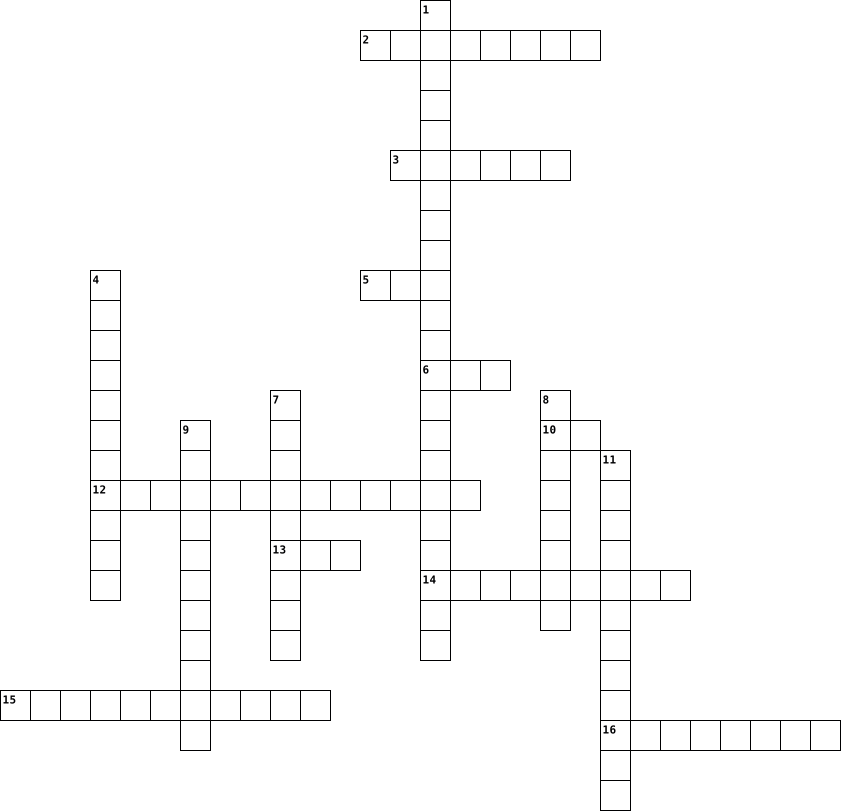
Across
- any part of the computer that you can physically touch; the parts that make up the computer
- software that allows you to perform a specific task
- manages the computer's memory and processes and its software and hardware (Windows, MacOS, Linux, iOS, Android)
- lets you use your mouse to click icons, buttons, and menus displayed on the screen
- any hardware receives data from a computer (printer, monitor, speaker, headphones)
- a tool you use to access the internet (Google Chrome, Safari, Internet Explorer, Edge, Firefox)
- the brain of the computer that controls all other parts and carries out commands
Down
- where your software, documents, and other files are stored
- an electronic device that has the ability to store, retrieve, and process data
- short-term memory, it temporarily stores the data until it is needed
- a storage medium that is used to store memory permanently and cannot be changed (holds programs and boot up information)
- series of commands
- any set of instructions or commands that tell a computer what to do
- any hardware that sends data to a computer (mouse, keyboard, touch screen, webcam, microphone)
- the computer's main circuit board that holds the CPU, memory, connectors, cards, and connections to your computer's ports.
- two digits used to represent information using electricity; ones and zeros
16 Clues: series of commands • software that allows you to perform a specific task • where your software, documents, and other files are stored • any set of instructions or commands that tell a computer what to do • short-term memory, it temporarily stores the data until it is needed • two digits used to represent information using electricity; ones and zeros • ...
Computer terms -- Cameron Valiquette 2024-10-11

Across
- any part of the computer that you can physically touch; the parts that make up the computer
- software that allows you to perform a specific task
- manages the computer's memory and processes and its software and hardware (Windows, MacOS, Linux, iOS, Android)
- lets you use your mouse to click icons, buttons, and menus displayed on the screen
- any hardware receives data from a computer (printer, monitor, speaker, headphones)
- a tool you use to access the internet (Google Chrome, Safari, Internet Explorer, Edge, Firefox)
- the brain of the computer that controls all other parts and carries out commands
Down
- where your software, documents, and other files are stored
- an electronic device that has the ability to store, retrieve, and process data
- short-term memory, it temporarily stores the data until it is needed
- a storage medium that is used to store memory permanently and cannot be changed (holds programs and boot up information)
- series of commands
- any set of instructions or commands that tell a computer what to do
- any hardware that sends data to a computer (mouse, keyboard, touch screen, webcam, microphone)
- the computer's main circuit board that holds the CPU, memory, connectors, cards, and connections to your computer's ports.
- two digits used to represent information using electricity; ones and zeros
16 Clues: series of commands • software that allows you to perform a specific task • where your software, documents, and other files are stored • any set of instructions or commands that tell a computer what to do • short-term memory, it temporarily stores the data until it is needed • two digits used to represent information using electricity; ones and zeros • ...
Computer Terms -- Bradlee Grbaber 2024-10-11

Across
- a tool you use to access the internet (Google Chrome, Safari, Internet Explorer, Edge, Firefox)
- series of commands
- any hardware that sends data to a computer (mouse, keyboard, touch screen, webcam, microphone)
- any hardware receives data from a computer (printer, monitor, speaker, headphones)
- any set of instructions or commands that tell a computer what to do
- a storage medium that is used to store memory permanently and cannot be changed (holds programs and boot up information)
- any part of the computer that you can physically touch; the parts that make up the computer
- short-term memory, it temporarily stores the data until it is needed
- two digits used to represent information using electricity; ones and zeros
- software that allows you to perform a specific task
Down
- lets you use your mouse to click icons, buttons, and menus displayed on the screen
- where your software, documents, and other files are stored
- manages the computer's memory and processes and its software and hardware (Windows, MacOS, Linux, iOS, Android)
- the brain of the computer that controls all other parts and carries out commands
- the computer's main circuit board that holds the CPU, memory, connectors, cards, and connections to your computer's ports.
- an electronic device that has the ability to store, retrieve, and process data
16 Clues: series of commands • software that allows you to perform a specific task • where your software, documents, and other files are stored • any set of instructions or commands that tell a computer what to do • short-term memory, it temporarily stores the data until it is needed • two digits used to represent information using electricity; ones and zeros • ...
Computer Terms-- Vivalynne Kirian 2024-10-11

Across
- software that allows you to perform a specific task
- where your software, documents, and other files are stored
- any part of the computer that you can physically touch; the parts that make up the computer
- an electronic device that has the ability to store, retrieve, and process data
- lets you use your mouse to click icons, buttons, and menus displayed on the screen
- series of commands
- the computer's main circuit board that holds the CPU, memory, connectors, cards, and connections to your computer's ports.
- any set of instructions or commands that tell a computer what to do
Down
- the brain of the computer that controls all other parts and carries out commands
- manages the computer's memory and processes and its software and hardware (Windows, MacOS, Linux, iOS, Android)
- short-term memory, it temporarily stores the data until it is needed
- any hardware that sends data to a computer (mouse, keyboard, touch screen, webcam, microphone)
- any hardware receives data from a computer (printer, monitor, speaker, headphones)
- a storage medium that is used to store memory permanently and cannot be changed (holds programs and boot up information)
- a tool you use to access the internet (Google Chrome, Safari, Internet Explorer, Edge, Firefox)
- two digits used to represent information using electricity; ones and zeros
16 Clues: series of commands • software that allows you to perform a specific task • where your software, documents, and other files are stored • any set of instructions or commands that tell a computer what to do • short-term memory, it temporarily stores the data until it is needed • two digits used to represent information using electricity; ones and zeros • ...
Computer Terms - Carter Bursiek 2024-10-11

Across
- a storage medium that is used to store memory permanently and cannot be changed (holds programs and boot up information)
- series of commands
- any hardware that sends data to a computer (mouse, keyboard, touch screen, webcam, microphone)
- two digits used to represent information using electricity; ones and zeros
- a tool you use to access the internet (Google Chrome, Safari, Internet Explorer, Edge, Firefox)
- an electronic device that has the ability to store, retrieve, and process data
- lets you use your mouse to click icons, buttons, and menus displayed on the screen
- software that allows you to perform a specific task
- the brain of the computer that controls all other parts and carries out commands
Down
- any hardware receives data from a computer (printer, monitor, speaker, headphones)
- short-term memory, it temporarily stores the data until it is needed
- any part of the computer that you can physically touch; the parts that make up the computer
- where your software, documents, and other files are stored
- the computer's main circuit board that holds the CPU, memory, connectors, cards, and connections to your computer's ports.
- manages the computer's memory and processes and its software and hardware (Windows, MacOS, Linux, iOS, Android)
- any set of instructions or commands that tell a computer what to do
16 Clues: series of commands • software that allows you to perform a specific task • where your software, documents, and other files are stored • any set of instructions or commands that tell a computer what to do • short-term memory, it temporarily stores the data until it is needed • two digits used to represent information using electricity; ones and zeros • ...
computer terms-- Corbin pitts 2024-10-11

Across
- software that allows you to perform a specific task
- where your software, documents, and other files are stored
- any part of the computer that you can physically touch; the parts that make up the computer
- an electronic device that has the ability to store, retrieve, and process data
- lets you use your mouse to click icons, buttons, and menus displayed on the screen
- series of commands
- the computer's main circuit board that holds the CPU, memory, connectors, cards, and connections to your computer's ports.
- any set of instructions or commands that tell a computer what to do
Down
- the brain of the computer that controls all other parts and carries out commands
- manages the computer's memory and processes and its software and hardware (Windows, MacOS, Linux, iOS, Android)
- short-term memory, it temporarily stores the data until it is needed
- any hardware that sends data to a computer (mouse, keyboard, touch screen, webcam, microphone)
- any hardware receives data from a computer (printer, monitor, speaker, headphones)
- a storage medium that is used to store memory permanently and cannot be changed (holds programs and boot up information)
- a tool you use to access the internet (Google Chrome, Safari, Internet Explorer, Edge, Firefox)
- two digits used to represent information using electricity; ones and zeros
16 Clues: series of commands • software that allows you to perform a specific task • where your software, documents, and other files are stored • any set of instructions or commands that tell a computer what to do • short-term memory, it temporarily stores the data until it is needed • two digits used to represent information using electricity; ones and zeros • ...
computer terms--Emiliano 2024-10-11

Across
- software that allows you to perform a specific task
- where your software, documents, and other files are stored
- any part of the computer that you can physically touch; the parts that make up the computer
- an electronic device that has the ability to store, retrieve, and process data
- lets you use your mouse to click icons, buttons, and menus displayed on the screen
- series of commands
- the computer's main circuit board that holds the CPU, memory, connectors, cards, and connections to your computer's ports.
- any set of instructions or commands that tell a computer what to do
Down
- the brain of the computer that controls all other parts and carries out commands
- manages the computer's memory and processes and its software and hardware (Windows, MacOS, Linux, iOS, Android)
- short-term memory, it temporarily stores the data until it is needed
- any hardware that sends data to a computer (mouse, keyboard, touch screen, webcam, microphone)
- any hardware receives data from a computer (printer, monitor, speaker, headphones)
- a storage medium that is used to store memory permanently and cannot be changed (holds programs and boot up information)
- a tool you use to access the internet (Google Chrome, Safari, Internet Explorer, Edge, Firefox)
- two digits used to represent information using electricity; ones and zeros
16 Clues: series of commands • software that allows you to perform a specific task • where your software, documents, and other files are stored • any set of instructions or commands that tell a computer what to do • short-term memory, it temporarily stores the data until it is needed • two digits used to represent information using electricity; ones and zeros • ...
Computer Terms Zoe Dehring 2024-10-11

Across
- software that allows you to perform a specific task
- where your software, documents, and other files are stored
- any part of the computer that you can physically touch; the parts that make up the computer
- an electronic device that has the ability to store, retrieve, and process data
- lets you use your mouse to click icons, buttons, and menus displayed on the screen
- series of commands
- the computer's main circuit board that holds the CPU, memory, connectors, cards, and connections to your computer's ports.
- any set of instructions or commands that tell a computer what to do
Down
- the brain of the computer that controls all other parts and carries out commands
- manages the computer's memory and processes and its software and hardware (Windows, MacOS, Linux, iOS, Android)
- short-term memory, it temporarily stores the data until it is needed
- any hardware that sends data to a computer (mouse, keyboard, touch screen, webcam, microphone)
- any hardware receives data from a computer (printer, monitor, speaker, headphones)
- a storage medium that is used to store memory permanently and cannot be changed (holds programs and boot up information)
- a tool you use to access the internet (Google Chrome, Safari, Internet Explorer, Edge, Firefox)
- two digits used to represent information using electricity; ones and zeros
16 Clues: series of commands • software that allows you to perform a specific task • where your software, documents, and other files are stored • any set of instructions or commands that tell a computer what to do • short-term memory, it temporarily stores the data until it is needed • two digits used to represent information using electricity; ones and zeros • ...
Computer Terms Preslee Riser 2024-10-11

Across
- software that allows you to perform a specific task
- two digits used to represent information using electricity; ones and zeros
- any hardware that sends data to a computer (mouse, keyboard, touch screen, webcam, microphone)
- series of commands
- a tool you use to access the internet (Google Chrome, Safari, Internet Explorer, Edge, Firefox)
- any set of instructions or commands that tell a computer what to do
- the brain of the computer that controls all other parts and carries out commands
- the computer's main circuit board that holds the CPU, memory, connectors, cards, and connections to your computer's ports.
Down
- where your software, documents, and other files are stored
- any hardware receives data from a computer (printer, monitor, speaker, headphones)
- manages the computer's memory and processes and its software and hardware (Windows, MacOS, Linux, iOS, Android)
- short-term memory, it temporarily stores the data until it is needed
- any part of the computer that you can physically touch; the parts that make up the computer
- lets you use your mouse to click icons, buttons, and menus displayed on the screen
- an electronic device that has the ability to store, retrieve, and process data
- a storage medium that is used to store memory permanently and cannot be changed (holds programs and boot up information)
16 Clues: series of commands • software that allows you to perform a specific task • where your software, documents, and other files are stored • any set of instructions or commands that tell a computer what to do • short-term memory, it temporarily stores the data until it is needed • two digits used to represent information using electricity; ones and zeros • ...
Computer Terms- Harper Bennett 2024-10-11

Across
- any part of the computer that you can physically touch; the parts that make up the computer
- software that allows you to perform a specific task
- manages the computer's memory and processes and its software and hardware (Windows, MacOS, Linux, iOS, Android)
- lets you use your mouse to click icons, buttons, and menus displayed on the screen
- any hardware receives data from a computer (printer, monitor, speaker, headphones)
- a tool you use to access the internet (Google Chrome, Safari, Internet Explorer, Edge, Firefox)
- the brain of the computer that controls all other parts and carries out commands
Down
- where your software, documents, and other files are stored
- an electronic device that has the ability to store, retrieve, and process data
- short-term memory, it temporarily stores the data until it is needed
- a storage medium that is used to store memory permanently and cannot be changed (holds programs and boot up information)
- series of commands
- any set of instructions or commands that tell a computer what to do
- any hardware that sends data to a computer (mouse, keyboard, touch screen, webcam, microphone)
- the computer's main circuit board that holds the CPU, memory, connectors, cards, and connections to your computer's ports.
- two digits used to represent information using electricity; ones and zeros
16 Clues: series of commands • software that allows you to perform a specific task • where your software, documents, and other files are stored • any set of instructions or commands that tell a computer what to do • short-term memory, it temporarily stores the data until it is needed • two digits used to represent information using electricity; ones and zeros • ...
Computer Terms - Ragan Valenti 2024-10-11

Across
- any part of the computer that you can physically touch; the parts that make up the computer
- the computer's main circuit board that holds the CPU, memory, connectors, cards, and connections to your computer's ports.
- series of commands
- an electronic device that has the ability to store, retrieve, and process data
- a tool you use to access the internet (Google Chrome, Safari, Internet Explorer, Edge, Firefox)
- lets you use your mouse to click icons, buttons, and menus displayed on the screen
- short-term memory, it temporarily stores the data until it is needed
- any hardware that sends data to a computer (mouse, keyboard, touch screen, webcam, microphone)
- any hardware receives data from a computer (printer, monitor, speaker, headphones)
Down
- software that allows you to perform a specific task
- where your software, documents, and other files are stored
- a storage medium that is used to store memory permanently and cannot be changed (holds programs and boot up information)
- manages the computer's memory and processes and its software and hardware (Windows, MacOS, Linux, iOS, Android)
- any set of instructions or commands that tell a computer what to do
- the brain of the computer that controls all other parts and carries out commands
- two digits used to represent information using electricity; ones and zeros
16 Clues: series of commands • software that allows you to perform a specific task • where your software, documents, and other files are stored • any set of instructions or commands that tell a computer what to do • short-term memory, it temporarily stores the data until it is needed • two digits used to represent information using electricity; ones and zeros • ...
Computer terms Luis Campos 2024-10-11

Across
- software that allows you to perform a specific task
- where your software, documents, and other files are stored
- any part of the computer that you can physically touch; the parts that make up the computer
- an electronic device that has the ability to store, retrieve, and process data
- lets you use your mouse to click icons, buttons, and menus displayed on the screen
- series of commands
- the computer's main circuit board that holds the CPU, memory, connectors, cards, and connections to your computer's ports.
- any set of instructions or commands that tell a computer what to do
Down
- the brain of the computer that controls all other parts and carries out commands
- manages the computer's memory and processes and its software and hardware (Windows, MacOS, Linux, iOS, Android)
- short-term memory, it temporarily stores the data until it is needed
- any hardware that sends data to a computer (mouse, keyboard, touch screen, webcam, microphone)
- any hardware receives data from a computer (printer, monitor, speaker, headphones)
- a storage medium that is used to store memory permanently and cannot be changed (holds programs and boot up information)
- a tool you use to access the internet (Google Chrome, Safari, Internet Explorer, Edge, Firefox
- two digits used to represent information using electricity; ones and zeros
16 Clues: series of commands • software that allows you to perform a specific task • where your software, documents, and other files are stored • any set of instructions or commands that tell a computer what to do • short-term memory, it temporarily stores the data until it is needed • two digits used to represent information using electricity; ones and zeros • ...
computer terms Dylan Travis 2024-10-11

Across
- lets you use your mouse to click icons, buttons, and menus displayed on the screen
- a tool you use to access the internet (Google Chrome, Safari, Internet Explorer, Edge, Firefox)
- the computer's main circuit board that holds the CPU, memory, connectors, cards, and connections to your computer's ports.
- the brain of the computer that controls all other parts and carries out commands
- short-term memory, it temporarily stores the data until it is needed
- where your software, documents, and other files are stored
- Devices any hardware that sends data to a computer (mouse, keyboard, touch screen, webcam, microphone)
- series of commands
- software that allows you to perform a specific task
Down
- an electronic device that has the ability to store, retrieve, and process data
- a storage medium that is used to store memory permanently and cannot be changed (holds programs and boot up information)
- any set of instructions or commands that tell a computer what to do
- manages the computer's memory and processes and its software and hardware (Windows, MacOS, Linux, iOS, Android)
- two digits used to represent information using electricity; ones and zeros
- any part of the computer that you can physically touch; the parts that make up the computer
- Devices any hardware receives data from a computer (printer, monitor, speaker, headphones)
16 Clues: series of commands • software that allows you to perform a specific task • where your software, documents, and other files are stored • any set of instructions or commands that tell a computer what to do • short-term memory, it temporarily stores the data until it is needed • two digits used to represent information using electricity; ones and zeros • ...
computer terms--henry penner 2024-10-11

Across
- series of commands
- any part of the computer that you can physically touch; the parts that make up the computer
- manages the computer's memory and processes and its software and hardware (Windows, MacOS, Linux, iOS, Android)
- any hardware receives data from a computer (printer, monitor, speaker, headphones)
- two digits used to represent information using electricity; ones and zeros
- a storage medium that is used to store memory permanently and cannot be changed (holds programs and boot up information)
Down
- any hardware that sends data to a computer (mouse, keyboard, touch screen, webcam, microphone)
- short-term memory, it temporarily stores the data until it is needed
- an electronic device that has the ability to store, retrieve, and process data
- the brain of the computer that controls all other parts and carries out commands
- a tool you use to access the internet (Google Chrome, Safari, Internet Explorer, Edge, Firefox)
- lets you use your mouse to click icons, buttons, and menus displayed on the screen
- any set of instructions or commands that tell a computer what to do
- where your software, documents, and other files are stored
- the computer's main circuit board that holds the CPU, memory, connectors, cards, and connections to your computer's ports.
- software that allows you to perform a specific task
16 Clues: series of commands • software that allows you to perform a specific task • where your software, documents, and other files are stored • any set of instructions or commands that tell a computer what to do • short-term memory, it temporarily stores the data until it is needed • two digits used to represent information using electricity; ones and zeros • ...
Computer Terms -- Aaron Miarer 2024-10-11

Across
- software that allows you to perform a specific task
- where your software, documents, and other files are stored
- any part of the computer that you can physically touch; the parts that make up the computer
- an electronic device that has the ability to store, retrieve, and process data
- lets you use your mouse to click icons, buttons, and menus displayed on the screen
- series of commands
- the computer's main circuit board that holds the CPU, memory, connectors, cards, and connections to your computer's ports.
- any set of instructions or commands that tell a computer what to do
Down
- the brain of the computer that controls all other parts and carries out commands
- manages the computer's memory and processes and its software and hardware (Windows, MacOS, Linux, iOS, Android)
- short-term memory, it temporarily stores the data until it is needed
- any hardware that sends data to a computer (mouse, keyboard, touch screen, webcam, microphone)
- any hardware receives data from a computer (printer, monitor, speaker, headphones)
- a storage medium that is used to store memory permanently and cannot be changed (holds programs and boot up information)
- a tool you use to access the internet (Google Chrome, Safari, Internet Explorer, Edge, Firefox)
- two digits used to represent information using electricity; ones and zeros
16 Clues: series of commands • software that allows you to perform a specific task • where your software, documents, and other files are stored • any set of instructions or commands that tell a computer what to do • short-term memory, it temporarily stores the data until it is needed • two digits used to represent information using electricity; ones and zeros • ...
Computer Terms - Gracie Cymbola 2024-10-11

Across
- manages the computer's memory and processes and its software and hardware (Windows, MacOS, Linux, iOS, Android)
- lets you use your mouse to click icons, buttons, and menus displayed on the screen
- any set of instructions or commands that tell a computer what to do
- where your software, documents, and other files are stored
- software that allows you to perform a specific task
- any part of the computer that you can physically touch; the parts that make up the computer
- any hardware that sends data to a computer (mouse, keyboard, touch screen, webcam, microphone)
- the computer's main circuit board that holds the CPU, memory, connectors, cards, and connections to your computer's ports.
- two digits used to represent information using electricity; ones and zeros
Down
- the brain of the computer that controls all other parts and carries out commands
- any hardware receives data from a computer (printer, monitor, speaker, headphones)
- a tool you use to access the internet (Google Chrome, Safari, Internet Explorer, Edge, Firefox
- short-term memory, it temporarily stores the data until it is needed
- series of commands
- an electronic device that has the ability to store, retrieve, and process data
- a storage medium that is used to store memory permanently and cannot be changed (holds programs and boot up information)
16 Clues: series of commands • software that allows you to perform a specific task • where your software, documents, and other files are stored • any set of instructions or commands that tell a computer what to do • short-term memory, it temporarily stores the data until it is needed • two digits used to represent information using electricity; ones and zeros • ...
Computer Terms By: Levi Colvin 2024-10-11

Across
- a tool you use to access the internet (Google Chrome, Safari, Internet Explorer, Edge, Firefox)
- the computer's main circuit board that holds the CPU, memory, connectors, cards, and connections to your computer's ports.
- short-term memory, it temporarily stores the data until it is needed
- software that allows you to perform a specific task
- the brain of the computer that controls all other parts and carries out commands
- manages the computer's memory and processes and its software and hardware (Windows, MacOS, Linux, iOS, Android)
Down
- lets you use your mouse to click icons, buttons, and menus displayed on the screen
- any part of the computer that you can physically touch; the parts that make up the computer
- two digits used to represent information using electricity; ones and zeros
- any hardware receives data from a computer (printer, monitor, speaker, headphones)
- a storage medium that is used to store memory permanently and cannot be changed (holds programs and boot up information)
- series of commands
- any hardware that sends data to a computer (mouse, keyboard, touch screen, webcam, microphone)
- where your software, documents, and other files are stored
- any set of instructions or commands that tell a computer what to do
- an electronic device that has the ability to store, retrieve, and process data
16 Clues: series of commands • software that allows you to perform a specific task • where your software, documents, and other files are stored • any set of instructions or commands that tell a computer what to do • short-term memory, it temporarily stores the data until it is needed • two digits used to represent information using electricity; ones and zeros • ...
Computer Terms -- Maci Nagy 2024-10-11

Across
- short-term memory, it temporarily stores the data until it is needed
- any part of the computer that you can physically touch; the parts that make up the computer
- an electronic device that has the ability to store, retrieve, and process data
- any set of instructions or commands that tell a computer what to do
- any hardware that sends data to a computer (mouse, keyboard, touch screen, webcam, microphone)
- any hardware receives data from a computer (printer, monitor, speaker, headphones)
- two digits used to represent information using electricity; ones and zeros
- manages the computer's memory and processes and its software and hardware (Windows, MacOS, Linux, iOS, Android)
Down
- a storage medium that is used to store memory permanently and cannot be changed (holds programs and boot up information)
- lets you use your mouse to click icons, buttons, and menus displayed on the screen
- the brain of the computer that controls all other parts and carries out commands
- a tool you use to access the internet (Google Chrome, Safari, Internet Explorer, Edge, Firefox)
- software that allows you to perform a specific task
- where your software, documents, and other files are stored
- the computer's main circuit board that holds the CPU, memory, connectors, cards, and connections to your computer's ports.
- series of commands
16 Clues: series of commands • software that allows you to perform a specific task • where your software, documents, and other files are stored • any set of instructions or commands that tell a computer what to do • short-term memory, it temporarily stores the data until it is needed • two digits used to represent information using electricity; ones and zeros • ...
Terms to know 2020-02-07

Across
- A hardware used to send data to a computer.
- A strip of icons usually at the bottom of a computer screen.
- Memory or information storage in a computer.
- Permanently stores data on a computer.
- Parts for a computer that are not essential.
Down
- The programs and operating system used by a computer.
- A unit used to measure storage space on a device.
- A numeric system that uses two numbers.
- A collection of physical parts of a computer.
- A seperate display screen on a computer.
- A graphical symbol.
11 Clues: A graphical symbol. • Permanently stores data on a computer. • A numeric system that uses two numbers. • A seperate display screen on a computer. • A hardware used to send data to a computer. • Memory or information storage in a computer. • Parts for a computer that are not essential. • A collection of physical parts of a computer. • ...
Computer Terms and Definitions Crossword 2022-03-17
Across
- any part of the computer that has physical structure; the parts that make up the computer
- digits 1 and 0 used to represent letters
- brain of the computer
- stores data until needed.
- manages all software/hardware/etc.
- any hardware that receives data
- stores memory permanently
- series of commands
- a tool you use to access the internet (Google Chrome, Safari, Internet Explorer, Edge, Firefox)
- an electronic device that can use/process data
Down
- lets you use your mouse to click icons, buttons, and menus displayed on the screen
- main board,holds CPU,memory,etc.
- where your software, documents, and other files are stored
- any set of instructions that tells the hardware what to do and how to do it
- software that performs a certain task
- any hardware that sends data to a computer
16 Clues: series of commands • brain of the computer • stores data until needed. • stores memory permanently • any hardware that receives data • main board,holds CPU,memory,etc. • manages all software/hardware/etc. • software that performs a certain task • digits 1 and 0 used to represent letters • any hardware that sends data to a computer • ...
Hardware 2014-03-17

Across
- Centrale computer in een netwerk , voor bijv. bestanden op te slaan.
- Waarop je de grafische kaart kan vinden, koelvinnen en ventilator,...
- Meest zichtbare deel van de computer.
- Waarop je bv. PP's kan zetten en zo mee naar school kan nemen.
- Externe hardware
- State Drive De afkorting SSD voluit geschreven.
- De snelheid van de processor.
- Zeer krachtige & stabiele computers voor bijv. banken.
- Randapparaat dat zowel voor invoer als voor uitvoer zorgt.
- Waardoor er veel scherpere beeldweergave bij een film bestaat.
Down
- Randapparaat wordt vanuit pc gestuurd.
- Gegevens aanleveren aan de pc.
- access memory De afkorting RAM voluit geschreven.
- Wordt door computerfanaten soms ‘gemod’.
- Hardware + Software
- Waarmee je tekst kan ingeven op de computer.
- Om tekst in te geven (engels).
- Bewegen van pijltje.
- Het scherm van de computer wordt uitgedrukt in...
19 Clues: Externe hardware • Hardware + Software • Bewegen van pijltje. • De snelheid van de processor. • Gegevens aanleveren aan de pc. • Om tekst in te geven (engels). • Meest zichtbare deel van de computer. • Randapparaat wordt vanuit pc gestuurd. • Wordt door computerfanaten soms ‘gemod’. • Waarmee je tekst kan ingeven op de computer. • State Drive De afkorting SSD voluit geschreven. • ...
Anatomy of a Computer 2022-09-13

Across
- Malicious program
- Smallest unit of information
- Switches inside a microprocessor
- Fetch, Decode, and _______
- Physical components of a computer
- Keyboard and monitor are examples of
- One picture element
- Read Only ______
Down
- programs that help a computer run better
- Execute uses ______ calculators
- tells the computer what to do
- ROM and ___
- Data entered into a computer
13 Clues: ROM and ___ • Read Only ______ • Malicious program • One picture element • Fetch, Decode, and _______ • Smallest unit of information • Data entered into a computer • tells the computer what to do • Execute uses ______ calculators • Switches inside a microprocessor • Physical components of a computer • Keyboard and monitor are examples of • programs that help a computer run better
COMPUTER PARTS PUZZLE 2020-10-19

Across
- Computer software that refer to programs designed for the computer users.
- Devices that display results of the processed data that was entered using input devices.
- Used to store data.
- POINTING DEVICE IN A MONITOR.
- A DEVICE WHICH LOOKS-LIKE A TYPEWRITER
- The physical and tangible components of a computer.
Down
- intangible components of a computer that allows the computer hardware to work.
- PRODUCES HARD COPY OUTPUT.
- BRAIN OF THE COMPUTER.
- A TV-LIKE DEVICE OF A COMPUTER.
- allows us to listen to the music and other sounds from the computer.
11 Clues: Used to store data. • BRAIN OF THE COMPUTER. • PRODUCES HARD COPY OUTPUT. • POINTING DEVICE IN A MONITOR. • A TV-LIKE DEVICE OF A COMPUTER. • A DEVICE WHICH LOOKS-LIKE A TYPEWRITER • The physical and tangible components of a computer. • allows us to listen to the music and other sounds from the computer. • ...
Computer Vocabulary Crossword Terms 2014-08-25

Across
- computers- a computer designed for use by one person at a time.
- brain of the computer.
- the act or process of orientating.
- changing its contours or adding ornamental features.
- is syntax to a computer programming language for defining data structures.
- wrap a feature that automatically moves a word that is too long to fit on a line to the beginning of the next line.
- skill or ability in a certain field.
- copy- printed version on a paper of data held in a computer.
- line a location in a document where a visible digital signature can be inserted.
- symbol that indicates the position on a CRT or other type of display.
- containing structure or a layer.
- unit- a component of a computers central processing unit (CPU) that directs operation of the processor.
- a key or command that toggles between two modes such as the caps lock key.
- a group or system of interconnected people or things.
- a place where, or a device through which, energy or information enters a system.
Down
- the retention of retrievable data on a computer or other electronic system or memory.
- arrange or put into a format.
- looking for errors or omissions.
- a printed heading on stationary stating a persons or organizations name and address.
- punctuation mark basically a period.
- Photography. Any device for exposing an image on film , a sensitized plate by tracing light along a series of many closely spaced parallel lines.
- selecting and preparing written, visual, audible and film media used to convey information.
- a drawing or sketch restricted to line without shading or modeling of form.
- an electronic device designed to accept data and perform prescribed mathematical and logical operations at high speed and display of these operations.
- a panel of keys that operate a computer or a typewriter
- indicator that is used to show the position on a computer monitor
- a long thin piece of metal on a scale or a dial that moves to indicate a figure or position.
- the amount of something produced by a person, machine, or industry.
- particular way of dealing with or considering something.
29 Clues: brain of the computer. • arrange or put into a format. • looking for errors or omissions. • containing structure or a layer. • the act or process of orientating. • punctuation mark basically a period. • skill or ability in a certain field. • changing its contours or adding ornamental features. • a group or system of interconnected people or things. • ...
Digital Citizenship Terms 2015-11-16

Across
- Packet of data sent from a server to a personal computer, returned by the browser when the user of the personal computer accesses said server.
- Representation of a face formed by multiple characters such as “:” and “)”, forming to make “:)”, or “☺”. Helps bring tone into digital text messages.
- Footprint: Used to describe traces or trail that is left by users online. Includes profiles, pictures, etc.
- Property: Work resulted from creativity that one can apply for a copyright, trademark, patent, etc. with.
- Someone or something that viciously exploits others.
- Intending to harm.
- Software allowing a user to convert and transfer data from another computer.
- Icon representing a user on a computer, commonly found on Internet forums, video games, and instant messaging platforms.
- Commons: A license built on copyrights, allowing others to copy, distribute, and make use of copyrights in their own work, non-commercially. Ensures the original creator gets credit for their work.
Down
- Stealing an online account or financial information by posing as legitimate companies.
- irrelevant messages sent on the internet to many recipients.
- The exclusive legal right to print, publish, etc. materials.
- Someone who has committed a crime or something malicious.
- Source: Software in which the source code is made public to be redistributed and modified by other users.
- A part of a computer used to block unauthorized access, while keeping communication outwards open.
- A person not taking part in an event, but present at the event.
- Software: Computer software used to prevent, find, and destroy harmful software.
- Use: Allowing certain usage of copyrights w/o the need of permission or payment to a copyright holder. Only under certain circumstances.
- To abuse someone via a message on the internet.
- To make deliberate offensive posts online aimed to upset other users.
- Software designed to harm and damage a computer or multiple computers.
- Horse: Program posing as non-harmful software that is able to breach the security of a computer.
- Ability to understand the feelings of someone else, and to share those feelings.
23 Clues: Intending to harm. • To abuse someone via a message on the internet. • Someone or something that viciously exploits others. • Someone who has committed a crime or something malicious. • irrelevant messages sent on the internet to many recipients. • The exclusive legal right to print, publish, etc. materials. • ...
Hardware 21-40 2016-10-17

Across
- a connection in a computer to which an outside (peripheral) device can be attached
- the faculty by which the mind stores and remembers information; the part of a computer in which data or program instructions can be stored for retrieval
- look quickly but not very thoroughly through (a document or other text) in order to identify relevant information; convert into digital form for storage or processing on a computer
- an output device for printing text or images, especially the one linked to a computer
- an instance of a program being executed in a multitasking operating system, typically running in an environment that protects it from other processes
- cause or enable (a condition or situation) to continue; correct or prevent faults in hardware
- a raised level surface on which people or things can stand; a group of computers that are compatible with each other and can run the same software
- move or cause to move in a circle round an axis or a centre
- do sth again or more than once
- move sth from where it is; lift, push, transfer, or carry away, or from one place to another
Down
- a device that has a specified function, especially one forming part of a complex mechanism; a single manufactured item
- a piece of equipment that is used to send information from a computer through a telephone line, cable or other link
- a device that emits light through a process of optical amplification based on the stimulated emission of electromagnetic radiation
- a device used for observing, checking, or keeping a continuous record of sth; a screen which displays an image generated by a computer
- restore sth to a good condition after damage
- the outer limits or edge of an area or object
- an area or portion that is distinct from others; a subdivision of a track on a magnetic disk
- function in a proper or a particular way
- a cursor control device consisting of a hand-held control box used as a locator
- a computer that provides services to another computer
20 Clues: do sth again or more than once • function in a proper or a particular way • restore sth to a good condition after damage • the outer limits or edge of an area or object • a computer that provides services to another computer • move or cause to move in a circle round an axis or a centre • a cursor control device consisting of a hand-held control box used as a locator • ...
IT Sphere 2024-11-02

Across
- The standard markup language used to create and design web pages and applications.
- A set of commands written in a programming or scripting language that automates tasks or adds functionality to a software application.
- A structured collection of data that can be easily accessed, managed, and updated, typically stored in a computer system.
- The merging of different technologies or concepts into a single, cohesive, and efficient system (e.g., IT and telecommunications).
- The set of rules governing the format of data sent over the internet or local network.
- A branch of computer science dealing with the simulation of intelligent behavior in computers, enabling them to learn and make decisions.
- The process of identifying and removing errors or bugs from software and hardware to improve functionality.
- The process of converting data into a coded format to prevent unauthorized access, securing sensitive information.
- A collection of programs and applications that instruct a computer on how to perform tasks.
- The software that manages computer hardware and software resources, providing services for computer programs.
- A network security system that monitors and controls incoming and outgoing network traffic based on predetermined security rules.
Down
- In IT, often refers to a computer or system that processes data and performs tasks based on instructions.
- Measures and protocols used to protect data and information systems from unauthorized access, attacks, or damage.
- A set of rules and tools that allows different software applications to communicate with each other.
- A unit of digital information that consists of eight bits, commonly used to measure the size of data.
- A computer or system that provides data, resources, or services to other computers, known as clients, over a network.
- A technology that allows data storage and computing resources over the internet, providing scalable resources as needed.
- Information that is processed or stored by a computer, often used for analysis and decision-making.
- A collection of interconnected devices that communicate with one another, often used to share resources and information.
- A set of rules or conventions for data exchange between devices in a network, ensuring proper communication.
20 Clues: The standard markup language used to create and design web pages and applications. • The set of rules governing the format of data sent over the internet or local network. • A collection of programs and applications that instruct a computer on how to perform tasks. • ...
Per. 2 Cyber Security Words and Terms Puzzle Maker 2022-09-12

Across
- Text that can be read by the human eye, like google results for how to make eggs.
- A simple form of code for software that can be written in word editors.
- A form of malicious software that disguises itself as a harmless computer program.
- The programs and other operating systems used by a computer.
- A test that distinguishes between robots and humans using a website.
- A language used to create and control the content on a website.
- The physical and tangible parts of a computer, such as the monitor, keyboard, speakers, etc.
- An effort to increase security by isolating processes and browser tabs from one another and the rest of the computer.
- official United States cryptologic organization under the Department of Justice. Responsible for global monitoring, collection, and processing of information and data for both foreign and domestic intelligence.
- Internet Protocol address, is the string of numbers used to identify each computer using the internet on a network.
- An error, flaw, failure, or fault in a computer program or system.
Down
- A secret word or phrase that is used to access a computer system or service.
- Software that can only be run for a limited amount of time before it expires.
- seemingly harmless impersonal data, like how many times a user clicked or refreshed the page when visiting a website.
- An alternative way to access software or hardware.
- An internet traffic filter meant to stop unauthorized incoming and outgoing traffic.
- Short for malicious software, is any kind of software designed to damage, or enable unauthorized access, to computer systems.
- A cyber attacker who uses software and social engineering methods to steal data and information.
- A segment of data sent by an Internet server to the browser that is returned to the browser every time it accesses the server.
- The method of obtaining user information through fraudulent communications targeted directly at people
- Program that automatically execute tasks as ordered by the creator of the program.
21 Clues: An alternative way to access software or hardware. • The programs and other operating systems used by a computer. • A language used to create and control the content on a website. • An error, flaw, failure, or fault in a computer program or system. • A test that distinguishes between robots and humans using a website. • ...
Cyber Security 2023-02-10

Across
- or identity theft.
- A company or organization that gives users and devices access to the Internet
- often by using emails or fake websites that look like they are from trusted organizations.
- Someone who uses computers and computer networks to disrupt services or share secret information in
- Software that harms computers, networks, or people. Includes viruses, worms, ransomware, and other
- until it is decrypted using a secret key
- Consists of code written in a programming language that instructs computers to perform specific tasks.
- computers are usually used to cause damage that couldn’t be achieved with a single computer
- Multiple computers on a network that are infected with a program that can be controlled remotely. The
Down
- The process of using codes to make readable information unreadable. Encrypted information cannot be
- Attempting to trick people into revealing sensitive information, such as passwords and credit card
- A type of malware that holds victims’ computer files hostage by locking access to them or encrypting
- Extra copies of computer files that can be used to restore files that are lost or damaged
- A distributed denial of service attack attempts to make an online service, like a website, unavailable by
- software Computer programs that can block, detect, and remove viruses and other malware
- A computer or computer program that provides specific services on a network, such as an email server
- It then demands a ransom if the victim wants his or her files back.
- Unsolicited emails sent to many addresses. The purpose of most spam is to make money through
- it with a flood of traffic from a team of computers.
- effort to draw attention to political or social issues.
- directs emails and a web server that serves up web pages.
- Software designed to block malware from entering protected networks
- programs.
- A fictional virus modeled after the Stuxnet virus. Like Stuxnet, Doxnet is able to damage physical
- The amount of data that can pass through a network or part of a network per second
25 Clues: programs. • or identity theft. • until it is decrypted using a secret key • it with a flood of traffic from a team of computers. • effort to draw attention to political or social issues. • directs emails and a web server that serves up web pages. • It then demands a ransom if the victim wants his or her files back. • ...
Phyton 2026-05-21

Across
- A symbol, like a plus or minus sign, used to perform math operations or compare values in code.
- A specific Python command that displays text or numbers on the computer screen for the user to see.
- The blank space or tab left at the start of a line of code to group instructions together.
- The specific rules about how words and symbols must be arranged so the computer can understand the code.
- A data type that can only have one of two possible values: either True or False.
- A complete collection of code or instructions that runs on a computer to perform a specific task.
- A popular, beginner-friendly programming language that uses clear and readable text to give commands to computers.
- A reusable block of code that performs a specific action only when it is called by its name.
- A collection used to store multiple items or pieces of data in a specific order inside square brackets.
Down
- A data type used for numbers that contain a decimal point, useful for precise measurements or fractions.
- The written instructions or text that a programmer writes to tell a computer exactly what to do.
- A named storage container or box used in code to hold information that can change later.
- A data type that represents a whole number, which can be positive, negative, or zero, without decimals.
- A command used to gather information or text typed in by the user through the keyboard.
- Notes written inside the code using a hashtag symbol to explain what the code does; the computer ignores them.
- A statement or test that the computer evaluates to decide whether it is true or false before moving on.
- A block of code that repeats a set of instructions over and over until a specific condition is met.
- A type of data that holds a sequence of text, letters, or characters, always wrapped in quotation marks.
- A mistake, error, or flaw in a computer program that prevents it from running correctly.
- The information, text, or results that a computer program displays or sends back to the user.
20 Clues: A data type that can only have one of two possible values: either True or False. • A command used to gather information or text typed in by the user through the keyboard. • A named storage container or box used in code to hold information that can change later. • A mistake, error, or flaw in a computer program that prevents it from running correctly. • ...
computer 2014-01-07

Across
- hier kijk je naar
- Hier typ je op
- een type van een toetsenbord
- hiermee kan je documenten afdrukken
Down
- hiermee kan je documenten openen, selecteren, verslepen, aanklikken
- vaste computer
- hier kan je documenten op opslaan
- alle dingen van een computer die je kan vastpakken
- draagbare computer
9 Clues: vaste computer • Hier typ je op • hier kijk je naar • draagbare computer • een type van een toetsenbord • hier kan je documenten op opslaan • hiermee kan je documenten afdrukken • alle dingen van een computer die je kan vastpakken • hiermee kan je documenten openen, selecteren, verslepen, aanklikken
Computer 2014-12-08

Across
- powers the computer.
- it is also known as the brain of the computer.
- it is the read only memory.
- removable media device.
Down
- stores and transfers information.
- the main body of a computer.
- it is a fast accses memory and saves deleted data.
- a usb holder.
- a removable media device.
9 Clues: a usb holder. • powers the computer. • removable media device. • a removable media device. • it is the read only memory. • the main body of a computer. • stores and transfers information. • it is also known as the brain of the computer. • it is a fast accses memory and saves deleted data.
computer 2022-09-06

Across
- to make copies of something
- what you type with
- plays Disc movies and dvds
- Keeps the computer on
- too keep the computer from over heating
Down
- what you look at in front of you
- the hardware component that stores all of your digital content
- card helps storage the data and memory in computer
- what you use to move around the computer
9 Clues: what you type with • Keeps the computer on • plays Disc movies and dvds • to make copies of something • what you look at in front of you • too keep the computer from over heating • what you use to move around the computer • card helps storage the data and memory in computer • the hardware component that stores all of your digital content
computer 2023-05-05

Across
- who doesnt have to follow the data protection act?
- how many liters of water does it take to make one phone?
- is accidentally logging on to someone else's phone illegal?
- how many phones are sold a year?
- where are most iphones made?
Down
- what popular way of spreading a virus is done via email?
- how long can you spend in prison for unauthorized access of someone's device?
- what popular mode of transport was hacked in 2016?
- what year was the data protection act made?
9 Clues: where are most iphones made? • how many phones are sold a year? • what year was the data protection act made? • who doesnt have to follow the data protection act? • what popular mode of transport was hacked in 2016? • what popular way of spreading a virus is done via email? • how many liters of water does it take to make one phone? • ...
computer 2025-01-13

Across
- hardware which you hold in your hand
- hardware which is the heart of the computer
- secret word
- hardware on which you can type letters and make words
- protection against virus
Down
- cross which moves on the screen
- software on which you can save your work
- small picture on which you click when you open a program
- bar which gives access to programs
9 Clues: secret word • protection against virus • cross which moves on the screen • bar which gives access to programs • hardware which you hold in your hand • software on which you can save your work • hardware which is the heart of the computer • hardware on which you can type letters and make words • small picture on which you click when you open a program
FIT E: Technology Vocab 2013-05-16

Across
- is made up of 1000 gigabytes
- the wiring in your computer
- is made up of 1000 zetabytes
- a type of booklet that advertises a company's products
- a company's symbol or graphic design
- the location where you can put in a disc
- the location on your computer where you can plug in your peripherals
- any type of attachment you can plug in your computer
- a type of program that allows you to receive internet
- anything that is sent out of a computer
- a informational paper about you and your history, usually made for a job
- the privacy and security of yourself on the internet
- is made up of 1000 bits
- is made up of 1000 petabytes
- is made up of 1000 bytes
- a type of search engine that searches all types of other search engine
- the main center of your computer where all the data goes
Down
- a program that allows you to search the web
- anything that has to do with the internet
- the device you use to operate your desktop
- is made up of 1000 yottabytes
- the act of spreading public notice for your product
- the brain of your computer, where all the data is stored
- the term used for a picture or graphic image that is made up by numbers
- a zoomable presentation program
- is made up of 1000 exabytes
- the screen of your computer
- anything that you plug in your computer
- a company's words or phrase that is advertised
- is made up of 1000 terabytes
- a program where you can access any type of media or internet wirelessly
- is made up of 1000 kilobytes
- is made up of 1000 brontobytes
- a portable electronic device that is wireless
- the location on your cmputer where you can plug in your headphones or earbuds
- the place where you can save files off of any type of device
- is made up of 1000 megabytes
- the smallest amount of storage you can have
38 Clues: is made up of 1000 bits • is made up of 1000 bytes • the wiring in your computer • is made up of 1000 exabytes • the screen of your computer • is made up of 1000 gigabytes • is made up of 1000 zetabytes • is made up of 1000 terabytes • is made up of 1000 kilobytes • is made up of 1000 petabytes • is made up of 1000 megabytes • is made up of 1000 yottabytes • ...
Unit Vocabulary crossword activity 2023-10-12

Across
- A collection of computers and mobile devices connected together, often wirelessly, via communications devices and transmission media.
- Electronic components that store instructions waiting to be executed and the data needed by those instructions.
- A high-speed, high-quality nonimpact printer that creates images using a laser beam and powdered ink called toner.
- A mobile device that allows users to take pictures and store the photographed images digitally.
- An Internet service that provides remote storage to computer users.
- Thin, lighter weight mobile computer that has a touch screen, usually smaller than a laptop but larger than a phone.
- A collection of related webpages and associated items stored on a web server.
- Desktop that does not have a tower and instead houses the screen and system unit in the same case.
- Term used to refer collectively to hard disks and SSDs.
- Any hardware component that conveys information from a computer or mobile device to one or more people.
Down
- A worldwide collection of computer networks that connects millions of businesses, government agencies, educational institutions, and individuals.
- A series of related instructions, organized for a common purpose, that tells the computer what tasks to perform and how to perform them.
- A computer dedicated to providing one or more services to other computers or devices on a network. Sometimes called a host computer.
- player A mobile device on which you can store, organize, and play or view digital media.
- A worldwide collection of electronic documents; short for World Wide Web.
- A mobile computing device designed for single-player or multiplayer video games.
- Program designed to make users more productive and/or assist them with personal tasks.
- Any hardware component that allows you to enter data and instructions into a computer or mobile device.
- Wireless communication technology that uses short-range radio signals to transmit data between two Bluetooth-enabled computers or devices to communicate with each other.
- Software that enables users with an Internet connection to access and view webpages on computers or mobile devices.
- A duplicate of content on a storage medium that you can use in case the original is lost, damaged, or destroyed.
21 Clues: Term used to refer collectively to hard disks and SSDs. • An Internet service that provides remote storage to computer users. • A worldwide collection of electronic documents; short for World Wide Web. • A collection of related webpages and associated items stored on a web server. • ...
Ian Smith - 4th period 2020-09-10

Across
- a theme or characteristic, typically forming one of several, running throughout a situation or piece of writing.
- the activity of moving from page to page or site to site on the World Wide Web.
- a computer that mediates multiple access to databases mounted on it or provides other services to a computer network
- the notional environment in which communication over computer networks occurs.
- see social media
- the state or condition of communicating or meeting.
- create a hyperlink between (documents or parts of a document).
- an act or process of uploading data.
- a line or block of text appearing at the top of each page of a book or document
- part of a network address that identifies it as belonging to a particular domain.
- an act or function of updating the display on a screen
- controlled by or connected to another computer or to a network.
- a list of questions and answers relating to a particular subject, especially one giving basic information for users of a website.
Down
- the action of moving displayed text or graphics up, down, or across on a computer screen in order to view different parts of them
- a list of questions and answers relating to a particular subject, especially one giving basic information for users of a website.
- a file which consists solely of a set of other files (which may themselves be directories).
- a computer or computer program which manages access to a centralized resource or service in a network
- the correct or acceptable way of communicating on the internet.
- make a post on the social media application Twitter.
- a network of social interactions and personal relationships.
- record the address of (a website, file, etc.) to enable quick access in future
- a list of the names and addresses of people to whom material such as advertising matter, information, or a magazine may be mailed, especially regularly.
- an informal conversation
- A location of data, usually in main memory or on a disk
- an identification used by a person with access to a computer, network, or online service.
25 Clues: see social media • an informal conversation • an act or process of uploading data. • the state or condition of communicating or meeting. • make a post on the social media application Twitter. • an act or function of updating the display on a screen • A location of data, usually in main memory or on a disk • a network of social interactions and personal relationships. • ...
Intro to Computers Review 2024-09-06

Across
- New technology, called ________________, resulted in smaller computers about the size of a dishwasher, called mini computers.
- The kind of application software program that your teacher uses to calculate your grade. ________________
- What type of software is used to play games? ________________
- A ________________ is peripheral device that gives a hard copy.
- What does it mean when we see that it is able to be carried around easily? ________________
- Software that controls the computer. ________________
- What kind of software is used for presentations? ________________
- The intangible sets of instructions that tell the computer what to do. ________________
- ________________ devices return feedback from your assigned task (ex. monitor, printer, speaker)
- An electronic device that receives input, process data, and produces a result (output. ________________
- A ________________ is a peripheral dives that gives a soft copy.
- The kind of software that works with the operating system to meet a need, such as learning to type. ________________
Down
- The CPU or processor is located inside the ________________.
- Connects all of your input to the processing state and determines how data will flow through your computer to an output device. ________________
- A fancy word processing program is called ________________ publishing.
- What does boot mean? ________________
- An operating system ________________ and controls the hardware connected to a computer.
- ________________ devices are how you send instructions to your computer (ex. keyboard, mouse, webcams, microphones, scanners)
- What type of software is used for email and internet? ________________
- The Central ________________ Unit processes the commands that you sent to your computer.
- Application software used to find library books. ________________
- A computer designed to be small enough, light enough, and portable so that it can be used on your lap is called a ________________.
- Portable computers primarily operated by touching the screen rather than using a physical keyboard. ________________
- Application software that lets you type a report or your class notes for school. ________________
- What type of software is used to teach people things? ________________
- The tangible, physical equipment that can be seen and touched is Calle ________________.
- ________________ is a hardware device no longer found on modern computers.
- The Mark I was one of the first ________________ computers.
28 Clues: What does boot mean? ________________ • Software that controls the computer. ________________ • The Mark I was one of the first ________________ computers. • The CPU or processor is located inside the ________________. • What type of software is used to play games? ________________ • A ________________ is peripheral device that gives a hard copy. • ...
TECHNOLOGY INNOVATIONS 2025-05-01

Across
- What developers write to build software
- Often followed by “intelligence” in tech discussions
- Refers to smartphones and tablets
- Connected to or available through the internet
- Software or hardware that blocks unauthorized access
- Physical components of a computer
- Raw facts and figures stored or processed
- System used for navigation and location tracking (abbr.)
- Method of securing information using codes
- Apple’s mobile operating system
- Orbits Earth, used for communication and GPS
- Language used to create web pages (abbr.)
- Protection of digital systems and data
- Use of machines to complete tasks with little human input
- Opposite of analog in tech terms
- Internet-based storage and computing service
- Software used to surf the internet
- Smallest unit in a digital display
- Someone who gains unauthorized access to systems
- Electronic device for processing data
- A handheld touchscreen computer
- Computer that provides data to other computers
- Global network that connects computers
Down
- A mobile operating system developed by Google
- Malicious software that harms systems
- A small, handy electronic device
- Wireless internet technology
- Programs and operating systems on a device
- A new idea or method in technology
- Programming language used for many applications
- Technology behind cryptocurrencies like Bitcoin
- A software program on a phone or computer
- A machine that can perform tasks automatically
- Powers your smartphone or laptop
- High-speed internet cable technology
- The most widely used search engine
- A group of connected devices
- A secret word used to access accounts
- A device that performs tasks or operations
- Digital form of correspondence
- A small piece of silicon used in electronics
- Playing video or computer games
- Transfer files from the internet to your device
- A set of rules for solving problems or completing tasks
- Outputs documents or images onto paper
- The “brain” of a computer (abbr.)
- Universal port for connecting devices (abbr.)
- Unmanned flying device, often remote-controlled
- Portable personal computer
- Short for technology
50 Clues: Short for technology • Portable personal computer • Wireless internet technology • A group of connected devices • Digital form of correspondence • Apple’s mobile operating system • Playing video or computer games • A handheld touchscreen computer • A small, handy electronic device • Powers your smartphone or laptop • Opposite of analog in tech terms • ...
Code.org 2025 2025-05-09

Across
- Doing something over and over.
- Pretend version of something real.
- Fix problems in a program.
- Moving through a program one command at a time.
- Place to store information in a program.
- Carry out a command.
- Moving pictures or sprites in a program.
- Do the same thing again.
- Make a program start.
- Information stored in a computer.
- Tiny square that makes up pictures on a screen.
- Pressing a button with a mouse.
- Breaking a big problem into smaller parts.
- Arrow or pointer on the computer screen.
- Event where a key is pressed on the keyboard.
- Rules for writing code.
- Information that comes out of a computer, like sound or pictures.
- Piece of code that can be moved and connected.
- Set of instructions for a computer.
- "If" statements that make decisions in a program.
- Something that repeats.
- Loop inside another loop.
- Mistake in a program that makes it not work.
- Information that goes into a computer, like clicking or typing.
- Way something moves, like left or right.
- Pattern of squares used to plan movement.
Down
- Specific instruction given to the computer.
- Set of numbers that shows a location.
- Character or object in a program.
- Finding and fixing mistakes in a program.
- Moving something on the screen with the mouse.
- Words used in a program.
- Two things happening at the same time.
- Group of commands that work together.
- Rule that tells the computer when to do something.
- Something that helps find and fix problems.
- Thinking about the steps to solve a problem.
- Putting commands in the right order.
- Instructions that a computer can understand.
- Something that happens to make the program do an action.
- Releasing the mouse to place an item.
- Place where code is written and changed.
- Set of steps to solve a problem or complete a task.
- True or false value in programming.
- Person who writes code.
45 Clues: Carry out a command. • Make a program start. • Rules for writing code. • Person who writes code. • Something that repeats. • Words used in a program. • Do the same thing again. • Loop inside another loop. • Fix problems in a program. • Doing something over and over. • Pressing a button with a mouse. • Character or object in a program. • Information stored in a computer. • ...
App Creators Vocabulary Crossword Puzzle 2023-01-06

Across
- the process of reducing complexity by hiding unnecessary details to make it easier to think about a problem
- the attempt to find and fix errors in computer hardware or programs
- the writing of compound words by starting each word with a capital letter. Procedures and variables are named using camelCase, but the first word in the name is not capitalized
- a systematic, problem-solving strategy that designers follow to come up with a solution to a problem
- a simulator that imitates a program or events
- an approach to programming where the programmer adds and tests code in small chunks at a time to make sure it behaves the way they want it to, before adding more code
- two people working together to create a computer program
- the layer of an app that the user sees and interacts with
- the person who writes the code in a computer program when two programmers are working together
Down
- the layer of an app that contains the program that tells the app how to behave
- to increase the value of a numeric variable by a set amount
- the person who observes or reviews each line of code in a computer program as it is typed when two programmers are working together
- a type of software application designed to run on a mobile device, such as a smartphone or tablet computer
- a representative consumer for whom a hardware or software product is designed
- the science of creating solutions and solving problems using the help of a computer. Some of the areas of focus include software engineering, programming, data analysis, algorithms, graphics, and animation
- a flaw in a computer program that causes the program to produce an incorrect result or behavior
- an ordered set of instructions that are used to carry out a task
- diagram that represents an algorithm, work flow, or process, and uses geometric symbols connected by arrows to show the direction of the flow of action
- a placeholder in a device’s memory that stores a value a program is using
- a set of instructions that a computer executes to achieve a particular objective
20 Clues: a simulator that imitates a program or events • two people working together to create a computer program • the layer of an app that the user sees and interacts with • to increase the value of a numeric variable by a set amount • an ordered set of instructions that are used to carry out a task • the attempt to find and fix errors in computer hardware or programs • ...
ISCC Chapter 7 2026-03-16

Across
- Safeguards protecting computer systems from attacks
- Self replicating program that spreads through networks
- Illegal activity conducted using the Internet or computer systems
- Fake QR codes used to trick users into scams
- Providing false or incomplete information
- Situation where personal interest conflicts with professional duty
- Person who gains unauthorized access to systems
- Fraudulent emails attempting to steal personal information
- Malicious program disguised as legitimate software
- Small text files stored by websites on a user's computer
- Obtaining goods or services through trickery
- Hidden method allowing bypass of security controls
- Network of infected computers controlled by attackers
- Failure to fulfill agreement terms
- Attack that disrupts access to an Internet service
- Software that displays unwanted advertisements
- Manipulating people to gain confidential information
- Private combination of words used for authentication
- Attacker who uses tools created by others without deep knowledge
- Program that infects files and alters system operation
- Digital record of a user's online activities
Down
- Individual using networks to cause political damage
- Stealing confidential or personal data
- Guidelines defining acceptable and ethical behaviour
- Using a computer system without permission
- Malware that blocks access until payment is made
- Hacker who intentionally destroys or steals data
- Degree to which information reflects true values
- Protection of devices networks and data from threats
- Illegal copying or stealing of software
- Original creations such as inventions writings or logos
- Attack where communication is secretly intercepted
- Event that could damage computer hardware software or data
- Technique where fake websites mimic real ones
- Program that hides deep in a system to allow remote control
- Valuable confidential business information
- Software that secretly collects user information
- Reporting illegal or unethical actions within an organization
- Unauthorized duplication or distribution of software
- Using computer resources for illegal or unapproved activities
- Right to control personal data collection and use
- Stealing physical computer equipment
- Criminal demanding payment to stop attacks
- Attack using many compromised systems to overwhelm a target
- Moral principles governing technology use
- Policy describing acceptable use of computer systems
46 Clues: Failure to fulfill agreement terms • Stealing physical computer equipment • Stealing confidential or personal data • Illegal copying or stealing of software • Providing false or incomplete information • Moral principles governing technology use • Using a computer system without permission • Valuable confidential business information • ...
Cortni's Crossword 2013-01-08

Across
- A piece of computer equipment on which information can be stored.
- a software program that can reproduce itself and harm your computer
- an information storage dvice for a computer
- a program that allows you to be able to edit a paper or product while it is up
- a mobile phone that is more advanced in the searching ability, internet access, can use applications, and texting
- examining online material such as databases, news clips, forums and other thing of interest.
- is an input device that scans documents and images
- a central processing unit, the core of the computer
- the program is set up or an arrangement of data
- for graphic monitors
- Is a line of tablet computers designed and marked by apple Inc. It can shoot videos take photos play music send and receive email and browse he web.
- a disk drive that can read and write to copy data from main memory to a storage.
- an operating program will bring the windows and other controls
- automatically starts up programs
- used to complete tasks while your computer is running
- another name for a laptop it is also a program
- a is a collection of data stored in one unit
- anywhere where Wi-Fi is accessible.
- is the main thing people use to get to a computer’s programs, folders, settings
- any problem with a computer
- a combined a device for modulation and demodulation
- a program used to view html documents
- a mini laptop; they are very small and light
- used to locate and launch programs through the start button, see any programs that is currently open, and display the time and or date.
Down
- much like text messaging
- is a proprietary open wireless technology standard for exchanging data over short distances
- The programs and other operating information used by a computer .
- it’s a small piece of software that tells the operating system and other software how to communicate the a piece of hardware
- a large database of information
- technology that allows an electronic device to share data wirelessly
- a set of related content such as text, images, video audio, etc.
- the electronic device that moves the cursor
- the collection of physical elements that comprise
- a program that finds sites and information that link to a key search word.
- collection of computers and other hardware interconnected by communication.
- a graphical representation of text
- is short for picture element , is one point in a graphic image.
- what you click on to begin
- most use touch screens with no cover
- a document that is usually used to present data
- the plural of datum information processed by computer
- optical disc storage medium, high – definition dvd
- a file that remembers and hold information, remembers everything that happens on the computer
- universal serial bus usb
- the hardware within a computer system or smartphone which carries out the instructions of a program or application software by performing the basic arithmetical, logical, and input/output operations of the system.
- optical disk format invented by Phillips, Sony Toshiba, and Panasonic in 1995
- I a small picture or object that represents a file, program, web page, or command.
- is an organized list of instructions that, when started, makes the computer act in a predetermined manner.
- a device that displays signals on a computer screen
49 Clues: for graphic monitors • much like text messaging • universal serial bus usb • what you click on to begin • any problem with a computer • a large database of information • automatically starts up programs • a graphical representation of text • most use touch screens with no cover • anywhere where Wi-Fi is accessible. • a program used to view html documents • ...
Backup Binary Bit Browser Byte Cable CD-ROM Cell Chat Chip (integr circuit Computer CPU Cursor Database Diskdrive Download E-mail Field Floppydisk(diskette) Gigabyte(GB) Hard disk/hard drive Hardware HTML Icon Initialize Internet Kilobyte(K) Megabyte(MB) 2013-03-11

Across
- easy to get RAM and Hard Disk space confused. When people get an "out of memory" error message from their computer, they often think their hard drive is too full, when in reality, the RAM (memory) is getting too full. Here's a chart which may help you think about the difference between RAM and Hard Disk storage space.
- is the programs that run on a computer
- a disk so it will hold information
- a database, a record holds all the iA device that can read text or illustrations printed on paper and translate the information into a format that the computer can use information about one item or subject. It is like one index card in an index card file
- Markup Language -- The language in which World Wide Web documents are written.
- a specific location within a spreadsheet and is defined by the intersection of a row and column.
- is a way people in different places can "talk" to each other by typing their words into a computer.
- icon is a tiny picture on the screen that represents a program, file or folder.
- sometimes abbreviated "gigs," are often used to measure storage capacity
- destructive computer program that invades by means of a normal program and damages the computer system
- World Wide Web (abbreviated as WWW or W3,[2] commonly known as the Web), is a system of interlinked hypertext documents accessed via the Internet. With a web browser, one can view web pages that may contain text, images, videos, and other multimedia, and navigate between them via hyperlinks.
- Processing Unit= The “brains” of the computer. This unit directs the computer’s activities. Every instruction given by the operator must first pass through the CPU before it can be carried out
- device added to the computer
Down
- means "two," or "base two." The binary system is a way of counting using just the two numbers 0 and 1.
- if you take the actual disk out of the protective casing, you will discover that the disk is, in fact, rather flexible
- files to a second medium (a disk or tape) as a precaution in case the medium fails and the files are lost.
- Resource Locator- The global address of documents and other resources on the World Wide Web.
- is a type of computer memory that allows data to be stored and retrieved as required. It is called random access because any part of the memory can be located without having to go through everything that comes before it
- a computer is a programmable machine. This means it can execute a programmed list of instructions and respond to new instructions that it is given.
- typically describes an integrated circuit, or IC, such as a central processor or a graphics chip, but may also refer to other components such as a memory module.
- is a unit of measure equal to 1,048,576 bytes, which is about a million bytes.
- is temporary storage space on chips in your computer
- for "Compact Disc Read-Only Memory." A CD-ROM is a CD that can be read by a computer with an optical drive
23 Clues: device added to the computer • a disk so it will hold information • is the programs that run on a computer • is temporary storage space on chips in your computer • sometimes abbreviated "gigs," are often used to measure storage capacity • is a unit of measure equal to 1,048,576 bytes, which is about a million bytes. • ...
Computer Basics Vocabulary Words Part 2 2019-04-17

Across
- Two or more computers and other devices that are connected, for the purpose of sharing data and programs
- Manipulation of data in many ways
- One trillion bytes
- unit Case that holds the power supply, storage devices, and the circuit boards (including the motherboard.)
- The unauthorized use or reproduction of another's work
- Means of recording data as light and dark spots on CD or DVD with the use of a low-power laser light
- Used to expand the computer's input, output, and storage capabilities
- domain Works in the public domain are those whose rights have expired, been forfeited, or are inapplicable
- Optional software additions that enhance and/or add functionality to a web browser
- licenses A legal contract that defines the ways in which you may use a computer program
- The density of the grid used to display or print text and graphics; the greater the horizontal and vertical density, the higher the resolution.
- Set of detailed, step-by-step instructions that tell a computer how to solve a problem or carry out a task
- In the area of graphical user interfaces (GUI), a tabbed document interface or a Tab is one that allows multiple documents to be contained within a single window, using tabs as a navigational widget for switching between sets of documents.
- A personal computer, designed to meet the computer needs of an individual
Down
- A picture element (dot) on a computer screen or printout. Groups of pixels compose the images
- Area of the computer that temporarily holds data waiting to be processed, stored, or output
- information system on the Internet that allows documents to be connected to other documents by hypertext links, enabling the user to search for information by moving from one document to another.
- A disk that will not allow a user to make changes to files
- Underlying software on which other applications can run. Examples are Macs and Pc's
- Device for sending information from the computer, such as a monitor or printer
- Random Access Memory. Memory that stores program instructions and data temporarily.
- A computer that was the fastest in the world at the time it was constructed
- Software that can be copied and shared freely, but must be paid for if you want to use it permanently
- Master controller for all activities that take place within a computer; primary purpose is to help the computer system monitor itself in order to function efficiently
- Making sure that the instructions and data from one area of memory don’t interfere with memory allocated for other programs
- Interconnected group of computers and peripherals that cover a large geographical area, such as multiple buildings.
- Device that sends and receives data to and from computers over telephone lines.
- Large expensive computer capable of simultaneously processing data for hundreds or thousands of users
- A device that connects at least two networks
- devices Long-term repositories for data. Disks and tape drives are examples
- Read Only Memory. Memory that includes permanent information only. The computer can only read information from it; it can never write any new information on it
- One million bytes
32 Clues: One million bytes • One trillion bytes • Manipulation of data in many ways • A device that connects at least two networks • The unauthorized use or reproduction of another's work • A disk that will not allow a user to make changes to files • Used to expand the computer's input, output, and storage capabilities • ...
Computer Basics Vocabulary Words Part 2 2019-04-17

Across
- A picture element (dot) on a computer screen or printout. Groups of pixels compose the images
- A device that connects at least two networks
- A computer that was the fastest in the world at the time it was constructed
- Underlying software on which other applications can run. Examples are Macs and Pc's
- domain Works in the public domain are those whose rights have expired, been forfeited, or are inapplicable
- Area of the computer that temporarily holds data waiting to be processed, stored, or output
- One trillion bytes
- A personal computer, designed to meet the computer needs of an individual
- The unauthorized use or reproduction of another's work
- Making sure that the instructions and data from one area of memory don’t interfere with memory allocated for other programs
- Software that can be copied and shared freely, but must be paid for if you want to use it permanently
- Random Access Memory. Memory that stores program instructions and data temporarily.
- Master controller for all activities that take place within a computer; primary purpose is to help the computer system monitor itself in order to function efficiently
- devices Long-term repositories for data. Disks and tape drives are examples
- Large expensive computer capable of simultaneously processing data for hundreds or thousands of users
- Interconnected group of computers and peripherals that cover a large geographical area, such as multiple buildings.
- Two or more computers and other devices that are connected, for the purpose of sharing data and programs
Down
- In the area of graphical user interfaces (GUI), a tabbed document interface or a Tab is one that allows multiple documents to be contained within a single window, using tabs as a navigational widget for switching between sets of documents.
- Optional software additions that enhance and/or add functionality to a web browser
- One million bytes
- Device for sending information from the computer, such as a monitor or printer
- Used to expand the computer's input, output, and storage capabilities
- unit Case that holds the power supply, storage devices, and the circuit boards (including the motherboard.)
- A disk that will not allow a user to make changes to files
- Set of detailed, step-by-step instructions that tell a computer how to solve a problem or carry out a task
- Means of recording data as light and dark spots on CD or DVD with the use of a low-power laser light
- Device that sends and receives data to and from computers over telephone lines.
- Manipulation of data in many ways
- The density of the grid used to display or print text and graphics; the greater the horizontal and vertical density, the higher the resolution.
- information system on the Internet that allows documents to be connected to other documents by hypertext links, enabling the user to search for information by moving from one document to another.
- licenses A legal contract that defines the ways in which you may use a computer program
- Read Only Memory. Memory that includes permanent information only. The computer can only read information from it; it can never write any new information on it
32 Clues: One million bytes • One trillion bytes • Manipulation of data in many ways • A device that connects at least two networks • The unauthorized use or reproduction of another's work • A disk that will not allow a user to make changes to files • Used to expand the computer's input, output, and storage capabilities • ...
Computer Basics Vocabulary Words Part 2 2019-04-17

Across
- A device that connects at least two networks
- A personal computer, designed to meet the computer needs of an individual
- Making sure that the instructions and data from one area of memory don’t interfere with memory allocated for other programs
- domain Works in the public domain are those whose rights have expired, been forfeited, or are inapplicable
- Read Only Memory. Memory that includes permanent information only. The computer can only read information from it; it can never write any new information on it
- Optional software additions that enhance and/or add functionality to a web browser
- One million bytes
- licenses A legal contract that defines the ways in which you may use a computer program
- Master controller for all activities that take place within a computer; primary purpose is to help the computer system monitor itself in order to function efficiently
- Interconnected group of computers and peripherals that cover a large geographical area, such as multiple buildings.
- Device that sends and receives data to and from computers over telephone lines.
- A computer that was the fastest in the world at the time it was constructed
- Large expensive computer capable of simultaneously processing data for hundreds or thousands of users
- Two or more computers and other devices that are connected, for the purpose of sharing data and programs
- Manipulation of data in many ways
- Device for sending information from the computer, such as a monitor or printer
- information system on the Internet that allows documents to be connected to other documents by hypertext links, enabling the user to search for information by moving from one document to another.
Down
- Set of detailed, step-by-step instructions that tell a computer how to solve a problem or carry out a task
- A disk that will not allow a user to make changes to files
- A picture element (dot) on a computer screen or printout. Groups of pixels compose the images
- One trillion bytes
- Means of recording data as light and dark spots on CD or DVD with the use of a low-power laser light
- Software that can be copied and shared freely, but must be paid for if you want to use it permanently
- Used to expand the computer's input, output, and storage capabilities
- unit Case that holds the power supply, storage devices, and the circuit boards (including the motherboard.)
- Area of the computer that temporarily holds data waiting to be processed, stored, or output
- In the area of graphical user interfaces (GUI), a tabbed document interface or a Tab is one that allows multiple documents to be contained within a single window, using tabs as a navigational widget for switching between sets of documents.
- The unauthorized use or reproduction of another's work
- Random Access Memory. Memory that stores program instructions and data temporarily.
- The density of the grid used to display or print text and graphics; the greater the horizontal and vertical density, the higher the resolution.
- Underlying software on which other applications can run. Examples are Macs and Pc's
- devices Long-term repositories for data. Disks and tape drives are examples
32 Clues: One million bytes • One trillion bytes • Manipulation of data in many ways • A device that connects at least two networks • The unauthorized use or reproduction of another's work • A disk that will not allow a user to make changes to files • Used to expand the computer's input, output, and storage capabilities • ...
ch.12 Joshua Park 2025-02-18

Across
- Resonance Imaging: A medical imaging technique that uses strong magnetic fields and radio waves to produce detailed images of the body's internal structures.
- Tomography: A medical imaging technique that uses computer-processed combinations of X-ray measurements taken from different angles to produce cross-sectional images.
- Each collection of related information.
- Power Supply: A backup power system that provides electricity in case of a power failure.
- Surgery: A type of surgery performed using robotic systems to enhance precision and control.
- Stress Test: A diagnostic test that uses a drug called adenosine to widen blood vessels and simulate the effects of exercise on the heart.
- Devices that generate concentrated beams of light used in medical treatments and surgeries.
- Instruction: The use of computers to provide interactive instruction or training.
- Specific categories or areas of data within a database.
- Portals: Secure online websites that allow patients to access their health records and communicate with providers.
- A global network that connects millions of private, public, academic, business, and government networks.
- Computer: A powerful computer used for large-scale data processing and critical applications.
- The use of telecommunications technology to provide healthcare services remotely.
- A test that records the electrical activity of the heart over a period of time.
- Security systems that protect networks from unauthorized access.
- Emission Tomography: A medical imaging technique that uses radioactive tracers to visualize metabolic processes in the body.
- Surgery: A surgical technique that uses real-time imaging to guide procedures with precision.
- Computer: A computer designed for general use by an individual.
Down
- When a group of related records is combined.
- A small, personal computer designed for individual use.
- Literacy: A basic understanding of how a computer works and the applications used in your field or profession.
- An applied science used to promote an individual's safety and well-being by adapting to the environment and using techniques to prevent injuries.
- A test that uses ultrasound waves to create images of the heart to assess its structure and function.
- Allows a user to locate records quickly, compile statistics and reports, enter additional information and changes readily, and store information more efficiently than paper files.
- Information Exchange: The secure sharing of health-related information among organizations.
- Stress Test: A test that uses radioactive tracers to evaluate blood flow to the heart.
- Stress Test: A test that evaluates heart function by monitoring its activity during physical exertion.
- Design: The use of computer software to create, modify, analyze, or optimize designs.
- Systems that connect computers and devices to share resources and information.
- Stress Test: A diagnostic test where dobutamine, a medication that mimics the effects of exercise, is administered to evaluate heart function.
- A software application used for organizing, analyzing, and storing data in tabular form.
- Therapy: The use of high-energy radiation to treat diseases, especially cancer.
- Mail: A method of exchanging digital messages over the internet.
- The remote delivery of pharmaceutical care through telecommunications.
- Learning: Education or training conducted over digital platforms.
- A diagnostic imaging technique that uses high-frequency sound waves to visualize internal body structures.
- Health Record: A computerized version of a patient’s medical information that may include statistical data.
- Malicious software programs designed to disrupt, damage, or gain unauthorized access to computer systems.
38 Clues: Each collection of related information. • When a group of related records is combined. • A small, personal computer designed for individual use. • Specific categories or areas of data within a database. • Computer: A computer designed for general use by an individual. • Mail: A method of exchanging digital messages over the internet. • ...
Cyber Security Puzzle 2020-04-10

Across
- The moment a hacker successfully exploits a vulnerability in a computer or device, and gains access to its files and network.
- The process of encoding data to prevent theft by ensuring the data can only be accessed with a key.
- Refers to a company security policy that allows for employees’ personal devices to be used in business.
- A defensive technology designed to keep the bad guys out.
- Evaluating security using hacker tools and techniques with the aim of discovering vulnerabilities and evaluating security flaws.
- A hacking attack that tricks victims into clicking on an unintended link or button, usually disguised as a harmless element.
- A type of malware aimed to corrupt, erase or modify information on a computer before spreading to others.
- An acronym that stands for distributed denial of service – a form of cyber attack.
- An internet version of a home address for your computer, which is identified when it communicates over a network.
- A tool that allows the user to remain anonymous while using the internet by masking the location and encrypting traffic.
Down
- A form of malware that deliberately prevents you from accessing files on your computer – holding your data hostage
- An umbrella term that describes all forms of malicious software designed to wreak havoc on a computer.
- A piece of malware that often allows a hacker to gain remote access to a computer through a “back door”.
- A set of programs that tell a computer to perform a task.
- A technique used by hackers to obtain sensitive information.
- A type of software application or script that performs tasks on command, allowing an attacker to take complete control remotely of an affected computer.
- A technology that allows us to access our files and/or services through the internet from anywhere in the world
- A malicious application or script that can be used to take advantage of a computer’s vulnerability.
- A group of computers, printers and devices that are interconnected and governed as a whole.
- A piece of malware that can replicate itself in order to spread the infection to other connected computers.
20 Clues: A set of programs that tell a computer to perform a task. • A defensive technology designed to keep the bad guys out. • A technique used by hackers to obtain sensitive information. • An acronym that stands for distributed denial of service – a form of cyber attack. • A group of computers, printers and devices that are interconnected and governed as a whole. • ...
Tech Terms 1 2020-09-03

Across
- metaphysical space created by networked computers where users may shop, chat, or learn
- is another way of describing reloading or updating what is being displayed or stored
- sending a file to another computer through a modem or network
- a term used to describe computer storage
- points to a location
- a icon, graphic, or text that links to another file or object
- a name or internet address
- refers to when a user, computer, or another device connects to the Internet
- a computer or another device connected to a computer network
- a location for storing files on your computer
- stored in the address book
Down
- a shortcut to any website you want
- a software or hardware device that accepts and responds to requests made over a network
- a website that brings people together to talk, share ideas and interests, or make new friends
- is an area where users share thoughts, ideas, or help by posting text messages
- information placed in front of other data known as the body or payload
- the name given to a user on a computer or computer network
- a term used to describe a single post (message) made on Twitter by someone often referred to as a tweeter
- a discussion groups over the Internet that links a group of people together with common interests via e-mail
- describes the act of browsing the Internet by going from one web page to another web page using hyperlinks in an Internet browser
- locations with information on frequently asked questions about a particular product or service
- a small set of instructions designed to be scheduled and executed by the CPU independently of the parent process
- the act of moving the visual portions of a window up, down, left, or right, to see additional information on the window
- follow the same basic rules you would in your real life
- a text-based communication that is live or in real-time
25 Clues: points to a location • a name or internet address • stored in the address book • a shortcut to any website you want • a term used to describe computer storage • a location for storing files on your computer • follow the same basic rules you would in your real life • a text-based communication that is live or in real-time • ...
S.T.E.M. UNIT 2 VOCABULARY 2017-11-17

Across
- A link from a hypertext file or document to another location or file, typically activated by clicking on a highlighted word or image on the screen
- Uniform Resource Locator; a location or address identifying where documents can be found on the Internet; a Web address
- A program that accesses and displays files and other data available on the Internet and other networks
- The programs and other operating information used by a computer
- To browse the Internet; look around casually and randomly, without seeking anything in particular
- Hypertext Markup Language, a standardized system for tagging text files to achieve font, color, graphic, and hyperlink effects on World Wide Web pages
- The intellectual and practical activity encompassing the systematic study of the structure and behavior of the physical and natural world through observation and experiment
- The imparting or exchanging of information or news
- To copy data from one computer system to another or to a disk
- Search Logic Combining words and phrases using the words AND, OR, NOT and NEAR (otherwise known as Boolean operators) to limit, widen, or define your Internet search
Down
- The machines, wiring, and other physical components of a computer or other electronic system
- Computer programs with a user interface
- An international computer network providing e-mail and information from computers in educational institutions, government agencies, and industry, accessible to the general public via modem links
- A piece of code that is capable of copying itself and typically has a detrimental effect, such as corrupting the system or destroying data
- World Wide Web; a system of interlinked hypertext documents contained on the Internet
- Camera Camera that records and stores digital images
- The application of scientific knowledge for practical purposes
- (Electronic Mail) To communicate electronically on the computer
- Processing Unit The key component of a computer system, which contains the circuitry necessary to interpret and execute program instructions
- (Central Processing Unit) The key component of a computer system, which contains the circuitry necessary to interpret and execute program instructions
20 Clues: Computer programs with a user interface • The imparting or exchanging of information or news • Camera Camera that records and stores digital images • To copy data from one computer system to another or to a disk • The application of scientific knowledge for practical purposes • The programs and other operating information used by a computer • ...
Crossword Puzzle 2019-10-10

Across
- It pertains to communication devices and it normally refers to the means of communication that uses unique tools to interconnect among people.
- A type of number system that a computer understands and uses to communicate to a different computer.
- A type of bus that is a pathway composed of cables and connectors used to carry data from a computer’s peripheral devices
- It is an electronic device that manipulates information or data.
- This person predicted that computing power would dramatically increase over time and that technology is bound to always upgrade itself
- This is anyone who communicates and interacts with a computer or makes use of the information it generates.
- Another term used for a program.
- Computer programmers creates these so that that computers are able to do good vibe.
- It is the application of scientific knowledge for practical purposes, especially in industry.
- It can either be an insult, slur, or slander
Down
- A type of bus that transfers data to and from a memory of a computer, or into or out of the CPU.
- It displays text, graphics, and videos on a screen. They usually look similar to a television back in the days.
- A type of number system that humans use to count, measure and compare
- This was a modular computer, composed of several panels capable of performing different functions although its storage is limited and could only do arithmetic operations
- It is a technique of making an apparatus, a process, or a system to operate automatically
- It is an extremely fast computer that can perform millions of instructions per second.
- People who writes programs.
- It refers to a particular style in fashion, devices, or entertainment.
- In digital age, this is already considered as one of the media—and it mainly refers to the tool or tools used in sending a message from the source to the destination. Social media platforms are included as one of its examples
- it is a combination of two words—web and log.
20 Clues: People who writes programs. • Another term used for a program. • It can either be an insult, slur, or slander • it is a combination of two words—web and log. • It is an electronic device that manipulates information or data. • A type of number system that humans use to count, measure and compare • ...
Digital Citizenship Terms 2015-11-16

Across
- Packet of data sent from a server to a personal computer, returned by the browser when the user of the personal computer accesses said server.
- Representation of a face formed by multiple characters such as “:” and “)”, forming to make “:)”, or “☺”. Helps bring tone into digital text messages.
- Footprint: Used to describe traces or trail that is left by users online. Includes profiles, pictures, etc.
- Property: Work resulted from creativity that one can apply for a copyright, trademark, patent, etc. with.
- Someone or something that viciously exploits others.
- Intending to harm.
- Software allowing a user to convert and transfer data from another computer.
- Icon representing a user on a computer, commonly found on Internet forums, video games, and instant messaging platforms.
- Commons: A license built on copyrights, allowing others to copy, distribute, and make use of copyrights in their own work, non-commercially. Ensures the original creator gets credit for their work.
Down
- Stealing an online account or financial information by posing as legitimate companies.
- irrelevant messages sent on the internet to many recipients.
- The exclusive legal right to print, publish, etc. materials.
- Someone who has committed a crime or something malicious.
- Source: Software in which the source code is made public to be redistributed and modified by other users.
- A part of a computer used to block unauthorized access, while keeping communication outwards open.
- A person not taking part in an event, but present at the event.
- Software: Computer software used to prevent, find, and destroy harmful software.
- Use: Allowing certain usage of copyrights w/o the need of permission or payment to a copyright holder. Only under certain circumstances.
- To abuse someone via a message on the internet.
- To make deliberate offensive posts online aimed to upset other users.
- Software designed to harm and damage a computer or multiple computers.
- Horse: Program posing as non-harmful software that is able to breach the security of a computer.
- Ability to understand the feelings of someone else, and to share those feelings.
23 Clues: Intending to harm. • To abuse someone via a message on the internet. • Someone or something that viciously exploits others. • Someone who has committed a crime or something malicious. • irrelevant messages sent on the internet to many recipients. • The exclusive legal right to print, publish, etc. materials. • ...
Computer Bits 2012-12-13

Across
- number of times we click things on computer lab computers
- what we click to save a new document
- what we use for typing
- desktop icon used to open FastMath or APlus
- circle at the top left that we click to save and open things (office resource button)
- tab we click to insert a picture
Down
- has a right and left click button
- asdf jkl;
- what we click to save changes to an existing document
- desktop icon used to open microsoft Powerpoint and Word
- what we click to put a line under something
- what we do to important words- makes them look slanted
- what we do to important words- makes them look thicker
- drive that students go to to save things
- the way the letters look
15 Clues: asdf jkl; • what we use for typing • the way the letters look • tab we click to insert a picture • has a right and left click button • what we click to save a new document • drive that students go to to save things • what we click to put a line under something • desktop icon used to open FastMath or APlus • what we click to save changes to an existing document • ...
Computer Bits 2012-12-18

Across
- drive that students save things to
- what we do to important words- makes them look thicker
- desktop icon used to open FastMath or APlus
- circle at the top left that we click to save and open things (office resource button)
- desktop icon used to open Microsoft Word and PowerPoint
- tab we click to insert a picture
- asdf jkl;
Down
- what we use for typing
- what we click to put a line under something
- what we do to important words- makes them look slanted
- what we click to save changes to an EXISTING document
- what we click to save a NEW document
- the way letters look
- has a right and left click button
- number of times we click things on computer lab computers
15 Clues: asdf jkl; • the way letters look • what we use for typing • tab we click to insert a picture • has a right and left click button • drive that students save things to • what we click to save a NEW document • what we click to put a line under something • desktop icon used to open FastMath or APlus • what we click to save changes to an EXISTING document • ...
Computer - Worksheet 2014-12-08

Across
- speed / It is measured by megahertz
- memory / It is the same of RAM except is faster
- devices / It is using a laser to read and write the data
- disk / It is an example of magnetic storage device
- unit / It is process all the instructions and commands
- bus / It connects only RAM and CPU
- / It is called base 2
Down
- cycle / It is the time to turn the transistor on and off again
- / It is a type of the Text Code and contains 128 symbols
- / Handle process the computer use two parts CPU and ………………
- / It is represent only one value 0 or 1
- / It is a data after process
- / Used to save Operating System files
- / It is a Universal Serial Bus.
- / It is a temporary memory
15 Clues: / It is called base 2 • / It is a temporary memory • / It is a data after process • / It is a Universal Serial Bus. • bus / It connects only RAM and CPU • speed / It is measured by megahertz • / Used to save Operating System files • / It is represent only one value 0 or 1 • memory / It is the same of RAM except is faster • disk / It is an example of magnetic storage device • ...
Computer Vocabulary 2015-09-09

Across
- creates spaces
- the programs used to direct the operation of a computer
- erases letters to the left
- a system for sending messages from one individual to another
- erases letters to the right
- where your fingers rest and return when typing
- moves typing to the next line
Down
- use it with other keys to perform demands
- the devices used (printer, monitor, mouse, tower)
- hold down to create a capital letter and some symbols
- all letters will be capitalized
- a word or string of characters used to access a computer
- indents 5 spaces
- lets you move up, down, left, and right
- a palm sized button operated device use to selct and move
15 Clues: creates spaces • indents 5 spaces • erases letters to the left • erases letters to the right • moves typing to the next line • all letters will be capitalized • lets you move up, down, left, and right • use it with other keys to perform demands • where your fingers rest and return when typing • the devices used (printer, monitor, mouse, tower) • ...
Computer science 2015-11-10

Across
- tablet a physical pad, similar in size to a mouse mat, which can be touched with a stylus or fingertips to allow highly-accurate movements on the screen
- used to enter characters and data into computers
- used to copy physical printed materials into the computer
- mouse, keyboard, webcam, games controller
- reader barcodes are scanned by a reader and the numbers in the code correspond to records in a database. They are used to identify goods and products
- controller use a combination of buttons and mini thumb-controlled joysticks
- used to control a pointer on the screen of a computer
Down
- strip different types of cards use magnetic bands to store information, eg credit and debit cards and security access cards.
- screen, printer, speakers, headphones
- similar to a mouse, this is used where extreme accuracy is needed
- camera/web cam used to capture and create images
- hard drive
- (near field communication) this builds on RFID, with the main difference that it allows for two-way communication
- chips (radio frequency ID chips) When passed through a special electrical field, they broadcast data through a high-frequency radio wave
- Motion a motion sensor that plugs into a computer through a USB connection
15 Clues: hard drive • screen, printer, speakers, headphones • mouse, keyboard, webcam, games controller • used to enter characters and data into computers • camera/web cam used to capture and create images • used to control a pointer on the screen of a computer • used to copy physical printed materials into the computer • ...
Computer Networks_Nov_2019 2019-11-05

Across
- DNS
- How many layers does OSI Reference Model has
- _______ provides a connection-oriented reliable service for sending messages
- PSTN
- LLC
- _____ is the error detection & correcting technique.
Down
- layer Which of the following layer of OSI model also called end-to-end layer
- MAC
- Communication between a computer and a keyboard involves _____transmission
- Modulator & Demodulator combinely is know as___
- I'm circular shape network known as________
- place where there is a field of signal through which you can access WiFi internet is called
- Bridge works in which layer of the OSI model
- I'm an Networking Device
- Set of rules is known as_____
15 Clues: MAC • DNS • LLC • PSTN • I'm an Networking Device • Set of rules is known as_____ • I'm circular shape network known as________ • Bridge works in which layer of the OSI model • How many layers does OSI Reference Model has • Modulator & Demodulator combinely is know as___ • _____ is the error detection & correcting technique. • ...
Computer science 2017-03-08

Across
- Sounds like an animal, but not an animal
- Step by step implementation plan of action
- The thing for which we must kiss the feet of Nathaniel Baldwin
- best teacher of computer science(Initials)
- Character set for every language
- The thing of which we worship
- Thibng for typing symbols
- Special code understandable only to computer
Down
- Information unit of measurement equal to 8 bits
- thing that everyone afraid to give to someone
- The thing with which we are watched
- A uniqe adress of electric device connected to local network
- Portable computer
- Special programm that helps us connect to VK at school
- Like a laptop, but not a laptop
15 Clues: Portable computer • Thibng for typing symbols • The thing of which we worship • Like a laptop, but not a laptop • Character set for every language • The thing with which we are watched • Sounds like an animal, but not an animal • Step by step implementation plan of action • best teacher of computer science(Initials) • Special code understandable only to computer • ...
Computer Terminology 2017-09-18

Across
- Smallest unit of information
- Contains the graphics card, which supplies the images on the screen.
- Used to connect digital cameras. Very much like a USB.
- supplies electricity for the PC.
- The data that is into the computer
- Stands for picture element.
- The brain of the computer that carries out instructions. The main chip.
- An example of this word is Windows.
- Conducts electricity
Down
- This is the coding of the PC.
- Permanent memory
- A small processor
- A code made out of 0s and 1s.
- The first of the three primary function of a microprocessor.
- info displayed to the user
15 Clues: Permanent memory • A small processor • Conducts electricity • info displayed to the user • Stands for picture element. • Smallest unit of information • This is the coding of the PC. • A code made out of 0s and 1s. • supplies electricity for the PC. • The data that is into the computer • An example of this word is Windows. • Used to connect digital cameras. Very much like a USB. • ...
Computer Virus 2017-11-29

Across
- virus that spreads through email attachments
- type of trojan virus
- virus spread through spam email
- virus designed to take down iran's nuclear program
- the programs and other operating information used by a computer
- virus spread through links
- any type of software that is unwanted
Down
- microsoft word macro
- virus that reduces security
- a standalone malware computer program that replicates itself in order to spread to other computers
- a type of virus that spreads through mail programs
- virus that locks you out
- an intentionally downloaded virus
- type of virus named after a myth
- a virus that floods the network
15 Clues: microsoft word macro • type of trojan virus • virus that locks you out • virus spread through links • virus that reduces security • virus spread through spam email • a virus that floods the network • type of virus named after a myth • an intentionally downloaded virus • any type of software that is unwanted • virus that spreads through email attachments • ...
computer viruses 2017-11-29

Across
- a virus that transmits personal financial information
- one of the fastest spreading virses
- form of the trojan horse
- came from a fake flash install
- a virus that started in the philpeans
- a virus opened by a email attachment
- a virus that is known as the trojan horse virus
Down
- a virus that is still around but isnt harmful anymore
- a virus that lcoks you out
- a virus caused by downloads from websites
- a virus distributed by a link
- a virus built as weapon
- a unwanted software
- the first worm virus
- named after a greek god
15 Clues: a unwanted software • the first worm virus • a virus built as weapon • named after a greek god • form of the trojan horse • a virus that lcoks you out • a virus distributed by a link • came from a fake flash install • one of the fastest spreading virses • a virus opened by a email attachment • a virus that started in the philpeans • a virus caused by downloads from websites • ...
Computer words 2017-12-08

Across
- The computing part of the computer.
- An organization that provides access to the Internet.
- Not enough _______ to get the job done
- Machinery and equipment
- The address that defines the route to a file
- Instructions for the computer.
- The fundamental display element of an electronic screen
Down
- a scam to steal valuable information
- The primary method for keeping a computer secure from intruders.
- An in house website that serves employees only
- a large network made up of smaller networks.
- A website that is usually ran by a small group
- Reserved areas of memory in every computer
- The most widely used hardware interface for attaching peripherals to a computer.
- A small text file (up to 4KB)
15 Clues: Machinery and equipment • A small text file (up to 4KB) • Instructions for the computer. • The computing part of the computer. • a scam to steal valuable information • Not enough _______ to get the job done • Reserved areas of memory in every computer • a large network made up of smaller networks. • The address that defines the route to a file • ...
Computer Stuff 2017-12-08

Across
- An organization that provides access to the Internet. Connection to the user is typically via DSL, cable or FiOS; however, ISPs can deliver service via satellite, dial-up, ISDN, private lines and wireless.
- An inhouse website that serves employees only, and most medium-sized and large companies have one.
- The most widely used hardware interface for attaching peripherals to a computer.
- The computing part of the computer. Also called the "processor," it is made up of the control unit and ALU.
- A small text file (up to 4KB) created by a website that is stored in the user's computer either temporarily for that session only or permanently on the hard disk (persistent cookie).
- The primary method for keeping a computer secure from intruders.
- Machinery and equipment (CPUs, drives, keyboards, printers, scanners, cables, etc.)
Down
- A series of instructions that performs a particular task is called a "program."
- The transmission capacity of an electronic pathway such as a communications line, computer bus or computer channel.
- The term internet, spelled with a lower case "i," has always meant a large network made up of smaller networks.
- The fundamental display element of an electronic screen or bitmapped image.
- A website that contains text entries in reverse chronological order (most recent entry first).
- Pronounced "fishing," it is a scam to steal valuable information such as credit card and social security numbers, user IDs and passwords.
- Reserved areas of memory in every computer that are used to speed up instruction execution, data retrieval and data updating.
- The address that defines the route to a file on an Internet server (Web server, mail server, etc.).
15 Clues: The primary method for keeping a computer secure from intruders. • The fundamental display element of an electronic screen or bitmapped image. • A series of instructions that performs a particular task is called a "program." • The most widely used hardware interface for attaching peripherals to a computer. • ...
Computer Shenanigans 2018-04-05

Across
- A thing that has many uses, like storing things or providing power input/output
- An organization providing access to the internet
- The physical bits of one's computer
- A small file to remember the user's information on websites
- A website made specifically for employees of a company
- News for fans often made by one person
- A way to steal information such as credit card numbers
- A direct way to a specific file or website
- Storage of important information all in one place
Down
- the capacity of things like communications
- A way to keep the user's digital items safe
- The digital bits of a user's computer
- A singular cube representing one unit of color
- The fast and easy way of saying what you're using to look at this crossword at this very second
- Can also be referred to as a "processor"
15 Clues: The physical bits of one's computer • The digital bits of a user's computer • News for fans often made by one person • Can also be referred to as a "processor" • the capacity of things like communications • A direct way to a specific file or website • A way to keep the user's digital items safe • A singular cube representing one unit of color • ...
Computer Hardware 2018-12-11

Across
- any hardware component that allows users to enter data and instruction into a computer.
- special type of computer display screen that allows commands to be entered by the user’s touching the screen
- brain of computer
- produces text and graphics printed on paper
- Interprets and carries out the basic instructions that operate a computer
- in a form that can’t be physically touched
- refers to objects that you can actually touch, like disks, disk drives, display screens, keyboards, printers, boards, and chips.
- also called game controller
Down
- enables the application software to interact with the computer. System software is “background” software. It includes programs that can help the computer manage its own resources and run basic operations
- described as “end-user” software. This software is designed to meet a user’s specific needs. The user interacts with the application software; they perform useful work on general-purpose tasks such as word processing and cost estimation systems
- is a device that controls the movement of the cursor or pointer on a display screen
- in a form that can be physically touched
- Any type of hardware component that conveys information to one or more people
- is a device for pointing (controlling input positioning) on a computer display screen
- A storage device is the computer hardware that records and/or retrieves items to and from storage media
15 Clues: brain of computer • also called game controller • in a form that can be physically touched • in a form that can’t be physically touched • produces text and graphics printed on paper • Interprets and carries out the basic instructions that operate a computer • Any type of hardware component that conveys information to one or more people • ...
Computer Science 2023-09-12

Across
- theft people takes your information
- anordertotheinstructions
- Likes to chase mice
- where you search for information
- requiredtocreatesoftwareprograms
- Flying mammal
- huge source of information
Down
- coding language used for websites
- shapesyouronlinereputation
- softwareusedinclass
- makes fun of you on social media
- Man's best friend
- set of instructions used to solve a problem
- Has a trunk
- Large marsupial
15 Clues: Has a trunk • Flying mammal • Large marsupial • Man's best friend • softwareusedinclass • Likes to chase mice • anordertotheinstructions • shapesyouronlinereputation • huge source of information • makes fun of you on social media • where you search for information • requiredtocreatesoftwareprograms • coding language used for websites • theft people takes your information • ...
Computer System 2023-11-25

Across
- a mechanical calculator invented by Blaise Pascal
- The binary digits 0 and 1, which are the basic units of memory, are called
- an electronic device that can be programmed to accept data (input), process it and generate result (output)
- 8-bit word is called a
- also known as volatile memory
- devices through which control signals are sent to a computer
- bits are grouped together to form
- first binary programmable computer based on Von Neumann architecture
Down
- It stores the copies of the data from frequently accessed primary memory locations, thus, reducing the average time
- memory is used to store data, instructions and results permanently for future use
- A 4-bit word is called a
- referred as the brain of the computer
- The device that receives data from a computer system for display, physical production, etc
- also known as non-volatile or permanent memory
- a CPU can be placed on one or more microchips
15 Clues: 8-bit word is called a • A 4-bit word is called a • also known as volatile memory • bits are grouped together to form • referred as the brain of the computer • a CPU can be placed on one or more microchips • also known as non-volatile or permanent memory • a mechanical calculator invented by Blaise Pascal • devices through which control signals are sent to a computer • ...
Computer Basics 2023-02-03

Across
- prints construction plans and blueprints
- _ Crystal display
- Most popular Operating system
- Input device used as pointer
- Dot matrix printer speed is _ per second
- Type of software
Down
- device through which we enter data and instructions to computer
- High level language to Machine language
- Printer gives 200 pages/min black & white prints
- high level language to solve mathematical and scientific problems
- Central __ unit
- Rules of COmputer language
- Monitor looks like TV Screen
- OCR Optical _ Recognition
- C++ is _ oriented programming language
15 Clues: Central __ unit • Type of software • _ Crystal display • OCR Optical _ Recognition • Rules of COmputer language • Input device used as pointer • Monitor looks like TV Screen • Most popular Operating system • C++ is _ oriented programming language • High level language to Machine language • prints construction plans and blueprints • Dot matrix printer speed is _ per second • ...
Computer Network 2023-02-22

Across
- Wireless Topology contains a ___________ to connect hosts in a n/w to servers
- All ____________ bits cannot be set to zero/ one
- When all hosts in the N/W are connected to every other host, it creates a ____________
- ultimate wise area n/w spanning entire globe
- Physical layout of computers and other components on a network
- time taken by a data signal to travel from one location to another on a N/W
- Collection of computers connected together
- N/W that connects devices in an individuals workspace
- Route Navigation system using satellites
Down
- Communication between different networks
- Sending messages to all hosts on your network at once
- ClassA, ClassB, ClassC, ClassD, ClassE represent concept of ___________
- Determines network and host parts of your IP address
- Device used to communicate b/w networks
- Sending data from your home computer to the Internet
15 Clues: Device used to communicate b/w networks • Communication between different networks • Route Navigation system using satellites • Collection of computers connected together • ultimate wise area n/w spanning entire globe • All ____________ bits cannot be set to zero/ one • Determines network and host parts of your IP address • ...
Computer crossword 2023-05-03

Across
- a wireless networking technology.
- a small handheld device that is dragged across a flat surface to move the cursor.
- the programs and other operating information used by a computer.
- a group or system of interconnected people or things.
- an electronic device for storing and processing data
- a machine for printing text or pictures onto paper
- a panel of keys that operate a computer or typewriter.
Down
- a set of related web pages located under a single domain name,
- a telephone.
- a movable indicator on a computer screen
- the application of scientific knowledge for practical purposes, especially in industry.
- facts and statistics collected together for reference or analysis.
- device that makes sounds louder.
- a device for observing a biological condition or function.
- a document
15 Clues: a document • a telephone. • device that makes sounds louder. • a wireless networking technology. • a movable indicator on a computer screen • a machine for printing text or pictures onto paper • an electronic device for storing and processing data • a group or system of interconnected people or things. • a panel of keys that operate a computer or typewriter. • ...
Computer Architecture 2023-03-19

Across
- = computer's central communications backbone connectivity point, through which all components and external peripherals connect
- memory = a type of memory that maintains its data only while the device is powered
- = a circular magnetic plate that is used for storing data in a hard disk
- state drive = a semiconductor-based storage device, which typically uses NAND flash memory to save persistent data.
- card = an expansion card for a pc that is responsible for rendering images to the display
- = a small CPU or processor built into a big CPU or CPU socket. It can independently perform or process all computational tasks
- drive = a “non-volatile” storage drive, which means it can retain the stored data even when no power is supplied to the device
Down
- card = an internal expansion card that provides input and output of audio signals to and from a computer under the control of computer programs
- = the ability of a program or an operating system to enable more than one user at a time without requiring multiple copies of the program running on the computer
- rate = the number of times per second that a raster-based display device displays a new image
- = a computer's short-term memory, where the data that the processor is currently using is stored
- = a socket on the motherboard that is used to insert an expansion card (or circuit board), which provides additional features
- = the smallest sequence of programmed instructions that can be managed independently by a scheduler, which is typically a part of the operating system
- = a software component that adds a specific feature to an existing computer program
- = a communication system that transfers data between components inside a computer, or between computers
- drive = magnetic storage medium for a computer
16 Clues: drive = magnetic storage medium for a computer • = a circular magnetic plate that is used for storing data in a hard disk • memory = a type of memory that maintains its data only while the device is powered • = a software component that adds a specific feature to an existing computer program • ...
Computer Parts 2021-09-23

Across
- all components of the computer all attached to this.
- _______________ processing unit
- The smallest unit of measure for memory.
- Physical parts of a computer.
- This type of memory is temporary.
- Today, many people use this type of storage.
Down
- A monitor is an example of this type of device.
- This type of port transmits data very slowly
- Equipment that is attached to a computer through ports.
- To plug a microphone into your computer, requires this type of card.
- A microphone is an example of this type of device.
- In order to access the internet this piece of equipment is needed.
- Extra slots on the motherboard where RAM can be added.
- This is the type of port that connects the laptop to the projector, and carries both audio and video.
- The most common storage device on a computer. (2 words)
15 Clues: Physical parts of a computer. • _______________ processing unit • This type of memory is temporary. • The smallest unit of measure for memory. • This type of port transmits data very slowly • Today, many people use this type of storage. • A monitor is an example of this type of device. • A microphone is an example of this type of device. • ...
computer terms 2024-10-01

Across
- kannettava
- ohjelmointi
- kaiutin
- saavutus
- pokaali
- hiiri
- pöytäkone
- sovitin
- koodaaminen
- moninpeli
Down
- timantti
- TAS
- näyttö
- kokemus
- taso
15 Clues: TAS • taso • hiiri • näyttö • kaiutin • kokemus • pokaali • sovitin • timantti • saavutus • pöytäkone • moninpeli • kannettava • ohjelmointi • koodaaminen
Computer things 2025-02-16

Across
- A small picture that represents a program or file
- The screen where a computer displays information
- A device used for typing letters and numbers
- A secret code used to access accounts and devices
- The physical parts of a computer
- A small device used to store and transfer files
- Bin A place where deleted files are temporarily stored
Down
- A wireless network that connects devices to the internet
- A global network that connects millions of computers
- A set of instructions that tells a computer what to do
- A small device used to move the cursor on a screen
- A program used to access websites on the internet
- A machine that processes information and performs tasks
- A device that produces a paper copy of digital files
- A document or piece of data stored on a computer
15 Clues: The physical parts of a computer • A device used for typing letters and numbers • A small device used to store and transfer files • The screen where a computer displays information • A document or piece of data stored on a computer • A small picture that represents a program or file • A program used to access websites on the internet • ...
computer science 2023-10-19

Across
- to have a civil disagreement
- a place of worship
- the color of dirt
- synonym for breaking something
- made from a cow
- when you eat in the evening
- color of the sky
Down
- a person with a medical degree
- what people do in plays
- the person who controls a car
- what makes kites work
- what keeps shirts closed
- the color and a fruit
- the third planet
- another way to say mammal
15 Clues: made from a cow • the third planet • color of the sky • the color of dirt • a place of worship • what makes kites work • the color and a fruit • what people do in plays • what keeps shirts closed • another way to say mammal • when you eat in the evening • to have a civil disagreement • the person who controls a car • a person with a medical degree • synonym for breaking something
Computer Networks 2024-01-13

Across
- cable The wire that connects machines together
- Network a group of computers
- hardware The things you need to stick computers together
- Tells the data From the computers where to go
- address your unique address
- Transmission sending and receiving information
- A massive network of computers
- network A group of wires connected that don't physically touch each other
- The protocol or method of how you send data.
Down
- Used to process requests and deliver data
- A unit of data
- How much information you can send at a time
- It connects the multiple computers
- network A group of computers physically connected together with wires
- Sending an Electric message
- A set of rules
16 Clues: A unit of data • A set of rules • Sending an Electric message • Network a group of computers • address your unique address • A massive network of computers • It connects the multiple computers • Used to process requests and deliver data • How much information you can send at a time • The protocol or method of how you send data. • Tells the data From the computers where to go • ...
Computer Terms 2024-10-03

Across
- - Screen that displays computer visuals
- - Secret word for account access
- - Used for typing letters and numbers
- - Device to point and click
- - Send files from computer to internet
- - Harmful software that attacks computers
Down
- - Software for exploring the internet
- - Group of connected computers
- - Document or data stored on computer
- - Information processed or stored by computers
- - Software application for specific tasks
- - Transfer files from internet to computer
- - Collection of pages on the internet
- - Online storage for files and data
- - New version or improvement installed
15 Clues: - Device to point and click • - Group of connected computers • - Secret word for account access • - Online storage for files and data • - Software for exploring the internet • - Document or data stored on computer • - Used for typing letters and numbers • - Collection of pages on the internet • - New version or improvement installed • - Send files from computer to internet • ...
Computer Applications 2024-10-20

Across
- Costs incurred by an individual or business.
- Devices that display or produce the results from a computer's processes.
- Where data is saved for long-term use, like a hard drive or USB drive.
- Temporary storage space used by the computer while it is on.
- A device that produces physical copies of digital documents.
- Items necessary for survival, such as food and housing.
- Items that are desired but not necessary for survival.
- A formatting style that makes text thicker and darker.
Down
- A plan for managing money and expenses.
- Devices that send information to a computer, like a keyboard or mouse.
- Money earned or received.
- Aligns text to the middle of a page.
- A popular word processing software by Microsoft.
- A device used for typing on a computer.
- A device that displays the output from a computer.
15 Clues: Money earned or received. • Aligns text to the middle of a page. • A plan for managing money and expenses. • A device used for typing on a computer. • Costs incurred by an individual or business. • A popular word processing software by Microsoft. • A device that displays the output from a computer. • Items that are desired but not necessary for survival. • ...
Computer Parts 2022-01-18

Across
- To play something out in the public
- were you type your letters on
- Your brain of your computer
- You need to connect to your websites
- So you can transfer files
- So your files can save
- You need this or else your computer parts will melt
- you need it for your cursive
- it stores data
Down
- it increases the heat flow
- Instead of using your trackpad you use it
- A output device
- Websites that you don't need wifi
- You need it to hear your audio in your computer
- it connects you to the wifi
15 Clues: it stores data • A output device • So your files can save • So you can transfer files • it increases the heat flow • Your brain of your computer • it connects you to the wifi • you need it for your cursive • were you type your letters on • Websites that you don't need wifi • To play something out in the public • You need to connect to your websites • ...
computer parts 2022-01-18

Across
- connect it is to ct to get internet
- video data and compressed or uncompressed digital audio data
- which uses a light source, typically a light-emitting diode, and a light detector
- fixed disk is an electro-mechanical data storage device
- it can connect to a monitor and has audio
- communication and power supply between computers, peripherals and other computers
- is a output device and displays information
- it connects to a monitor and a computer has it and has letters
Down
- it is a equipment that provides data and signals
- is the main board in a computer
- the transfer of information between two or more points that do not use an electrical conductor
- doesn't let the computer to over heat and cools it down
- is a removable flash memory card format
- device that converts attributes of one electrical device or system to those of an otherwise incompatible device or system
- an internal expansion card that provides input and output of audio signals
15 Clues: is the main board in a computer • connect it is to ct to get internet • is a removable flash memory card format • it can connect to a monitor and has audio • is a output device and displays information • it is a equipment that provides data and signals • doesn't let the computer to over heat and cools it down • fixed disk is an electro-mechanical data storage device • ...
Computer parts 2022-01-16

Across
- output device
- increases the heat
- expand the storage system of smartphones, drones, gaming devices and cameras.
- one of the most important components in determining your system's performance.
- you make words
- the physical components that a computer system requires to function.
- generates sound
- Processing Unit the brain of the system
Down
- sticks an electronic data storage device used for storing digital information, typically using flash memory.
- keeps computer cool
- connects all of your hardware
- allows the brain and spinal cord to receive and send information to other areas of the body
- the component that stores all the data on your computer, from files to software.
- instructions that tell a computer what to do.
- are used to provide an internet connection, connect devices to a local network.
15 Clues: output device • you make words • generates sound • increases the heat • keeps computer cool • connects all of your hardware • Processing Unit the brain of the system • instructions that tell a computer what to do. • the physical components that a computer system requires to function. • expand the storage system of smartphones, drones, gaming devices and cameras. • ...
Computer languages 2025-06-01

Across
- The base of Hexadecimal number system
- The number system by digital computer
- Short form of 'most significant digit '
- Base of Decimal number system
- A technique used to add binary number
- The Base of Octal number system
- The codes understood by computer systems
- Arithmetic operation on Binary number
Down
- The format for the base of the number
- During the conversion of Decimal to binary,________ that are obtained in each step are written in reverse order
- The base of Binary number system
- Meaning of the word 'Hex'
- Another name for base
- The values which depend on the position of a digit in a number
- Short form of 'least significant digit '
15 Clues: Another name for base • Meaning of the word 'Hex' • Base of Decimal number system • The Base of Octal number system • The base of Binary number system • The base of Hexadecimal number system • The format for the base of the number • The number system by digital computer • A technique used to add binary number • Arithmetic operation on Binary number • ...
Computer Languages 2025-06-02

Across
- Machine-readable instruction format
- Dynamic interpretation processes
- Runtime execution without compilation
- Human-authored code foundation
- Structural rules governing code composition
- High-level conceptual modeling
- Instruction processing mechanics
Down
- Execution environment management
- Translation system converting source to machine code
- Error identification and resolution
- Computational problem-solving methods
- Foundational practice of writing executable instructions
- Just Another Virtual Accelerator
- Meaning and behavior of program elements
- High-level, interpreted, general-purpose language
15 Clues: Human-authored code foundation • High-level conceptual modeling • Execution environment management • Dynamic interpretation processes • Just Another Virtual Accelerator • Instruction processing mechanics • Machine-readable instruction format • Error identification and resolution • Runtime execution without compilation • Computational problem-solving methods • ...
Computer Networks 2025-08-03

Across
- Topology where all devices share a single cable
- Topology shaped like a closed loop
- Every node connects to every other node
- All devices connect to a central hub
- A short-range personal network
- Data flows in both directions at the same time
- Network covering a city
- Transmission to multiple specific receivers
- A network that spans a large geographical area
Down
- Data sent to all devices on the network
- A hierarchical topology
- Transmission in one direction only
- Data flows both ways, but not simultaneously
- Data sent from one sender to one receiver
- A small network within a building or home
15 Clues: A hierarchical topology • Network covering a city • A short-range personal network • Topology shaped like a closed loop • Transmission in one direction only • All devices connect to a central hub • Data sent to all devices on the network • Every node connects to every other node • Data sent from one sender to one receiver • A small network within a building or home • ...
Computer Parts 2022-01-17

Across
- an electronic device that connects a computer to a computer network
- cools parts that are too hot
- the screen used for display
- set of instructions that are stored and run by hardware
- stores information
- the wireless technology used to connect the computer to the internet
- the network technology that connects computers via cables to each other and to the Internet-speakers generates sound
- A removable flash memory
- physical parts of a computer
Down
- a removable flash memory card format
- the memory or information storage in a computer
- input device that allows user to enter text
- a machine or device that you use to produce a current of air
- main circuit board
- an expansion card which generates a feed of output images to a display device
15 Clues: main circuit board • stores information • A removable flash memory • the screen used for display • cools parts that are too hot • physical parts of a computer • a removable flash memory card format • input device that allows user to enter text • the memory or information storage in a computer • set of instructions that are stored and run by hardware • ...
Computer Parts 2022-01-24

Across
- apps
- random access memory
- Displays your screen.
- faster usb
- Has many keys to give commands
- drive where you put your disks
- A storage device
Down
- controls what is displayed on screen
- keeps your computer parts from overheating
- Circuit Board
- makes audio
- an output device that generates sound
- Acts out all commands
- universal serial bus
- movies and games are stored on these
15 Clues: apps • faster usb • makes audio • Circuit Board • A storage device • random access memory • universal serial bus • Displays your screen. • Acts out all commands • Has many keys to give commands • drive where you put your disks • controls what is displayed on screen • movies and games are stored on these • an output device that generates sound • keeps your computer parts from overheating
Computer Hardware 2022-04-27

Across
- Gives Power To Objects That Can't Produce Their Own
- Read Only Memory
- High Speed Video Output
- Random Access Memory
- Connector for A mouse Or Keyboard
- Produces Sound
- The Built-In Core Processor Software Responsible For Booting Up Your System.
- Controls Flow Of Electricity
- Transmit Or Receive Data
- Backbone of the Computer
Down
- Power Supply Unit
- Socket That Connects To A Serial Interface
- Data Processor
- Central Processing Unit
- Allows High-Speed Computer Data-Transfer
15 Clues: Data Processor • Produces Sound • Read Only Memory • Power Supply Unit • Random Access Memory • High Speed Video Output • Central Processing Unit • Transmit Or Receive Data • Backbone of the Computer • Controls Flow Of Electricity • Connector for A mouse Or Keyboard • Allows High-Speed Computer Data-Transfer • Socket That Connects To A Serial Interface • ...
Computer Science 2023-01-03

Across
- combination of operators and values
- group of programming expressions
- ___ Loop runs until something isn't true
- can hold one value
- ____ expressions evaluate to true or false
- _____ operators are &&,||, or !
- assigns value to variables
- form of compression that can be reversed
Down
- eight bits
- description of how command works
- statements that run from top to bottom
- ____ error code doesn't follow rules of language
- a binary digit
- ____ layer has each represented by red, green, or blue light
- form of compression that cannot be reversed
15 Clues: eight bits • a binary digit • can hold one value • assigns value to variables • _____ operators are &&,||, or ! • description of how command works • group of programming expressions • combination of operators and values • statements that run from top to bottom • ___ Loop runs until something isn't true • form of compression that can be reversed • ...
Computer Crossword 2025-11-17

Across
- What does MG stand for?
- what you plug hardware into
- Forgets information
- What is a modem an example of
- The smallest unit of bits
- A common operating system
- ROM
- What is a printer an example of?
Down
- CPU
- The largest circuit board in a computer
- Holds the important parts of the computer
- Unit containing one billion bits
- How many bits in one byte?
- Digital video disk
- A common input device
15 Clues: CPU • ROM • Digital video disk • Forgets information • A common input device • What does MG stand for? • The smallest unit of bits • A common operating system • How many bits in one byte? • what you plug hardware into • What is a modem an example of • Unit containing one billion bits • What is a printer an example of? • The largest circuit board in a computer • ...
Computer language 2025-05-26

Across
- set of instructions
- example of 4GL programming language
- previous program writing procedure like BASIC language programming procedure
- example of 5GL
- translator for assembly language
- language for beginners
- languages to create webpages
- rules for giving code
Down
- first computer programmer
- translate HLL to machine code line by line
- code of 0's and 1's
- language for AI programming
- assembly language code
- process after translation of program.
- 8 12 12 decode with alphabet
15 Clues: example of 5GL • set of instructions • code of 0's and 1's • rules for giving code • assembly language code • language for beginners • first computer programmer • language for AI programming • languages to create webpages • 8 12 12 decode with alphabet • translator for assembly language • example of 4GL programming language • process after translation of program. • ...
Computer organisation 2025-06-30

Across
- A technique that allows overlapping of instruction execution for faster processing
- The cycle of retrieving decoding and running instructions in a CPU
- The part of the CPU that directs operations and coordinates data movement
- A register in the CPU that stores intermediate arithmetic or logic results
- The set of wires used to transfer data among computer components
- An external device that provides input output or storage functions
- A digital circuit that selects one of many inputs and forwards it to a single output
- The organization of storage from fastest to slowest in a computer system
- The main printed circuit board connecting CPU memory and peripherals
Down
- The part of the CPU that performs mathematical and logical operations
- The collection of commands a CPU can execute directly
- High-speed memory that stores frequently used data to speed up access
- Carries memory addresses specifying where data should be read or written
- The central integrated circuit that performs computation and control in a computer
- Small high-speed storage locations inside the CPU for temporary data
15 Clues: The collection of commands a CPU can execute directly • The set of wires used to transfer data among computer components • The cycle of retrieving decoding and running instructions in a CPU • An external device that provides input output or storage functions • Small high-speed storage locations inside the CPU for temporary data • ...
Computer 8 2025-12-22

Across
- A method to gain access to specific accounts or devices without permission.
- Design Features of a device or app that try to hook you into using it frequently.
- Intelligence (AI) A computer program that can perform tasks that typically require human intelligence.
- A person who has many followers on social media and can sway the opinions of others.
- A belief you form about someone or something based on limited information.
- Deception tricking others on the internet by pretending to be someone or sharing false information
- engineering a type of online deception that aims to steal personal information by pretending to be someone you trust
- Design Features that prioritize what's good for people and help them use technology in a healthy way.
Down
- Recognition A type of AI technology that can use a digital image of a face to identify a person.
- Privacy The right to control your personal information, including what's collected and shared about you online.
- Being true to who you really are, instead of showing only what others want to see.
- Automatic routines or things we do, often without even really thinking about them.
- Breach An incident when unauthorized people purposely or accidentally expose information, like personally identifiable information or account data.
- Identifiable Information (PII) Any information that can be used to identify someone, like full names, addresses, phone numbers, email addresses, or even photos.
- Audience Unknown or unanticipated people who might see information about you online, now or in the future.
- Footprint All of the information online about a person, either posted by that person or others, intentionally or unintentionally.
- Well-Being Experiencing media and technology in ways that support one's mental, physical, social, and emotional health.
17 Clues: A belief you form about someone or something based on limited information. • A method to gain access to specific accounts or devices without permission. • Design Features of a device or app that try to hook you into using it frequently. • Being true to who you really are, instead of showing only what others want to see. • ...
Computer Devices+ 2025-09-18

Across
- writing instructions for computers
- a saved document or picture
- the tool you use to look at websites
- a flat device you can touch to use
- the box that gives you internet
- the machine that puts things on paper
- the thing that you move to control the pointer
- a program you use on a phone or tablet
Down
- the signal that connects you to the internet
- the wire that connects devices
- a message you send online
- the part of the computer you look at
- the thing that you use to type
- a small computer you can carry
- a small picture you click to open something
15 Clues: a message you send online • a saved document or picture • the wire that connects devices • the thing that you use to type • a small computer you can carry • the box that gives you internet • writing instructions for computers • a flat device you can touch to use • the tool you use to look at websites • the part of the computer you look at • the machine that puts things on paper • ...
Computer Ethics 2025-09-25

Across
- A teacher reminds students to apply moral guidelines when using IT systems.
- An office encourages employees to shut down computers after work to save energy.
- A YouTuber uses a popular song in their video without giving credit or paying for the rights.
- A student plagiarizes content from the internet without citing the source.
- A company logo is copied and used on another business’s website without approval.
- An employee always tells the truth about data usage in reports.
- A student shares edited photos online claiming they are real, causing panic among classmates.
Down
- A software developer follows guidelines to ensure programs do not harm society.
- A scam email asks a user to “update” their bank login details through a fake link.
- A company builds strong customer loyalty by keeping user data safe.
- A group spreads malicious software and hacks into multiple accounts for profit.
- A hacker steals credit card numbers from an e-commerce website.
- A student forwards unverified health advice on social media, which later turns out false.
- A person downloads a cracked version of Microsoft Office instead of buying it.
- An organization enforces rules stating employees must not access others’ files without permission.
15 Clues: A hacker steals credit card numbers from an e-commerce website. • An employee always tells the truth about data usage in reports. • A company builds strong customer loyalty by keeping user data safe. • A student plagiarizes content from the internet without citing the source. • A teacher reminds students to apply moral guidelines when using IT systems. • ...
Verben Computer 2026-04-29

Across
- Beiträge oder Fotos im Internet veröffentlichen
- im Internet Seiten besuchen
- den Computer starten
- sich im Internet anmelden
- mit der Maus auf etwas drücken
- Dokumente digital kopieren
- Software aktualisieren
Down
- mit dem Finger über den Bildschirm bewegen
- über Skype sprechen
- online schreiben
- im Internet nach Informationen suchen
- etwas im Internet mit „Gefällt mir“ markieren
- Dateien aus dem Internet herunterladen
- E-Mails senden
- Musik oder Videos online hören oder sehen
15 Clues: E-Mails senden • online schreiben • über Skype sprechen • den Computer starten • Software aktualisieren • sich im Internet anmelden • Dokumente digital kopieren • im Internet Seiten besuchen • mit der Maus auf etwas drücken • im Internet nach Informationen suchen • Dateien aus dem Internet herunterladen • Musik oder Videos online hören oder sehen • ...
cOmpUtEr sAfEtY 2026-05-22

Across
- we don’t keep drinks around computer because they could ____
- also known as malware
- the process of removing static electricity
- when in a lap always have a _____ extinguisher nearby
- Make sure all the electricity is ______ before taking a computer apart
- a common example of a bad password
Down
- wires on the ground could be a ______ hazard
- also known as a virus
- to prevent overheating most machines use a _______ system
- these are used to make it so components don’t get “fried” from the voltage
- create _____ files often in case something goes wrong with the original file
- we care about safety so nobody ____ or gets injured
- a term used when a component is damaged from being overloaded by electricity
- something that is dangerous is also called a
- touching a damaged wire could ____ you
15 Clues: also known as a virus • also known as malware • a common example of a bad password • touching a damaged wire could ____ you • the process of removing static electricity • wires on the ground could be a ______ hazard • something that is dangerous is also called a • we care about safety so nobody ____ or gets injured • when in a lap always have a _____ extinguisher nearby • ...
IL COMPUTER 2020-09-23

Across
- un browser molto conosciuto
- penna per scrivere sulla lim
- una app di google
- serie di istruzioni
- è lo schermo del computer
- tipo di sistema operativo
- serve ad inserire lettere, numeri e simboli
- dispositivi di output per riprodurre suoni
Down
- scatola che contiene i componenti essenziali
- l'insieme delle componenti fisiche del computer
- dispositivo di input per inserire suoni
- servono ad ascoltare l'audio da soli
- periferica per stampare testi e immagini
- ha un puntatore che si muove sul desktop
- piccola telecamera
15 Clues: una app di google • piccola telecamera • serie di istruzioni • è lo schermo del computer • tipo di sistema operativo • un browser molto conosciuto • penna per scrivere sulla lim • servono ad ascoltare l'audio da soli • dispositivo di input per inserire suoni • periferica per stampare testi e immagini • ha un puntatore che si muove sul desktop • ...