
types of computer Crossword Puzzles
Hardware 2021-10-11

Across
- Central Processing Unit
- Main circuit board of the computer
- Input unit to scan images and texts
- Powerful computer used by companies
- The base term used for CPU speed
- Smallest unit of data
- Main storage unit without mechanical parts
- The term used for network speed
- Temporary memory
- Output unit to print on paper
Down
- External devices connects to the computer
- High Definition video output port
- Most common Input-Output port
- Portable Computer
- Main input unit for typing
- Main storage unit with mechanical parts
- Base memory term
- Main output unit of a desktop computer
18 Clues: Base memory term • Temporary memory • Portable Computer • Smallest unit of data • Central Processing Unit • Main input unit for typing • Most common Input-Output port • Output unit to print on paper • The term used for network speed • The base term used for CPU speed • High Definition video output port • Main circuit board of the computer • Input unit to scan images and texts • ...
Computer Anatomy Crossword - Saiyami 2022-02-15

Across
- You can connect another device to the port without rebooting the computer after unplugging the previous device - ports are hot-swappable. You can connect many different types of peripherals like digital video cameras.
- It supplies power through the multicolored cables to each of your PC components.
- Large printed circuit board that houses most of your computer’s components
- Acts like a brain, it calculates, interprets, and carries out your computers instructions
- USB and FireWire connections are now replacing this ports on most peripherals, including scanners and printers
Down
- You can add devices such as modems and sound cards to this slot
- Does its job when you turn on the computer, performs system checks before starting your main operating system
- Allows you to connect older keyboards, mice, and modems to this port. Also known as COM.
- When this part of the computer gets full, the processor leads the excess data to your hard drive
- 1.1 ports transfer data at 12 megabits per second while new 2.0 ports can transfer data at up to 480Mbps
- If you want better sound quality or if you don’t have one, you can buy a *blank*
- Houses your graphics card that supplies the image to the monitor
- Although some newer mice and keyboards include USB cables, most require *blank* ports. The colours of these ports are usually purple and green.
13 Clues: You can add devices such as modems and sound cards to this slot • Houses your graphics card that supplies the image to the monitor • Large printed circuit board that houses most of your computer’s components • It supplies power through the multicolored cables to each of your PC components. • ...
Info Technology 2023-10-19

Across
- program language
- it is free to use to get on the internet at cafes
- checking products for problems
- a famous social network website
- numbers entered/held in a computer
- you print documents on a_____
- putting secret information into code
- the act of using information
- the act of protecting information
- helping people use/understand technology
Down
- most powerful computer
- programs/instructions added to computers
- device used to see people's faces on a computer
- the physical parts of a computer
- company that produces smart phones
- a portable computer
- connected to the Internet
- an popular AI program
18 Clues: program language • a portable computer • an popular AI program • most powerful computer • connected to the Internet • the act of using information • you print documents on a_____ • checking products for problems • a famous social network website • the physical parts of a computer • the act of protecting information • company that produces smart phones • ...
Operating System and Utility Software - GCSE 2020-01-31

Across
- turns data into secure information
- prevents unauthorized access to computer networks
- organizing the hard drive to optimize storage
- reduces file sizes - typical file types are .zip and .rar
Down
- a utility software that determines the operation status within specific software
- utility software that carries out full and incremental backups
- acts a barrier to prevent malware spreading on the computer
7 Clues: turns data into secure information • organizing the hard drive to optimize storage • prevents unauthorized access to computer networks • reduces file sizes - typical file types are .zip and .rar • acts a barrier to prevent malware spreading on the computer • utility software that carries out full and incremental backups • ...
internet software crossword 2022-10-25

Across
- act of requesting another person to be your friend (and connecting with you) on a social media.
- online conversation where a person can continually read messages from others and then type and send a message reply.
- serves as a single platform to connect all of the parts of a computer together.
- Its a type of online fraud this type of fraud can send you to fake website
- is a unit of measurement for computer memory/data storage used by mathematicians and computer science professionals.
- A unit or measure of digital information, consisting of eight binary digits
- temporary memory bank where your computer stores data
- It's the most important part of the computer.
- it’s a unit of frequency equal to one billion hertz.
- Its equal to about one billion bytes
- PHONE A mobile phone that offers advanced capabilities and features like a web connection and a portable media player.
Down
- is a type of technology that stores operating systems, applications, and
- An online graphic representation of a user
- Software that displays advertisements on your computer.
- It's the smallest unit of data that a computer can hold and store.
- Messages sent through an electronic computer network to specific groups or individuals
- An industry standard for short-range wireless connections between devices like mobile phones, headsets, computers and PDAs.
- Several networks that are connected to one
- DISK A fixed magnetic disk drive used to store data on computes
19 Clues: Its equal to about one billion bytes • An online graphic representation of a user • Several networks that are connected to one • It's the most important part of the computer. • it’s a unit of frequency equal to one billion hertz. • temporary memory bank where your computer stores data • Software that displays advertisements on your computer. • ...
POB Chapter 2 Key Terms 2020-04-01

Across
- Aided Design (CAD) software is used by architects, engineers, drafters, artists, and others to create precision drawings or technical illustrations.
- Tunnel Chronic pain, numbness, or tingling in the hand. Can be caused by repetitive bending and extension of the wrist, as in keyboarding.
- using a computer to gain unauthorized access to data in a system.
- Intelligence computer systems able to perform tasks that normally require human intelligence.
- buying and selling of goods and services, or the transmitting of funds or data, over an electronic network, such as the Internet.
- Network a set of computers connected together for the purpose of sharing resources.
- collection of information that is organized so that it can easily be accessed, managed, and updated.
- to run or operate (something, such as a factory or system) by using machines or computers, instead of people to do the work.
- work from home through the use of the Internet, e-mail, and the telephone.
- list of items such as property, goods in stock, or the contents of a building.
- set of rules or a promise that limits access or places restrictions on certain types of information.
Down
- machines capable of carrying out a complex or repetitious series of actions automatically.
- System software systems that use databases of expert knowledge to offer advice or make decisions in such areas as medical diagnosis and trading on the stock exchange.
- an electronic document in which data is arranged in the rows and columns of a grid and can be manipulated and used in calculations.
- a local or restricted (private) communications network.
- the unauthorized use or reproduction of another's work.
- Collar Crime “Lying, Cheating, Stealing”- financially motivated nonviolent crime committed by business and government professionals.
- The global communication network that allows almost all computers worldwide to connect and exchange information.
- Virus a piece of code that typically has a detrimental effect to a computer, such as corrupting the system or destroying data.
- obtaining (goods or a service) from an outside supplier.
- an estimate of income and expenditure for a set period of time.
- Information System (MIS) hardware and software systems within an business that provide the information that management needs to run the business.
22 Clues: a local or restricted (private) communications network. • the unauthorized use or reproduction of another's work. • obtaining (goods or a service) from an outside supplier. • an estimate of income and expenditure for a set period of time. • using a computer to gain unauthorized access to data in a system. • ...
Chapter 1 2023-08-16

Across
- numbers written with only 0s and 1s
- Location where important data is stored for a long time without requiring power
- long list of numbers and instructions to form a simple program close in nature to machine language
- only converts program into machine language but also immediately executes the program
- Main memory that can be quickly accessed
- The main part if the computer that runs programs. Can only understand machine language
- Tiny electrical components that can either be on or off / have a negative or positive charge.
- Words that make up differentiate high level languages from one another
- Numeric code that can represent many different languages making it easier to adapt
- Programs that make the computer useful for the user the apps or websites that can run on a computer
- fundamental sets of programs which interact with the hardware given allowing the hardware to interact with software.
- Set rules each language has to dictate how keywords or operation must be use in order fot the program to run
- 128 numeric codes that represent the English language making it easier for both the computer and user to understand
- Makes up a computer from every action a computer does till turned off
- Any language a user works with but the computer/CPU can not understand
- Type of language that uses words making it easier to understand for the programmer.
- The way a user interacts with a computer with a physical device
Down
- Temporary memory only stored while running program
- A person trained to make and test programs
- Translates languages so the computer can understand
- Any way a computer gives information to the user such as graphics or list
- Takes a high-level language and converts it into machine language.
- a set of instruction most languages have built in making it easier to program example + -
- the execution steps the CPU takes to run a code
- What a programmer writes in a high-level language
- storage location for bits that keep the computers memory
- Programs that run a computer basic operations
- The computers product after given instructions.
- a set of instruction that follow a list of arrays/code to complete a task
- the language only the computer can understand.
- What the user tells the computer to do.
- The physical components of a computer what the user can interact with
32 Clues: numbers written with only 0s and 1s • What the user tells the computer to do. • Main memory that can be quickly accessed • A person trained to make and test programs • Programs that run a computer basic operations • the language only the computer can understand. • the execution steps the CPU takes to run a code • The computers product after given instructions. • ...
Technology words 2024-04-19

Across
- A structured set of data held in a computer
- small files of information that a web server generates
- Connects computer systems
- blocks unauthorized access to things
- It connects everything
- A combined device for modulation and demodulation
- A machine that can be programmed
- A small electronic device containing flash memory
- Hand-controlled electromechanical device to control the computer
- The capacity at which a network can transmit data
Down
- A form of mass media based on electronic delivery
- The use or operation of computers
- operating info used by a computer
- A hardware whose function is to control the flow of electrical energy
- Software that is specifically designed to disrupt, damage, or gain unauthorized access to a computer
- A communication method that uses electronic devices
- External and internal devices and equipment
- A term used to describe a global network of servers, each with a unique function
- A type of data storage device that is used in laptops and desktop computers.
19 Clues: It connects everything • Connects computer systems • A machine that can be programmed • The use or operation of computers • operating info used by a computer • blocks unauthorized access to things • A structured set of data held in a computer • External and internal devices and equipment • A form of mass media based on electronic delivery • ...
Code Words 2016-02-10

Across
- is a precise sequence of instructions for successfully carrying out a task. It will be written in everyday language but the steps might be capable of translation into a programming language. There might be a number of workable algorithms for a task but not all will be as efficient as the others.
- Decomposition in computer science, also known as factoring, is breaking a complex problem or system into parts that are easier to conceive, understand, program, and maintain.
- is an accurate representation of a real life activity. We use simulations when something is either too dangerous or too expensive to do for real.
- In computer programming, a loop is a sequence of instruction s that is continually repeated until a certain condition is reached. Typically, a certain process is done, such as getting an item of data and changing it, and then some condition is checked such as whether a counter has reached a prescribed number.
- it can take a variety of forms, from commands you enter from the keyboard to data from another computer or device. A device that feeds data into a computer, such as a keyboard or mouse, is called an input device. (v.) The act of entering data into a computer.
- One of the three basic logic structures in computer programming. The other two logic structures are selection and loop. In a sequence structure, an action, or event, leads to the next ordered action in a predetermined order.
- is a computer’s way of evaluating something and saying that if it has a particular attribute it will do one thing, otherwise it’ll do something else.
- Data is defined as facts or figures, or information that's stored in or used by a computer. An example of data is information collected for a research paper. An example of data is an email.
- A programming language is a formal constructed language designed to communicate instructions to a machine, particularly a computer. Programming languages can be used to create programs to control the behavior of a machine or to express algorithms.
- Conceal a miniature microphone in (a room or telephone) in order to monitor or record someone's conversations.
Down
- it has been employed for many years, mainly in high-performance computing
- is a subset of a program that does a particular thing. It can be called up by the main program at any time to save having to type it out again and again
- In computer science, conditional statements, conditional expressions and conditional constructs are features of a programming language, which perform different computations or actions depending on whether a programmer-specified Boolean condition evaluates to true or false.
- is what data becomes after they are organised. It might be reported in words or a chart of some sort.
- can mean either print some output (words, numbers or images) on a screen or on paper through a printer. Nowadays it is even possible to print in 3D
- In computers, debugging is the process of locating and fixing or bypassing bugs (errors) in computer program code or the engineering of a hardware device. To debug a program or hardware device is to start with a problem, isolate the source of the problem, and then fix it.
- A computer operator is the person responsible for monitoring and controlling computer systems especially mainframe computer systems in a company or organization.
- A computer program is a collection of instructions that performs a specific task when executed by a computer. A computer requires programs to function, and typically executes the program's instructions in a central processing unit.
- An embedded system is a computer system with a dedicated function within a larger mechanical or electrical system, often with real-time computing constraints. It is embedded as part of a complete device often including hardware and mechanical parts. Embedded systems control many devices in common use today.
- An output device is any piece of computer hardware equipment used to communicate the results of data processing carried out by an information processing system (such as a computer) which converts the electronically generated information into human-readable form.
20 Clues: it has been employed for many years, mainly in high-performance computing • is what data becomes after they are organised. It might be reported in words or a chart of some sort. • Conceal a miniature microphone in (a room or telephone) in order to monitor or record someone's conversations. • ...
CD-ROM 2016-10-25

Across
- called when graphics, video, and sound are combined together in a project
- hard disk drive.
- and
- They created the standard for WiFi technology which all wireless
- generally defined as any auxiliary device
- networked computing devices
- read-only optical memory device for a computer system.
- including connecting to the Internet
- peripheral devices
Down
- help a computer user
- Collection is the first stage of the cycle
- seeing things
- acronym for modulator/demodulator
- and demodulation between the digital data of a computer
- how do you connect to the internet.
- series of instructions that tells the computer what to do
- floppy drive
- second floppy drive
- wireless thing
- where you might see/use a GUI
20 Clues: and • floppy drive • seeing things • wireless thing • hard disk drive. • peripheral devices • second floppy drive • help a computer user • networked computing devices • where you might see/use a GUI • acronym for modulator/demodulator • how do you connect to the internet. • including connecting to the Internet • generally defined as any auxiliary device • ...
study 2023-05-03

Across
- sign that there is a problem on a computer network ; between 169.254.0.0 to 169.254.255.255
- layer 2 PDU
- a protocol that allows a node on a computer network to request an IPv4 address assignment from an external server ; an option for dynamically configuring a node with an IPv4 address on a computer network
- the address of the Router's Interface (port) through which all traffic of your Local Area Network goes to the Internet
- rack mounted pieces of equipment that provide another layer of fault tolerance to a communications rack setup
- World's largest association of technical professionals focused on education & advancement of telecommunications & computer engineering.
- this topology is when all nodes are connected via a common & shared link ; advantages: simple design and linear architecture, easy to extend ; disadvantages: performance suffers, bandwidth is shared, if there is a break in the main cable then entire computer network shuts down
- group of computers or other devices that use a common set of communication protocols over digital interconnections for the purpose of sharing resources
- rapid transmission of bits in a series
Down
- not routable over the Internet & is primarily assigned to a node on an internal computer network ; can be reused for different internal computer networks
- the degree to which our computer networks can suffer degradation in operations due to some type of failure but still maintain mission capable functionality
- this topology is when all nodes connect to each other ; advantages: full redundancy, decreased latency ; disadvantages: expensive, requires more administrative oversight
- leading series of bits ; contains a source & destination address field to assist in the frame getting to its destination
- _____ layer of the OSI model ; responsible for taking a packet and encapsulating it inside of a frame before it is transmitted over the physical layer as a bitstream on a computer network.
- a mechanism that allows nodes or pieces of network equipment to have both an IPv4 & IPv6 address associated to them
- Principal technical development & standard settings organization for the Internet. Focused on development of voluntary standards & those related to the TCP/IP Internet protocol suite
- devices that are in some way connected to a computer network ; also referred to as hosts or clients depending on the situation ; (Ex: IP phones, computers)
- primarily used for troubleshooting nodes on a computer network ; utilizes echo reply requests to determine connectivity ; command syntax "ping"
- a protocol that provides mechanisms for collecting & organizing information from participating nodes on a computer network ; provides the capability to change configuration options for devices & establish configuration baselines on a computer network
19 Clues: layer 2 PDU • rapid transmission of bits in a series • sign that there is a problem on a computer network ; between 169.254.0.0 to 169.254.255.255 • rack mounted pieces of equipment that provide another layer of fault tolerance to a communications rack setup • ...
Parts of a Computer 2025-03-27

Across
- A standardized interface for connecting peripherals such as keyboards, mice, flash drives, and more.
- A camera that captures video input for communication or recording.
- A device designed to keep computer components cool and prevent overheating.
- A hand-held input device used to interact with and navigate on-screen elements.
- An input device with keys for typing letters, numbers, and commands into the computer.
- A storage device that permanently holds data such as files, software, and the operating system.
- A hardware component that enhances visual output for graphics-intensive tasks like gaming.
- The main circuit board that connects and allows communication between all hardware components.
Down
- An input device used to capture audio for recording or communication.
- A display screen used to visually output information from the computer.
- A network adapter for wired internet connectivity.
- Converts electricity from an outlet into usable power for the computer’s components.
- A network adapter for wireless internet connectivity.
- Temporary memory that the computer uses to store data needed for running applications.
- The "brain" of the computer responsible for executing instructions and processing data.
- Hardware responsible for processing audio signals for playback or recording.
- A device that produces physical copies of documents or images.
- A device used to convert physical documents or photos into digital formats.
- Permanent memory that stores essential instructions like the computer’s boot process.
19 Clues: A network adapter for wired internet connectivity. • A network adapter for wireless internet connectivity. • A device that produces physical copies of documents or images. • A camera that captures video input for communication or recording. • An input device used to capture audio for recording or communication. • ...
Parts of a Computer 2025-11-07

Across
- A part that connects the computer to the internet or a network.
- A small program that starts the computer and checks if everything is working before the main system loads.
- A cable connection used for fast and stable internet or network access.
- The main memory (likeRandom Access memory) that holds data while the computer is running.
- Thin glass cables that carry internet data as light, making the internet very fast.
- A newer version of BIOS (basic input output system) that helps start the computer faster and supports bigger hard drives.
Down
- Very fast memory that helps the CPU (central processing unit) work faster by storing commonly used data.
- A storage device that saves all your files using spinning disks; slope than SSDs.
- The outer box that holds all the computer parts together and protects them.
- A fast storage device with no moving parts; it loads data and programs quickly.
- storage that the computer uses to quickly access information while it’s working.
- Long term storage for files, like hard drive or SSD (Solid State drive).
- Bus) A common port used to connect devices like flash drives, keyboards, and phones to a computer.
- The brain of the computer that does all the thinking and calculations.
- A wireless connection used to connect devices like headphones or keyboards.
- Storage you can easily take out or carry, like a USB (universal serial bus) flash drive or memory ca
- A part that creates the images, videos, and animations you see on the screen.
- Unit The brain of the graphics card that handles visual work and helps with gaming or video editing.
- The main circuit board that connects all the computer parts so they can work together.
19 Clues: A part that connects the computer to the internet or a network. • The brain of the computer that does all the thinking and calculations. • A cable connection used for fast and stable internet or network access. • Long term storage for files, like hard drive or SSD (Solid State drive). • ...
Computer Basics 2021-01-07

Across
- ______ computer is another name for personal computer
- A system of interconnected computers
- These are the devices that gives sound out and sometimes built into the monitors
- The smallest piece of computer information, either the number 0 or 1
- International Business Machine
- Random access Memory
- An output device
- Change the case of the letter when pressed
Down
- The process of transferring information from a computer to a website
- _____ are found on the right side of the keyboard and act much like a calculator pad,
- Small, lightweight, portable, battery-powered computers that can fit onto your lap
- A video display terminal
- Read- Only-Memory
- starting up a computer
- The brain of the computer
- The _________ is a most oldest input device
- Any hardware unit that is either part of, or is connected to, your PC
- An input device
18 Clues: An input device • An output device • Read- Only-Memory • Random access Memory • starting up a computer • A video display terminal • The brain of the computer • International Business Machine • A system of interconnected computers • Change the case of the letter when pressed • The _________ is a most oldest input device • ______ computer is another name for personal computer • ...
Types and components of a computer system 2018-11-26

Across
- Memory often used to contain configuration data for a computer system.
- refers to a general-purpose computer that is made up of a separate monitor, keyboard, mouse and processor unit.
- Type of software that runs on mobile phones or tablets.
- Printed circuit board found in all computers.
- Physical components that make up a computer system.
- computer where the monitor, keyboard, pointing device and processor are all together in one single unit.
- More modern computers (and all tablets) use this technology to store files.
Down
- Programs that allow the user to do specific tasks.
- Made up of one or more tables. Each row is called a 'record' and each column is called a 'field'.
- You can use formulas to carry out calculations.
- allow normal phone calls to be made but also have an operating system, allowing them to run a number of applications.
11 Clues: Printed circuit board found in all computers. • You can use formulas to carry out calculations. • Programs that allow the user to do specific tasks. • Physical components that make up a computer system. • Type of software that runs on mobile phones or tablets. • Memory often used to contain configuration data for a computer system. • ...
Intro to Computers Review 2019-08-29

Across
- name the functions of the microprocessor
- what is windows file management system
- what are the instructions that tell the hardware how to perform
- what type of software is designed for a specific function
- what does GUI stand for
- is a set of data or instructions that have been named and stored to a disk
- what does RAM stand for
- what are files that contain the work you create, and are associated with specific applications
Down
- a set of circuits dedicated to numerical calculations & logical operations
- what files contain sets of instructions that tell the computer how to perform specific tasks
- what are the two types of files
- what does CPU stand for
- windows is the computer's what software
- what is the computer's electronic and mechanical equipment
14 Clues: what does CPU stand for • what does GUI stand for • what does RAM stand for • what are the two types of files • what is windows file management system • windows is the computer's what software • name the functions of the microprocessor • what type of software is designed for a specific function • what is the computer's electronic and mechanical equipment • ...
Intro to Computers Review 2019-08-29

Across
- what are the two types of files
- what does GUI stand for
- name the functions of the microprocessor
- what are the instructions that tell the hardware how to perform
- what is windows file management system
- what files contain sets of instructions that tell the computer how to perform specific tasks
- is a set of data or instructions that have been named and stored to a disk
Down
- windows is the computer's what software
- what type of software is designed for a specific function
- a set of circuits dedicated to numerical calculations & logical operations
- what does CPU stand for
- what are files that contain the work you create, and are associated with specific applications
- what does RAM stand for
- what is the computer's electronic and mechanical equipment
14 Clues: what does CPU stand for • what does GUI stand for • what does RAM stand for • what are the two types of files • what is windows file management system • windows is the computer's what software • name the functions of the microprocessor • what type of software is designed for a specific function • what is the computer's electronic and mechanical equipment • ...
Intro to Computers Review 2019-08-29

Across
- what is the computer's electronic and mechanical equipment
- what are the instructions that tell the hardware how to perform
- what does RAM stand for
- what is windows file management system
- what does CPU stand for
- what files contain sets of instructions that tell the computer how to perform specific tasks
- what are the two types of files
Down
- a set of circuits dedicated to numerical calculations & logical operations
- what are files that contain the work you create, and are associated with specific applications
- what type of software is designed for a specific function
- name the functions of the microprocessor
- what does GUI stand for
- windows is the computer's what software
- is a set of data or instructions that have been named and stored to a disk
14 Clues: what does GUI stand for • what does RAM stand for • what does CPU stand for • what are the two types of files • what is windows file management system • windows is the computer's what software • name the functions of the microprocessor • what type of software is designed for a specific function • what is the computer's electronic and mechanical equipment • ...
Intro to Computers Review 2019-08-29

Across
- what is windows file management system
- is a set of data or instructions that have been named and stored to a disk
- what files contain sets of instructions that tell the computer how to perform specific tasks
- a set of circuits dedicated to numerical calculations & logical operations
- what are the two types of files
- what does RAM stand for
- what does CPU stand for
- what is the computer's electronic and mechanical equipment
- what are files that contain the work you create, and are associated with specific applications
Down
- what does GUI stand for
- what type of software is designed for a specific function
- what are the instructions that tell the hardware how to perform
- name the functions of the microprocessor
- windows is the computer's what software
14 Clues: what does GUI stand for • what does RAM stand for • what does CPU stand for • what are the two types of files • what is windows file management system • windows is the computer's what software • name the functions of the microprocessor • what type of software is designed for a specific function • what is the computer's electronic and mechanical equipment • ...
Computers today 2021-06-02

Across
- The information which is presented to the computer
- Physical units attached to the computer
- A set of keys on a terminal or computer , including the standard typewriter keys(for letters and numbers)
- The chip that processes the instruction provided by the software
- The main circuit board of a computer, which contains the processor, memory chips and expansion slots
Down
- A unit of computer information, consisting of a group of eight bits
- Frequency used to measure processor speed
- A tiny piece of silicon containing complex electronic circuit
- An electrical channel which allow devices inside the computer to communicate with each other
- The 'brain' of the computer
- Physical parts that make up a computer system
- Sockets into which an external device may be connected
- An output device which converts data into printed form
- The results produced by a computer
- Programs, graphic package, web browser
15 Clues: The 'brain' of the computer • The results produced by a computer • Programs, graphic package, web browser • Physical units attached to the computer • Frequency used to measure processor speed • Physical parts that make up a computer system • The information which is presented to the computer • Sockets into which an external device may be connected • ...
Computer Terms # 1 2014-03-21

Across
- - to transfer data from the internet to the computer.
- - The pointer, usually arrow or cross shaped, which is controlled by the mouse.
- - a file you create, as opposed to the application which created it.
- - first thing you see in your computer.
- - Stores Data (information) a way to move more data from one computer to another.
- - to move the mouse while its button is being depressed.
- - to start up a computer.
Down
- - an electronic subdirectory which contains files.
- - a typeface that contains the characters of an alphabet or some other letterforms.
- - the machinery that writes the data from a disk and/or writes data to a disk.
- - the generic word for an application, document, control panel or other computer data.
- - Electronic device for storing and processing data.
- - the smallest piece of information used by the computer.
- - The processing chip that is the "brains" of a computer.
- - an acronym for Compact Disc Read-Only Memory.
- - a pop-up box that requires additional information before completing a command.
- - is a collection of data or information.
- - When Computers are provided with wireless connection to share information & data.
- - can be text and/or numbers, example: names, dates, places, addresses.
19 Clues: - to start up a computer. • - first thing you see in your computer. • - is a collection of data or information. • - an acronym for Compact Disc Read-Only Memory. • - an electronic subdirectory which contains files. • - Electronic device for storing and processing data. • - to transfer data from the internet to the computer. • ...
Data Security 2024-01-23

Across
- software or hardware that sits between a computer and external network that monitors and filters all incoming and outgoing activities.
- a way of proving somebody or something is who or what they claim to be.
- (2words)the privacy of personal information, or other information stored on a computer, that should not be accessed by unauthorised parties.
- (2words)Identifying individuals through facial features.
- software that detects and removes spyware programs installed illegally on a user’s computer system.
- the use of encryption keys to make data meaningless without the correct decryption key.
- Comparison of unique patterns for access approval.
- Making data unreadable without proper decoding keys.
- malicious software that seeks to damage or gain unauthorised access to a computer system.
- Internet robots that can take control of computer systems.
- (2words)use of access levels to ensure only authorised users can gain access to certain data.
- (2words)Code activated under specific conditions to carry out harmful tasks.
- Infra-red scan capturing blood vessel patterns for identification.
- redirecting a user to a fake website in order to illegally obtain personal data about the user.
- (3words)altering IP addresses on a DNS server by a ‘pharmer’ or hacker with the intention of redirecting a user to their fake website.
Down
- Unauthorized access to computer systems.
- (3words)laws which govern how data should be kept private and secure.
- rely on the unique characteristics of human beings as part of the password system.
- illegal access to a computer system without the owner’s permission.
- legitimate-looking emails designed to trick a recipient into giving their personal data to the sender of the email.
- (2words)an agreement that allows an individual to use a computer or network server, often requiring a user name and password.
- (2words)methods taken to prevent unauthorised access to data and to recover data if lost or corrupted.
- (2words)hacking done with the sole intent of causing harm to a computer system or user (for example, deletion of files or use of private data to the hacker’s advantage).
- Stand-alone virus replicating and spreading to other computers.
- use of unique human characteristics to identify a user (such as fingerprints or face recognition).
- hacking (2words)hacking used to test the security and vulnerability of a computer system. The hacking is carried out with the permission of the computer system owner.
26 Clues: Unauthorized access to computer systems. • Comparison of unique patterns for access approval. • Making data unreadable without proper decoding keys. • (2words)Identifying individuals through facial features. • Internet robots that can take control of computer systems. • Stand-alone virus replicating and spreading to other computers. • ...
ICT KEYWORDS 2025-02-10

Across
- Computer uses this to find the adress of a page on the internet
- Optically marks tests
- Uncompressed image file
- Used in wireless payment
- Also is the name of an animal
- Interface in a computer that is driven by graphics
- Program used to create virtual products
- A type of text file
- A type of wired connection
- The general study of technology
- A type of network that spans over a short area
- A type of storage that runs using MAGNETICmedia
- An executable file
- Component responsible for transporting data between CPU and memory
- Type of image file that is raster
- The thing in the CPU responsible for arithmatic operations
- Animated emote
- A type of network that spans over a large area
- A compressed file
- Type of image file that can not be compressed
- People on social media do this to credit their pictures to other people on other accounts
- Type of image file that is raster
- Used to make HTML fancier
- The type of gear used to kill titans in Attack on Titan
- The computer uses this list of domain name to access servers
Down
- Used to start op the computer
- A global network
- Masks your IP adress
- Optically recognises charecters
- Interface in a computer that is driven by application
- The adress for you computer that can not be changed
- Handle graphic related things in a computer
- Interface in a computer that is driven by menu
- A type of text file
- A type of storage that runs using flash media
- Interprets, processes and executes instructions in a computer
- Record containing information about activities in a computer, often a crash ___
- Interconnected computer networks
- Base 16 number used in coding
- Rules that a company has to follow (to do with IT)
- Error in programming
- A type of network that is connected only to one person's devices
- Responsible for providing you with internet
- Allows you to connect wirelessly to a network
- Automated system made to do commands
- Used to locate the position of an entity anywhere around the world
- A colour pallete use by you in paint
- Command prompt
48 Clues: Animated emote • Command prompt • A global network • A compressed file • An executable file • A type of text file • A type of text file • Masks your IP adress • Error in programming • Optically marks tests • Uncompressed image file • Used in wireless payment • Used to make HTML fancier • A type of wired connection • Used to start op the computer • Also is the name of an animal • ...
COMPUTER WORDS 2014-03-31

Across
- A portable computer.
- A place where you can search for information.
- Something that projects the computers sound .
- something that allows you and only you to head sound from your computer.
- something that keeps track of what the user is doing.
- when your computer is on the server.
- a software that protects your computer from any viruses.
- A type of storage that computers use.
- when you are not connected to the server.
- what projects the image that is on your computer
Down
- you use this to print out your work.
- A brand that makes computers .
- a brand that make computer software.
- what you use to type.
- something that infects you computer to make it not work or for someone else to see what you are doing.
- someone that can steel information for your computer.
- a device that allows you to move your way around a computer.
- an online page that gives information.
18 Clues: A portable computer. • what you use to type. • A brand that makes computers . • you use this to print out your work. • a brand that make computer software. • when your computer is on the server. • A type of storage that computers use. • an online page that gives information. • when you are not connected to the server. • A place where you can search for information. • ...
Parts of a Computer 2024-04-16

Across
- The device u clicking
- The be computer
- device that vices through cables
- device that computer
- device that etwork
- device that con the computer
- device that displays visual output
- device th into analog signals for transmission over telephone lines
- device that anicate wirelessly with other devices
- circulate air in theevent overheating
- allows you to
Down
- you can ictures on the computer
- temporarer that helps files run faster
- of
- device usedmmands
- protects tst.
- device that stores data permanently
- device used fages
- device that conv sound
- you go herecomputer
20 Clues: of • protects tst. • allows you to • The be computer • device usedmmands • device used fages • device that etwork • you go herecomputer • device that computer • The device u clicking • device that conv sound • device that con the computer • you can ictures on the computer • device that vices through cables • device that displays visual output • device that stores data permanently • ...
Parts of a computer 2026-03-27

Across
- The “brain” of the computer that processes instructions
- Permanent memory that stores essential startup instructions
- Input device with keys used to type letters, numbers, and commands
- Card Component that processes audio input and output
- Card Hardware that connects a computer to wired networks
- Device that captures sound for recording or communication
- Card Component that allows a computer to connect to Wi‑Fi
- Temporary memory the computer uses while running programs
- Card Hardware that controls graphics and visual output
- Main circuit board that connects and supports all computer components
Down
- Fan Device that prevents overheating by moving air through the system
- Screen that displays text, images, and videos from the computer
- Port Connection point for plugging in external devices
- Device that produces physical copies of digital documents
- Supply Unit that converts electricity from the outlet to power the computer
- Drive Main storage device that permanently holds data and files
- Camera used to capture video for calls and recordings
- Device that converts physical documents into digital files
- Hand‑held device used to point, click, and select items on the screen
19 Clues: Card Component that processes audio input and output • Camera used to capture video for calls and recordings • Port Connection point for plugging in external devices • Card Hardware that controls graphics and visual output • The “brain” of the computer that processes instructions • Device that produces physical copies of digital documents • ...
Computer Safety/Kelley Deale 2018-08-14

Across
- If you restart your computer you______your info.
- Synonym for secure.
- a complex system of interconnected elements, especially one perceived as a trap or danger.
- Messages distributed by electronic means from one computer user to one or more recipients via a network.
- Your personal data.
- Controlled or connected to the internet.
- Username and________.
- Synonym for search.
- To post your copied information from your computer to the internet.
- Someone who illegally codes on a computer.
Down
- Tools machinery and other durable equipment.
- Device that you type on that sends to your computer what your typing.
- Not using internet.
- The computer sends what your doing and plays it on the_______.
- programs that run on your computer.
- Websites have______to other websites.
- Computer program that can corrupt files.
- You put it on something if you don't want it stolen.
- Newest version.
- O biding the law.
20 Clues: Newest version. • O biding the law. • Not using internet. • Synonym for secure. • Your personal data. • Synonym for search. • Username and________. • programs that run on your computer. • Websites have______to other websites. • Computer program that can corrupt files. • Controlled or connected to the internet. • Someone who illegally codes on a computer. • ...
Computers 2013-02-03

Across
- copies pages on to your computer
- access the internet
- connected computers
- place on the inter to talk to people
- put stuff on the internet
- save stuff to your computer
- used to type in words
- works by using pixels
- produces hardcopies from your computer
- someone who tries to illegally access your computer from the internetu
- junk mail
Down
- contains the hard drive of your pc
- location on the internet
- allows you to chat face to face
- the programs on your computer
- protects your computer from hackers
- the attachments to your computer
- go from site to site on the internet
- stores information on your computer
- can be right or left clicked
- allows only you to access your emails
- information
- watch programs online
- to be connected to the internet
- symbol on windows
- download illegally
26 Clues: junk mail • information • symbol on windows • download illegally • access the internet • connected computers • used to type in words • works by using pixels • watch programs online • location on the internet • put stuff on the internet • save stuff to your computer • can be right or left clicked • the programs on your computer • allows you to chat face to face • ...
Tech Terms 2025-04-17

Across
- a little device in the computer that saves everything
- something you can touch
- CTRL+V
- unit of data that a computer uses
- a massive search engine
- Small files that are stored in your browser to help the websites remember information about you
- CTRL+C
- A computer or server that provides resources
- something you can't touch
- modulator-demodulator
- Any program or file that is intentionally harmful to the computer
- Internet Protocol
- A Multiple of the unit byte for digital information
- Hypertext Markup Language
- A device that connects two or more packet-switched networks or subnetworks
- A system for connecting a number of computer systems to and from a local area of net-work
- Personally Identifiable Information
- A software that supports the computer's basic functions
- A security system that monitors incoming and outgoing network traffic
- saving something to the cloud or to a hard drive
- a unit of data that is 8 binary digits long
Down
- the gulf between those who can get ahold of computers and the internet and those who can't
- Uniform resource locator
- Portable document format
- Output device
- A website or web page that is usually done by one person
- central processing unit
- input device
- Byte or the 8 digit number system
- Google chrome
- Computer Generated Simulation
- open-server Software
- read-only memory
- A printed circuit board containing the principal components of a computer or device
- the cloud and/or a hard drive
- to start up the computer
- to Restart the computer
- the domain name system
- random access memory
- A conection of devices
41 Clues: CTRL+V • CTRL+C • Google • input device • Output device • Google chrome • read-only memory • Internet Protocol • open-server Software • random access memory • modulator-demodulator • the domain name system • A conection of devices • something you can touch • a massive search engine • central processing unit • to Restart the computer • Uniform resource locator • Portable document format • ...
Vivein's ICT Crossword Puzzle 2021-01-11

Across
- The sort of layout which often appears on newspapers and newsletters.
- Devices which are bigger than smart phones, but have similar features.
- The area at the bottom of a page or presentation slide that contains content to be repeated on every page or slide.
- A range of effects which you can use to modify the appearance of your document.
- It allows you to emphasize key points in your document.
- It allows you to insert text in different places in your document.
- The person who uses a computer system.
- This facility allows you to make your table layout visible while working on it.
- A device which is used to capture still images.
Down
- It allows you to give text effects which make it stand out and to give it some elegance.
- The area at the top of a page or presentation slide that contains content to be repeated on every page or slide.
- Covering or filling a space with too many things, therefore making it untidy and difficult to use.
- There are two types of this word-processing software: Portrait and Landscape.
- Allows you to change the size of the letters in the document.
- To produce standardized spacing between text or to move text away from a margin.
- Small dots which help make an image on a screen.
- These are used in order to show the comparisons between two different pieces of text.
- This allows you to cut out unwanted parts of an image.
- A special phrase which is used at the beginning of a letter or speech.
- This allows you to insert different types of shapes into your document.
20 Clues: The person who uses a computer system. • A device which is used to capture still images. • Small dots which help make an image on a screen. • This allows you to cut out unwanted parts of an image. • It allows you to emphasize key points in your document. • Allows you to change the size of the letters in the document. • ...
CH.12 computers and technology in health care 2025-02-18

Across
- handheld tablet,smartphone, personal digital assistant, or a laptop in a compact case.
- surgery (IGS) a procedure in which a surgeon uses preoperative and intraoperative images to guide or direct the surgery.
- design uses three-dimensional imaging models and other things for therapeutic treatment.
- computers that are linked together through systems.
- computer can sit on a desktop
- stress test a medication that stimulates the effect of exercise is given to increase the blood flow and heart rate.
- stress test an ECG run while the patient is exercising.
- allows for rapid dispensing of medications
- resonance imaging (MRI) computerized, body-scanning method uses nuclear magnetic resonance.
- learning online teaching and learning environment.
- surgery computer-assisted surgery
- stress test a small amount of radioactive substance such as thallium is given intravenously.
- collection of related information
- portals secure online websites that are established by a physician, health care facility
- scanning method that uses high-frequency sound waves that bounce back as an echo.
- organized collection of information
- information exchange(HIE) allows all health care agencies to readily transfer patient electronic health records between agencies.
- emission tomography (PET): a radioactive substance is injected into the patient and detected by the PET scanner.
- programs that contain instructions to alter the operation of the computer programs.
- protective programs that limit the ability of other computers access to a computer
- an applied science used to promote an individual’s safety and well-being.
Down
- tomography computerized x-ray that permits physicians to see clear, cross-sectional views of both bone and body tissues.
- mail the process of sending messages from one computer to another.
- uses technology to direct ultrahigh-frequency sound waves through the chest wall and into the heart.
- involves the use of video, audio, and computer systems to provide medical or health care services.
- uses special software to perform high-speed math calculations.
- a group of related records that are combined.
- power supply (UPS) a battery backup for when an electrical failure occurs.
- links millions of computers throughout the world
- therapy uses high-energy particles to decrease the size of tumors and treat cancer.
- health record (EHR) a computerized version of a patient’s medical information.
- computer can control the launch of a rocket to outer space.
- instruction educational computer programming designed for individualized use.
- a basic understanding of how a computer works.
- stress test a medication that stimulates the effect of exercise is given to increase the blood flow and heart rate.
35 Clues: computer can sit on a desktop • surgery computer-assisted surgery • collection of related information • organized collection of information • allows for rapid dispensing of medications • a group of related records that are combined. • a basic understanding of how a computer works. • links millions of computers throughout the world • ...
Vivein's ICT Crossword Puzzle 2021-01-11

Across
- The sort of layout which often appears on newspapers and newsletters.
- This allows you to insert different types of shapes into your document.
- Small dots which help make an image on a screen.
- Covering or filling a space with too many things, therefore making it untidy and difficult to use.
- It allows you to insert text in different places in your document.
- The area at the top of a page or presentation slide that contains content to be repeated on every page or slide.
- To produce standardized spacing between text or to move text away from a margin.
- Size Allows you to change the size of the letters in the document.
- There are two types of this word-processing software: Portrait and Landscape.
Down
- It allows you to give text effects which make it stand out and to give it some elegance.
- This facility allows you to make your table layout visible while working on it.
- It allows you to emphasize key points in your document.
- The person who uses a computer system.
- A special phrase which is used at the beginning of a letter or speech.
- A device which is used to capture still images.
- A range of effects which you can use to modify the appearance of your document.
- Devices which are bigger than smart phones, but have similar features.
- These are used in order to show the comparisons between two different pieces of text.
- This allows you to cut out unwanted parts of an image.
- The area at the bottom of a page or presentation slide that contains content to be repeated on every page or slide.
20 Clues: The person who uses a computer system. • A device which is used to capture still images. • Small dots which help make an image on a screen. • This allows you to cut out unwanted parts of an image. • It allows you to emphasize key points in your document. • It allows you to insert text in different places in your document. • ...
Roll no 25314 2025-11-04

Across
- - of Good Analytical Questions
- - operations in R (reading/writing, SQL in R)
- - Analytics Applications (Marketing Analytics, HR
- - for Analytics
- - Data Visualization Tools
- - Analyst vs Business Analyst
- - / sapply / tapply functions in R
- - Information, Knowledge (differences)
- - for Analytics
- - Structures in R (vectors, lists, data frames, matrices,
- - Intelligence vs Data Science
- Analytics)
- - Programming Environment
- Chain Analytics, Web & Social Media
- - of Analytics (Descriptive, Diagnostic, Predictive,Prescriptive)
Down
- - Control in R (loops, conditionals)
- - Decision-Making Process
- - of Analytics
- - Analysis (introduction)
- - Testing (conceptual)
- - Visualization (concept)
- - Quality Issues
- - Types in R
- - Data Analysis (EDA)
- - Scraping basics in R
- - of a Business Analyst
- - of Analytics
- - maturity stages of organizations
- - Exploration / Data Cleaning
- - Analytics vs Business Analysis
- - Bar, Pie Charts, Histograms (visualization types)
- - of Insights
32 Clues: Analytics) • - Types in R • - of Insights • - of Analytics • - of Analytics • - for Analytics • - for Analytics • - Quality Issues • - Data Analysis (EDA) • - Testing (conceptual) • - Scraping basics in R • - of a Business Analyst • - Decision-Making Process • - Analysis (introduction) • - Visualization (concept) • - Programming Environment • - Data Visualization Tools • ...
ANSWER KEY 2026-03-09

Across
- the process of creating step-by-step instructions that tell a computer, application, or device how to perform specific tasks
- a set of step-by-step instructions to solve a problem or accomplish a task.
- Java developers building back-end systems, Python programmers designing AI, or game developers using C++
- a comprehensive, web-based computer science curriculum and teaching platform designed primarily for K-12 schools and districts
Down
- allows developers to annotate variables, function parameters, and return values with expected data types
- an electronic device for storing and processing data, typically in binary form, according to instructions given to it in a variable program.
- a system of words, letters, figures, or other symbols substituted for other words, letters, etc., especially for the purposes of secrecy.
- using specific tags that describe the content's purpose to browsers, developers, and search engines rather than just its visual appearance
- uses plain English and simplified programming keywords to describe the logic of an algorithm or program
- uses standardized geometric shapes to map processes, where ovals signify start/end points, rectangles indicate actions or steps, and diamonds denote decisions
10 Clues: a set of step-by-step instructions to solve a problem or accomplish a task. • uses plain English and simplified programming keywords to describe the logic of an algorithm or program • allows developers to annotate variables, function parameters, and return values with expected data types • ...
Parts of a Computer 2023-03-16

Across
- Receives data and permanently writes it on a chip, and it lasts even after you turn off your computer
- A device that accepts text and graphic output from a computer and transfers the information to paper
- A small device that a computer user pushes across a desk surface in order to point to a place on a display screen and to select one or more actions to take from that position
- An electrical device that offers electric power to an electrical load
- The main printed circuit board within a computer; A computer's central communications backbone connectivity point, through which all components and external peripherals connect
- An electro-mechanical data storage device that stores and retrieves digital data
- The component of a computer system that controls the interpretation and execution of instructions
- A device that translates sound vibrations in the air into electronic signals and scribes them to a recording medium or over a loudspeaker
- A peripheral device that attaches to the ISA or PCI slot on a motherboard to enable the computer to input, process, and deliver sound
- Computer or laptop's short-term memory
Down
- An output that displays information in pictorial or textual form
- A wireless terminal device used to enable internet connection through the wireless connection network under the coverage of a wireless local area network
- A computer expansion card that generates a feed of graphics output to a display device such as a monitor
- Used to put information including letters, words and numbers into your computer
- Used to draw cooler air into the case from the outside, expel warm air from inside and move air across a heat sink to cool a particular component
- A common interface that enables communication between devices and a host controller such as a personal computer (PC) or smartphone
- Enables a computer to access the Internet by means of an Ethernet cable
- A digital video device commonly built into a computer. Its main function is to transmit pictures over the Internet
- A device that captures images from photographic prints, posters, magazine pages and similar sources for computer editing and display
19 Clues: Computer or laptop's short-term memory • An output that displays information in pictorial or textual form • An electrical device that offers electric power to an electrical load • Enables a computer to access the Internet by means of an Ethernet cable • Used to put information including letters, words and numbers into your computer • ...
RU ITEC411-Crime and Security 2022-10-16

Across
- gaining unauthorized access to data in a system or computer
- software that allow future access to a computer system by bypassing the normal layers of security.
- can infect computers but does not need to attach itself to a program and is designed to exploit specific system flaws.
- biological characteristics unique to an individual
- criminal activity that involves the use of a computer r a network
- person that uses their technical knowledge to break into a computer system or network by no standard means.
- irrelevant or inappropriate messages sent in bulk to recepients
- malware that can monitor or record victim's activities on a computer or mobile phone
- group of internet connected devices each of which runs one or more bots.
- use of computers or computer network techniques such as hacking to promote political agenda
- the assurance that private data will remain private
Down
- sending fraudulent text messages on purpose appearing to come from reputable and legit companies
- the assurance that data will not change without authorization
- malware that blocks access to data or threatens to publish it unless a ransom is paid.
- recording devices inside credit card readers to collect credit card numbers and PINs.
- converting information into secret code that hides the meaning of the information
- protection of computer systems and networks from information theft or hardware damage.
- the way in which thieves collect personal data by luring the victims to fake websites
- sending deceiving emails in order to obtain sensitive personal information from the victim
- malicious computer worm that targets a specific type of control system
- software designed intentionally to be intrusive and destructive to a computer or network
- software that attaches itself to other software and spreads when someone runs an infected program.
22 Clues: biological characteristics unique to an individual • the assurance that private data will remain private • gaining unauthorized access to data in a system or computer • the assurance that data will not change without authorization • irrelevant or inappropriate messages sent in bulk to recepients • criminal activity that involves the use of a computer r a network • ...
ELECTRONIC DEVICES - are you familiar with them? 2023-03-12

Across
- A camera used for video calls
- An application that lets you find information on the Internet
- A pice of equipment needed to make two things compatible with each other
- The end of cable that you insert into a socket
- A device used to change paper documents into electronic files
- Usually a plastic controller to turn sth on and off
- A small picture on your desktop that represents a file or a program
- An application that lets you surf the Internet
- The part of a monitor you look at
- A device attached to a computer that plays music loud for everyone to hear
- To save a website and add it to your favourites so that you can easily find it later
- The part of your computer where all the data is stored
- A device used to control another device from a distance
Down
- A piece of equipment, a machine
- A device used to power up your phone
- A small device to store data and move it from one computer to another
- The pieces of equipment that make a computer and its additions
- A device that plays music in your ears
- An addition i.e. a document, a picture or other file to an email
- Pictures on the Internet
- A machine that prints your documents
- A type of wire that connects a device with a computer
- A computer one will not be chased by a cat
- The main computer on the web
- Programs needed for the computer to work
- You need this to type on the computer
- To get rid of unwanted file
27 Clues: Pictures on the Internet • To get rid of unwanted file • The main computer on the web • A camera used for video calls • A piece of equipment, a machine • The part of a monitor you look at • A device used to power up your phone • A machine that prints your documents • You need this to type on the computer • A device that plays music in your ears • ...
Notable People in CS History 2024-08-27

Across
- Created the Electronic Numerical Integrator and Computer, which was the first general-purpose electronic digital computer.
- Mathematician known for their invention of the slide rule.
- Developed the architecture model for digital computers that forms the basis for most modern computers.
- Invented the first integrated circuit.
- Invented the first computer compiler known as A-0, a program that translated mathematical code into machine-readable code.
- Proposed a law which makes the observation that the number of transistors in an integrated circuit doubles about every two years.
- Developed a branch of algebra that is fundamental to digital circuit design and computer logic.
- Invented the first mechanical calculator.
- The original designer of IBM's Harvard Mark I, the United States' first programmable computer.
- Invented random-access, coincident-current magnetic storage, which was the standard memory device for early digital computers.
- Considered the inventor of binary arithmetic, which is the representational basis for today's digital computing.
Down
- Developed one of the first general purpose computer programming languages known as Fortan.
- Invented a machine known as the Bombe, which helped decipher German Enigma-machine-encrypted secret messages during World War 2.
- Known for designing the Analytical Engine.
- Invented the tabulating machine, which was an electromechanical machine that helped summarize information that was stored on punched cards.
- Inventor of email.
- Credited with inventing the world's first working programmable, fully digital automatic computer known as the Z3.
- Invented the telecommunication method that uses dots and dashes.
- Considered the world’s first computer programmer.
- Played a critical role in popularizing an operating system known as Microsoft Windows, which had a significant impact on the development of the personal computer industry.
20 Clues: Inventor of email. • Invented the first integrated circuit. • Invented the first mechanical calculator. • Known for designing the Analytical Engine. • Considered the world’s first computer programmer. • Mathematician known for their invention of the slide rule. • Invented the telecommunication method that uses dots and dashes. • ...
ai 2025-01-10

Across
- Een apparaat dat je helpt om taken uit te voeren met behulp van software.
- Informatie die door een computer kan worden opgeslagen en verwerkt.
- Opslag en toegang tot data via internet, in plaats van op je lokale computer.
- Een wereldwijd netwerk dat computers met elkaar verbindt.
- Een beveiligingssysteem dat je netwerk beschermt tegen ongewenste toegang.
- Software die de basisfuncties van een computer beheert, zoals Windows of macOS.
- Een computer die andere computers of apparaten in een netwerk van gegevens voorziet.
- De geschreven instructies die computers begrijpen en uitvoeren.
- Software waarmee je het internet kunt doorzoeken, zoals Google Chrome of Firefox.
- Een systeem van computers die met elkaar communiceren en gegevens delen.
- netwerk Een soort algoritme geïnspireerd door de werking van de menselijke hersenen, gebruikt in AI.
- learning Een type kunstmatige intelligentie waarbij computers leren van gegevens zonder expliciete programmering.
- assistent Software die spraak of tekst gebruikt om taken voor je uit te voeren, zoals Siri of Google Assistant.
Down
- Het proces van het onderzoeken en interpreteren van gegevens om inzichten te verkrijgen.
- Een programma of applicatie, meestal ontworpen voor een mobiel apparaat, zoals een telefoon of tablet.
- Een reeks stappen die een computer volgt om een probleem op te lossen.
- Programma's die je gebruikt om je computer te laten doen wat je wilt.
- De taal die je gebruikt om instructies aan een computer te geven, zoals Python of Java.
- De fysieke onderdelen van een computer, zoals de monitor, toetsenbord en harde schijf.
- intelligentie Technologie die machines in staat stelt om te leren en taken uit te voeren die normaal menselijke intelligentie vereisen.
- Een machine die automatisch taken kan uitvoeren, vaak met behulp van AI.
21 Clues: Een wereldwijd netwerk dat computers met elkaar verbindt. • De geschreven instructies die computers begrijpen en uitvoeren. • Informatie die door een computer kan worden opgeslagen en verwerkt. • Programma's die je gebruikt om je computer te laten doen wat je wilt. • Een reeks stappen die een computer volgt om een probleem op te lossen. • ...
Tech 2025-11-03

Across
- → The part of the CPU that performs calculations and logic.
- → Programs and applications that run on a computer.
- → A tiny electronic component inside circuits or processors.
- → An electronic device used to process data and perform tasks.
- -> A machine that can perform tasks automatically.
- / Internet → A collection of web pages accessible through the internet.
- → A feature that turns your device into an internet access point.
- → A popular programming language named after coffee.
- → Process of converting data into a secret code for protection.
Down
- → A device that connects and directs data between networks.
- → The physical components of a computer system.
- System (OS) → The main system software that manages all hardware and software.
- → A programming language named after a type of snake.
- → A portable version of a computer.
- → A keyword used to exit a loop in programming.
- → A malicious program that can harm your computer.
- → A mistake or flaw in a program that causes errors.
- → Technology that allows wireless internet connection.
- → The brain of the computer that performs all operations.
- → Portable storage device that connects through a USB port.
20 Clues: → A portable version of a computer. • → The physical components of a computer system. • → A keyword used to exit a loop in programming. • → A malicious program that can harm your computer. • -> A machine that can perform tasks automatically. • → Programs and applications that run on a computer. • → A mistake or flaw in a program that causes errors. • ...
tech 2025-11-03

Across
- → A portable version of a computer.
- → A popular programming language named after coffee.
- → A malicious program that can harm your computer.
- → A mistake or flaw in a program that causes errors.
- → A device that connects and directs data between networks.
- → The physical components of a computer system.
- → An electronic device used to process data and perform tasks.
- → A programming language named after a type of snake.
- / Internet → A collection of web pages accessible through the internet.
- → A tiny electronic component inside circuits or processors.
- → A keyword used to exit a loop in programming.
Down
- System (OS) → The main system software that manages all hardware and software.
- → Process of converting data into a secret code for protection.
- → The part of the CPU that performs calculations and logic.
- → Programs and applications that run on a computer.
- → A feature that turns your device into an internet access point.
- → Technology that allows wireless internet connection.
- → The brain of the computer that performs all operations.
- -> A machine that can perform tasks automatically.
- → Portable storage device that connects through a USB port.
20 Clues: → A portable version of a computer. • → The physical components of a computer system. • → A keyword used to exit a loop in programming. • → A malicious program that can harm your computer. • -> A machine that can perform tasks automatically. • → Programs and applications that run on a computer. • → A popular programming language named after coffee. • ...
Tech 2025-11-03

Across
- → The physical components of a computer system.
- System (OS) → The main system software that manages all hardware and software.
- / Internet → A collection of web pages accessible through the internet.
- → A programming language named after a type of snake.
- → A popular programming language named after coffee.
- → Process of converting data into a secret code for protection.
- → A mistake or flaw in a program that causes errors.
- → An electronic device used to process data and perform tasks.
- → Technology that allows wireless internet connection.
- → The brain of the computer that performs all operations.
Down
- → Portable storage device that connects through a USB port.
- → A feature that turns your device into an internet access point.
- → A malicious program that can harm your computer.
- → Programs and applications that run on a computer.
- → A portable version of a computer.
- → The part of the CPU that performs calculations and logic.
- → A device that connects and directs data between networks.
- → A keyword used to exit a loop in programming.
- → A tiny electronic component inside circuits or processors.
- → An integrated circuit that performs computation and logic operations.
20 Clues: → A portable version of a computer. • → The physical components of a computer system. • → A keyword used to exit a loop in programming. • → A malicious program that can harm your computer. • → Programs and applications that run on a computer. • → A popular programming language named after coffee. • → A mistake or flaw in a program that causes errors. • ...
Chapter 1 2025-02-11

Across
- Stores sort term memory of the computer
- small network, limited to a single collection of machine; special yellow cable use on a switch
- a networked collections of LANs tied together
- What the computer shows on the screen after it thinks
- Data sent across the network sometimes called frames
- Used in place of hard drives
- Receives data from protocols and send it to the physical NIC
- Used to connect Integrated Drive Electronics
- The CPU is installed in this socket
- Collection of wires that carry data from one place to another on a computer
Down
- The connector where the motherboard gets power
- The protocol packages the message in a format suitable for the NETWORK and sends it to the NIC driver
- Slots for installing RAM on the motherboard
- A cable that plugs into the NIC and the rest of the network
- Thinking but for computers
- Basic input/Output system
- What the computer takes from the keyboard
- Define the rules and format a computer must use
- A public worldwide internetwork that everyone uses on phones and computers
- The brain of the computer
20 Clues: Basic input/Output system • The brain of the computer • Thinking but for computers • Used in place of hard drives • The CPU is installed in this socket • Stores sort term memory of the computer • What the computer takes from the keyboard • Slots for installing RAM on the motherboard • Used to connect Integrated Drive Electronics • ...
Automation and Robotics - vr.vex.com 2020-12-04

Across
- a control flow statement that allows code to be executed repeatedly
- the light blue (turquoise) category of code blocks; some are shaped like a hexagon (to represent a yes/no question), and some are shaped like an oval (to represent a numeric value)
- 1 of the 3 types of robot behaviors; this is a behavior at the highest level, and it is always composed of smaller behaviors
- a code statement or block that controls the flow of a program, such as a conditional statement or a loop
- the yellow control block used to end code in VEXcode VR (2 words, no space)
- the purple category of code blocks; it includes the blocks that set the robot pen color
- the name of the blue box in VEXcode VR where you change and save the name of your program (2 words, no space)
- the tool used to take a snapshot of your programming code (2 words, no space)
- a compact and informal description of a computer program; it is a hybrid of programming language and human language
- the three colors that can be detected by the VEXcode VR robot using its Front Eye and its Down Eye; abbreviated RGB (3 words, no spaces)
- a control flow statement loop that makes the robot repeat a conditional statement over and over again indefinitely
- a control statement that controls the flow of the program by pausing the program for a set number of seconds
- the attempt to find errors in a program and then fix them
- the video recording tool used to record your robot as it performs your programming code (no punctuation)
- a device that sends information or signals into a computer system, such as a robot (2 words, no spaces)
Down
- the coding language used for VEX robotics (1 word and 1 letter, no spaces)
- the yellow control block used to begin code in VEXcode VR (2 words, no space)
- the grey category of code blocks; they are added to the program to describe what the code is doing, and they are ignored by the robot during runtime; they are just notes for the programmer and are not regarded as code
- under file in VEXcode VR, it is what to select to begin a new coding project (3 words, no spaces)
- input devices that provide robots information such as the distance to an object, the amount of light around the robot, the color the robot detects, or whether the robot has bumped into an object
- a set of steps used to complete a task
- expressions in computing that evaluate to one of two values: true or false (2 words, no space)
- the google extension used to edit and submit your notes in Schoology
- 1 of the 3 types of robot behaviors; it is a small behavior your robot can understand and perform directly
- 1 of the 3 types of robot behaviors; it is a small, bite-sized behavior that allows your robot to perform a simple yet significant task; it is large enough to describe useful actions but small enough to code in ROBOTC
- an embedded test environment where you can run your code to look for errors; it offers options to start, stop, and reset your program, as well as control the camera view
- the naming convention used to name your projects in VEXcode VR; instead of placing a space between each word, the first letter of each new word is capitalized
- self-driving
- the blue category of code blocks; it includes the blocks that tell the robot what direction to drive and turn and how fast to drive
- anything your robot does; there are 3 types
- a control statement that controls the flow of the program by pausing the program until a specific action or response is received (2 words, no space)
31 Clues: self-driving • a set of steps used to complete a task • anything your robot does; there are 3 types • the attempt to find errors in a program and then fix them • a control flow statement that allows code to be executed repeatedly • the google extension used to edit and submit your notes in Schoology • ...
Automation and Robotics - VEXcode VR (vr.vex.com) 2020-12-08

Across
- 1 of the 3 types of robot behaviors; it is a small behavior your robot can understand and perform directly
- the coding language used for VEX robotics (1 word and 1 letter, no spaces)
- anything your robot does; there are 3 types
- the grey category of code blocks; they are added to the program to describe what the code is doing, and they are ignored by the robot during runtime; they are just notes for the programmer and are not regarded as code
- a compact and informal description of a computer program; it is a hybrid of programming language and human language
- the light blue (turquoise) category of code blocks; some are shaped like a hexagon (to represent a yes/no question), and some are shaped like an oval (to represent a numeric value)
- the yellow control block used to end code in VEXcode VR (2 words, no space)
- the purple category of code blocks; it includes the blocks that set the robot pen color
- under file in VEXcode VR, it is what to select to begin a new coding project (3 words, no spaces)
- a device that sends information or signals into a computer system, such as a robot (2 words, no spaces)
- a control flow statement loop that makes the robot repeat a conditional statement over and over again indefinitely
- input devices that provide robots information such as the distance to an object, the amount of light around the robot, the color the robot detects, or whether the robot has bumped into an object
- 1 of the 3 types of robot behaviors; this is a behavior at the highest level, and it is always composed of smaller behaviors
- the naming convention used to name your projects in VEXcode VR; instead of placing a space between each word, the first letter of each new word is capitalized
- a control statement the controls the flow of the program by pausing the program for a set number of seconds
- a code statement or block that controls the flow of a program, such as a conditional statement or a loop
- the google extension used to edit and submit your notes in Schoology
Down
- the tool used to take a snapshot of your programming code (2 words, no space)
- the attempt to find errors in a program and then fix them
- the video recording tool used to record your robot as it performs your programming code (no punctuation)
- a control statement that controls the flow of the program by pausing the program until a specific action or response is received (2 words, no space)
- the blue category of code blocks; it includes the blocks that tell the robot what direction to drive and turn and how fast to drive
- expressions in computing that evaluate to one of two values: true or false (2 words, no space)
- the three colors that can be detected by the VEXcode VR robot using its Front Eye and its Down Eye; abbreviated RGB (3 words, no spaces)
- a control flow statement that allows code to be executed repeatedly
- an embedded test environment where you can run your code to look for errors; it offers options to start, stop, and reset your program, as well as control the camera view
- 1 of the 3 types of robot behaviors; it is a small, bite-sized behavior that allows your robot to perform a simple yet significant task; it is large enough to describe useful actions but small enough to code in ROBOTC
- a set of steps used to complete a task
- the yellow control block used to begin code in VEXcode VR (2 words, no space)
- the name of the blue box in VEXcode VR where you change and save the name of your program (2 words, no space)
- self-driving
31 Clues: self-driving • a set of steps used to complete a task • anything your robot does; there are 3 types • the attempt to find errors in a program and then fix them • a control flow statement that allows code to be executed repeatedly • the google extension used to edit and submit your notes in Schoology • ...
Game Design 2019-03-05

Across
- torrent file is a computer file that contains metadata about files and folders to be distributed
- specific way in which players interact with a game
- any attempt to expose, alter, disable, destroy, steal or gain unauthorized access to or make unauthorized use of an asset.
- tells what level of knowledge or skill has been acquired
- is computer software that is made available free of charge, but which is copyrighted by its developer
- include pirating, hacking, invasion of privacy, bullying, exploitation, identity theft and more.
- is computer software that you can try before deciding whether or not to buy the legal right to use it.
- A chatbot designed by Dr. Richard Wallace
- In computer networking, a condition that occurs when two or more computers on a network try to transmit signals at the same time.
- A sequence of images and annotations for a cartoon, animation or video.
- can be a variable, a data structure, a function, or a method
- use of computer hardware specially made to perform some functions
- is a program that performs a core or essential function for other programs.
- Computer abuse is the use of a computer to do something improper or illegal.
- premier minority owned computer supplier and distributor
- is something visual used to represent non-visual concepts or ideas,
- temporary ad hoc computer cluster running specific software to coordinate the individual computers into one single supercomputer.
- hand-operated electronic device that controls the coordinates of a cursor on your computer screen as you move it around on a pad
- Any Act in any jurisdiction respecting copyright.
- how easy hardware or software is to operate,
- a loop is a sequence of instruction s that is continually repeated until a certain condition is reached.
Down
- Unauthorized copying of some purchased software.
- small software program that can spread from one computer system to another and cause interferences with computer operations.
- acknowledge of creators of a game
- a technique in game physics, motion graphics, and computer graphics that uses a large number of very small sprites,
- is the speed at which something moves in a particular direction
- is desirable and important in supplying traction to facilitate motion on land
- the revolutionary game development platform that allows anyone to create the game of their dreams without writing a line of code.
- an error in a software program
- Proper manners when conferencing between two or more users on an online service or the Internet
- A set of conditions or standards which have been agreed upon. See standards. See also laws
- A classification of something
- piece of computer hardware used to input text, characters, and other commands
- the occurrence of an incorrect result produced by a computer.
- A real-time communication via keyboard between two or more users on a local network (LAN) or over the Internet.
- A device that controls the transfer of data from a computer to a peripheral device and vice versa
- software developed by YoYo games
- computer graphics term for a two-dimensional bitmap that is integrated into a larger scene.
- A software used to create games
- is the force that causes everything that goes up to fall back down to Earth
- A Web site where an individual maintains a personal journal or even an interactive forum much like a personal newsgroup
- is a graphical control element consisting of a window containing an image, a logo, and the current version of the software
- Science Technology Engineering and Math
- a sequence of related events arranged in chronological order and displayed along a line
44 Clues: A classification of something • an error in a software program • A software used to create games • software developed by YoYo games • acknowledge of creators of a game • Science Technology Engineering and Math • A chatbot designed by Dr. Richard Wallace • how easy hardware or software is to operate, • Unauthorized copying of some purchased software. • ...
Technology 2023-02-28
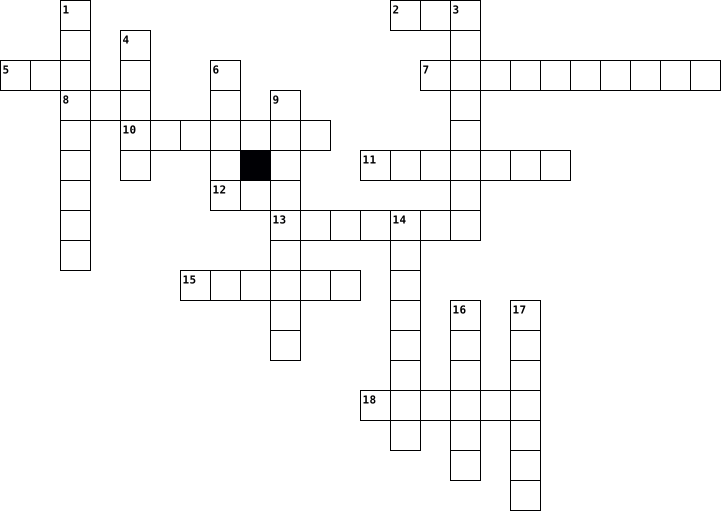
Across
- Simon Personal Communicator
- The world's first smartphone was created by
- cellular telephone with an integrated computer
- A central proessing unit or main processor
- Devuce that can only sounding
- Device that connect to wifi
- Type of flay panel display which was liquid crystals
- Device can takes data from a computer in the form of text on paper
- Perdonal computer that can be easily moved
- Portable personal computer with touchscreen interface
Down
- A portable video camera
- Device with big screen can accepts information
- Small, movabel device to control a range of things on a computer
- Electronic mail
- A pair of small speaker with foam around them
- To control the mouse pointer
- Absorbs electricity for use on modern smartphone
- Device that stores electrical energy
18 Clues: Electronic mail • A portable video camera • Simon Personal Communicator • Device that connect to wifi • To control the mouse pointer • Devuce that can only sounding • Device that stores electrical energy • A central proessing unit or main processor • Perdonal computer that can be easily moved • The world's first smartphone was created by • ...
Unit 4 Vocabulary 2021-10-25

Across
- A computer with software capabilities that provide services for other computer programs and their users. Such as email, web, gaming, music
- is a physical or virtual appliance that passes information between two or more packet-switched computer networks. It inspects a given data packet's destination Internet Protocol address (IP address), calculates the best way for it to reach its destination and then forwards it accordingly.
- 2 words, is a tool that allows you to change a program’s settings or alter the way it looks or behaves.
- 3 words, the place where a computer stores data while it is being used or changed. Think of it as a computer’s short-term memory. It doesn’t have unlimited storage, but it makes for quick access to information you’re currently using.
- Millions of computers connected around the world.
- 2 words, refers to a computer’s hard drive or long-term memory. This is where a computer stores information that isn’t being used at the time. If becomes too full, a computer may become sluggish as it takes the time to wade through all that data.
- is the wireless technology used to connect computers through radio signal sent from a wireless router to a nearby device, which translates the signal into data.
- an abbreviation for “binary digit,” the smallest piece of information used by a computer. Each bit is either a 1 or a 0, which are the binary digits that make up computer language. Bits are literally the foundation upon which computer science is built. Since they’re so miniscule, computer whizzes also need to know some basic tech math to think of bits on a larger scale
- is the step by step directions to take input data and generate output that data. input>Algorithm step by step directions> output
- providing information to the computer from the keyboard or mouse
- refers to different programming languages used to create, edit or manage computer programs or applications. Most computer science students will specialize in a small handful of coding languages depending on the career they’d like to pursue.
- set of programs, procedures, and routines associated with the operation of a computer system. The term was coined to differentiate these instructions from hardware—i.e., the physical components of a computer system.
- It’s a system connecting a number of computers or devices to the same network, allowing for fast, monitored transmission of data.they have restricted network access that’s managed by a handful of system administrators, making it a secure network solution for many companies.
- Area Network This is a small computer network, often located within just a single room. (Think your school network.)
- is a coding language used to write Internet-based documents, like websites. It’s one of the basic coding languages
Down
- 3 words, it is the processing chip and "brains" of a computer.
- This term refers to the amount of information that can be transmitted or processed, either wirelessly or across a hardwired connection. Internet services will advertise fast speeds measured so it is a well-known component of the IT world.
- It is a hardware component that allows a computer or another device, such as a router or switch, to connect to the Internet. ... Similarly, it converts digital data from a computer or other device into an analog signal that can be sent over standard telephone lines.
- refers to the process of finding and removing errors from a program's source code. The goal is for programmers to discover and fix bugs before their end user experiences problems.
- 2 words, is an alternative to storing data on a computer’s physical storage. Information that’s stored “on the cloud” is kept on remote servers that can be accessed anywhere via the Internet.
- Takes the input data and generates an out come such as your mouse( input) clicks on a video, your screen and speakers output images and sounds.
- is a number system that only uses two digits: 1 and 0. All information that is processed by a computer is in the form of a sequence of 1s and 0s. Therefore, all data that we want a computer to process needs to be converted into binary.
- two words, this is a numerical code that identifies a specific computer on the Internet. Think of it as a computer’s unique Social Security Number.
- is a programming error that causes unexpected glitches or problems for a program’s end user.
- Quite simply, computer hardware is the physical components that a computer system requires to function. It encompasses everything with a circuit board that operates within a PC or laptop; including the motherboard, graphics card, CPU (Central Processing Unit), ventilation fans, webcam, power supply, and so on.
- This is memory that can only be read from and not written to. Computers use it to store important tasks like start-up processes and software instructions.
26 Clues: Millions of computers connected around the world. • 3 words, it is the processing chip and "brains" of a computer. • providing information to the computer from the keyboard or mouse • is a programming error that causes unexpected glitches or problems for a program’s end user. • ...
Computer Viruses - Jane Toohil 2018-11-16

Across
- software that is intended to damage or disable computers
- a type of virus that floods a network
- a virus in which if anyone attempts to view an infected sector, the virus will replace it with a clean copy of the sector, so it goes undetected
- the act of a computer virus attaching itself to another computer program
- Unwanted computer software installed on your computer
- A technique intruders use to make their network or internet transmission appear legitimate
- a security system consisting of a combination of hardware and software that limits the exposure of a computer or computer network to attack from crackers
- a type of virus named after a greek myth
- a type of virus that replicates itself
Down
- a software you can download to repel a virus
- programs and operating information used by a computer
- first email virus
- a type of software that locates and saves data from users without them knowing
- a computer worm that copies itself to another computer then deletes itself from the previous computer
- a type of virus that spreads through mail programs
15 Clues: first email virus • a type of virus that floods a network • a type of virus that replicates itself • a type of virus named after a greek myth • a software you can download to repel a virus • a type of virus that spreads through mail programs • programs and operating information used by a computer • Unwanted computer software installed on your computer • ...
Intro to Computers Review 2019-08-29

Across
- what is the computer's electronic and mechanical equipment
- what does RAM stand for
- what files contain sets of instructions that tell the computer how to perform specific tasks
- what does GUI stand for
- what type of software is designed for a specific function
- is a set of data or instructions that have been named and stored to a disk
- name the functions of the microprocessor
Down
- what are the instructions that tell the hardware how to perform
- a set of circuits dedicated to numerical calculations & logical operations
- what is windows file management system
- windows is the computer's what software
- what are the two types of files
- what does CPU stand for
- what are files that contain the work you create, and are associated with specific applications
14 Clues: what does RAM stand for • what does CPU stand for • what does GUI stand for • what are the two types of files • what is windows file management system • windows is the computer's what software • name the functions of the microprocessor • what type of software is designed for a specific function • what is the computer's electronic and mechanical equipment • ...
Intro to Computers Review 2019-08-29

Across
- what are the two types of files
- what is windows file management system
- name the functions of the microprocessor
- is a set of data or instructions that have been named and stored to a disk
- what does CPU stand for
- what files contain sets of instructions that tell the computer how to perform specific tasks
Down
- what are the instructions that tell the hardware how to perform
- what is the computer's electronic and mechanical equipment
- a set of circuits dedicated to numerical calculations & logical operations
- what does RAM stand for
- what are files that contain the work you create, and are associated with specific applications
- what does GUI stand for
- what type of software is designed for a specific function
- windows is the computer's what software
14 Clues: what does RAM stand for • what does GUI stand for • what does CPU stand for • what are the two types of files • what is windows file management system • windows is the computer's what software • name the functions of the microprocessor • what type of software is designed for a specific function • what is the computer's electronic and mechanical equipment • ...
SMART CITIES 2022-02-15

Across
- The transmission of information by various types of technologies over wire, radio, optical, or other electromagnetic systems
- T in ciTies
- SMART is the ___ use of resources in an efficient & effective way
- a person who is among the first to explore or settle a new country or area
- E in citiEs
- C in Cities
- facts and statistics collected together for reference or analysis
Down
- 2nd I in citIes
- S in citieS
- A global network which facilitates communication and sharing of information online
- the protection of computer systems and networks from cyber threats
- 1st I in cIties
- Reuse discarded objects or material in such a way as to create a product of higher quality or value than the original
13 Clues: S in citieS • T in ciTies • E in citiEs • C in Cities • 2nd I in citIes • 1st I in cIties • SMART is the ___ use of resources in an efficient & effective way • facts and statistics collected together for reference or analysis • the protection of computer systems and networks from cyber threats • a person who is among the first to explore or settle a new country or area • ...
Understanding Computers 2022-10-27

Across
- - develops the Android operating system.
- - The Central Processing Unit of a computer.
- - displays image on a computer.
- - manages computer's software and hardware.
- - the main circuit board of the computer.
- - data that is received by the computer.
Down
- - flies or documents are saved in computer.
- - develops the windows operating system.
- - a device that displays information.
- - the opposite of input
- - when someone takes over your computer or phone
- - it allows you to keep data safe.
- - a set of keys that is used to type on computer.
- - input sound into the computer.
14 Clues: - the opposite of input • - displays image on a computer. • - input sound into the computer. • - it allows you to keep data safe. • - a device that displays information. • - develops the Android operating system. • - develops the windows operating system. • - data that is received by the computer. • - the main circuit board of the computer. • ...
Technolgy Terms 2013-03-11

Across
- In a database record, a category that holds one type of information
- Device or program that enables a computer to transmit data over telephone lines
- Electronic Mail -- The transmission of messages over communications networks
- Also called processor. An electronic device designed to accept data, perform prescribed mathematical and logical operations at high speed, and display the results of these operations
- A picture or symbol that appears on a monitor and is used to represent a command, as a file drawer to represent filing.
- Very strong rope made of strands of metal wire, as used to support cable cars or suspension bridges.
- The programs used to direct the operation of a computer, as well as documentation giving instructions on how to use them
- to set (variables, counters, switches, etc.) to their starting values at the beginning of a program or subprogram
- The basic unit of the composition of an image on a television screen, computer monitor, or similar display
- A device that can read text or illustrations printed on paper and translate the information into a format that the computer can use
- A software tool used to organize data in a row and column format and to perform multiple calculations
- This is a type of computer memory that allows data to be stored and retrieved as required. It is called random access because any part of the memory can be located without having to go through everything that comes before it.
- A digit in the binary number system. It can have two values, 0 or 1. In computer RAM and ROM memory, a bit is a small electrical switch which is either on (value 1) or off (value 0).
- Communicating with people over an electronic device
- The process of transferring software/information from the Internet to your computer
- A unit of computer memory or data storage capacity equal to 1,048,576 (220) bytes. One million bytes.
- A unit of computer memory or data storage capacity equal to 1,024 megabytes (230 bytes). One billion bytes.
- A computerized store (collection) of related information
- A destructive computer program that invades by means of a normal program and damages the computer system
- Compact disc read-only memory; a compact disc used with a computer system as a read-only optical disk
- Movable, sometimes blinking, symbol that indicates the position on a CRT or other type of display where the next character entered from the keyboard will appear, or where user action is needed
- A collection of related, often adjacent items of data, treated as a unit.\
- Hypertext Markup Language -- The language in which World Wide Web documents are written
Down
- Universal Resource Locator- The global address of documents and other resources on the World Wide Web
- A global network connecting millions of computers
- Short for microchip, the incredibly complex yet tiny modules that store computer memory or provide logic circuitry for microprocessors
- The screen that displays the images, files, documents, etc. that the user is using
- A hypertext-based collection of computers on the Internet that allows you to travel from one linked document to another, even if those documents reside on many different servers.
- Flexible plastic disk coated with magnetic material and covered by a protective jacket, used primarily by computers to store data magnetically
- A computer, central processing unit program that translates another program into a form acceptable by the computer being used
- Any device added to the computer
- Central Processing Unit, brain of your computer. It processes everything from basic instructions to complex functions
- A unit of computer memory or data storage capacity equal to 1,024 (210) bytes
- A hardware device that accesses the data stored on a disk, a CD, or a Zip disk
- A unit of measurement used to measure data. One byte contains eight binary bits, or a series of eight zeros and ones
- An inflexible magnetic disk with greater storage capacity than a CD; can be internal to the computer or external
- System of computers interconnected by telephone wires or other means in order to share information
- The mechanical, magnetic, electronic, and electrical devices comprising a computer system, as the CPU, disk drives, keyboard, or screen.
- Unit of a computer that preserves data for retrieval capacity for storing information
- Describes a numbering scheme in which there are only two possible values for each digit: 0 and 1. The term also refers to any digital encoding/decoding system in which there are exactly two possible states.
- A software program that allows the user to find and read encoded documents in a form suitable for display, especially such a program for use on the World Wide Web.
- Is the activity of copying files or databases so that they will be preserved in case of equipment failure or other catastrophe
- A single unit for electrolysis or conversion of chemical into electric energy, usually consisting of a container with electrodes and an electrolyte; a battery
43 Clues: Any device added to the computer • A global network connecting millions of computers • Communicating with people over an electronic device • A computerized store (collection) of related information • In a database record, a category that holds one type of information • A collection of related, often adjacent items of data, treated as a unit.\ • ...
FITD Vocab.af 2013-05-15

Across
- the internet and online world
- Where you connect to a network using a wired connection (internet)
- searches all search engines and gets the top results
- SSID
- Alternatively to as high-speed Internet or wide band transmission
- a program that allows you to search the internet for information
- long term memory
- the way you behave online
- a readable file
- Homeland Security (NCSA)
- CPU
- examples: headphones, speakers
- the heart of the computer
- the software of a laptop
- hand free speaking device
- set of structured activies (safari, firefox)
- 8 bits make a ____
- is a sequence of instructions
- created with a copyright symbol on it
- location for CD in your laptop
- a device that displays signals on a computer screen
- a brief background of your history
Down
- is equal to 1,099,511,627,776 bytes
- ISP
- portable device
- where all information is stored
- when the computer isn't working you ____ it back up
- this is a program
- What do they want? who is asking? Why do they want it?
- a port used to connect a computer a mouse or a keyboard to an IBM compatible computer
- is an object on a computer that stores data
- rules and behavior to keep you and your computer safe
- short term memory
- USB (flash drive)
- examples: flashdrive, keyboard, mouse, etc
- LCD
- the purpose of this is to upgrade your computer
- LED
- a device that receives data and projected data
- a storage device or backup device that you can access
- A electronical and physical port
- to protect information and networks
- a program on your device that allows you to download and upload
- is a physical components of computer wiring (the inside of the computer)
- cloud based presentation on the internet. There is only one slide that can be edited. .
45 Clues: ISP • LCD • CPU • LED • SSID • portable device • a readable file • long term memory • this is a program • short term memory • USB (flash drive) • 8 bits make a ____ • Homeland Security (NCSA) • the software of a laptop • the way you behave online • the heart of the computer • hand free speaking device • the internet and online world • is a sequence of instructions • examples: headphones, speakers • ...
crossword 2017-06-21

Across
- the same message indiscriminately to the Internet
- global computer network providing a variety of information and communication facilities
- packet of data sent by an Internet server to a browser
- sign whose form directly reflects the thing it signifies
- electronic device for storing and processing data
- a computer program had stops functioning property and exits
- a system designed to prevent unauthorized access to or from a private network
- Drive-a high-capacity, self-contained storage device containing a read-write mechanism plus one or more hard disks, inside a sealed unit
- the abbreviation for central processing unit.
- to the present or recent times as opposed to the remote past
- (data) from one computer system to another, typically over the Internet.
- small handheld device that is dragged across a flat surface to move
- piece of code that is capable of copying itself and typically has a detrimental effect
Down
- folding cover or holder, typically made of stiff paper or cardboard, for storing loose papers.
- System-the software that supports a computer's basic functions
- flash drive-an external flash drive, small enough to carry on a key ring
- panel of keys that operate a computer
- Wide Web-an information system on the Internet that allows documents to be connected to other documents
- or nearly as described, but not completely or according to strict definition.
- program with a graphical user interface for displaying HTML files
- an object on a computer that stores data, information, settings, or commands used with a computer program.
- machinery, and other durable equipment.
- instrument or device used for observing
- act or instance of booting a computer system again.
- the working surface of a desk.
- -a computer or computer program that manages access to a centralized resource or service in a network
26 Clues: the working surface of a desk. • panel of keys that operate a computer • machinery, and other durable equipment. • instrument or device used for observing • the abbreviation for central processing unit. • the same message indiscriminately to the Internet • electronic device for storing and processing data • act or instance of booting a computer system again. • ...
technology work 2023-03-23

Across
- used to edit photos or videos
- programmable digital electronic machine
- used for computer work
- people have it in their heads
- is an email service
- earth have alot of that
- independent learners and collaborative workers
- specializes in products and services related to the Internet, software
- computer programs that make it possible to execute specific tasks within a computer
- It is used to select things on the computer
Down
- responsible citizens
- software that has the objective of altering the normal operation of any type of computing device
- something visible to the naked eye on the face
- devoted catholics
- looks from head to toe
- effective communicators
- a programmable machine capable of performing various functions or complex tasks
- used to use a website
- it is an animal like horses
- solvers problems and criticals thinkers
20 Clues: devoted catholics • is an email service • responsible citizens • used to use a website • looks from head to toe • used for computer work • earth have alot of that • effective communicators • it is an animal like horses • used to edit photos or videos • people have it in their heads • programmable digital electronic machine • solvers problems and criticals thinkers • ...
CIM 2024-11-04

Across
- Instructions written for computers
- The part of a computer that displays images
- Malicious software that can harm computers
- Entering credentials to access a system
- To look for information online
- Programs and applications run on computers
- A device used to control the pointer on a screen
- Software used to access the internet
- Device for storing and retrieving data
- Facts and statistics for reference or analysis
- Unit of digital information
Down
- Physical components of a computer
- A location on the Internet with an address
- Sending data from a local system to the internet
- Collections of data stored on a computer
- Global network connecting millions of computers
- A machine for processing data
- Online storage accessible via internet
- A computer or program that manages resources in a network
- Electronic messages sent over the internet
20 Clues: Unit of digital information • A machine for processing data • To look for information online • Physical components of a computer • Instructions written for computers • Software used to access the internet • Online storage accessible via internet • Device for storing and retrieving data • Entering credentials to access a system • Collections of data stored on a computer • ...
VEXcodeVR 2022-03-04

Across
- anything your robot does; there are 3 types
- a set of steps used to complete a task
- the grey category of code blocks; they are added to the program to describe what the code is doing, and they are ignored by the robot during runtime; they are just notes for the programmer and are not regarded as code
- a control flow statement loop that makes the robot repeat a conditional statement over and over again indefinitely
- under file in VEXcode VR, it is what to select to begin a new coding project (3 words, no spaces)
- a code statement or block that controls the flow of a program, such as a conditional statement or a loop (2 words, no space)
- a control statement that controls the flow of the program by pausing the program until a specific action or response is received (2 words, no space)
- the name of the blue box in VEXcode VR where you change and save the name of your program (2 words, no space)
- 1 of the 3 types of robot behaviors; this is a behavior at the highest level, and it is always composed of smaller behaviors
- the naming convention used to name your projects in VEXcode VR; instead of placing a space between each word, the first letter of each new word is capitalized
- the yellow control block used to end code in VEXcode VR (2 words, no space)
- the purple category of code blocks; it includes the blocks that set the robot pen color
- 1 of the 3 types of robot behaviors; it is a small behavior your robot can understand and perform directly
Down
- the attempt to find errors in a program and then fix them
- the three colors that can be detected by the VEXcode VR robot using its Front Eye and its Down Eye; abbreviated RGB (3 words, no spaces)
- a control statement the controls the flow of the program by pausing the program for a set number of seconds
- a device that sends information or signals into a computer system, such as a robot (2 words, no spaces)
- a control flow statement that allows code to be executed repeatedly
- 1 of the 3 types of robot behaviors; it is a small, bite-sized behavior that allows your robot to perform a simple yet significant task; it is large enough to describe useful actions but small enough to code in ROBOTC
- the blue category of code blocks; it includes the blocks that tell the robot what direction to drive and turn and how fast to drive
- an embedded test environment where you can run your code to look for errors; it offers options to start, stop, and reset your program, as well as control the camera view
- input devices that provide robots information such as the distance to an object, the amount of light around the robot, the color the robot detects, or whether the robot has bumped into an object
- self-driving
- expressions in computing that evaluate to one of two values: true or false (2 words, no space)
- the yellow control block used to begin code in VEXcode VR (2 words, no space)
- a compact and informal description of a computer program; it is a hybrid of programming language and human language
- the light blue (turquoise) category of code blocks; some are shaped like a hexagon (to represent a yes/no question), and some are shaped like an oval (to represent a numeric value)
27 Clues: self-driving • a set of steps used to complete a task • anything your robot does; there are 3 types • the attempt to find errors in a program and then fix them • a control flow statement that allows code to be executed repeatedly • the yellow control block used to end code in VEXcode VR (2 words, no space) • ...
Computer Programming One 2019-03-05

Across
- arranging in an ordered sequence
- another condition
- basic unit of information in computer storage and processing
- operation that adds an element to the collection
- identify and remove errors from
- value passed through program
- defines a variable with a fractional value
- abstract data type that serves as a collection of elements, with two principal operations(push and pop)
- operation of joining character strings end-to-end
- physical, tangible parts or components of a computer
- operation that which removes the most recently added element that was not yet removed
- a type of procedure or routine which returns a value
- memory that retains its contents even when the computer is turned off
- set of rules that defines the combinations of symbols
- something to keep track of how many of a certain value is created
- punctuation used to separate relevant information or a comment from the rest of the text
- computer software that is made available with no charge
- operation that finds the remainder after division of one number by another
- a process or set of rules to be followed in calculations or other problem-solving operations
- high-level programming language developed by Sun Microsystems which runs on multiple platforms
- To add a fixed amount
- an unknown number
- a high-level general-purpose programming language that is used in class
- computer program or device that provides a service to another computer program and its user
Down
- a sequence of instructions that is continually repeated
- smallest unit of data in a computer
- linear data structure, or more abstractly a sequential collection
- data type that represents some range of mathematical number
- users try a product, and if they like it, they voluntarily pay a set registration fee
- an informal high-level description of the operating principle of a computer program or other algorithm
- a data type that has one of two possible values
- an instruction that tells a computer to begin executing a different part of a program rather than executing statements one-by-one
- a method of solving a problem where the solution depends on solutions to smaller instances of the same problem
- computer program that directly executes
- a value that can change, depending on conditions or on information passed to the program
- the answer to an addition problem
- if either are true
- a sequence of program instructions that performs a specific task
- a type of computer memory that can be accessed randomly
- character that represents an action
- when both are true
- a data structure consisting of a collection of elements
- computer program that transforms computer code written in one programming language into another programming language
- a range were you know when it ends
44 Clues: another condition • an unknown number • if either are true • when both are true • To add a fixed amount • value passed through program • identify and remove errors from • arranging in an ordered sequence • the answer to an addition problem • a range were you know when it ends • smallest unit of data in a computer • character that represents an action • ...
Ingle TP N°03 2021-06-07

Across
- a small picture or symbol on a computer screen that you use to give the computer an instruction
- the set of keys on a computer that you press in order to make it work.
- to provide the finance for a project, typically using the internet.
- a disruptive message posted on a computer network or sent as e-mail.
- the part of a computer in which information or programs are stored either permanently or temporarily.
- peripheric device that you move across a surface in order to move a cursor on your computer screen.
- the programs that can be used with a particular computer system.
- a central computer from which others, over a network to get information.
Down
- to transfer a file onto a computer from another computer or the internet.
- a machine that is connected to a computer and prints onto paper using ink.
- symbol used to refer readers to a note at the bottom of a page of text, or to show that a letter is missing.
- a computer program that makes it possible for you to read information on the internet.
- symbol used on social media websites and applications to identify digital content on a specific.
- the information operated on by a computer program.
- computer user who illegally gains access to restricted computer systems.
15 Clues: the information operated on by a computer program. • the programs that can be used with a particular computer system. • to provide the finance for a project, typically using the internet. • a disruptive message posted on a computer network or sent as e-mail. • the set of keys on a computer that you press in order to make it work. • ...
ICF 2014-09-28

Across
- a hardware that transfers intangible data into a tangible data
- an program that is open or running
- Stops the window from running
- a hardware with a set of keys with alphabet and number buttons for computers
- a hardware that displays digital data for people to see
- a computer needs human intervention to work
- provides input and produces output
- The ___ case capitalizes the first letter of the title
- an hardware that lets you hear the auditory data of the computer
- cannot be touched
- a part of a window where tasks are located
- a part of a window that displays the name of the window
- it is used to switch users
- the expert computer users
- provides a launching point for programs and other tasks
- a hardware that takes or records images or videos to transfer to the computer
- this is where deleted items are located yet can be recycled
- a button which sets the window to its original scale before maximized
- a type of dialog box which you can choose a combination of choices
- show notification at the lower right of the screen
- part(s) of a computer that you can actually touch
- Enlarges a window to full screen
- beginners in using a computer
- computer are electronics and need ___ to run
- the personnel involved with computer operation
- a part of a window where you put your work
- the main screen of the computer which shows some of its programs
- windows xp considers special ___ in titles
- turns the computer off and all running programs
- a dialog box that has up and down buttons
- a location where you can see all hard drives
- a mouse skill that is used to pinpoint an object onscreen
- computers cannot ___ from its object
- a picture that represents a program
- a dialog box that has a panel that drops which shows choices
Down
- also called a software
- can be touched
- can keep files
- computers cannot operate without being a certain ___
- refers to the specifying the manner
- computers can execute a task 100% accuracy
- a part of a window that is similar to a slider
- a dialogue box that uses a scroll-like
- experienced computer users
- computers are subject to occasional ___
- a mouse skill which allows us to open a program
- a dialog box with choices in different sections
- a computer can remind without exhaustion
- is a modifier key which, when pressed with another key, performs a special operation
- A Computer is an ____ device
- a dialog box that has a list and you can only choose one
- to arrange windows in an overlapping order
- the word processor for windows
- programs in Microsoft
- the component of the computer that performs the basic operations
- the part pf the computer
- a powerful operating system
- a mouse skill which shows the options that you can do with the file
- a hardware that is used to point, click, etc.
- sets a window aside to the task bar
- a dialog box which you can check as many choices as you want
- an ability of a computer to do something really fast
- a dialogue box that consider texts as a command
- a computer has logical ___
- Explores files in windows
- Computers can detect ___ yet cannot correct them
- a mouse skill that allows to transfer objects into a particular place
67 Clues: can be touched • can keep files • cannot be touched • programs in Microsoft • also called a software • the part pf the computer • the expert computer users • Explores files in windows • experienced computer users • it is used to switch users • a computer has logical ___ • a powerful operating system • A Computer is an ____ device • Stops the window from running • ...
Deutsch Vocabulary 2023-03-21

Across
- Technology
- larger version of phone
- data in computer
- apply
- digital letters
- plugs into computer
- on front of phone
Down
- location on the internet
- conncted to computer
- foldable computer
- medien facebook/instagram
- on the internet
- used to type
- message sent to phones
- mini computer
15 Clues: apply • Technology • used to type • mini computer • on the internet • digital letters • data in computer • foldable computer • on front of phone • plugs into computer • conncted to computer • message sent to phones • larger version of phone • location on the internet • medien facebook/instagram
第一弹 2025-09-27

Across
- | School clothing
- | For sending letters
- | Snow sport on skis
- | Stylish and neat
- | Running fast short distance
- | Network service computer
- on | To enter a system
- | Elegantly fashionable
- | Part of clothing for arm
- | Worn around neck
- | Computer program
- | Sport with gloves
- | Bag carried on back
- | Graceful and stylish
- | Large storage box
- | To store old files
- | Sport with flips
- | Clickable connection
- | Worn around waist
- | Computer pointing device
- sharpener | Tool for sharpening pencils
- | Portable computer
- | Footwear for winter
- | Computer display
- | Not valid
- | Display on computer or phone
- | Shiny white gem
- | Sport with bat and ball
- | Sleepwear
- | Comfortable indoor shoes
- | Computer or paper documents
- | Fitting closely
- | Sport with swords
- | Women's one-piece outfit
- | App on phone or computer
- | Sport with bat and wicket
- | For organizing documents
- | Sport with stick and puck
- | Mistake
- | Woman's small bag
- | Running over barriers
- | For typing on computer
- | For stapling papers
- unit | Computer main box
- | Sport with hoop
- | Riding a bicycle
- clips | Metal clips for papers
- | Denim pants
- | Hallway in a building
- | Clothing for legs
Down
- | Machine for printing
- | Sweater with a hood
- | Computer screen workspace
- | Sport with racket and ball
- up | To close with a zipper
- | Short pants
- | Clothing for upper body
- | Warm knitted top
- | Device for projecting images
- | Soft absorbing material
- up | To save data copies
- | Storage cabinet for belongings
- | Not working, offline
- | Device for math
- | Open-front sweater
- | Open shoe for summer
- | Bones of the body
- coat | Coat for rain
- | Not tight, baggy
- | Neck part of shirt
- | To damage data
- pins | For pinning paper
- | For removing pencil marks
- in | To sign into account
- | For fastening clothes
- | Secret code for login
- | Decorative picture on wall
- | Computer network
- browser | Software for internet
- | For carrying money
- | Computer programs
- | Sport with shuttlecock
- | To access data
- | Untidy in appearance
- | Sport with ball and goal
- | Electronic or paper file
- | Part of the body
- | Fashionable
- | Flat-screen computer
- | To reverse an action
- | For tying shoes
- | For travel
- clothes | Ordinary clothing
- | Sport like football
- | To fit well
- jacket | Jacket made of leather
- | Piece for repairing
- | Women's garment
- | Computer virus
- up | To fasten buttons
100 Clues: | Mistake • | Not valid • | Sleepwear • | For travel • | Short pants • | Fashionable • | To fit well • | Denim pants • | To damage data • | To access data • | Computer virus • | School clothing • | Device for math • | Shiny white gem • | Fitting closely • | For tying shoes • | Sport with hoop • | Women's garment • | Stylish and neat • | Warm knitted top • | Worn around neck • | Computer program • ...
KAILEY'S VOCAB!!! :) 2012-10-04

Across
- Processed by a computer as a unit.
- Access to data files programs
- Metal ware used as tools like locks, and hinges.
- A rigid, slotted board that contains the basic circuitry wires of a computer.
- Program used to direct the operation of a computer, T.V.
- A company or organization that provides access to the internet through its server.
- Device Electronic equipment connected to a computer.
- device A peripheral device that accepts data.
- Computer system
- code The representation of each one of a set of numbers, letters,exc
Down
- used for specifying addresses on t he internet.
- A software program that allows the user to find and read
- A device inside another device.
- An internet, passage.
- Short term memory that only exists while computer is running.
- A font used for size, color, or what kind of style.
- device The collection of software that directs a computers operation.
- A small object that can fit on a desk.
- address the numerical code that identifies all computers that are connected to the internet.
- Memory saved when computers are turned off and turned on.
20 Clues: Computer system • An internet, passage. • Access to data files programs • A device inside another device. • Processed by a computer as a unit. • A small object that can fit on a desk. • device A peripheral device that accepts data. • used for specifying addresses on t he internet. • Metal ware used as tools like locks, and hinges. • ...
Unit 1 Review 2014-10-27

Across
- study of workplace health and safety
- part of the email that contains the message
- email service based on a web server
- any part of a computer you can see or touch
- the ability to attach a file or photo to email
- when a page is oriented vertically
- any company that provides access to the internet
- any set of machine readable instructions that gives directions
- any device used to put information into the computer
- any device used to get information out of the computer
- what the email is about
Down
- memory that is volatile
- when the page is turned so it is wider then tall
- manages the computers hardware and software
- network located over a large area
- network located in a small area
- software used to retrieve, present and browse pages on the internet
- computer memory on which data has been prerecorded
- to adjust so the print is even on one side or fills a space evenly
- global system of interconnected computer networks
- collection of private computer networks within an organization
21 Clues: memory that is volatile • what the email is about • network located in a small area • network located over a large area • when a page is oriented vertically • email service based on a web server • study of workplace health and safety • part of the email that contains the message • manages the computers hardware and software • any part of a computer you can see or touch • ...
ITC PUZZULE 2024-12-19

Across
- Central Processing Unit, the brain of the computer.
- A numbering system using only 0 and 1.
- Programs and operating systems that run on a computer.
- Software managing hardware and applications.
- A group of 8 bits.
- Graphics Processing Unit for rendering images.
- A small amount of memory for quick access.
- A device for permanent data storage.
- A standard for connecting peripherals.
- Physical components of a computer.
- The screen used to display visuals.
- A group of interconnected computers.
Down
- Wireless internet connection.
- An input device for typing data.
- Temporary memory used by the computer to run programs.
- A wired connection for networking.
- External devices like printers or scanners.
- The smallest unit of data in a computer.
- A handheld device used to interact with the screen.
- A solid-state drive, faster than a hard drive.
- The main circuit board in a computer.
- A security system for network protection.
- A set of integrated circuits for specific tasks.
- Remote storage and computing services.
- Memory storing permanent instructions.
25 Clues: A group of 8 bits. • Wireless internet connection. • An input device for typing data. • A wired connection for networking. • Physical components of a computer. • The screen used to display visuals. • A device for permanent data storage. • A group of interconnected computers. • The main circuit board in a computer. • A numbering system using only 0 and 1. • ...
IT 2025-09-11

Across
- a type of virus
- storage on the internet you can accsess from everywhere
- a security barrier that save your PC
- a type of storage in your PC
- a small computer in your pocket
- a error in a software
- a faster storage in the computer
- a software update that fixes bugs
- calculate almost everything in the computer
- you see on it what you doing on your computer
- give electiricy for the computer
Down
- a temporary astorage for faster data access
- a robot that act like humans
- you get WiFi from it
- you can write on your comuter with it
- the delay of data transfer
- a protocol for secure remote access
- a sercet word or a code for security
- a copy of a data for safety
- the short version of the graphics card
20 Clues: a type of virus • you get WiFi from it • a error in a software • the delay of data transfer • a copy of a data for safety • a robot that act like humans • a type of storage in your PC • a small computer in your pocket • a faster storage in the computer • give electiricy for the computer • a software update that fixes bugs • a protocol for secure remote access • ...
Computers 2013-03-07

Across
- Copy A type of output that is printed on paper or other permanent media
- A very flat and thin screen that is made up of two layers of a polarizing material with a liquid crystal solution in between, dividing into tiny cells
- This software takes a scanned image and converts the characters in the image into computer characters
- Drives A drive that is connected to a computer and on which a CD-ROM can be ''played''
- Radio Frequency Identification that uses special tags that contain chips which are programmed with information
- The manipulation of data by a microprocessor or embedded processor according to instructions given to it by a program or embedded in the chip it self
- A famous slogan in computing sums up the importance of accurate data
- Access Memory A type of memory in the computer storage(RAM)
- Storage A type of storage that holds what is not currently being processed. This is the stuff that is ''filed away'' but is ready to be pulled out when needed
- Turning the power off does not erase the data
- Drives A storage medium which has a greater capacity and band width than a CD. DVD's can be used for multimedia and data storage
- One of the first early computing machines
- The way which screens are measured
- Only Memory A type of memory in the computer storage(ROM)
- The act of entering data into a computer.
- Any device in which information is stored
- A pointing device that moves a cursor around the screen faster than using keystrokes
Down
- The physical parts of teh computer system that you can touch and feel
- A pointing device that's natural to do-reach out and touch something
- The sets of instructions that direct the computer
- Determines how clear and detailed the image is
- Software A type of software(AS)
- The programs and data that make computer hardware function
- Systems A type of software(OS)
- Turning off the power erases all the data
- The computer-generated information that is displayed to the user in some discernable form such as a scren display, printed page, or sound
- Drives A device that allows your computer to read floppy disks
- The raw facts given to the computer
- Memory Keeps track of what is currently being processed
29 Clues: Systems A type of software(OS) • Software A type of software(AS) • The way which screens are measured • The raw facts given to the computer • Turning off the power erases all the data • One of the first early computing machines • The act of entering data into a computer. • Any device in which information is stored • Turning the power off does not erase the data • ...
Crossword Puzzle 2017-06-21

Across
- packet of data sent by an Internet server to a browser
- a system designed to prevent unauthorized access to or from a private network
- the same message indiscriminately to the Internet
- or nearly as described, but not completely or according to strict definition.
- the abbreviation for central processing unit.
- flash drive-an external flash drive, small enough to carry on a key ring
- to the present or recent times as opposed to the remote past
- panel of keys that operate a computer
- (data) from one computer system to another, typically over the Internet.
- -a computer or computer program that manages access to a centralized resource or service in a network
- instrument or device used for observing
- small handheld device that is dragged across a flat surface to move
- System-the software that supports a computer's basic functions
- act or instance of booting a computer system again.
- sign whose form directly reflects the thing it signifies
Down
- the working surface of a desk.
- Wide Web-an information system on the Internet that allows documents to be connected to other documents
- machinery, and other durable equipment.
- Drive-a high-capacity, self-contained storage device containing a read-write mechanism plus one or more hard disks, inside a sealed unit
- electronic device for storing and processing data
- piece of code that is capable of copying itself and typically has a detrimental effect
- an object on a computer that stores data, information, settings, or commands used with a computer program.
- folding cover or holder, typically made of stiff paper or cardboard, for storing loose papers.
- a computer program had stops functioning property and exits
- global computer network providing a variety of information and communication facilities
- program with a graphical user interface for displaying HTML files
26 Clues: the working surface of a desk. • panel of keys that operate a computer • machinery, and other durable equipment. • instrument or device used for observing • the abbreviation for central processing unit. • the same message indiscriminately to the Internet • electronic device for storing and processing data • act or instance of booting a computer system again. • ...
ADSI Julian Martinez 2022-05-11

Across
- Reload or display the contents of a Web page or window
- Describe the tasks and bisiness functions that users, managers, and IT staff members perform to achieve a specific results
- Connecting an Internet document to another that is highlighted in a special way, also called Hyperlink
- refers to the action of creating programs or applications through the development of a source code
- Folder or buffer that temporarily stores files on your computer
- Appearance that the programs present after their execution through which we exercise communication with these
- is the text that a person enters in a browser to enter a specific website
- are symbolic representations of a certain qualitative or quantitative attribute or variable
- Security devices to unauthorized entries
- A person who uses a computer or computer system
Down
- is the area related to computer science that focuses on the protection of the computational infrastructure and everything related to it
- Mix data to protect it as a security measure making it unreadable
- is the stage where a programmer can read and modify a computer program.
- Science that studies the design of automatic machines or robots in order to provide them with human intelligence
- Set of concrete and detailed instructions by which a certain action is achieved
- is the physical layer of the information system
- is any computer program
- Program capable of storing a large amount of data, related and structured, which can be consulted quickly
- Computer scientists who use their great knowledge to cross any computer barrier
- is an error in the code of a program
20 Clues: is any computer program • is an error in the code of a program • Security devices to unauthorized entries • is the physical layer of the information system • A person who uses a computer or computer system • Reload or display the contents of a Web page or window • Folder or buffer that temporarily stores files on your computer • ...
concepts associated with network requirements. 2021-04-09

Across
- handles connection to the network by the higher layers
- Define the rules that govern the communications between two computers connected to the network
- a communication computer that connects different types of networks using different protocols
- a device on a network can be thought of as this
- Manages sessions among applications
- provides end-to-end errors detection and correction
- defines the physical characteristics of the network
- allows the constitution of communication groups (newsgroups) organized around specific topics
- type of network that covers buildings
- allows the management of the network
- provides safe communication of data over the physical network
Down
- Consists of only 4 layers
- Consists of only 7 layers
- allows the transfer of collection of files between two machines connected to the Internet
- Numeric quantities that are easy for computers with but not for humans to remember
- provides standard data representations for applications
- type of networks that covers cities
- defines a basic service for electronic mails
- allows a user to connect to a remote host in terminal mode
- applications connected to the network
20 Clues: Consists of only 4 layers • Consists of only 7 layers • type of networks that covers cities • Manages sessions among applications • allows the management of the network • applications connected to the network • type of network that covers buildings • defines a basic service for electronic mails • a device on a network can be thought of as this • ...
DIGIT 2016 Cryptic crossword 2016-10-06

Across
- Video conferencing software by Microsoft
- Computer term used when software suddenly shuts down
- in which state is Facebook headquarters located?
- Information which a user gives to a computer
- location of Microsoft HQ
- tagline ‘Yours is here’?
- Trojan is a form of ______
- Full form of RAM
- Which company uses the tagline ‘Don’t be Evil’?
- Database management software made by Microsoft
- who is known as the father of internet
- Term used to describe computer programs
- What is the default Internet Browser in Windows 10
- The first operating system
Down
- purpose for which a firewall is used
- Note taking software made by Microsoft
- Full form of CD
- Basic unit of Spreadsheet where data is entered
- first computer game
- Microsoft software used in making presentations
- computer which defeated Garry Kasparov in chess
- what was the name of the first search engine?
- Which major IT company was launched in 1975?
- Company which founded Bluetooth
- Software by Microsoft used in making spreadsheets
- computer hard disk was first introduced by
26 Clues: Full form of CD • Full form of RAM • first computer game • location of Microsoft HQ • tagline ‘Yours is here’? • Trojan is a form of ______ • The first operating system • Company which founded Bluetooth • purpose for which a firewall is used • Note taking software made by Microsoft • who is known as the father of internet • Term used to describe computer programs • ...
Tech Terms 1 + 2 2025-10-21

Across
- A printer is an _____ device
- Restart an already booted computer
- One way to backup information
- Hypertext Markup Language
- A number, unique to you and your internet activity
- External source to store more information on a computer
- One million bytes
- Uniform Resource Locater
- Manages resources on a computer
- Machine language
- You can touch this
- You can't touch this
Down
- Brains of Computer
- A keyboard is an _____ device
- Keyboard shortcut Ctrl+V
- A series of interconnected webpages
- Safari and Firefox are examples of...
- Files websites store on your device to remember information
- A transfer of data from the internet to one's own device
- Global network of interlinked computers
- Keyboard shortcut Ctrl+P
- Bing and Yahoo are examples of...
- Cables that connect to the internet via LAN
- Initial computer startup
- Keyboard shortcut Ctrl+C
- Network security system
- Group of bits
- Software created to damage or gain unauthorized access to a computer system
- 0 or 1
- Portable Document File
30 Clues: 0 or 1 • Group of bits • Machine language • One million bytes • Brains of Computer • You can touch this • You can't touch this • Portable Document File • Network security system • Keyboard shortcut Ctrl+V • Keyboard shortcut Ctrl+P • Uniform Resource Locater • Initial computer startup • Keyboard shortcut Ctrl+C • Hypertext Markup Language • A printer is an _____ device • ...
Tech 2025-11-03

Across
- → The physical components of a computer system.
- System (OS) → The main system software that manages all hardware and software.
- / Internet → A collection of web pages accessible through the internet.
- → A programming language named after a type of snake.
- → A popular programming language named after coffee.
- → Process of converting data into a secret code for protection.
- → A mistake or flaw in a program that causes errors.
- → An electronic device used to process data and perform tasks.
- → Technology that allows wireless internet connection.
- → The brain of the computer that performs all operations.
Down
- → Portable storage device that connects through a USB port.
- → A feature that turns your device into an internet access point.
- → A malicious program that can harm your computer.
- → Programs and applications that run on a computer.
- → A portable version of a computer.
- → The part of the CPU that performs calculations and logic.
- → A device that connects and directs data between networks.
- → A keyword used to exit a loop in programming.
- → A tiny electronic component inside circuits or processors.
- → An integrated circuit that performs computation and logic operations.
20 Clues: → A portable version of a computer. • → The physical components of a computer system. • → A keyword used to exit a loop in programming. • → A malicious program that can harm your computer. • → Programs and applications that run on a computer. • → A popular programming language named after coffee. • → A mistake or flaw in a program that causes errors. • ...
Tech 2025-11-03

Across
- → A programming language named after a type of snake.
- → A portable version of a computer.
- / Internet → A collection of web pages accessible through the internet.
- → The part of the CPU that performs calculations and logic.
- → A device that connects and directs data between networks.
- → Portable storage device that connects through a USB port.
- → A malicious program that can harm your computer.
- → Technology that allows wireless internet connection.
- System (OS) → The main system software that manages all hardware and software.
Down
- → A tiny electronic component inside circuits or processors.
- → An electronic device used to process data and perform tasks.
- → A machine that can perform tasks automatically.
- → Programs and applications that run on a computer.
- → Process of converting data into a secret code for protection.
- → The brain of the computer that performs all operations.
- → The physical components of a computer system.
- → A mistake or flaw in a program that causes errors.
- → A keyword used to exit a loop in programming.
- → A feature that turns your device into an internet access point.
- → A popular programming language named after coffee.
20 Clues: → A portable version of a computer. • → The physical components of a computer system. • → A keyword used to exit a loop in programming. • → A machine that can perform tasks automatically. • → A malicious program that can harm your computer. • → Programs and applications that run on a computer. • → A mistake or flaw in a program that causes errors. • ...
Tech 2025-11-03

Across
- → A portable version of a computer.
- → A popular programming language named after coffee.
- → A malicious program that can harm your computer.
- → A mistake or flaw in a program that causes errors.
- → A device that connects and directs data between networks.
- → The physical components of a computer system.
- → An electronic device used to process data and perform tasks.
- → A programming language named after a type of snake.
- / Internet → A collection of web pages accessible through the internet.
- → A tiny electronic component inside circuits or processors.
- → A keyword used to exit a loop in programming.
Down
- System (OS) → The main system software that manages all hardware and software.
- → Process of converting data into a secret code for protection.
- → The part of the CPU that performs calculations and logic.
- → Programs and applications that run on a computer.
- → A feature that turns your device into an internet access point.
- → Technology that allows wireless internet connection.
- → The brain of the computer that performs all operations.
- -> A machine that can perform tasks automatically.
- → Portable storage device that connects through a USB port.
20 Clues: → A portable version of a computer. • → The physical components of a computer system. • → A keyword used to exit a loop in programming. • → A malicious program that can harm your computer. • -> A machine that can perform tasks automatically. • → Programs and applications that run on a computer. • → A popular programming language named after coffee. • ...
Technology 2 2025-09-28

Across
- To make an exact duplicate of a file or text.
- A small picture or symbol that you click to open a file or program.
- A flat, touch-screen computer you can carry easily.
- To press the mouse button twice very fast to open something.
- A set of instructions that makes the computer do a task, like drawing.
- The main screen you see when a computer starts up, full of icons.
- A giant network that connects millions of computers all over the world.
- To link two or more devices together, often using Wi-Fi.
- To look for something specific online using a tool like Google.
- A way to send messages from one computer to another, like a digital letter.
- When the computer makes a mistake or something goes wrong.
- The set of keys you use to type letters, numbers, and symbols.
- A collection of pages on the internet you can visit, like a digital book.
- A place to store and organize your files on the computer.
- To copy a file (like a game or picture) from the internet to your computer.
Down
- A small device you move with your hand to click and point on the screen.
- The special language used to tell a computer what to do.
- Playing video games on a computer, console, or tablet.
- The "brain" of the computer that does all the thinking and math.
- A small program you use on a tablet or phone. (Like a game or drawing tool.)
- Something that uses electronic technology (like a digital clock).
- The screen that looks like a TV, where you see what the computer is doing.
- A single piece of information, like a document or a saved picture.
- All the programs and files that run on a computer (like games and apps).
- Pieces of information, like numbers, words, or pictures.
- To quickly press and release a mouse button to select something.
- The blinking line or arrow that shows where you are typing or clicking.
- The program you use to look at websites (like Chrome or Safari).
- A secret word or phrase that keeps your account safe.
- A place on the internet where you can save and store files.
30 Clues: To make an exact duplicate of a file or text. • A flat, touch-screen computer you can carry easily. • A secret word or phrase that keeps your account safe. • Playing video games on a computer, console, or tablet. • The special language used to tell a computer what to do. • Pieces of information, like numbers, words, or pictures. • ...
Computers. 2012-03-21

Across
- A video camera that feeds its images in real time to a computer network.
- A pointing device consisting of a ball held by a socket containing sensors to detect a rotation of the ball.
- A portable, usually battery-powered microcomputer.
- A computer input device for controlling the pointer on a display screen by sliding the finger along a touch-sensitive surface.
- Senses the user pressing directly on the display.
- A device for projecting a beam of light.
- A global system of interconnected computer networks.
- The components of the computer in which such information is stored.
Down
- A combination of two or more cells electrically connected to work together to produce electric energy.
- A pair of small loudspeakers which are designed to be held in place close to a user's ears.
- A set of keys used to input information to a computer.
- Also called processor.
- A segment of self-replicating code planted illegally in a computer program, often to damage a system.
- A thin, flexible plastic disk coated with magnetic material, on which data can be stored for later use.
- An acoustic sensor that provides input by converting sound into electrical signals.
- An output device that produces a paper copy of alphanumeric or graphic data.
- A lever used to control movement of a cursor or other graphic element for video games.
- A component, as a CRT, with a screen for viewing data at a computer terminal.
- An electromechanical device which produces sound.
- A palm-sized, button-operated pointing device.
20 Clues: Also called processor. • A device for projecting a beam of light. • A palm-sized, button-operated pointing device. • Senses the user pressing directly on the display. • An electromechanical device which produces sound. • A portable, usually battery-powered microcomputer. • A global system of interconnected computer networks. • ...
Annika Lau_Crossword 2026-02-06

Across
- it is a small removable flash memory card used for storing data in electronic devices.
- it is the standard hardware interface used to connect storage devices to a computer’s motherboard.
- it is the primary filling system that newer Windows systems use to organize, store, and find files on internal hard drives.
- a type of external data storage that uses flash memory hardware media for data storage.
- a type of flat-panel screen used in electronics to display text, images, or videos.
- it is a physical storage device used in computers to permanently store digital information.
- it is part of any technical document that’s created for a government contract that should be protected because it could release personal information.
- the component within a CPU that acts as the “manager” of the computer.
- it is a functional computer which is kept in a small compact case.
- a small device that stores data and plugs into a computer’s USB port.
- a type of computer storage that saves data using memory chips.
- a standard physical connector and cable used to transmit high-quality video and audio from a source.
- it is the pre-installed software firmware that runs when it’s turned on.
Down
- it is a video hardware connector used to send high-quality video signals.
- it is a specialized circuit designed to quickly manipulate computer memory.
- a hardware system that combines multiple physical hard drives into a single unit to increase performance or protect against data loss.
- a type of computer hardware that stores data permanently, even when the device is turned off.
- the main hardware component that acts like the “brain” of the computer.
- it is a standardized interface which is used to connect storage devices to a computer’s motherboard.
- it is the standard technology for connecting wired devices into an LAN.
- it is a connector on a computer that sends video signals so you can see images on a screen.
- a piece of computer hardware that allows a computer, server, or other device to connect to a network.
- it is a tiny computer contained on a single chip.
- a digital circuit that performs all math calculations on binary data.
- a program or code that can attach itself to files or software on a computer. It can be very dangerous to parts of your computer.
25 Clues: it is a tiny computer contained on a single chip. • a type of computer storage that saves data using memory chips. • it is a functional computer which is kept in a small compact case. • a digital circuit that performs all math calculations on binary data. • a small device that stores data and plugs into a computer’s USB port. • ...
IT 11 Crossword 2013-08-12

Across
- / The greatest enemy of a computer.
- / Main input peripheral used by most of the computers around the world.
- / A data processor.
- / Someone who does computer programming and develops computer programs.
- / Displays messages on the command line.
- / Considered to be the "Father of the computer".
- / Command for removing or deleting a directory.
Down
- / A handheld pointing device for computers, involving small objects fitted with one to three buttons.
- / Command for changing the directory.
- / A program or a set of instructions describing the tasks to be performed by the computer.
- / The fourth generation of computers.
- / The physical components of a computer.
- / A TV-like or a screen peripheral device capable of displaying computer output.
- / Command for clearing the screen.
- / The first actual calculating mechanism known to man.
15 Clues: / A data processor. • / Command for clearing the screen. • / The greatest enemy of a computer. • / Command for changing the directory. • / The fourth generation of computers. • / The physical components of a computer. • / Displays messages on the command line. • / Command for removing or deleting a directory. • / Considered to be the "Father of the computer". • ...
Theory Study Guide 2026-03-16

Across
- High speed but short term memory
- Smallest switch usually for true false or on and off
- an type of virus that grants Unauthorised computer access
- Sending a Fraudulent Email to make the victim to reveal personal info
- A translation of a coded message
- Acts like a long term memory
- 1000 Gigabytes
- Primary or Secondary storage
- 1B bytes
- A microchip that handles high performance tasks
- Brain of a computer
Down
- Main circuit board in a computer
- the key building blocks of integrated circuits and microchips
- A unique number to every number or letter
- A microchip that handles low performance tasks
- High speed memory contained within the cpu
- A fraudulent act that keeps track of every keystroke the victim has pressed
- Gigahertz(measure the speed of the cpu of a computer)
- Tells the computer operating system on how to operate properly
- run a program
20 Clues: 1B bytes • run a program • 1000 Gigabytes • Brain of a computer • Acts like a long term memory • Primary or Secondary storage • High speed but short term memory • Main circuit board in a computer • A translation of a coded message • A unique number to every number or letter • High speed memory contained within the cpu • A microchip that handles low performance tasks • ...
Crossword for Retro 2023-04-26

Across
- A list of steps to finish a task. A set of instructions that can be performed with or without a computer. For example, the collection of steps to make a peanut butter and jelly sandwich is an ...
- Computers that exist only to provide things to others.
- A collection of instructions (algorithms) that performs a specific task when executed by a computer.
- A number or string (or other things to be named later) that can be stored in a variable or computed in an expression.
- A small device that is connected to a computer that you move with your hand to help you click on items on the computer screen.
- A methodical process of finding a reducing the number of defects in a computer program.
- An action that causes something to happen.
- A computer language that only consists of 1's and 0's.
- An error in a software program.
- Information.
Down
- Break a problem down into smaller pieces.
- A group of files or documents that are stored together by a title on your computer.
- A name that refers to a value. Stores a piece of data, and gives it a specific name.
- A data type that has two possible values: 'true' and 'false'.
- A wireless method of sending information using radio waves.
- A programming language construction that allows the programmer to instruct the computer to perform an instruction or set of instructions over and over again.
- A relatively easy-to-remember address for calling a web page (like www.code.org).
- Information in a program that is meant for other programmers (or anyone reading the source code) and has no effect on the execution of the program.
- The set of keys that are used to type words on a computer or typewriter.
19 Clues: Information. • An error in a software program. • Break a problem down into smaller pieces. • An action that causes something to happen. • Computers that exist only to provide things to others. • A computer language that only consists of 1's and 0's. • A wireless method of sending information using radio waves. • ...
Computers. 2012-03-21

Across
- A segment of self-replicating code planted illegally in a computer program, often to damage a system.
- A computer input device for controlling the pointer on a display screen by sliding the finger along a touch-sensitive surface.
- A video camera that feeds its images in real time to a computer network.
- A device for projecting a beam of light.
- An output device that produces a paper copy of alphanumeric or graphic data.
- Senses the user pressing directly on the display.
- A combination of two or more cells electrically connected to work together to produce electric energy.
- A global system of interconnected computer networks.
- A portable, usually battery-powered microcomputer.
Down
- A set of keys used to input information to a computer.
- A palm-sized, button-operated pointing device.
- The components of the computer in which such information is stored.
- An electromechanical device which produces sound.
- A pair of small loudspeakers which are designed to be held in place close to a user's ears.
- A thin, flexible plastic disk coated with magnetic material, on which data can be stored for later use.
- An acoustic sensor that provides input by converting sound into electrical signals.
- A lever used to control movement of a cursor or other graphic element for video games.
- Also called processor.
- A pointing device consisting of a ball held by a socket containing sensors to detect a rotation of the ball.
- A component, as a CRT, with a screen for viewing data at a computer terminal.
20 Clues: Also called processor. • A device for projecting a beam of light. • A palm-sized, button-operated pointing device. • An electromechanical device which produces sound. • Senses the user pressing directly on the display. • A portable, usually battery-powered microcomputer. • A global system of interconnected computer networks. • ...
Computer Acronyms 2024-02-16

Across
- Connects the computer to external devices
- Connects visual screens to computers
- The brain of the computer
- Performs arithmetic and logic operations
- Data transmission through the internet
- Connects visual screens to other devices with visual screens
- Connects the adaptor to the storage
- An even smaller version of a component or entire computer
Down
- Medium term memory that replaces hard drives
- Handles the inputs from a keyboard
- Renders the graphics; performs mathematical calculations at high speeds
- A smaller version of a component or entire computer
- Directs operations around the computer
- Connects storage devices
- Stores data when the computer is turned off
- standard connector for video input
- Short term memory
- Memory that can't be modified, only read
18 Clues: Short term memory • Connects storage devices • The brain of the computer • Handles the inputs from a keyboard • standard connector for video input • Connects the adaptor to the storage • Connects visual screens to computers • Directs operations around the computer • Data transmission through the internet • Performs arithmetic and logic operations • ...
IT 2026-02-23

Across
- something used to write on the computer
- device to move on the screen, small rodent
- a camera used with a computer
- something that shows information, pictures and documents
- a computer you can carry
- a box that contains the screen of the computer
- a place on the internet that has information
- a letter sent on the internet
Down
- android or iPhone
- devices that allow people to hear sound coming from the computer
- connection that allows people to play multiplayer games
- a machine used to write, get information and play games
- something that allows people to speak on the computer
- devices that allow people to listen to music privately
- to use text or voice to connect with people
- a device on which you can save copies of your documents to move them to another computer
- a phone you can carry
- a software that you can download on your smartphone
18 Clues: android or iPhone • a phone you can carry • a computer you can carry • a camera used with a computer • a letter sent on the internet • something used to write on the computer • device to move on the screen, small rodent • to use text or voice to connect with people • a place on the internet that has information • a box that contains the screen of the computer • ...
Word List 2020-04-28

Across
- a type of malware that encrypts data on victim’s computer and demands ransom for the encryption key
- evil which is commited by hackers every day
- is a cyber-attack in which the perpetrator seeks to make a machine or network resource unavailable to its intended users by temporarily or indefinitely disrupting services of a host connected to the Internet.
- person who can intrude the system
- the process of encoding information
- characteristics or information
- a possible danger that might exploit a vulnerability to breach security and therefore cause possible harm
- two-dimensional barcode
- the utility that lets the hacker to trace the data of user's device
- to destroy the secret of the data
- the domain that lets the hacker trace the personal geolocation.
Down
- a piece of software, a chunk of data, or a sequence of commands that takes advantage of a bug or vulnerability to cause unintended or unanticipated behavior to occur on computer software
- a type of computer program that, when executed, replicates itself by modifying other computer programs and inserting its own code
- computer-software vulnerability that is unknown to, or unaddressed by, those who should be interested in mitigating the vulnerability
- situation in which a person or program successfully identifies as another by falsifying data, to gain an illegitimate advantage
- to kidnap the data
- any type of offensive maneuver that targets computer information systems, infrastructures, computer networks, or personal computer devices
- a type of cyberattack that targets casual users. The main goal of this cybercrime is to get login information of a user
- the most popular remote access trojan
- the global system of interconnected computer networks
- case of programms for interacting with wireless networks
- to get the data in a dishonest way
- critical system error on Windows
23 Clues: to kidnap the data • two-dimensional barcode • characteristics or information • critical system error on Windows • person who can intrude the system • to destroy the secret of the data • to get the data in a dishonest way • the process of encoding information • the most popular remote access trojan • evil which is commited by hackers every day • ...
Computer terms (Shriaan Alshriaan) 2015-06-02

Across
- Helped develop USB, AGP, PCI Express.
- Was awarded the Nobel Prize in physics on 2000.
- Created Tic-Tac-Toe.
- The base of creating a webpage.
- Helped develop BASIC programming language.
- A system of numerical notation that has 2 numbers.
- An intergrated circuit that incorporates with the functions of a CPU.
- concepts of algorithm with the Turing machine.
- A program that transforms codes into computer language.
- A program that enables a computer to transfer data.
- An early computer hobbyist group.
- A portable object that hold info.
- Beginner's All-purpose Symbolic Instruction Code.
- A device that serves in a network.
- The smallest picture element.
- Created the Atari.
- An interface with graphical icons to help a user.
- A board that contains a printed electric circuit.
- A computer unit made of 8 bits.
- coauthor of Mosaic.
Down
- led to making a one-gigahertz computer processor chip.
- A computer from the brand "Apple".
- first programmable computer.
- The Basis of the Internet.
- inventor of the World Wide Web.
- known as "The Father of Video Games".
- The core member of the team that created ENIAC.
- A set of electronic circuits on a small plate.
- The only person to win the Nobel Prize twice.
- A reference to a resource on the internet.
- Invented the first successful personal computer.
- A system of connected links to exchange data.
- Storage stored in in logical pools.
- A barcode.
- first to foresee modern-style interactive computing.
- Another member who helped create the ENIAC.
- Helped invent the ENIAC.
- Where the brains of a computer are.
- Helped develop the BASIC programming language.
- A portable storage device.
- A device to control flow of electricity in electronic equipment.
- One of the inventors of the microprocessor.
- Created the printed circuit board.
43 Clues: A barcode. • Created the Atari. • coauthor of Mosaic. • Created Tic-Tac-Toe. • Helped invent the ENIAC. • The Basis of the Internet. • A portable storage device. • first programmable computer. • The smallest picture element. • The base of creating a webpage. • inventor of the World Wide Web. • A computer unit made of 8 bits. • An early computer hobbyist group. • ...
Students basic computer systems KS3 by karme 2026-05-18

Across
- data or media a computer or device produces
- the physical or digital retention of objects
- electronic machine
- A group of parts working together as a whole.
- any auxiliary hardware added to a computer
- the fundamental unit of digital information
- how something works
- a digital or virtual form of currency
- the physical, touchable parts of a system
Down
- A set of instructions that a computer follows.
- it has a wiggly tail
- An input device used to type text and commands.
- Pathways that allow electricity to flow through components.
- quantity The amount of data, measured in bits and bytes.
- used to describe a mechanism
- a wire
- is a base-2 number system
- a labelled list where you use custom labels
- this are full number
- gates Electronic switches that make binary decisions
- enter(data or a program into a computer
21 Clues: a wire • electronic machine • how something works • it has a wiggly tail • this are full number • is a base-2 number system • used to describe a mechanism • a digital or virtual form of currency • enter(data or a program into a computer • the physical, touchable parts of a system • any auxiliary hardware added to a computer • data or media a computer or device produces • ...
BCS Review Isaac Thornton 2015-11-13

Across
- a code or instruction that connects to a program
- opposite of letters
- slide show
- two or more computers linked together , which can communicate with each other
- a computer software
- the act of typing
- the programs and other operating information used by a computer.
- space
Down
- what a link takes you to
- opposite of numbers
- used to type on a computer
- The middle row of keys on a computer or keyboard.
- computer screen
- Physical equipment that makes up a computer.
- capitalize letters
15 Clues: space • slide show • computer screen • the act of typing • capitalize letters • opposite of numbers • opposite of letters • a computer software • what a link takes you to • used to type on a computer • Physical equipment that makes up a computer. • a code or instruction that connects to a program • The middle row of keys on a computer or keyboard. • ...
Computers 2024-12-30

Across
- A quick press of the mouse button
- A name and password to enter the computer
- Software that helps you do tasks on a computer
- A small picture that represents a program or file
- A secret word to protect your computer
- The long key on the keyboard for adding spaces
- A place to organize files on the computer
Down
- A wire that connects devices to the computer
- The part of the computer you look at
- The blinking line that shows where you type
- A panel with keys to type letters and numbers
- The arrow that moves on the screen when using the mouse
- A machine that makes paper copies of your work
- Another word for the computer screen
- A tool used to move the pointer on the screen
- To keep your work for later use
- A program used on a computer or tablet
17 Clues: To keep your work for later use • A quick press of the mouse button • The part of the computer you look at • Another word for the computer screen • A secret word to protect your computer • A program used on a computer or tablet • A name and password to enter the computer • A place to organize files on the computer • The blinking line that shows where you type • ...
Computer Definitions 2024-06-24

Across
- files embedded within online communication channels such as emails, instant messages, or social networks
- the transmission of high-quality data of wide bandwidth.
- a type of malware that downloads onto a computer disguised as a legitimate program
- a commonly used method of lossy compression for digital images, particularly for those images produced by digital photography
- the program that, after being initially loaded into the computer by a boot program, manages all of the other application programs in a computer.
- used to refer to computer files or memory that can be read or used, but not changed or added to in any way
- a computer which uses continuously changeable entities like mechanical, electrical, hydraulic, etc.
- the amount of data that can reside within the disk drive or storage medium to a maximum limit.
- allows devices to communicate with each other without cables or wires.
- the practice of protecting systems, networks, and programs from digital attacks
- a data measurement unit applied to digital computer or media storage
- a multi-platform, object-oriented, and network-centric language that can be used as a platform in itself.
- a network security device that monitors and filters incoming and outgoing network traffic based on an organization's previously established security policies
- a file format that can contain multiple files combined and compressed into one file.
- the use or operation of computers.
- A computer program that can copy itself and infect a computer without permission or knowledge of the user
- the capacity at which a network can transmit data.
- the process of protecting information or data by using mathematical models to scramble it in such a way that only the parties who have the key to unscramble it can access it.
- malicious software that enters a user's computer, gathers data from the device and user, and sends it to third parties without their consent.
- the logic circuitry that responds to and processes the basic instructions that drive a computer
Down
- the ability of software and hardware from different sources to work together without having to be altered to do so
- any intrusive software developed by cybercriminals (often called hackers) to steal data and damage or destroy computers and computer systems.
- a software program used to locate and display information on the Internet or an intranet.
- a unit of data that is eight binary digits long
- Any stored data.
- a set of rules for formatting and processing data.
- device that is used to store data or programs (sequences of instructions) on a temporary or permanent basis for use in an electronic digital computer.
- a storage location used to temporarily store data used by servers, apps, and browsers to speed load times.
- the number of pixels that are displayed per inch for an image
- computer systems that are connected to a network and are accessible to users from anywhere at any time
- any unsolicited communication sent in bulk.
- a type of malware that can automatically propagate or self-replicate without human interaction, enabling its spread to other computers across a network.
- small files of information that a web server generates and sends to a web browser
- to reload the operating system of a computer:
- the smallest unit of data that a computer can process and store.
- the clock speed of a central processing unit (CPU), which determines how many instructions a processor can execute per second.
- any criminal activity that involves a computer, network or networked device.
- a tiny wafer of semiconducting material with an embedded electronic circuit.
- a computer on a network that provides the interface between two applications or networks that use different protocols
- an image, video, piece of information, etc. that is circulated rapidly and widely on the internet.
40 Clues: Any stored data. • the use or operation of computers. • any unsolicited communication sent in bulk. • to reload the operating system of a computer: • a unit of data that is eight binary digits long • a set of rules for formatting and processing data. • the capacity at which a network can transmit data. • the transmission of high-quality data of wide bandwidth. • ...
Chapter 1 2016-04-09

Across
- A computer that provides services to other computers over a network.
- a copy of data and resources from your computer onto a hard drive or USB at another location.
- information in a computer
- large fast expensive computer. They process trillions of instructions per second.
- A device that accepts input, processes data, stores data and produces output according to a stored program.
- information put into the computer by an input device or storage device
- is the master program on your computer.
- provides rules to avoid injuries
- software used to access the internet
- is different than memory. Data that is stored.
- is the place where information is held before it is processed. It is a waiting area before the work.
Down
- a saved page/s of information with a name
- data to the storage area
- instructions that direct a computer to perform a task or process data
- a larger and even faster
- The physical parts of the computer. The part u see. Monitor, printer, speakers, mouse, keyboard, system unit, storage devices
- can process information by performing calculations, saving, keeping track of scores in a game, sort list
- help to organize and locate files. If you have 20 files it is easiest to keep track of the pages if you use like 3-4 folders for different subjects. You place files inside the folders.
- displayed on the screen, print or transmit the results somewhere
19 Clues: data to the storage area • a larger and even faster • information in a computer • provides rules to avoid injuries • software used to access the internet • is the master program on your computer. • a saved page/s of information with a name • is different than memory. Data that is stored. • displayed on the screen, print or transmit the results somewhere • ...
CSIT Words 2025-05-21

Across
- The last configuration that ran well.
- Allows you to boot certain things up safely with networking.
- Authentication that requires multiple steps
- Protects you from downloading things that are harmful to your computer.
- Allows you to wipe data from a computer without physical access.
- Nonbinding agreement that highlights the agreements of two or more parties to collaborate or conduct business. It serves as a starting point for negotiations, defining key objectives, roles, and responsibilities of each party involved
- A microsoft application that allows you to access other approved applications.
- A type of malware that holds your computer in lockdown until you pay a ceratin amount
- The policy of how long you are able to hold data.
- Storage that stores things online and easily accessible.
- A new table for allocating file destinations.
- A security measure that uses a pin to lock securely
- The command panel.
- An account that only allows you to log into one computer.
- Security Updates, typically small.
- Phishing but with voice.
- A software that gives authorization to a user to centralized resources
- The use that is accepted by a policy.
- A connector that supports visual and audio.
- A port that only supports a display cable.
- A type of software that counters malware
- Backup that backups data in pieces.
- A device that automatically assigns an IP to something, abbreviated.
- Used to connect a visual output to a graphics card
- A type of software that makes something work inside of a device.
- Backup that only backups the data since last change.
Down
- The first GUI that shows up when you turn the computer on, it is how you can log into other accounts and put in a password for one account.
- USB-C, or USB Type-C, is a 24-pin reversible connector that supersedes previous USB connectors and can carry audio, video, and other data to connect various devices such as monitors, external drives, and mobile phones. It is an industry-standard connector for transmitting both data and power on a single cable, supporting faster charging and data transfer rates compared to older USB types.
- Device management on mobile devices.
- Something someone does to act friendly to try and get access into your computer to do harmful things to it.
- Something that allows you to experiment without harming a physical computer.
- A type of malware that logs your keystrokes.
- A log that logs the amount of
- The word for sharing files to other people.
- A panel that allows you to view the panel that controls permissions of certain user accounts.
- A backup that mirrors the data since last time.
- An abbreviation that stands to bring your own device.
- A type of safe mode that allows you to access safe mode with command prompt access within windows.
- This is where you see all the open and pinned applications that are currently on your computer.
- Cloud based mobile service.
- Group security settings.
- A harmful software, typically confused with a virus.
- A type of harmful software, often confused with malware.
- A type of software that counters a virus
- A physical attack to a hardware component
- A panel that allows you to control multiple things on your computer.
- A type of install that allows your windows to run the way you wish to set it up.
- Metrics that have measures of biology.
- A microsoft supported account that allows you to sign into other microsoft computers.
- Allows you to boot certain things up safely.
- A physical card that authorizes someone to a place
- the process of restoring a database or program to a previously defined state, typically to recover from an error.
- USB Type A, also known as Standard-A, is a flat and rectangular connector that is the most recognizable and commonly used USB connector. It is supported in every USB version, including USB 3.0, USB 2.0, and USB 1.1. USB Type A connectors are typically found on computers, laptops, game consoles
- A type of virus/malware that disguises itself as a desirable application that you would want.
54 Clues: The command panel. • Group security settings. • Phishing but with voice. • Cloud based mobile service. • A log that logs the amount of • Security Updates, typically small. • Backup that backups data in pieces. • Device management on mobile devices. • The last configuration that ran well. • The use that is accepted by a policy. • Metrics that have measures of biology. • ...
Tech Crossword-Abby 2025-01-16

Across
- What is the cable you use when grounding a computer?
- What does HDD stand for?
- What does BIOS stand for?
- What is a copy of data that is
- How many volts would it take for a person to feel it?
- What does AR stand for?
- What is voltage measured in?
- What is current measured in?
- What does WYSIWYG stand for?
- How many volts does it take to damage a computer?
- What is the proper way to dispose of a computer?
- A type of printer used to make things 3D(hint hint)
- What hardware cools down the CPU?
- What is power measured in?
- What is the name of the profession of people who work on computers?
- What does SSD stand for?
- What is a device that takes info from a computer?
- What is a systematic way to solving a problem on your computer?
- What is used on the CPU that cools it down
- A type of printer that uses physical impact to make hard copies
- What does RAID stand for?
- What is the antistatic thing you wear on your wrist when working on a computer?
- What does GPU stand for?
Down
- What does POST stand for?
- What is resistance measured in?
- What does I/O mean?
- What is the outermost part of a computer?
- What holds all the components together?
- What does Mbps mean?
- What is good humidity for a computer?
- What does PASS stand for?
- What does PC stand for?
- What does DRAM stand for?
- What does ESD stand for?
- What does a peripheral do?
- What is the proper room temperature for a computer?
- What does RAM stand for?
- What is power measured in?
- The most quiet of all printers
- What connects all hardware to CPU?
- What does LED stand for?
- What does WLAN stand for?
- What does WWW stand for?
- A special bag used to store computer components during travel
- What is the thing you stand on that helps ground your body when working on a computer?
- device What is a device that gives info to a computer?
- What is considered the brain of the computer?
- What powers all the components?
- What does VR stand for?
- A type a printer that make hardcopies by spraying ink onto paper
- What is resistance measured in?
- The most commonly used USB port in 2024
52 Clues: What does I/O mean? • What does Mbps mean? • What does PC stand for? • What does AR stand for? • What does VR stand for? • What does HDD stand for? • What does ESD stand for? • What does RAM stand for? • What does LED stand for? • What does WWW stand for? • What does SSD stand for? • What does GPU stand for? • What does POST stand for? • What does BIOS stand for? • ...
Emerging Technology vocabulary 2023-10-12

Across
- mobile device that allows users to take pictures and store the photographed images digitally.
- a mobile phone that performs many of the functions of a computer
- content on a storage medium that you can use in case the original is lost, damaged
- Thin, lighter weight mobile computer that has a touch screen, usually smaller than a laptop but larger than a phone.
- A mobile computing device designed for video games
- the electronic data stored on a computer or other device and generates a hard copy
- a global computer network providing a variety of information and communication facilities, consisting of interconnected networks
- A electronic device, operating under the control of instructions stored in its own memory
Down
- A hardware component that conveys information with people
- A personal computer designed to be in a stationary location
- contain text, graphics, audio, and video.
- A worldwide collection of electronic documents
- Term used to refer collectively to hard disks and SSDs.
- Thin, lightweight mobile computer with a screen in its lid and a keyboard in its base
- Software that enables users with an Internet connection to access and view webpages on devices
- a set of related web pages located under a single domain name
- the faculty by which the mind stores and remembers information
- A personal computer designed to be in a stationary location
- the programs and other operating information used by a computer
- collection of computers and mobile devices connected together
20 Clues: contain text, graphics, audio, and video. • A worldwide collection of electronic documents • A mobile computing device designed for video games • Term used to refer collectively to hard disks and SSDs. • A hardware component that conveys information with people • A personal computer designed to be in a stationary location • ...
Wolfgang Garrett- Crossword -1st Period 2016-10-24

Across
- A phone that has many functions of a computer.
- to divide your hard drive.
- A desktop or terminal that is networked and made more powerful than a normal computer.
- Flaws in coding that allows hackers to exploit it for information.
- uses a local area network to connect you directly to the internet modem.
- Posing as a company official to get people's credentials.
- A common connection point for devices in a network.
- Software on your computer that is made to not help or cause problems.
- It is the small photo that is used as a preview for the original item.
- the use of your phone lines to provide internet to a computer.
Down
- allows you to connect devices wirelessly.
- Things like Microsoft word and MS paint that are not usually necessary to a computer.
- The most mobile way of having internet.
- A type of program that is made to run your computer's files. EX: Macintosh, Windows.
- Type of memory that anything goes away on RAM if you shut it down.
- Irrelevant or inappropriate messages sent to a large group of people.
- A self-replicating piece of code.
- sends packets to your subnet.
- A small, less powerful computer that is easily portable.
- A system for connecting a computer to a LAN.
20 Clues: to divide your hard drive. • sends packets to your subnet. • A self-replicating piece of code. • The most mobile way of having internet. • allows you to connect devices wirelessly. • A system for connecting a computer to a LAN. • A phone that has many functions of a computer. • A common connection point for devices in a network. • ...
Valentina 2022-10-18

Across
- provides additional features to a computer such as video, sound, advanced graphics, Ethernet, or memory. The more expansion slots a computer has the more expansion
- displays information in pictorial or text form.
- is to store the short-term data that a PC requires to operate properly.
- is where all your permanent computer data is stored
- provides the instructions and processing power the computer needs to do its work.
- These are devices that allow output sound from a computer.
- allows a computer to start up or regenerate each time it is turned on.
- can be added.
- Is a device that prints text and graphics on paper.
- is any cache memory that is not built into a CPU chip.
Down
- Consists of letters, numbers, special characters, functions, and control keys that enable users to enter data into a computer.
- contains chips that add new features to a computer. Ex, a graphics card or sound card gives the computer the ability to input and output video and audio signals.
- Are devices connected to computers that can take pictures at defined time intervals
- pulls power from your wall outlet and distribute it throughout your PC.
- It's the circuit board that connects all of your hardware to your processor
- They are devices that allow the computer to transmit data by converting digital signals to analog signals etc. They can also be connected internally.
- Controls the movement of a cursor, or pointer on a display screen
- are a set of files that instructs a piece of hardware how to function by communicating with a computer’s operating system they are to interface and interact with specific devices
- lets you access some information more quickly than if you access it from your computer's main hard drive.
- Can be used to input sound to a computer for voice recordings and for having conversations over the internet.
- These are devices that look and work much like photocopiers.
21 Clues: can be added. • displays information in pictorial or text form. • is where all your permanent computer data is stored • Is a device that prints text and graphics on paper. • is any cache memory that is not built into a CPU chip. • These are devices that allow output sound from a computer. • These are devices that look and work much like photocopiers. • ...
valentina 2022-10-18

Across
- Controls the movement of a cursor, or pointer on a display screen
- provides the instructions and processing power the computer needs to do its work.
- pulls power from your wall outlet and distribute it throughout your PC.
- cache. lets you access some information more quickly than if you access it from your computer's main hard drive.
- It is where all your permanent computer data is stored
- It's the circuit board that connects all of your hardware to your processor
- Are devices connected to computers that can take pictures at defined time intervals
- These are devices that allow output sound from a computer.
- can be added.
- provides additional features to a computer such as video, sound, advanced graphics, Ethernet, or memory. The more expansion slots a computer has the more expansion
- Can be used to input sound to a computer for voice recordings and for having conversations over the internet.
- Is a device that prints text and graphics on paper.
Down
- displays information in pictorial or text form.
- contains chips that add new features to a computer. Ex, a graphics card or sound card gives the computer the ability to input and output video and audio signals.
- Consists of letters, numbers, special characters, functions, and control keys that enable users to enter data into a computer.
- is any cache memory that is not built into a CPU chip.
- They are devices that allow the computer to transmit data by converting digital signals to analog signals etc. They can also be connected internally.
- is to store the short-term data that a PC requires to operate properly.
- allows a computer to start up or regenerate each time it is turned on.
- are a set of files that instructs a piece of hardware how to function by communicating with a computer’s operating system they are to interface and interact with specific devices
- These are devices that look and work much like photocopiers.
21 Clues: can be added. • displays information in pictorial or text form. • Is a device that prints text and graphics on paper. • is any cache memory that is not built into a CPU chip. • It is where all your permanent computer data is stored • These are devices that allow output sound from a computer. • These are devices that look and work much like photocopiers. • ...
Computer vocabulary 2012-10-04

Across
- an arrangement of conducting elements
- a reciprocating part of certain machine tools,
- device-Electronic equipment connected to a computer
- of pertaining to a peripheral.
- the programs used to direct the operation of computer
- computer memory
- The best component in the computer system.
Down
- bits processed by a computer
- a computer that provides services.
- your own computer that has enough working space.
- A board with other boards to provide or contain the basic circuitry of a computer.
- Equipment that is used for any kind of activity.
- system- collection of software that directs a computer's operations
- address that identifies a particular file
14 Clues: computer memory • bits processed by a computer • of pertaining to a peripheral. • a computer that provides services. • an arrangement of conducting elements • address that identifies a particular file • The best component in the computer system. • a reciprocating part of certain machine tools, • your own computer that has enough working space. • ...