
types of computer Crossword Puzzles
ict 131 2025-12-02

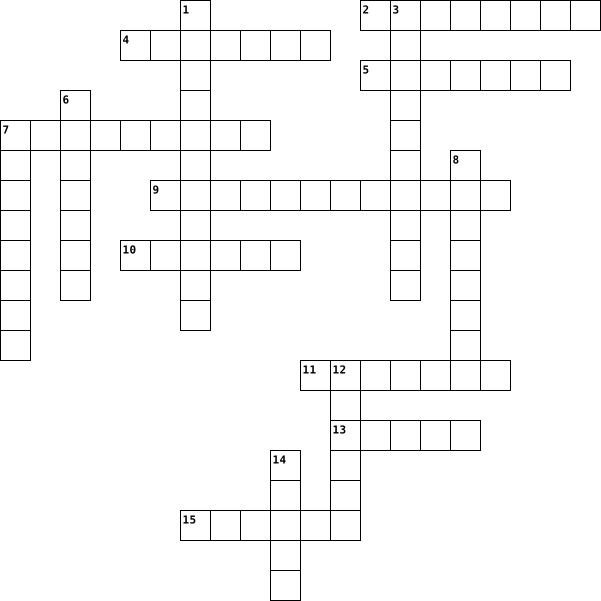
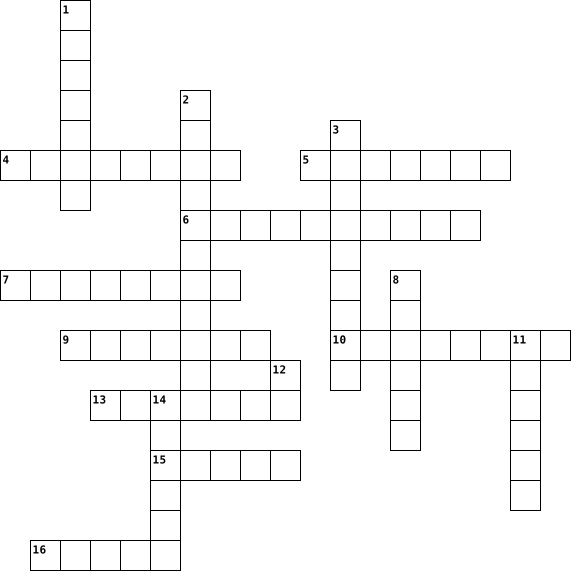
Across
- _________-based glass cleaner - chemical that must NOT be used on LCD screens
- ________Storage - the computer’s working storage space that uses RAM chips.
- A tool used to retrieve parts from tight spaces.
- The set of instructions that guides computer hardware to function.
- Central _______ Unit (CPU)- the “brain” of the computer
- _______ Reader - An input device that reads bar patterns on labels.
- The connector used specifically for Ethernet networking.
- A tool used to strip and cut wires.
- _____Software helps users perform tasks like word processing or graphic editing.
- A tool used to test the integrity of circuits and electrical quality.
- ______ Drive - a storage device that uses lasers to read/write data on discs.
- _____Bus A data pathway between computer hardware components inside or outside the computer.
- Or HDD - the permanent magnetic storage device inside a computer used to store data and the OS.
- A screen-based device that accepts input through touch.
- The essential cable that connects the computer to the main power source.
- Software that removes unwanted spyware programs.
- Disk _________ or Defrag - a Windows tool that optimizes the arrangement of files on a hard drive.
- _______ Checker (SFC) - a command-line tool that replaces corrupted system files.
- Computer Hardware _______The act of supporting and maintaining computer hardware, including diagnosing, repairing and upgrading.
Down
- _______Air - a tool used to blow away dust from computer components without contact.
- An audio input device used for speech recognition or recording.
- People involved in computer operations such as administrators and users
- A universal high-speed port used for modern peripherals such as flash drives and printers.
- _______ Pliers - a tool used to grip and hold small parts.
- ______Unit (PSU)- the device that converts AC to DC power for computer components.
- The main part of the microcomputer that contains the motherboard, CPU, memory, and other components.
- A pointing device that uses a ball or optical sensor to move a cursor.
- _______Wrist Strap – a tool worn to prevent electro-static discharge when repairing computers.
- A process/tool used to prepare a hard drive for storing information.
- The port commonly used for monitors and has 15 pins.
- A device used to bundle cables neatly in and around a computer.
- ________ Reference Tools - online sources such as FAQs and manuals used for troubleshooting.
- The display device of a computer that shows visual output.
- A circuit card that allows the computer to use peripherals it normally cannot.
- A technician’s handwritten or digital log containing troubleshooting steps and outcomes.
- Read ____ Memory - memory that is non-volatile and retains data even without power.
- Random ______Memory - memory that is volatile and loses data when power is turned off.
- The main circuit board of a computer that holds all circuits and components.
- The tool that deletes temporary and unnecessary files to free up disk space.
- The port used for wired network connections using RJ45 connectors.
- Or ScanDisk - A Windows tool used to scan and repair hard drive errors.
- A software that protects a computer from viruses.
- ______Screwdriver - a hand tool used to tighten or loosen slotted screws.
- ________Mat – a mat used as a grounded surface to avoid electrostatic buildup.
- ____Software supports the execution of application programs and manages hardware.
45 Clues: A tool used to strip and cut wires. • A tool used to retrieve parts from tight spaces. • Software that removes unwanted spyware programs. • A software that protects a computer from viruses. • The port commonly used for monitors and has 15 pins. • Central _______ Unit (CPU)- the “brain” of the computer • A screen-based device that accepts input through touch. • ...
TAGG OCTOBER CROSSWORD 2015-09-04
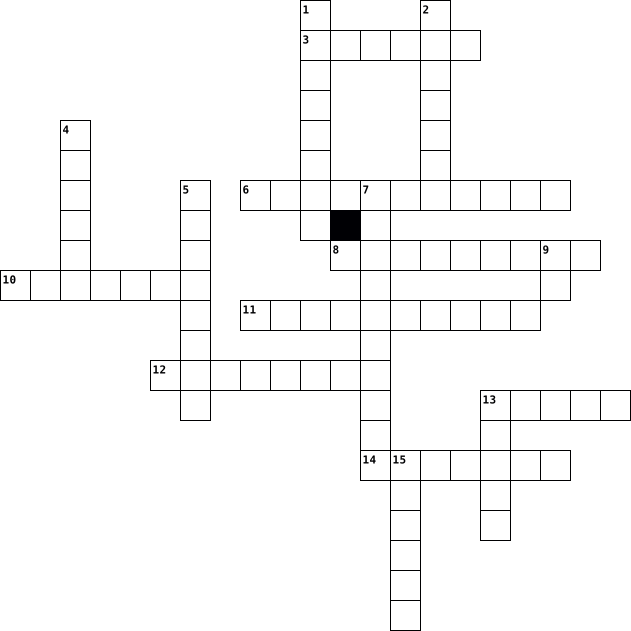
Across
- Capability Brown's real birth name
- What flower family does the Lantana belong to?
- What spice is from the stigmas of a Crocuses?
- TV Presenter Geoff Hamilton's garden?
- Jorge Loring Oyarzabal & Amalia Heredic Livermore created what gardens?
- What are 'Nyon', 'Liguria' & 'Gaeta' types of?
- National flower of Indonesia
- Chervil, Fenugreek and Hissop are all types of?
- What type of disease is Leaf curl?
Down
- Air Layering is a form of what?
- Commonly know as 'Lily of the Nile'
- What city can the Generalife gardens found in?
- Fertiliser
- Garden World presenter
- Blackflies & Whiteflies are types of?
- Spanish word for Figs
16 Clues: Fertiliser • Spanish word for Figs • Garden World presenter • National flower of Indonesia • Air Layering is a form of what? • Capability Brown's real birth name • What type of disease is Leaf curl? • Commonly know as 'Lily of the Nile' • TV Presenter Geoff Hamilton's garden? • Blackflies & Whiteflies are types of? • What spice is from the stigmas of a Crocuses? • ...
Founders of Computing 2024-08-29

Across
- Developed FORTRAN, the first widely used programming language.
- Co-developed a software company with Paul Allen, known as Microsoft.
- Credited for creating the slide rule, the mechanical calculator before the digital calculator.
- Credited for designing and developing the first digital computer that can solve linear equations.
- Invented the first mechanical calculator for his father who was a mathematician.
- Credited with the invention of the first general-purpose electronic computer (ENIAC).
- Developed the magnetic core memory which became standard in early computers.
- Invented a way for instant communication, the telegraph.
- Developed Macintosh 128K, a commercially successful personal computer.
Down
- Credited for the invention of the Analytical Engine.
- Designed the computer that broke the Enigma code during World War II.
- Credited for writing the first computer algorithm, and known as the first programmer.
- Invented the Harvard Mark I computer, one of the first electro-mechanical computers.
- Credited for the term "debugging".
- Invented the punch card system for census data.
- Credited with the prediction that the number of transistors per device will double every two years. This prediction is now named after him.
- Credited for the invention of true or false statements in programming.
- Credited with the invention of the integrated circuit.
- Developed SNDMSG, the first email program.
- Developed the Mathematical Analyzer, Numerical Integrator, and Computer(MANIAC), designed to solve complex math problems.
20 Clues: Credited for the term "debugging". • Developed SNDMSG, the first email program. • Invented the punch card system for census data. • Credited for the invention of the Analytical Engine. • Credited with the invention of the integrated circuit. • Invented a way for instant communication, the telegraph. • Developed FORTRAN, the first widely used programming language. • ...
Valentina 2022-10-18

Across
- is to store the short-term data that a PC requires to operate properly.
- Controls the movement of a cursor, or pointer on a display screen
- These are devices that allow output sound from a computer.
- is where all your permanent computer data is stored
- allows a computer to start up or regenerate each time it is turned on.
- pulls power from your wall outlet and distribute it throughout your PC.
- Are devices connected to computers that can take pictures at defined time intervals
- are a set of files that instructs a piece of hardware how to function by communicating with a computer’s operating system they are to interface and interact with specific devices
- lets you access some information more quickly than if you access it from your computer's main hard drive.
- These are devices that look and work much like photocopiers.
- is any cache memory that is not built into a CPU chip.
- Consists of letters, numbers, special characters, functions, and control keys that enable users to enter data into a computer.
Down
- displays information in pictorial or text form.
- It's the circuit board that connects all of your hardware to your processor
- Can be used to input sound to a computer for voice recordings and for having conversations over the internet.
- They are devices that allow the computer to transmit data by converting digital signals to analog signals etc. They can also be connected internally.
- provides additional features to a computer such as video, sound, advanced graphics, Ethernet, or memory.
- contains chips that add new features to a computer. Ex, a graphics card or sound card gives the computer the ability to input and output video and audio signals.
- provides the instructions and processing power the computer needs to do its work.
- Is a device that prints text and graphics on paper.
20 Clues: displays information in pictorial or text form. • is where all your permanent computer data is stored • Is a device that prints text and graphics on paper. • is any cache memory that is not built into a CPU chip. • These are devices that allow output sound from a computer. • These are devices that look and work much like photocopiers. • ...
Vocab lesson 24 2016-04-19

Across
- A combination of hardware and software that creates a buffer between an internal network and the Internet to prevent unauthorized access
- High end programs designed to provide network control and include special functions for connecting computers and other devices as a single file
- Examines a fingerprint, voice pattern, or the iris or retina of the eye
- Communications hardware device that facilitates the transmission of data
- A series of connected personal computers, workstations and other devices such as printers or scanners, within a confined space, such as an office building
- A computer that handles request for data, email,file transfer, and other network services from other computers
- The world's colection of interconnected commercial and government owned voice oriented systems
- A junction where information arrives from connected computers or peripheral devices and is then forwarded in one or more directions to other computers and devices
- Computer architecture in which all of the computers on a network are equal and there is no computer designated as the server
- A device that uses coaxial cable to send and recieve data
- A type of fiber optic telephone line that can transmit up to 1.544 megabits per second or can be used to transmit 24 digitized voice channels
- Computer network that covers a large geographical area
Down
- An IPS that provides connection speeds more than 30 times faster than dial up connections
- Expert computer user who invades someone else's computer either for personal gain or simply for the satifaction of being able to do it
- A device that directs traffic on a network by dividing data into smaller packets that travel by different routes and then are reassembled at their destination
- A server that acts as an intermediary between a user and the Internet
- A recent wireless technology that can deliver maximum speeds of up to 7 Mbps to your cell phone, home computer,or car
- A network designed for the exclusive use of computer users within an organization that cannot be accesed by users outside the organization
- An Internet connection technology that provides for the transfer of information to a computer at a high speed bandwidth over telephone lines
- Computer configuration in which one or more computers on the network acts as a server
- Link from one computer to another through which data can be transmitted
- A computer that uses the services of another program
- A variation of a LAN that uses no physical wires
- The largest network used as a communication tool
- A device on the network
- A network configuration that allows selected outside organizations to access internal information systems
26 Clues: A device on the network • A variation of a LAN that uses no physical wires • The largest network used as a communication tool • A computer that uses the services of another program • Computer network that covers a large geographical area • A device that uses coaxial cable to send and recieve data • ...
Vocabulary 24 2016-04-18

Across
- A variation of LAN that uses no physical wires
- A type of fiber-optic telephone line that can be transmitted up to 1.544 megabits per second or can be used to transmit 24 digitized voice channels
- Link from one computer to another through which data can be transmitted
- high-end programs designed to provide network control and include special function for connecting computers and other devices into a network
- A combination of hardware and software that creates a buffer between an internal network and the Internet to prevent unauthorized access
- A recent wireless technology that can deliver maximum speeds of up to 7 Mbps to your cell phone, home computer, or car.
- A network designed for the exclusive use of computer users within an organization that cannot be accessed by users outside the organization
- Computer architecture in which all of the computers on a network are equal and there is no computer designated as the server
- The largest network used as a communication tool
- Computer configuration in which one or more computers on the network acts as a server
- A device that directs traffic on a network by dividing data into smaller packets that travel by different routes and then are reassembled at their destination
Down
- A device that uses coaxial cable to send and receive data
- A computer that uses the services of another program
- A device on the network
- A technique or device that examines a fingerprint, voice pattern, or the iris or retina of the eye
- A junction where information arrives from connected computers or peripheral devices and is then forwarded in one or more directions to other computers and devices
- A series of connected personal computers, workstations, and other devices, such as printers or scanners, within a confined space, such as an office building
- A computer that handles requests for data, e-mail, file transfers, and other network services from other computers
- An internet connection technology that provides for the transfer of information to a computer at a high-speed bandwidth over ordinary systems such as Linux use the term directory
- Computer network that covers a large geographic area
- expert computer user who invades someone else’s computer either for personal gain or simply for the satisfaction of being able to do it
- A network configuration that allows selected outside organizations to access internal information systems
- The world’s collection of interconnected commercial and government-owned voice-oriented systems
- An ISP that provides connection speeds more than 30 times faster than dial-up connections-from 384 Kbps to 2.0 Mbps
- Communications hardware device that facilitates the transmission of data
25 Clues: A device on the network • A variation of LAN that uses no physical wires • The largest network used as a communication tool • A computer that uses the services of another program • Computer network that covers a large geographic area • A device that uses coaxial cable to send and receive data • Link from one computer to another through which data can be transmitted • ...
Computers Landon Wood 2020-10-01

Across
- super-fast storage that your computer uses to hold data it needs in the short term
- makes your computer louder
- copys paper
- basic input output system
- the first ever person to code
- founded IBM
- social media
- output device that projects an image on to a large surface
- wireless connection
- cord used to connect a keyboard or mouse
- handheld hardware input device
- mobile computer
- movie app
- non-volatile storage on a computer
- conceived the first automatic digital
- local-area network
- typing into a computer
- programs, procedures, and routines
Down
- physical parts of a computer
- herman hollerith invention
- internet browser
- hardware that streams a video
- communication app
- firewall protection
- smaller tv
- music app
- speaking hardware
- a special surface that tracks user finger also pointer
- computer main circuit board
- condenses sound to two spots
30 Clues: music app • movie app • smaller tv • copys paper • founded IBM • social media • mobile computer • internet browser • communication app • speaking hardware • local-area network • firewall protection • wireless connection • typing into a computer • basic input output system • herman hollerith invention • makes your computer louder • computer main circuit board • physical parts of a computer • ...
Garden Crossword Oct 2015-09-03
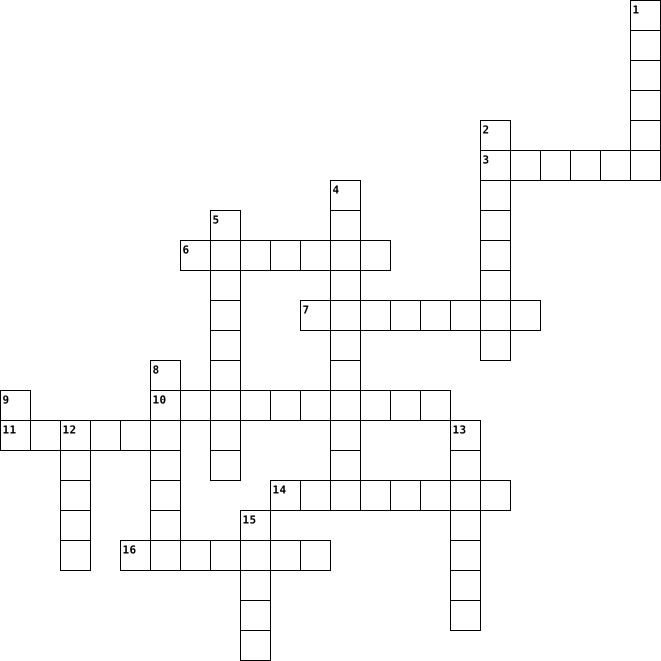
Across
- What are 'Nyon', 'Liguria' & 'Gaeta' types of?
- Air Layering is a form of what?
- TV Presenter Geoff Hamilton's garden7
- National flower of Indonesia
- t city can the Generalife gardens found in?
- Capability Brown's real birth name
- Spanish word for Figs
- what spice is from the sigmas of a Crocuses
Down
- Garden World presenter
- What flower family does the Lantana belong to?
- What type of disease is Leaf curl?
- Type of fertiliser
- Commonly know as 'Lily of the Nile'
- Conception Jorge Loring Oyarzabal & Amalia Heredic Livermore created what gardens?
- Chervil, Fenugreek and Hissop are all types
- Blackflies & Whiteflies are types of?
16 Clues: Type of fertiliser • Spanish word for Figs • Garden World presenter • National flower of Indonesia • Air Layering is a form of what? • What type of disease is Leaf curl? • Capability Brown's real birth name • Commonly know as 'Lily of the Nile' • TV Presenter Geoff Hamilton's garden7 • Blackflies & Whiteflies are types of? • t city can the Generalife gardens found in? • ...
October 2015-09-04
Across
- What are 'Nyon', 'Liguria' & 'Gaeta' types of?
- What spice is from the stigmas of a Crocuses
- Capability Brown's real birth name
- Commonly know as 'Lily of the Nile'
- Blackflies & Whiteflies are types of?
- Type of fertiliser
- What flower family does the Lantana belong to?
Down
- What type of disease is Leaf curl?
- Garden World presenter
- Air Layering is a form of what?
- TV Presenter Geoff Hamilton's garden7
- National flower of Indonesia
- Conception Jorge Loring Oyarzabal & Amalia Heredic Livermore created what gardens?
- Spanish word for Figs
- What city can the Generalife gardens found in?
- Chervil, Fenugreek and Hissop are all types
16 Clues: Type of fertiliser • Spanish word for Figs • Garden World presenter • National flower of Indonesia • Air Layering is a form of what? • What type of disease is Leaf curl? • Capability Brown's real birth name • Commonly know as 'Lily of the Nile' • TV Presenter Geoff Hamilton's garden7 • Blackflies & Whiteflies are types of? • Chervil, Fenugreek and Hissop are all types • ...
Lesson 24 Vocab 2016-04-19

Across
- Link from one computer to another through which data can be transmitted
- A network configuration that allows selected outside organization to access internal information systems
- A junction where information arrives from connected computers or peripheral devices and is then forwarded in one or more directions to other computers and devices
- A recent wireless technology that can deliver maximum speeds of up to 7 Mbps to your cell phone, home computer, or car. Stands for Worldwide Interoperability for Microwave Access
- A devices on the network
- network Computer configuration in which one or more computers on the network acts as a server
- An ISP that provides connection speeds more than 30 times faster than dial up connections – from 384 Kbps to 2.0 Mbps
- Computer architecture in which all of the computers on a network are equal and there is no computer designated as the server
- Biometrics refers to metrics related to human characteristics. Biometrics authentication (or realistic authentication) is used in computer science as a form of identification and access control.
- Expert computer user who invades someone else’s computer either for personal gain or simply for the satisfaction of being able to do it
- network that covers a large geographical area. Most WANs are made up of several connected LANS
- A computer that uses the services of another program
- A computer that handles requests for data, email, file transfers, and other network services from other computers
- Communications hardware device that facilitates the transmission of data
- A type of fiber optic telephone line that can transmit up to 1.544 megabits per second or can be used to transmit 24 digitized voice channels
Down
- A series of connected personal computers, workstations, and other devices, such as printers or scanners, within a confined space, such as an office building
- The largest network used as a communication tool
- An internet connection technology that provides for the transfer of information to a computer at a high-speed bandwidth over ordinary copper telephone lines
- The worlds collection of interconnected commercial and government owned voice oriented systems
- Something that uses radio or infrared frequencies to connect to connect to a computer rather than a cable
- A server that acts as an intermediary between a user and the internet
- A device that uses coaxial cable to send and receive data
- High end programs designed to provide network control and include special functions for connecting computers and other devices into a network
- A combination of hardware and software that creates a buffer between an internal network and the internet to prevent unauthorized access
- A network designed for the exclusive use of computer users within an organization that cannot be accessed by users outside the organization
- A device that directs traffic on a network by dividing data into smaller packets that travel by different routes and then are reassembled at their destination
26 Clues: A devices on the network • The largest network used as a communication tool • A computer that uses the services of another program • A device that uses coaxial cable to send and receive data • A server that acts as an intermediary between a user and the internet • Link from one computer to another through which data can be transmitted • ...
Bailey D. period 6 2024-02-06

Across
- Place to display and organize icons on a computer screen.
- Instructions programs or data can tell from a specific task to preform.
- Transfer, move, or copy data from a different website to a computer or other device.
- Is another word for internet.
- All devices use a wireless networking technology to connect to the internet.
- A collection where software developed by Microsoft.
- A area on a Web page.
- Transfer, move, or copy data from a different website to a remote device or internet.
- Wireless inter connection from your phone and computer.
- The @ in your email address.
- Send data to a file.
Down
- Software programs that run on the computer but not accessible from a web browser or internet.
- Is a network that connects to a lot of computers world wide.
- Cloud storage which allows you to store files.
- Online cloud storage service from Microsoft.
- A physical element on the computer.
- Web page of an address.
- A pice of comuter device that can be display with images, text, video on a computer.
- To connect your computers to your phone.
- For people to organize on line so it can be accessable anytime.
- Application for accessing an website.
- Bring data into a file.
- computer file format for the compression and storage.
- Files with small pieces of data.
- Computer file format for image files for 2 kinds of images.
- Is a type of image that is commonly used on the internet.
- Text and graphics that looks like a printed document.
27 Clues: Send data to a file. • A area on a Web page. • Web page of an address. • Bring data into a file. • The @ in your email address. • Is another word for internet. • Files with small pieces of data. • A physical element on the computer. • Application for accessing an website. • To connect your computers to your phone. • Online cloud storage service from Microsoft. • ...
computers and technology in health care 2025-02-18

Across
- Computer in Healthcare – A powerful computer used by hospitals and healthcare institutions to store and process large amounts of patient data.
- Learning in Medicine – Online educational platforms used for medical training, continuing education, and simulations.
- – The use of digital communication technologies (such as video calls) to provide medical consultations and care remotely.
- Portals – Secure online platforms that allow patients to access their medical records, schedule appointments, and communicate with healthcare providers.
- in Healthcare IT – A digital document that contains patient data, test results, or other medical records.
- in Healthcare – A global network that enables medical research, online consultations, and digital record management.
- Stress Test – A heart test that uses a small amount of radioactive material to show blood flow to the heart during rest and exercise.
- in Healthcare – Organized collections of digital health records, including patient histories, laboratory results, and prescriptions.
- & Computer-Related Terms
- Instruction (CAI) in Medicine – The use of digital programs and simulations for training healthcare professionals.
- Mail (Email) in Healthcare – A digital communication method used for exchanging information between healthcare providers and patients securely.
- Resonance Imaging (MRI) – A non-invasive imaging technique that uses strong magnetic fields and radio waves to create detailed images of internal organs and tissues.
- Surgery – A minimally invasive surgical technique that uses robotic systems controlled by a surgeon for greater precision.
- in Medical Databases – Specific sections in a digital database that store different types of medical information, such as patient names and test results.
- in Healthcare – Digital systems that connect hospitals, clinics, and medical databases to share information securely.
- in Healthcare IT – Security systems that protect medical data from cyber threats and unauthorized access.
- Computer (PC) in Healthcare – A computer used by healthcare professionals for accessing medical records, research, and patient management.
- Health Record (EHR) – A digital version of a patient’s medical history, including diagnoses, medications, and treatment plans, used by healthcare providers.
- Tomography (CT Scan) – A diagnostic imaging test that uses X-rays and computer processing to create cross-sectional images of the body.
- – A test that uses ultrasound waves to create images of the heart, assessing its structure and function.
- in Healthcare – A digital tool used for organizing and analyzing medical data, such as patient statistics and financial records.
Down
- Power Supply (UPS) in Healthcare – A backup power system that ensures critical medical equipment remains operational during power outages.
- Information Exchange (HIE) – A system that allows healthcare providers to share and access patient health data electronically.
- Design (CAD) in Healthcare – Software used to design medical devices, prosthetics, and anatomical models.
- (Ultrasound) – A diagnostic imaging method that uses high-frequency sound waves to create images of internal organs and structures.
- – A system where pharmacists provide medication counseling and prescription verification remotely using telecommunications technology.
- Therapy – A cancer treatment that uses high-energy radiation to shrink tumors and kill cancer cells.
- Stress Test – A diagnostic test that uses the drug adenosine to dilate blood vessels and assess blood flow to the heart, often used when a patient cannot exercise.
- in Healthcare – A small computer used in medical settings for tasks like monitoring vital signs and managing patient records.
- in Healthcare – The study of designing medical workplaces and equipment to improve efficiency, comfort, and safety.
- in Healthcare – A collection of a patient’s medical history, test results, and treatment information, stored electronically or on paper.
- Emission Tomography (PET Scan) – An imaging test that uses radioactive tracers to visualize metabolic activity in the body, often used in cancer detection.
- (ECG or EKG) – A test that records the electrical activity of the heart to detect arrhythmias, heart disease, or other conditions.
- in Medicine – High-intensity beams of light used in medical procedures, such as surgery, eye treatments, and skin therapies.
- in Healthcare IT – Malicious software that can infect medical systems, compromising patient data and hospital operations.
- Stress Test – A test in which a patient exercises (usually on a treadmill or stationary bike) while heart activity is monitored to assess cardiovascular health.
- Stress Test – A heart test that uses the drug dobutamine to stimulate the heart, mimicking exercise, to evaluate heart function.
- Literacy – The ability to use computers and digital technology effectively, essential for healthcare professionals in managing patient data.
- Surgery – A surgical technique that uses real-time imaging, such as CT or MRI, to guide the procedure with precision.
39 Clues: & Computer-Related Terms • Therapy – A cancer treatment that uses high-energy radiation to shrink tumors and kill cancer cells. • – A test that uses ultrasound waves to create images of the heart, assessing its structure and function. • Design (CAD) in Healthcare – Software used to design medical devices, prosthetics, and anatomical models. • ...
science and tecnology 2013-06-13

Across
- the machinery and electronic parts of a computer system
- a piece of equipment worn over or in the ears that makes it possible to listen to music, the radio, etc. without other people hearing it
- able to be added to a computer system so that it can do more t
- an object or a piece of equipment that has been designed to do a particular job
- a machine that you connect to your telephone to answer your calls and record any message left by the person calling
- any of the tubes that carry blood from all parts of the body towards the heart
- a small round piece of thin plastic that you put on your eye to help you see better
- a piece of equipment for loading a battery with electricity
- the use of living cells and bacteria in industrial and scientific processes
- a sudden failure of a machine or system, especially of a computer or computer system
Down
- a machine that makes copies of documents, etc. by photographing them
- a computer program that searches the Internet for information, especially by looking for documents containing a particular word or group of words
- a collection of cells that form the different parts of humans, animals and plants
- the flat surface at the front of a television, computer, or other electronic device, on which you see pictures or information
- a system that cools and dries the air in a building or car
- a device in a wall that you put a plug into in order to connect electrical equipment to the power supply of a building
- a video camera that records pictures and sound and that can be carried around
- moving stairs that carry people between different floors of a large building
- the part of a computer where information is stored; the amount of space in a computer for storing information
- the branch of science and technology that studies electric currents in electronic equipment
20 Clues: the machinery and electronic parts of a computer system • a system that cools and dries the air in a building or car • a piece of equipment for loading a battery with electricity • able to be added to a computer system so that it can do more t • a machine that makes copies of documents, etc. by photographing them • ...
Valentina 2022-10-18

Across
- is to store the short-term data that a PC requires to operate properly.
- Controls the movement of a cursor, or pointer on a display screen
- These are devices that allow output sound from a computer.
- is where all your permanent computer data is stored
- allows a computer to start up or regenerate each time it is turned on.
- pulls power from your wall outlet and distribute it throughout your PC.
- Are devices connected to computers that can take pictures at defined time intervals
- are a set of files that instructs a piece of hardware how to function by communicating with a computer’s operating system they are to interface and interact with specific devices
- lets you access some information more quickly than if you access it from your computer's main hard drive.
- These are devices that look and work much like photocopiers.
- is any cache memory that is not built into a CPU chip.
- Consists of letters, numbers, special characters, functions, and control keys that enable users to enter data into a computer.
Down
- displays information in pictorial or text form.
- It's the circuit board that connects all of your hardware to your processor
- Can be used to input sound to a computer for voice recordings and for having conversations over the internet.
- They are devices that allow the computer to transmit data by converting digital signals to analog signals etc. They can also be connected internally.
- provides additional features to a computer such as video, sound, advanced graphics, Ethernet, or memory.
- contains chips that add new features to a computer. Ex, a graphics card or sound card gives the computer the ability to input and output video and audio signals.
- provides the instructions and processing power the computer needs to do its work.
- Is a device that prints text and graphics on paper.
20 Clues: displays information in pictorial or text form. • is where all your permanent computer data is stored • Is a device that prints text and graphics on paper. • is any cache memory that is not built into a CPU chip. • These are devices that allow output sound from a computer. • These are devices that look and work much like photocopiers. • ...
Crossword Puzzle 2022-03-22
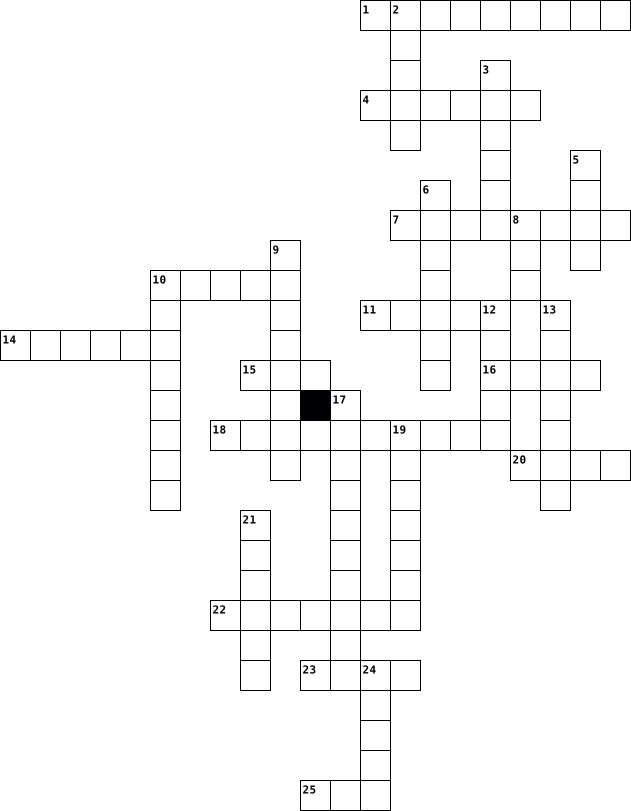
Across
- Is a line of desktop and laptop computers developed by Apple
- A process that copies all your files, data and information to effectively create two versions.
- Comprises the entire set of programs, procedures, and routines associated with the operation of a computer system.
- Is hardware or software that is used to store something, usually data, temporarily in a computing environment.
- A malicious piece of computer code designed to spread from device to device.
- Is described by its boundaries, structure and purpose and expressed in its functioning.
- Is a non-volatile memory type.
- A small graphical representation of a program or file.
- Sometimes referred to as a screencap or screengrab, is an image that shows the contents of a computer display.
- An object-oriented programming language that produces software for multiple platforms.
- A collection of linked web pages that share a unique domain name
- Is a function performed to reverse the action of an earlier action.
- Is an unexpected problem with software or hardware.
Down
- A data structure consisting of a collection of elements values or variables.
- Data that a computer sends
- A cross-platform open-source computer programming language used widely in the commercial and private computing sectors.
- A general-purpose, compiled imperative programming language that is especially suited to numeric computation and scientific computing.
- Is an English word that means “ network ,” “cobweb,” or “mesh.”
- A panel of keys that operate a computer or typewriter.
- An electronic device for storing and processing data, typically in binary form.
- Is a modifier key on a keyboard, used to type capital letters and other alternate "upper" characters.
- Detailed plan or procedure for solving a problem with a computer.
- The clarity of the text and images displayed on your screen.
- The component of your computer that allows you to store and access data on a long-term basis.
- Are the virtual components or codes, which divides the physical core of a CPU into virtual multiple cores.
- Process of detecting and removing of existing and potential errors in a software code that can cause it to behave unexpectedly or crash.
26 Clues: Data that a computer sends • Is a non-volatile memory type. • Is an unexpected problem with software or hardware. • A panel of keys that operate a computer or typewriter. • A small graphical representation of a program or file. • Is a line of desktop and laptop computers developed by Apple • The clarity of the text and images displayed on your screen. • ...
Bri's ICT Crossword 2020-12-17

Across
- / a large network of information that is not tied to a single location
- / a collection of devices connected together in one physical location, such as a building, office, or home
- / a range of frequencies within a given band, in particular that used for transmitting a signal
- / a panel of keys that operate a computer or typewriter
- (a network or system) from unauthorized access with a firewall
- / a power tool with a shaped cutter, used in carpentry for making grooves for joints, decorative mouldings, etc
- / a system of words, letters, figures, or symbols used to represent others, especially for the purposes of secrecy
- / a set of related web pages located under a single domain name, typically produced by a single person or organization
- / the programs and other operating information used by a computer
- / a computer's short-term memory. None of your programs, files, or Netflix streams would work without it
- / the global system of interconnected computer networks
Down
- / the process of converting information or data into a code, especially to prevent unauthorized access
- / software that is specifically designed to disrupt, damage, or gain unauthorized access to a computer system
- / the delay before a transfer of data begins following an instruction for its transfer
- / characteristics or information, usually numerical, that are collected through observation
- / a printed circuit board containing the principal components of a computer or other device, with connectors for other circuit boards to be slotted into
- / the electronic circuitry within a computer that executes instructions that make up a computer program
- / memory read at high speed but not capable of being changed by program instructions
- / a system for connecting a number of computer systems to form a local area network, with protocols to control the passing of information and to avoid simultaneous transmission by two or more systems
- / a wireless networking technology that allows devices such as computers (laptops and desktops), mobile devices (smart phones and wearables), and other equipment (printers and video cameras) to interface with the Internet
- / the retention of retrievable data on a computer or other electronic system
21 Clues: / a panel of keys that operate a computer or typewriter • / the global system of interconnected computer networks • (a network or system) from unauthorized access with a firewall • / the programs and other operating information used by a computer • / a large network of information that is not tied to a single location • ...
SEMESTER TEST REVIEW!!!!!!!!!! 2018-01-05

Across
- a way to get photos to go around text on a doc.
- online program to make a slide show
- finding spelling word
- Bullying someone online
- equipment to store and transfer info for computer using a USB
- the display
- cools down your computer
- buying things online and at a store
- a command to make words bold
- a command to select everything
Down
- making list with dots
- circuit board of the computer
- card computer hardware that bring the images you see on the monitor
- way to type a proper email to someone like a boss or teacher
- memory that can be accessed randomly
- Buying thing from a store only
- Making a list with numbers
- in charge of bringing power to the computer
- old way to transfer data that holds little storage(pre version of the CD
- buying online
- a fun way to make fun designs with words on google docs.
- a command to paste text that you copied
- where all the keys are to type
- a command to copy text
- processor of the computer
25 Clues: the display • buying online • making list with dots • finding spelling word • a command to copy text • Bullying someone online • cools down your computer • processor of the computer • Making a list with numbers • a command to make words bold • circuit board of the computer • Buying thing from a store only • where all the keys are to type • a command to select everything • ...
Unit 2 and 3 Vocabulary 2025-11-05

Across
- This contains the main components of a computer
- The action of fastening or securing something with a screw
- Removes the character or item
- Used to type uppercase letters or special symbols
- Device or button to turn power or signals on/off.
- This reads and writes disks
- Component that provides electrical power to the computer.
- Front part of the case with buttons and ports.
- Removable cover on the side of the computer case.
Down
- This allows the computer to have audio
- This is called a memory module
- Move the cursor up, down, left, or right
- Allows to type all uppercase letters
- Structure that houses the main computer components.
- This stops the processor from getting too hot
- Confirms commands or starts a new line
- Moves the cursor to the next tab stop or field
- This is the computer's brain
- Small fastener that holds parts or cables in place
- A connection on a computer for data transfer and power to external devices.
- This is the main storage space for data
21 Clues: This reads and writes disks • This is the computer's brain • Removes the character or item • This is called a memory module • Allows to type all uppercase letters • This allows the computer to have audio • Confirms commands or starts a new line • This is the main storage space for data • Move the cursor up, down, left, or right • This stops the processor from getting too hot • ...
Algorithms and Coding (1) 2024-10-27

Across
- The graphical representation of an algorithm.
- The process of fixing bugs.
- A device used display information on a large screen.
- A tool used to check and identify errors in a program.
- The circuit board where all the hardware components are connected.
- A way to write an algorithm by using a mix of natural and programming languages.
- The symbol used for input/output in a flowchart.
- A device used to convert information from computer in form of paper.
- A programming tool used to translate the entire code before its execution.
- Input device used to enter letters, numbers and symbols into computer.
- Dry ... is testing a program by manually executing it step-by-step, while tracing its execution.
Down
- A set of step-by-step finite instructions designed to solve a particular problem.
- An electronic machine used to process data.
- The process of checking if a program works as expected.
- Also called a loop, it's the process of repeating steps.
- Also known as "The brain of computer".
- Data that has neen processed and organized.
- Small device used to control computer using movements.
- The process of creating a set of instructions that a computer can understand and execute.
- The word used in the first step when writing a pseudocode.
20 Clues: The process of fixing bugs. • Also known as "The brain of computer". • An electronic machine used to process data. • Data that has neen processed and organized. • The graphical representation of an algorithm. • The symbol used for input/output in a flowchart. • A device used display information on a large screen. • A tool used to check and identify errors in a program. • ...
Internet Security 2013-10-03

Across
- Software that sends information from your computer to a third party without your consent
- Programs that are designed to harm your computer
- A group of computers within a small area, such as a house, office or school, that are connected to each other
- Stealing information from mobile devices using a wireless connection Cookie – Information, usually in a file, about someone’s Internet activities, such as the date of the last visit to a Web site, preferences, etc.
- Driving around with a computer to find and access wireless networks
- A number used to identify a computer or other device on the Internet
- Trying to get into computer systems in order to steal, corrupt, or illegitimately view data
- Buying items online and conducting business over the Internet
- Phony email warning about a computer virus or other threat
- A device that monitors and controls the traffic coming into and out of your computer
- A self-replicating, self-spreading malicious program
Down
- Software that displays advertising banners or pop-up windows Bandwidth – How fast information can be moved from one computer to another
- Redirecting users from legitimate Web sites they are trying to visit to fraudulent Web sites
- A computer language that is used for creating World Wide Web pages
- A code of conduct followed on the Internet in order to be respectful and clearly understood (Internet + etiquette)
- A malicious program disguised as legitimate software
- A way of communicating online in code by changing the spellings of words
- Unwanted email used mainly for advertising
- When someone uses your personal information to commit fraud and the nation’s first research and education center devoted to information networking
- Using fake Web sites to trick you into giving away personal information
- Hanging out on Internet bulletin boards or chat rooms without posting
- Computer system that provides shared resources over a network
- In gaming, targeting players below your skill level; Also, a type of Denial of Service attack
- Posting messages that are deliberately hostile and insulting
24 Clues: Unwanted email used mainly for advertising • Programs that are designed to harm your computer • A malicious program disguised as legitimate software • A self-replicating, self-spreading malicious program • Phony email warning about a computer virus or other threat • Posting messages that are deliberately hostile and insulting • ...
COMPUTER TERMINOLOGY 2024-04-04

Across
- The speed at which a modem transfers data.
- computer systems and algorithms that perform tasks, process data, and create content that would normally require human intelligence.
- A data path that transfers information within a computer or between computers.
- A domain is the location of a given website.
- The practice of protecting computer and network systems, data, and other digital assets from misuse, damage, disruption, and unauthorized access.
- The standard practices used to upload, download, and manage files between computer networks.
- Equals a billion bytes
Down
- A method of storing data across remote servers instead of on a local computer.
- A program that allows you to look at web sites.
- A location in cyberspace
- An organized collection of structured information, or data, typically stored electronically in a computer system
- A deliberate attempt to compromise data and resources or disrupt systems, networks, and devices, usually for personal or financial gain.
- A special place for chatting about a certain subject.
- Information that has been formatted so that it can be understood by computer.
- A firewall is a security device that monitors network traffic and prevents unauthorized access.
- Unreasonably criticizing someone in cyberspace
- A storage location that gathers temporary data to help websites load faster.
- The smallest unit of information that can be sent among computers. A 0 or a 1.
- This is an acronym for graphics interchange format, which is an animated image file.
- Getting information from the Internet to your computer. It will be stored on your computer for retrieval whenever you want.
- When your email cannot get to where you tried to send it, it bounces back to your computer.
- The process of converting data into a coded or unreadable form to protect it from unauthorized access or interception.
- A number system that uses ones and zeros to create a language that helps computers execute commands.
- A unit of information – (equal to eight bits) represents a letter or a number.
24 Clues: Equals a billion bytes • A location in cyberspace • The speed at which a modem transfers data. • A domain is the location of a given website. • Unreasonably criticizing someone in cyberspace • A program that allows you to look at web sites. • A special place for chatting about a certain subject. • ...
Unit 1: Technology and media 2025-09-11

Across
- A set of pages of information on the internet, for example, Google or YouTube.
- An electronic machine that you use for browsing the internet, storing information and playing games.
- The large system of connected computers around the world that allows people to share information and communicate with each other.
- Websites and computer programs that allow people to communicate and share information, opinions, pictures, etc. on the internet.
- An electronic letter.
- A type of thin book with large pages and a paper cover that contains articles and photographs.
- A mobile phone that can be used as a small computer and that connects to the internet.
- A design or symbol used by a company to advertise its products.
- A computer program designed for a particular purpose that you can download onto a mobile phone, for example Spotify.
- To copy or move programs or information into a computer's memory, especially from the internet.
- A device with a part to cover each ear through which you can listen to music.
Down
- A flat, portable computer that's touchscreen operated.
- You use this to move and click on a computer.
- The part of your computer where you see the pictures or words.
- Internet connection without wires or cables.
- A very large board on which advertisements are shown, especially at the side of a road.
- An electronic system with a screen that shows images and sound over a distance.
- A type of malicious program that spreads between computers and causes damage to data and software.
- A piece of electronic equipment used for listening to radio broadcasts.
- A publication with folded paper sheets that is printed and distributed regularly to provide news, opinions or articles.
- A computer that you can travel with.
- A person with a strong online following who can affect other people's opinions about specific topics.
- You use this to write on a computer. It has letters or characters on.
- You can play this on the computer for fun.
- To take part in a discussion that involves sending messages over the internet.
25 Clues: An electronic letter. • A computer that you can travel with. • You can play this on the computer for fun. • Internet connection without wires or cables. • You use this to move and click on a computer. • A flat, portable computer that's touchscreen operated. • The part of your computer where you see the pictures or words. • ...
Coach Hansen Crossword 1 2025-12-18

Across
- – The process of writing instructions for a computer.
- – A harmful program designed to damage or steal data.
- – A secret code used to keep your accounts safe.
- – The physical parts of a computer system.
- – The number system (0s and 1s) that computers use.
- – The smallest unit of computer data (a single 0 or 1).
- – The branch of technology that deals with building robots.
- – The device that sends Wi-Fi signals around your house.
- – Programs and instructions that tell a computer what to do.
- – To send data from your computer to the internet.
- – Wireless networking technology for internet access.
- – A popular laptop used in schools that runs on Google’s OS.
- – A tool like Google used to find info online.
- – The tiny dots that make up an image on a screen.
- – The set of keys used to input text.
- – Short for "application," a program on a phone or tablet.
- – A handheld pointing device used to click on things.
- – The web address you type into a browser.
- – Technology that uses discrete values, usually 0 and 1.
- – A step-by-step set of rules to solve a problem.
Down
- – The "brain" of the computer (Central Processing Unit).
- – A powerful computer that "serves" data to other computers.
- – Information processed or stored by a computer.
- – A digital icon or figure representing a person online.
- – To take a file from the internet and put it on your device.
- – A program used to view websites (e.g., Chrome, Safari).
- – Someone who uses the internet to be mean to others.
- – Two or more computers connected together.
- – The screen that shows you what the computer is doing.
- – A portable computer with a touchscreen (e.g., iPad).
- – The blinking line or arrow that shows where you are typing.
- – Scrambling data so only authorized people can read it.
- – A security system that blocks unauthorized access.
- – Storing data on the internet instead of your local drive.
- – Unwanted or "junk" email sent to many people.
35 Clues: – The set of keys used to input text. • – The physical parts of a computer system. • – The web address you type into a browser. • – Two or more computers connected together. • – A tool like Google used to find info online. • – Unwanted or "junk" email sent to many people. • – Information processed or stored by a computer. • ...
Brett Johnson, period 2 2024-02-07

Across
- An output device that displays pictures
- A dedicated software program
- a cloud-based storage service
- A Global computer network
- A global network of servers
- Internal or external components
- Joint Photographic Experts Group
- Portable Network Graphic
- most widely used computer software packages.
- Uniform Resource Locator
- Digital data stored in servers at off-site locations
- A piece of website data stored in your web browser
Down
- A desktop computer display
- Allow USB devices to be connected to each other
- portable document format
- Graphics Interchange Format
- extracting data
- A digital reference to data
- A wireless networking technology
- A set of computer instruction programs
- Transmitting data
- Allows devices to communicate with each other
- Data installed on your computer
- An Ip address
- the Microsoft cloud service
25 Clues: An Ip address • extracting data • Transmitting data • portable document format • Portable Network Graphic • Uniform Resource Locator • A Global computer network • A desktop computer display • Graphics Interchange Format • A global network of servers • A digital reference to data • the Microsoft cloud service • A dedicated software program • a cloud-based storage service • ...
Introduction to ICT 2023 2023-06-30

Across
- Human ware simply means
- This is processed data
- Changing data into information
- Information Communications Technology
- A document file on a computer
- The information viewed on a computer screen
- A place where learners go for computer practical
- One of the social media platforms
- Supermarkets use this device to bill their customers
Down
- Physical part of a computer
- A major input device
- Science of designing tools while considering user capabilities
- Data entered into a computer
- Data entered into computer
- A printed document on paper
15 Clues: A major input device • This is processed data • Human ware simply means • Data entered into computer • Physical part of a computer • A printed document on paper • Data entered into a computer • A document file on a computer • Changing data into information • One of the social media platforms • Information Communications Technology • The information viewed on a computer screen • ...
Computer Parts & Accessories 2023-08-12

Across
- Temporary memory for running programs.
- Input device with keys for typing.
- Main circuit board containing essential components.
- Security system that controls network traffic.
- Software that manages computer hardware and software resources.
- Software used to access the internet and view web pages.
- Camera used for video conferencing and streaming.
- Wireless technology for connecting devices.
- The "brain" of the computer.
- Programs and applications that run on a computer.
- Software for accessing and navigating the internet.
Down
- Storage device for long-term data storage.
- Universal Serial Bus for connecting peripherals.
- Display device used to view computer output.
- Hardware that renders images on a computer screen.
- Fast and durable storage technology.
- Output device that produces physical copies of documents.
- Network technology for wired connections.
- Pointing device for interacting with a computer interface.
- Wireless local network connection.
20 Clues: The "brain" of the computer. • Input device with keys for typing. • Wireless local network connection. • Fast and durable storage technology. • Temporary memory for running programs. • Network technology for wired connections. • Storage device for long-term data storage. • Wireless technology for connecting devices. • Display device used to view computer output. • ...
Technology Words 2024-10-09

Across
- Computer Camera
- Used to type
- You call people on it
- Set of rules to be followed in calculations or other problem-solving operations, especially by a computer.
- Communicate with others vocally
- Coded software
- Analyze and solve problems
- Prevents viruses
- Provides entertainment
- Something that you can transfer digital info to
- Stores information
- Another word for apps
Down
- Gain unauthorized access
- Random Access Memory
- Decode a code
- Also an animal
- Requires a router
- Protects from cyber attacks
- The use of computer technology
- Remote connection
- Communication technology tool
- Central Processing Unit
- Look through the web
- Creates apps/websites
- Find locations
- Amount of data your internet connection can handle
- Accessed from a browser
- Protects your computer from virus
- Convert data into a code
- Social feed
30 Clues: Social feed • Used to type • Decode a code • Also an animal • Coded software • Find locations • Computer Camera • Prevents viruses • Requires a router • Remote connection • Stores information • Random Access Memory • Look through the web • You call people on it • Creates apps/websites • Another word for apps • Provides entertainment • Central Processing Unit • Accessed from a browser • ...
CYBER FEST CROSSWORD 2025-01-23

Across
- Cybercrime that uses fake emails to trick people into people sharing personal information
- Digital currency
- Any type of harmful software designed to damage or disrupt a computer system
- a machine programmed by a computer capable of carrying out actions automatically
- a collection of instructions, data, or computer programs that enable a computer to perform specific tasks
- AI
- Common Gateway Interface
- an intentional act of compromising computer systems
Down
- VR
- Virtual computer world
- Characters used to verify identity
- Act of gaining access to a computer, database or system
- A global computer network
13 Clues: VR • AI • Digital currency • Virtual computer world • Common Gateway Interface • A global computer network • Characters used to verify identity • an intentional act of compromising computer systems • Act of gaining access to a computer, database or system • Any type of harmful software designed to damage or disrupt a computer system • ...
Viruses- Aili Bussolari 2018-11-16

Across
- when an attacker uses fraud to get people to give them info
- large, frequently run program the virus is attached to
- A computer program or part of a program that lies dormant until it is triggered by a specific logical event
- a program that finds and removes viruses from a computer
- A software program designed to infiltrate or damage a computer system without the user's informed consent
- malware disguised as real software
- security system consisting of a combination of hardware and software that limits the exposure of a computer or computer network to attack
Down
- Distributed denial of service attack
- software that copies itself and spreads to uninfected computers
- act of a computer virus attaching itself to another computer program
- code capable of destroying or corrupting data or a system
- A type of Malware that locates and saves data from users without them knowing about it
- operating programs used by a computer
- A software program that delivers advertising content that is unwanted by the user
- electronic messages transferred from one computer to another
15 Clues: malware disguised as real software • Distributed denial of service attack • operating programs used by a computer • large, frequently run program the virus is attached to • a program that finds and removes viruses from a computer • code capable of destroying or corrupting data or a system • when an attacker uses fraud to get people to give them info • ...
October 2015-09-04
Across
- Garden World presenter
- what spice is from the stigmas of a Crocuses
- Commonly know as 'Lily of the Nile'
- Type of fertiliser
- National flower of Indonesia
- Capability Brown's real birth name
- What city can the Generalife gardens found in?
- Chervil, Fenugreek and Hissop are all types
- Spanish word for Figs
Down
- What flower family does the Lantana belong to?
- Air Layering is a form of what?
- TV Presenter Geoff Hamilton's garden7
- What type of disease is Leaf curl?
- What are 'Nyon', 'Liguria' & 'Gaeta' types of?
- Conception Jorge Loring Oyarzabal & Amalia Heredic Livermore created what gardens?
- Blackflies & Whiteflies are types of?
16 Clues: Type of fertiliser • Spanish word for Figs • Garden World presenter • National flower of Indonesia • Air Layering is a form of what? • What type of disease is Leaf curl? • Capability Brown's real birth name • Commonly know as 'Lily of the Nile' • TV Presenter Geoff Hamilton's garden7 • Blackflies & Whiteflies are types of? • Chervil, Fenugreek and Hissop are all types • ...
Computer Hardware and System Startup 2025-07-30

Across
- A personal computer (7)
- ICT tools attached to a computer (10)
- Main Output device
- Uninterrupted power supply (3)
- ICT tool used when presenting to a large audience(9)
- To highlight text (6)
- A portable storage device (5)
- Hardware includes input, output and processing ...(7)
- Connectors in ICT can be ...(8)
- Making a similar or identical version of a text or image(7)
- Main processing device of a computer (3)
Down
- Processor speed is measured in ...(5)
- A hard disk is an example of a ... device (7)
- A device that turns a soft copy into a hard copy (7)
- A portable computer
- A pointing device (5)
- The longest key on a keyboard (8)
- Audio output devices (8)
- Starting a computer (7)
- To press a mouse(5)
20 Clues: Main Output device • A portable computer • To press a mouse(5) • A pointing device (5) • To highlight text (6) • A personal computer (7) • Starting a computer (7) • Audio output devices (8) • A portable storage device (5) • Uninterrupted power supply (3) • Connectors in ICT can be ...(8) • The longest key on a keyboard (8) • Processor speed is measured in ...(5) • ...
Cybersecurity 2023-06-04

Across
- process of maintaining data confidentiality by converting plain data into secret code with the help of an algorithm
- when a programmer gains access to a computer or network by bypassing security steps through a trapdoor programs
- a malicious computer program that is often sent as an email attachment or a download with the intent of infecting that device
- provides additional- revised or updated code for an operating system or application
- software that is secretly installed on a user’s device to gather sensitive data
- someone who intentionally challenges the security of a computer system- network- or web application to discover vulnerabilities that an attacker or hacker could exploit
- information should be consistently and readily accessible for authorized parties
- attack when one or more compromised systems launch a flooding attack on a remote target(s)- in an attempt to overload network resources and disrupt service.
- a type of internet fraud that seeks to acquire a user’s credentials by deception- usually taking the form of fake notifications from banks- providers- e-pay systems- and other organizations.
- taking advantage of a vulnerability or flaw in a network system to penetrate or attack it.
- the operational lead for federal cybersecurity and the national coordinator for critical infrastructure security and resilience.
- the name given to malicious programs designed to extort money from victims by blocking access to the computer or encrypting stored data
- an attack where the attacker secretly relays and possibly alters the communications between two parties who believe they are directly communicating with each other
- maintaining the consistency- accuracy and trustworthiness of data over its entire lifecycle. Data must not be changed in transit- and steps must be taken to ensure data cannot be altered by unauthorized people
Down
- assurance that information is not disclosed to unauthorized persons- processes- or devices.
- an attack method for guessing a password (or the key used to encrypt a message) that involves systematically trying a high volume of possible combinations of characters until the correct one is found.
- criminals who break into computer networks with malicious intent.
- an increasingly popular method of gaining access to unauthorized resources by exploiting human psychology and manipulating users – rather than by breaking in or using technical hacking techniques
- a facility where enterprise information systems (websites- applications- databases- data centers and servers- networks- desktops- and other endpoints) are monitored- assessed- and defended by SOC analysts.
- look for vulnerabilities in a system without the owner's permission or knowledge. If issues are found- they report them to the owner- sometimes requesting a small fee to fix the problem
- sometimes also called “ethical hackers” or “good hackers” – exploit computer systems or networks to identify their security flaws so they can make recommendations for improvement.
- the practice and study of techniques for secure communication in the presence of adversarial behavior.
- the process of verifying the identity of a user or piece of information and the veracity of the information provided. In computing- it is the process of identifying a person or system with a username- password- etc.
- encrypted parts of the internet that are not indexed by search engines- most notoriously used by all types of criminals including; pedophiles- illicit human and contraband traffickers- and cyber criminals- to communicate and share information without being detected or identified by law enforcement.
- a kind of spyware software that records every keystroke made on a computer’s keyboard
- when a hacker successfully exploits a network or device vulnerability and gains access to its files and data.
- a security system that forms a virtual perimeter around a network of workstations preventing viruses- worms- and hackers from penetrating.
- a general term for any type of intrusive computer software with malicious intent against the user.
- a term commonly used to describe a person who tries to gain unauthorized access to a network or computer system
- a common model that forms the basis for the development of security systems. They are used for finding vulnerabilities and methods for creating solutions.
30 Clues: criminals who break into computer networks with malicious intent. • software that is secretly installed on a user’s device to gather sensitive data • information should be consistently and readily accessible for authorized parties • provides additional- revised or updated code for an operating system or application • ...
BRIGHT AS A BUTTON 2018-06-03

Across
- Device which digitises photos or other illustrations
- Powerful supercomputers which carry out highly complex calculations
- A copy of information held on computer, stored separately from the computer
- Microchip found inside pocket calculators, car engines
- To connect a computer to a computer system so that you can start working
- It enables communication between computers over telephone lines by converting digital data into telephone signals and vice versa
- All the pieces of equipment which you can see and touch
- It includes the letters of the alphabet, function keys and keys to control the movement of the cursor on the screen
- To arrange a computer so that it works with other equipment
- Flat screen panel with a display based on liquid crystal technology
- It converts sound waves into electronic signals which can be read by the computer
- It enables the user to activate the computer by using a finger to touch symbols or words on the screen
- Device which transforms digital signals into sound waves which can be heard by the user
Down
- To make a device or program better and able to do more things
- A Standardised system for connecting electronic devices using a socket
- It functions as the computer’s memory
- using this device you can direct the movement of the cursor on the screen, select icons and click on a button
- Precise series of instructions
- All the programs which tell the hardware what to do
- It is the computer’s central circuit board
- It indicates how fast the computer can work
- A piece of software which allows a peripheral device to work with a computer
- Device which produces output on paper
- Light and easy to carry
- unit of frequency equal to one cycle per second
- Microprocessor which functions as the computer’s brain
26 Clues: Light and easy to carry • Precise series of instructions • It functions as the computer’s memory • Device which produces output on paper • It is the computer’s central circuit board • It indicates how fast the computer can work • unit of frequency equal to one cycle per second • All the programs which tell the hardware what to do • ...
Year 7 Revision Crossword 2020-03-09

Across
- How we input data like text and numbers into the computer
- Makes a copy of files
- Social media app that allows users to send 10 second videos
- Fastest growing social media app
- How users interact with a device
- Examples included MacOS, Windows, Linux
- Input to point and click icons on the screen
- To put output on paper
- Scrambles the data to protect it if someone else gets hold of it
- Scans a computer and stops bugs infecting the computer
Down
- Updates a computer system to make it more secure
- Reduces the size of large files so they take up less space
- To output audio like music
- The computer groups the files for each program together to free up space
- The brain of the computer
- To view output from the computer, can be LED or LCD
16 Clues: Makes a copy of files • To put output on paper • The brain of the computer • To output audio like music • Fastest growing social media app • How users interact with a device • Examples included MacOS, Windows, Linux • Input to point and click icons on the screen • Updates a computer system to make it more secure • To view output from the computer, can be LED or LCD • ...
Java Crossword Puzzle 2023-04-22

Across
- A category or set of data values
- Computer memory unit equal to 1024 MB
- term that means to write down the methods
- A value or operation that computes a value
- Computer memory unit equal to 1024 KB
- Term that means to run the methods
- named group of statements
- Data type that stores one character
- set of instructions to be carried out by a computer.
- Stores a value into a variable
- Text box into which the program's output is printed
- Name given to an item in your program
- a memory location that can hold an integer which negative or positive and non decimal
- The set of instructions in a program
- A sequence of characters to be printed
- Computer memory unit equal to 8 bits
- set of legal structures and commands that can be used in a particular language
- Devices that produce a result out of the computer
- Combines multiple values or expressions
- An object that can read input from many resources
Down
- An identifier that you cannot use because it already has a reserved meaning in Java
- Order in which operators are evaluated
- A popular programming language used to web applications
- Computer memory unit equal to 1024 GB
- A note written in source code by the programmer to describe or clarify the code
- A piece of the computer's memory that is given a name and type
- Computer component that acts a control center
- Data type that stores true or false statements
- An electronic device use to store information and process data
- Data type that stores up to a decimal value with 6 to 7 points
- is a program that translates high-level language into low-level language
- Data type that can store up to 8 bytes
- Data type that stores whole numbers from -128 to 127
- Computer memory unit equal to 1024 bytes
- Devices that are plugged into the computer
- Computer memory unit equal to 0 or 1
- Statement that prints any argument you pass and adds a new line after it
- Data type that stores a double character
- Stores information in a computer for a short period
- a command to be executed
40 Clues: a command to be executed • named group of statements • Stores a value into a variable • A category or set of data values • Term that means to run the methods • Data type that stores one character • Computer memory unit equal to 0 or 1 • The set of instructions in a program • Computer memory unit equal to 8 bits • Computer memory unit equal to 1024 MB • ...
ict 131 2025-12-02

Across
- _________-based glass cleaner - chemical that must NOT be used on LCD screens
- ________Storage - the computer’s working storage space that uses RAM chips.
- A tool used to retrieve parts from tight spaces.
- The set of instructions that guides computer hardware to function.
- Central _______ Unit (CPU)- the “brain” of the computer
- _______ Reader - An input device that reads bar patterns on labels.
- The connector used specifically for Ethernet networking.
- A tool used to strip and cut wires.
- _____Software helps users perform tasks like word processing or graphic editing.
- A tool used to test the integrity of circuits and electrical quality.
- ______ Drive - a storage device that uses lasers to read/write data on discs.
- _____Bus A data pathway between computer hardware components inside or outside the computer.
- Or HDD - the permanent magnetic storage device inside a computer used to store data and the OS.
- A screen-based device that accepts input through touch.
- The essential cable that connects the computer to the main power source.
- Software that removes unwanted spyware programs.
- Disk _________ or Defrag - a Windows tool that optimizes the arrangement of files on a hard drive.
- _______ Checker (SFC) - a command-line tool that replaces corrupted system files.
- Computer Hardware _______The act of supporting and maintaining computer hardware, including diagnosing, repairing and upgrading.
Down
- _______Air - a tool used to blow away dust from computer components without contact.
- An audio input device used for speech recognition or recording.
- People involved in computer operations such as administrators and users
- A universal high-speed port used for modern peripherals such as flash drives and printers.
- _______ Pliers - a tool used to grip and hold small parts.
- ______Unit (PSU)- the device that converts AC to DC power for computer components.
- The main part of the microcomputer that contains the motherboard, CPU, memory, and other components.
- A pointing device that uses a ball or optical sensor to move a cursor.
- _______Wrist Strap – a tool worn to prevent electro-static discharge when repairing computers.
- A process/tool used to prepare a hard drive for storing information.
- The port commonly used for monitors and has 15 pins.
- A device used to bundle cables neatly in and around a computer.
- ________ Reference Tools - online sources such as FAQs and manuals used for troubleshooting.
- The display device of a computer that shows visual output.
- A circuit card that allows the computer to use peripherals it normally cannot.
- A technician’s handwritten or digital log containing troubleshooting steps and outcomes.
- Read ____ Memory - memory that is non-volatile and retains data even without power.
- Random ______Memory - memory that is volatile and loses data when power is turned off.
- The main circuit board of a computer that holds all circuits and components.
- The tool that deletes temporary and unnecessary files to free up disk space.
- The port used for wired network connections using RJ45 connectors.
- Or ScanDisk - A Windows tool used to scan and repair hard drive errors.
- A software that protects a computer from viruses.
- ______Screwdriver - a hand tool used to tighten or loosen slotted screws.
- ________Mat – a mat used as a grounded surface to avoid electrostatic buildup.
- ____Software supports the execution of application programs and manages hardware.
45 Clues: A tool used to strip and cut wires. • A tool used to retrieve parts from tight spaces. • Software that removes unwanted spyware programs. • A software that protects a computer from viruses. • The port commonly used for monitors and has 15 pins. • Central _______ Unit (CPU)- the “brain” of the computer • A screen-based device that accepts input through touch. • ...
Digital Literacy 2024-04-30

Across
- ,facts provided or learned about
- ,the transfering of digital photos online
- ,The virtual environment
- ,programming that controls computer, video, or electronic hardware
- ,appropriate ,tailor content to the user's age group
- ,the ability to effectively analyze information
- ,a worldwide network of computer networks
- ,information resources
- ,the learned ability to act with determined results
- ,main computer on the network
- ,on-scree work area
- ,to shut down and restart a computer
- ,accessible by a computer
- ,to expose,to harm and to loss
- ,representation of a person's real self ,online
- ,to exchange message and files online
- ,the practice of taking someone else's work or ideas
- ,a device that accepts information in digital
- ,application of conceptual knowledge
- ,being aware of the nature of the possible threats that you could encounter
- bullying ,the use of technology to harass, threaten, embarrass, or target another person
- ,meaning an item for information
- ,a small computer designed for use by a single user at a time
- ,the ability to access and analyze media messages
Down
- ,the hard ware and operating system
- ,a person is ethical, responsible, and culturally aware in their interactions with others.
- ,a group of computers that connected to shares resources
- ,a new form of culture in which the culture of humanity will digitalize
- ,a piece of software
- ,small image displayed on the screen
- ,most commonly deployed via email phishing attacks, where a victim clicks on a link
- ,being aware of the nature of the possible threats online
- ,learning facilitated by technology
- ,a mobile phone that performs many of the functions of a personal computer
- ,knowledge and ability to use computers and related technology efficiently
- ,a collection of World Wide Web pages or files
- , a web address of a specific web page or file on the Internet.
- ,the act of sending sexual text messages
- ,a powerful computer that can process large amounts of data
- ,to copy a file, e-mail, or other information from one's personal computer
- ,being groomed, forced or coerced into doing something
- ,describes all channels of communication
- ,relating to the present or recent times.
- ,used by computers to exchange messages and files with other people in a digital format
- ,a globally connected massive computer network system
- ,the ability to control how much of your information online.
- ,a single hypertext file or a page that is part of a Web site
- ,a category of cybersecurity risks that may cause an undesirable event or action via the internet
- ,the apps that allow people, creators, and businesses to communicate
- ,rules governing socially acceptable behavior
50 Clues: ,on-scree work area • ,a piece of software • ,information resources • ,The virtual environment • ,accessible by a computer • ,main computer on the network • ,to expose,to harm and to loss • ,facts provided or learned about • ,meaning an item for information • ,the hard ware and operating system • ,learning facilitated by technology • ,small image displayed on the screen • ...
Complete the jobs 2018-04-18

Across
- - This person looks after people in hospital
- - This person teaches in a school
- - T>his person fixes machines
- - This person types letters in an office
- - This woman serves food and drinks in a restaurant
- - This person cooks food in a restaurant
Down
- - This man serves food and drinks in a restaurant
- - This This person goes to university
- engineer - This person fixes computers
- - This person builds houses
- - This woman works at home and looks after her family
- assistant - This person sells things in a shop
12 Clues: - This person builds houses • - T>his person fixes machines • - This person teaches in a school • - This This person goes to university • engineer - This person fixes computers • - This person types letters in an office • - This person cooks food in a restaurant • - This person looks after people in hospital • assistant - This person sells things in a shop • ...
Questions about computer generations. 2016-07-03

Across
- another part of the common computer and was being used in the 3rd generation up until now.
- Who did apple introduced the microprocessor to in 1984?
- The fifth generations main development.
- The part used mainly by the 4th generation
- Main computer component for first generation of computers.
- generation What generation of computers did it end in 1965?
Down
- What was the material/part of the computer use in the third generation computer instead of punch cards and input
- Another development made in the 4th gen and to become one of the most common thing found in the computer
- language What language did the first generation use?
- Circuit What is Ic?
- One of the creator of the first gen computer Edvac
- One of the first generation of computers
- 2nd generation mainly based computer part
- One of the languages used in the 2nd generation of computers
- Who created the third generation of computers?
15 Clues: Circuit What is Ic? • The fifth generations main development. • One of the first generation of computers • 2nd generation mainly based computer part • The part used mainly by the 4th generation • Who created the third generation of computers? • One of the creator of the first gen computer Edvac • language What language did the first generation use? • ...
Computer Science Crossword Vocab. 2020-12-11

Across
- a basic task of a computer, especially one that corresponds to a single instruction from the user.
- a structured set of data held in a computer, especially one that is accessible in various ways.
- a long thin section at the edge of a computer display by which material can be scrolled using a mouse.
- several computers working together
- allows to find a word or phrase quickly
- redo
- file opener
- italicize or un-italicize
- (in a network) a desktop computer or workstation that is capable of obtaining information and applications from a server.
- cancel or copy
Down
- a coding system using the binary digits 0 and 1 to represent a letter, digit, or other character in a computer or other electronic device.
- paste
- the use of electronic communication to bully a person, typically by sending messages of an intimidating or threatening nature.
- a process or set of rules to be followed in calculations or other problem-solving operations, especially by a computer.
- bold or un-bold
- the process or activity of writing computer programs.
- shortcut to save file
- add, edit, or modify a hyper-link
- shortcut to new window
- the use of dedicated websites and applications to interact with other users, or to find people with similar interests to oneself.
- underline texts
- copy all or edit all content
22 Clues: redo • paste • file opener • cancel or copy • bold or un-bold • underline texts • shortcut to save file • shortcut to new window • italicize or un-italicize • copy all or edit all content • add, edit, or modify a hyper-link • several computers working together • allows to find a word or phrase quickly • the process or activity of writing computer programs. • ...
Technobibzzz crossword puzzle 2022-05-23

Across
- A feature that enables you to focus on a larger or smaller part of the worksheet in print review
- A small picture on a computer screen that represents a program or function that can be opened
- A set of facts or figure that can be displayed through a computer, especially in columns
- babbage Father of tha computer
- A peripheral device that provides a common way to communicate with computer
- Which one is the user programmed semiconductor memory
- A program that combines the software instructions necessary to make exact replices of itself and interact these instructions into other executable programs
- Name the symbol (*)
- A group of files or documents that are stored together by a file on your computer
- A key on the keyboard which moves left and earses whatever is to the left of it
Down
- which converts low level language to high level language(find the mistakes while conversion)
- one How many keys are presnt in the keyboard
- A named location on a page that can be the target of a hyperlink
- A brief content or explanation
- The CPU chip used in a computer partially made up of
- where you can find the images on your electronic device
- To look up something
- Are on the keyboard to help you enter information in the computer
- Co founder of apple computers
- An error in an application program or a problem with hardware
20 Clues: Name the symbol (*) • To look up something • Co founder of apple computers • A brief content or explanation • babbage Father of tha computer • The CPU chip used in a computer partially made up of • one How many keys are presnt in the keyboard • Which one is the user programmed semiconductor memory • where you can find the images on your electronic device • ...
Garden 1 2015-09-03
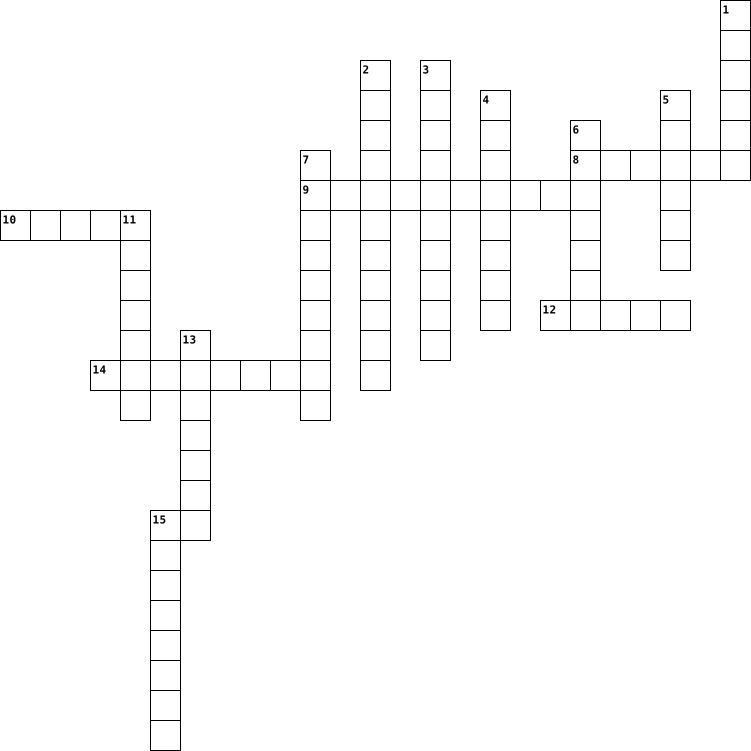
Across
- Blackflies & Whiteflies are types of?
- Commonly know as 'Lily of the Nile'
- Spanish word for Figs
- Chervil, Fenugreek and Hissop are all types
- Type of fertiliser
- Conception Jorge Loring Oyarzabal & Amalia Heredic Livermore created what gardens?
Down
- What type of disease is Leaf curl?
- Air Layering is a form of what?
- t city can the Generalife gardens found in?
- Garden World presenter
- What are 'Nyon', 'Liguria' & 'Gaeta' types of?
- National flower of Indonesia
- TV Presenter Geoff Hamilton's garden7
- what spice is from the sigmas of a Crocuses
- What flower family does the Lantana belong to?
- Capability Brown's real birth name
16 Clues: Type of fertiliser • Spanish word for Figs • Garden World presenter • National flower of Indonesia • Air Layering is a form of what? • What type of disease is Leaf curl? • Capability Brown's real birth name • Commonly know as 'Lily of the Nile' • TV Presenter Geoff Hamilton's garden7 • Blackflies & Whiteflies are types of? • t city can the Generalife gardens found in? • ...
October 2015-09-04
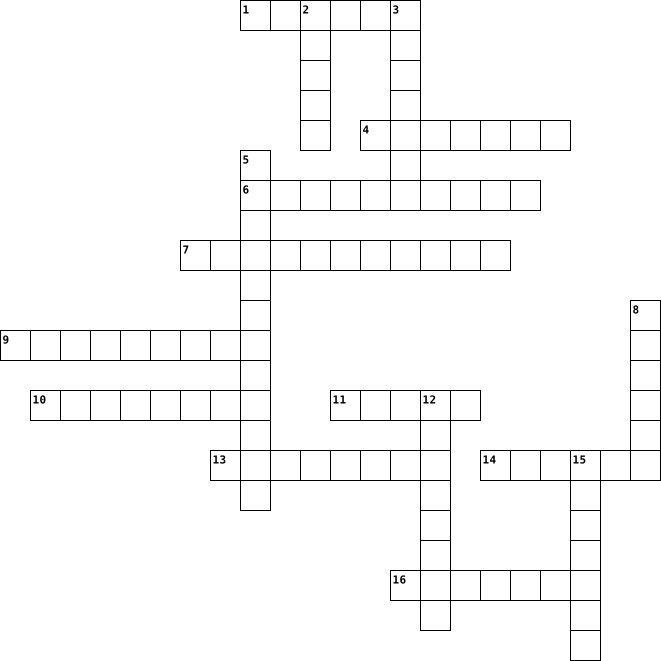
Across
- Blackflies & Whiteflies are types of?
- What city can the Generalife gardens found in?
- Commonly know as 'Lily of the Nile'
- Air Layering is a form of what?
- TV Presenter Geoff Hamilton's garden7
- Capability Brown's real birth name
- Chervil, Fenugreek and Hissop are all types
- Garden World presenter
- What are 'Nyon', 'Liguria' & 'Gaeta' types of?
- National flower of Indonesia
Down
- Spanish word for Figs
- What spice is from the stigmas of a Crocuses
- Jorge Loring Oyarzabal & Amalia Heredic Livermore created what gardens?
- What type of disease is Leaf curl?
- Type of fertiliser
- What flower family does the Lantana belong to?
16 Clues: Type of fertiliser • Spanish word for Figs • Garden World presenter • National flower of Indonesia • Air Layering is a form of what? • What type of disease is Leaf curl? • Capability Brown's real birth name • Commonly know as 'Lily of the Nile' • Blackflies & Whiteflies are types of? • TV Presenter Geoff Hamilton's garden7 • Chervil, Fenugreek and Hissop are all types • ...
10E 2021-06-24

Across
- Used for copying a picture or document into a computer.
- A desktop computer is also known as..
- your system's short-term memory
- any part of your computer that has a physical structure, such as the keyboard or mouse.
- the tool you use to access the Internet
- What is a shorter term for Wireless Internet Connection
- measured in megahertz (MHz), or millions of instructions per second; and gigahertz (GHz), or billions of instructions per second.
- a device for computer games
- Any computer-generated information displayed on screen, printed on paper or in machine readable form, such as disk and tape.
Down
- another important tool for communicating with computers. Commonly known as a pointing device.
- Usually consists of eight bits.
- where your software, documents, and other files are stored
- An electronic device that can intensify speeches, music, etc., and made audible throughout a room, hall, or the like.
- a mobile operating system
- WHAT WORD DESCRIBES RESTARTING YOUR DEVICE
- is a type of software that allows you to perform specific tasks
- A device that feeds data into a computer such as mouse
- any set of instructions that tells the hardware what to do and how to do it
- A screen that displays an image that is being generated by a computer.
- Sending an email, posting photos on a social media site and using your webcam.
20 Clues: a mobile operating system • a device for computer games • Usually consists of eight bits. • your system's short-term memory • A desktop computer is also known as.. • the tool you use to access the Internet • WHAT WORD DESCRIBES RESTARTING YOUR DEVICE • A device that feeds data into a computer such as mouse • Used for copying a picture or document into a computer. • ...
10F 2021-06-25

Across
- Used for copying a picture or document into a computer.
- A desktop computer is also known as..
- your system's short-term memory
- any part of your computer that has a physical structure, such as the keyboard or mouse.
- the tool you use to access the Internet
- What is a shorter term for Wireless Internet Connection
- measured in megahertz (MHz), or millions of instructions per second; and gigahertz (GHz), or billions of instructions per second.
- a device for computer games
- Any computer-generated information displayed on screen, printed on paper or in machine readable form, such as disk and tape.
Down
- another important tool for communicating with computers. Commonly known as a pointing device.
- Usually consists of eight bits.
- where your software, documents, and other files are stored
- An electronic device that can intensify speeches, music, etc., and made audible throughout a room, hall, or the like.
- a mobile operating system
- WHAT WORD DESCRIBES RESTARTING YOUR DEVICE
- is a type of software that allows you to perform specific tasks
- A device that feeds data into a computer,
- any set of instructions that tells the hardware what to do and how to do it
- A screen that displays an image that is being generated by a computer.
- Sending an email, posting photos on a social media site and using your webcam.
20 Clues: a mobile operating system • a device for computer games • Usually consists of eight bits. • your system's short-term memory • A desktop computer is also known as.. • the tool you use to access the Internet • A device that feeds data into a computer, • WHAT WORD DESCRIBES RESTARTING YOUR DEVICE • Used for copying a picture or document into a computer. • ...
Unit 9 - Unit 12 2025-05-28

Across
- Something that not made by people.
- A event where musicians play music live.
- A place to keep information.
- The way something sounds.
- Something you use to make music.
- Something is a little scary or creepy.
- Watching videos or listening music live on the internet.
- Where you can keep little thing in your clothes.
- A small plastic tape that holds music or sounds.
- To feel something with your skin.
- To make new and fun things.
- A person who plays the drums.
- When you do something the wrong way.
- A shiny, round metal instrument that makes a loud sound.
Down
- Games, apps, or tools you use on a phone or computer.
- A big room or building where people gather for events.
- Easy to use or helpful.
- Something that is just right, without any mistakes.
- Musical notes that make up a song or melody.
- Someone who uses science and math to design and build things.
- Something happening right now or it can mean the flow of things like water.
- A flat, round object.
- A set of that tells a computer or machine what to do.
- A power let lights, TV to work.
- Capturing sound, video, or pictures so you can play them back.
- Moving your hand or it can be the up-and-down of water.
- Something made of wood.
- A stick or wire that helps send or receive signals.
- Having many different kinds or types of things.
- Almost or very close to something.
30 Clues: A flat, round object. • Easy to use or helpful. • Something made of wood. • The way something sounds. • To make new and fun things. • A place to keep information. • A person who plays the drums. • A power let lights, TV to work. • Something you use to make music. • To feel something with your skin. • Something that not made by people. • Almost or very close to something. • ...
Lesson 24 vocab 2015-04-20

Across
- computer network that covers a large geographical area. Most WANs are made up of several connected LANs
- link from one computer to another through which data can be transmitted
- a network designed for the exclusive use of computer users within an organization that cannot be accessed by users outside the organization
- a type of fiber-optic telephone line that can transmit up to 1.533 megabits per second or can be used to transmit 24 digitized voice channels
- computer configuration in which one or more computers on the network acts as a server
- the world's collection of interconnected commercial and government-owned voice-oriented system
- a computer that handles request for data, e-mail, file transfers, and network services from other computers (clients).
- a network configuration that allows selected outside organizations to access internal information systems
- a recent wireless technology that can deliver maximum speeds of up to 7 Mbps to your cell phone, home computer, or car. Stands for Worldwide Interoperability for Microwave Access
- examine a fingerprint
- a device that directs traffic on a network by dividing data into smaller packets that travel by different routes and then are reassembled at their destination
- high-end programs designed to provide network control and include special functions for connecting computers and other devices into a network
Down
- a device on the network
- an ISP that provides connection speeds more than 30 times faster than dial-up connections- from 384 Kbps to 2.0 Mbps
- a computer that uses the services of another program
- computer architecture in which all of the computers on a network are equal and there is no computer designated as the server
- a device that uses coaxial cable to send and receive data
- expert computer user who invades someone else's computer either for personal gain or simply for the satisfaction of being able to do it
- a junction where information arrives from connected computers or peripheral devices and is then forwarded in one or more directions to other computers and devices
- an internet connection technology that provides for the transfer of information to a computer at a high-speed bandwidth over ordinary copper telephone lines
- a series of connected personal computers, workstations, and other devices, such as printers or scanners, within a confined space, such as an office building.
- the largest network used as a communication
- a variation of a lan that uses no physical wires
- a server that acts as an intermediary between a user and the internet
- a combination of hardware and software that creates a buffer between an internal network and and the software to prevent unauthorized access
- communications hardware device that facilitates the transmission of data
26 Clues: examine a fingerprint • a device on the network • the largest network used as a communication • a variation of a lan that uses no physical wires • a computer that uses the services of another program • a device that uses coaxial cable to send and receive data • a server that acts as an intermediary between a user and the internet • ...
ITF Vocabulary 2022-03-08

Across
- This hardware provides more memory to the computer to run more programs and run them faster.
- a web file that contains information, website details, and user preferences.
- An OS that interfaces with the user through text only.
- a utility software that shows all running programs. Can be accessed through Ctrl + Alt + Esc
- Any hardware device that displays to the user the computer's results of processing
- This is the hardware that contains all the circuitry of the computer
- a computer language that consists of only 0 and 1
- This is one of the only Freeware OS available.
- This is the numeric address of a computer connected to the internet. It can be changed.
- The most storage heavy optical disk, the blu-ray
- A computer that shares it resources with others on a network
- An OS that interfaces with the user through graphics, icons, and text
- This is software that allows a single computer to run multiple virtual OS simultaneously
- A device that converts digital signals into analog signals
- This is the numeric address of a computer. It cannot be changed.
Down
- The most common Internet Standard that allows for multiple devices, and has speeds of upto 1 Gbps
- An RJ-45 cord that allows computers or modems to connect through a wire to the internet.
- a number language that ranges from 0-9
- A person who tries to exploit weaknesses in code to gain access to information within a program or system.
- This type of authentication uses more than one unique authentication method, such as a password and an SMS code.
- A type of SSD that is usually called a USB drive, USB stick, or thumb drive.
- This hardware takes the dangerous levels of heat away from the GPU & CPU and disperses it safely.
- Any hardware device that sends signal to a computer that the user interacts with
- This hardware helps takes the graphics processing away from the CPU through its own processing core.
- a computer language that ranges from 0-F
- A storage drive that consists of magnetic plates that spin around at certain RPMs
- A storage drive that consists of many microchips linked together
- A device that connects networks to networks
- Store Where you can purchase or download apps for your smartphone, tablet, or computer
- an attack on a computer or network where multiple computers are overwhelming it with packets.
- This is the basic language for creating web pages
- an optical disk that came after the CD but before the blu-ray disc
- This is the brain of the computer.
33 Clues: This is the brain of the computer. • a number language that ranges from 0-9 • a computer language that ranges from 0-F • A device that connects networks to networks • This is one of the only Freeware OS available. • The most storage heavy optical disk, the blu-ray • a computer language that consists of only 0 and 1 • This is the basic language for creating web pages • ...
Unit 2 2024-07-17

Across
- This allows devices with Wi-Fi connectivity to connect to wired networks
- Acts as the mediator in a network
- Dynamic address
- Used to amplify the signal in a network
- Link a web page to another page
- Server which manage files on the network
- This server checks usernames & passwords
- Connects a computer to a network
- The name of an organisation maintaining the site
- This server is used to keep installed all the programs, software, etc.
- To view files on the web, you need this
Down
- Method used to track a device on a network
- Can act as a gateway
- This server can also act as a data filter
- Changing static address
- Provides the internet facility
- Aends the transmitted data to all computers
- Key device within a client-server network
- The global network
- Connects two different types of network
- This software prevents users from accessing inappropriate information
- Modulate and demodulate the signals
- One million bits equals to how many Megabytes
23 Clues: Dynamic address • The global network • Can act as a gateway • Changing static address • Provides the internet facility • Link a web page to another page • Connects a computer to a network • Acts as the mediator in a network • Modulate and demodulate the signals • Used to amplify the signal in a network • Connects two different types of network • ...
Computers 2025-02-04

Across
- Ctrl + V
- Your computer’s operating system
- ↑
- Ctrl + C
- The software that runs your computer; two words
- Used to control a computer, typically has 2 buttons and a wheel
- Allows you to view web pages
- Used to control a computer, is rectangular and can be clicked
- Things that help you organize your files into sections
- wpm
- The cloud storage your school account is saved to
- The port on your laptop for connecting to screens with a cable
- fn
Down
- A larger computer that fits on a desk, and is not portable
- Ctrl
- PC
- Ctrl + S
- A small ovular plug or port, often used for charging devices
- Allows you to type information into a computer
- Allows you to view the files on your computer; two words
- The bar at the bottom of your screen that shows which apps you have open
- A folding, portable computer that fits on your lap
- HP
- The headphones port, 3.5mm plug; two words
- ↩
- Taking an image of what is visible on your screen
26 Clues: ↑ • ↩ • PC • HP • fn • wpm • Ctrl • Ctrl + V • Ctrl + C • Ctrl + S • Allows you to view web pages • Your computer’s operating system • The headphones port, 3.5mm plug; two words • Allows you to type information into a computer • The software that runs your computer; two words • Taking an image of what is visible on your screen • The cloud storage your school account is saved to • ...
Computer Vocabulary 2024-12-02

Across
- Ctrl + V
- your computer’s operating system
- ↑
- Ctrl + C
- The software that runs your computer
- used to control a computer, typically has 2 buttons and a wheel
- allows you to view web pages
- used to control a computer, is rectangular and can be clicked
- things that help you organize your files into sections
- wpm
- the cloud storage your school account is saved to
- the port on your laptop for connecting to screens with a cable
- fn
Down
- a larger computer that fits on a desk, and is not portable
- Ctrl
- PC
- Ctrl + S
- A small ovular plug or port, often used for charging devices
- allows you to type information into a computer
- allows you to view the files on your computer
- the bar at the bottom of your screen that shows which apps you have open
- a folding, portable computer that fits on your lap
- HP
- the headphones port, 3.5mm plug
- ↩
- taking an image of what is visible on your screen
26 Clues: ↑ • ↩ • PC • HP • fn • wpm • Ctrl • Ctrl + V • Ctrl + C • Ctrl + S • allows you to view web pages • the headphones port, 3.5mm plug • your computer’s operating system • The software that runs your computer • allows you to view the files on your computer • allows you to type information into a computer • taking an image of what is visible on your screen • ...
Grade 7 Hardware Software 2013-02-11

Across
- software made just for you. it's expensive
- me and her and ________ we
- non-moving parts of hardware are known as _____ state
- where everything inside a computer is connected to
- anything connected to a computer
- these small files save your website info
- many software in 1 package
- information is lost when the power is off
- / look and rest
Down
- the brain of the computer
- Jab Men In
- Universal Serial ___________
- this type of storage fits in your pocket
- stores the instructions to start the computer
- programs like word and safari
- ______ once read many
- gives power
- helps you do things to the computer like kill viruses
18 Clues: Jab Men In • gives power • / look and rest • ______ once read many • the brain of the computer • me and her and ________ we • many software in 1 package • Universal Serial ___________ • programs like word and safari • anything connected to a computer • this type of storage fits in your pocket • these small files save your website info • information is lost when the power is off • ...
COMPUTER CROSSWORD 2022-03-16

Across
- Which part of the computer fetches, decodes, and executes the programming instructions?
- A computer use which type of number system to calculate and to store data
- Which information storage is used to store short-term running programs and data in a computer?
- Which popular company designed the first CPU?
- What is the name of the system that manages and programs hardware resources for a computer?
- Which command to change the file location to another folder?
- Computer Hard Disk was first introduced in 1956 by?
- Code for 7th Generation Intel Proccessors
- The basic units of a excel spreedsheet where we enter data is called?
- Code for 5th Generation Intel Proccessors
- Code for 2nd Generation Intel Proccessors
- The name of the device used for a user to computer communications, usually the display and the keyboard is called?
- Code for 11th Generation Intel Proccessors
- Which command displays the date?
- How many generations of computers have been invented?
- Which command is used to view the sub directory structure of a drive?
- Code for 6th Generation Intel Proccessors
- Who is known as the father of computers?
- Code for 4th Generation Intel Proccessors
- The processing power of a CPU is measured in?
- Code for 8th Generation Intel Proccessors
- Code for 12th Generation Intel Proccessors
Down
- Code for 9th Generation Intel Proccessors
- Code for 3rd Generation Intel Proccessors
- Which output device is used to display information in visual pictorial form?
- Code for 10th Generation Intel Proccessors
- To move a program or operating system from one hardware platform to another is?
- Which input device is used to enter letters, numbers, and other characters into a computer?
- A common boundary between two computer systems is known as?
- Which computer hardware device performs the functions like click, point, drag, or select?
- Which command is used to delete the directory?
- A list of tasks a system could perform is known as?
- Which one is the first fully supported 64-bit operating system?
- Code for 1st Generation Intel Proccessors
- Which one is the default ‘Word Processor’ for Microsoft Windows?
- What is the computer's main circuit board called?
- Which command to clean up the CMD screen?
- What was the name of the first computer programmer?
- The process of recognizing the lexical components in a source string is called?
- What was the name of the first computer invented?
- Which one is a ‘text editor’ for Microsoft Windows?
- In computer world, Trojan refer to?
- An extra or redundant bit used to detect transmission errors is called?
43 Clues: Which command displays the date? • In computer world, Trojan refer to? • Who is known as the father of computers? • Code for 9th Generation Intel Proccessors • Code for 3rd Generation Intel Proccessors • Code for 7th Generation Intel Proccessors • Code for 5th Generation Intel Proccessors • Code for 2nd Generation Intel Proccessors • ...
Lesson 24 vocab 2016-04-19

Across
- A computer that handles requests for data,email,file,transfers,and other computer/clients
- A recent woreless technology that can deliver maximum speeds of up to 7 Mbps to your cell phone, home computer, or car. Stands for Worldwide Interoperability for Microwave access
- A network designed for the exclusive use of computer users within an organization that cannot be accessed by users outside the orginization
- A server that acts like an intermediary between a user and the internet
- A combination of hardware and software that create a buffer zone between an internal network and the internet to prevent unauthurized access
- A junction where information arrives from connected computers or peripheral devices and is then forwarded in one or more directions to other computers and devices
- Computer architecture in which all of the co mputers on a network are equal and there is no comuter designated as the server
- A device that uses coaxial cable to send and recive data
- The worlds collection of interconneceted commercial and government owned voice oriented systems
- High end programs desinged to provide network control and include special functions for connecting computers and other devices into a network
- Expert computer user who invades someone elses computer either for personal gain or somply the satisfaction of being able to do it
- Computer configuration in which one or more computers on the network act as a server
- A variation of a lan that uses no physical wires
- A device on the network
Down
- internet service provider An isp that provides connection speeds more than 30 times faster than dial up
- A techqnique that examines a fingerprint,voice patterns, or the iris or retina of the eye
- A type of fiber optic telephone line hat can transmit up to 1.544 megabits per second or can be used to transmit 24 digitized voice channels
- An internet connection technology that provides for the transfer of information to a computer at a a high speed bandwidth over ordinary copper telephone lines
- The largest network used as a communication tool
- Link from one computer to another through which data can be transmitted
- Computer network that convers a large geogrpahical area
- A series of connected personal computers and workstations such as printers or scanners within a confined space such as an office building
- Communications hardware deivce that facilitates the transmission of data
- A computer that uses the services of another program
- A network configuration that allows selected outside organizations to access internal information systems
- A device that directs traffic on a netowrk by dividing data into smaller packets that travel by different routes and then are reassemvled at their destination
26 Clues: A device on the network • The largest network used as a communication tool • A variation of a lan that uses no physical wires • A computer that uses the services of another program • Computer network that convers a large geogrpahical area • A device that uses coaxial cable to send and recive data • ...
Ivy Z. Common Terms 2026-03-12

Across
- Application for getting on websites and the internet
- Computer file for storage of digital emails and makes it easier to be stored
- File format that can give electronic image of text and graphics that can be viewed or printed
- Type of file that works easily with creating graphics with fun backgrounds
- Something small stored in a web browser that u can identify as you use a network
- Most used place to display and organize things
- When something is stored in the internet instead of computer hard drive
- Physical elements of a computer or the machinery of the computer like keyboard and or monitor
- Collection of common softwares developed by microsoft
- Wireless connection to a device without it being wired
- To bring something into something else
Down
- Program that stand alone or locally on computer device
- Used to connect wired things inside to use the computer
- Place on web page that will transport the user to something else
- Cloud storage which you can create and store files online and get them anywhere
- Online storage service that includes softwares like Word and Powerpoint
- A network that links computers. It connects billions of computers and people can communicate and share ideas through it.
- The thing that goes behind your @ symbol when sending a email
- Computer file for images that support animated and static
- To bring something out of something
- To transfer something to a remote device or internet
21 Clues: To bring something out of something • To bring something into something else • Most used place to display and organize things • Application for getting on websites and the internet • To transfer something to a remote device or internet • Collection of common softwares developed by microsoft • Program that stand alone or locally on computer device • ...
Bri's ICT Crossword 2020-12-17

Across
- / the global system of interconnected computer networks
- / a power tool with a shaped cutter, used in carpentry for making grooves for joints, decorative mouldings, etc
- / a set of related web pages located under a single domain name, typically produced by a single person or organization
- / a printed circuit board containing the principal components of a computer or other device, with connectors for other circuit boards to be slotted into
- / a system of words, letters, figures, or symbols used to represent others, especially for the purposes of secrecy
- / a range of frequencies within a given band, in particular that used for transmitting a signal
- (a network or system) from unauthorized access with a firewall
- / memory read at high speed but not capable of being changed by program instructions
- / characteristics or information, usually numerical, that are collected through observation
- / software that is specifically designed to disrupt, damage, or gain unauthorized access to a computer system
- / a large network of information that is not tied to a single location
Down
- / the process of converting information or data into a code, especially to prevent unauthorized access
- / a panel of keys that operate a computer or typewriter
- / a collection of devices connected together in one physical location, such as a building, office, or home
- / a system for connecting a number of computer systems to form a local area network, with protocols to control the passing of information and to avoid simultaneous transmission by two or more systems
- / the electronic circuitry within a computer that executes instructions that make up a computer program
- / the programs and other operating information used by a computer
- / the retention of retrievable data on a computer or other electronic system
- / a computer's short-term memory. None of your programs, files, or Netflix streams would work without it
- / the delay before a transfer of data begins following an instruction for its transfer
- / a wireless networking technology that allows devices such as computers (laptops and desktops), mobile devices (smart phones and wearables), and other equipment (printers and video cameras) to interface with the Internet
21 Clues: / the global system of interconnected computer networks • / a panel of keys that operate a computer or typewriter • (a network or system) from unauthorized access with a firewall • / the programs and other operating information used by a computer • / a large network of information that is not tied to a single location • ...
Computer Basics 2020-05-05

Across
- where you can find the physical components of an electronic device.
- booting a computer system again usually due to a problem.
- A machine that is used for printing documents, pictures, etc.
- a small picture on a computer screen that represents a program or function that can be opened.
- the main circuit board of a computer that holds together many of the important components of a computer.
- The set of keys that are used to type words on a computer or typewriter.
- are on a keyboard to help you enter information on the computer.
Down
- An electronic device that can intensify speeches, music, etc., and made audible throughout a room, hall, or the like.
- A small device that is connected to a computer that you move with your hand to help you click on items on the computer screen.
- A screen that displays an image that is being generated by a computer.
- a computer program where you can look up and information on the internet.
- a brief comment or explanation.
- a group of files or documents that are stored together by a title on your computer.
- A set of facts or figures that can be displayed through a computer, especially in columns.
14 Clues: a brief comment or explanation. • booting a computer system again usually due to a problem. • A machine that is used for printing documents, pictures, etc. • are on a keyboard to help you enter information on the computer. • where you can find the physical components of an electronic device. • ...
Access Controls Game 2025-02-25

Across
- The owner of the data decides who can access and use their information
- uses social skills to convince people to reveal access credential
- The process that follows identification
- The device that video records all activities
- Malware that collects and sends information from infected computer to attacker
- creating logs that records all users activities in a system
Down
- Two or more distinct authentication types
- willful and malicious defacement, destruction, or disruption of websites
- The password that must be changes immediately after creating the account
- Access is granted based on predefined roles within an organization
- Basic methods to secure a building
- Needs host and human interaction to replicate
- Approach based on the use of measurable human characteristics/traits to authenticate identity
- disguise themselves as useful programs but include malware
14 Clues: Basic methods to secure a building • The process that follows identification • Two or more distinct authentication types • The device that video records all activities • Needs host and human interaction to replicate • disguise themselves as useful programs but include malware • creating logs that records all users activities in a system • ...
tech+puzzle 2024-10-09

Across
- a program that spreads by first infecting files or the system areas of a computer or network router's hard drive and then making copies of itself.
- any intrusive software developed by cybercriminals
- sound, especially when recorded, transmitted, or reproduced.
- to move from link to link to view the contents of Web pages
- interconnected computing devices that can exchange data and share resources with each other.
- a wireless, portable personal computer with a touchscreen interface.
- A prefix that means “computer” or “computer network,”
- information that has been translated into a form that is efficient for movement or processing.
- something that the user interacts with that controls the system
- a branch of Physics that deals with the theory and use of devices in which the electrons travel through a vacuum, gas, or a semiconductor medium.
- not physically existing as such but made by software to appear to do so.
- a form of microcode or program embedded into hardware devices to help them operate effectively
- most thing people by at Apple
Down
- an electronic device for storing and processing data, typically in binary form, according to instructions given to it in a variable program.
- electronic technology that generates, stores and processes data in terms of positive and nonpositive states
- the process of advancement and improvement of existing technologies or the creation of entirely new technologies through research and innovation.
- the programs and other operating information used by a computer.
- the gaining of unauthorized access to data in a system or computer.
- a link between a plug or connector into a port or jack
- a set of related web pages located under a single domain name, typically produced by a single person or organization.
- the transmission of a file or data from one computer to another over a network, usually from a larger server to a user device.
- part of a computer to which other pieces of equipment, such as a printer, camera, etc. can be connected:
- a global computer network providing a variety of information and communication facilities, consisting of interconnected networks using standardized communication protocols.
- a process or set of rules to be followed in calculations or other problem-solving operations, especially by a computer.
- cellular telephone with an integrated computer and other features not originally associated with telephones.
- the delivery of computing services—including servers, storage, databases, networking, software, analytics, and intelligence—over the internet
- any goal-oriented activity requiring, benefiting from, or creating computing machinery.
- the capacity at which a network can transmit data.
- a system that takes an input, changes it according to the system's use, and then produces an outcome. I
- the combination of tools, devices, and platforms that enable the creation, distribution, and consumption of various forms of media content, such as text, images, audio, and video.
30 Clues: most thing people by at Apple • any intrusive software developed by cybercriminals • the capacity at which a network can transmit data. • A prefix that means “computer” or “computer network,” • a link between a plug or connector into a port or jack • to move from link to link to view the contents of Web pages • ...
Paloma's Crossword Puzzle 2023-03-22

Across
- a panel of keys that operate a computer or typewriter.
- a thinker who focuses on the problem.
- the programs and other operating information used by a computer.
- abbreviation of universal serial bus.
- being an active learner, taking responsibility for your work.
- The movie soundtrack featuring the songs of ABBA.
- a traditional Japanese dish.
- messages distributed by electronic means from one computer user to one or more recipients via a network.
- abides by all the law and order of the country.
- someone who conveys their message thoroughly and is receptive and responsive to others' input.
Down
- a computer program with a graphical user interface for displaying and navigating between web pages.
- Month of Christmas
- Pink and Cyan combined
- expressing piety or religious devotion.
- an electronic device for storing and processing data, typically in binary form, according to instructions given to it in a variable program.
- a piece of hardware attached to a computer system used to produce sound.
- a small device that a computer user pushes across a desk surface in order to point to a place on a display screen and to select one or more actions to take from that position.
- an output device that displays information in pictorial or textual form.
- a wireless networking technology that uses radio waves to provide wireless high-speed Internet access.
- Main Character in Gilmore Girls.
20 Clues: Month of Christmas • Pink and Cyan combined • a traditional Japanese dish. • Main Character in Gilmore Girls. • a thinker who focuses on the problem. • abbreviation of universal serial bus. • expressing piety or religious devotion. • abides by all the law and order of the country. • The movie soundtrack featuring the songs of ABBA. • ...
Computer Crossword Puzzle 2021-09-29

Across
- It’s an input hardware device the user of the computer moves with their hands to control the movement of the cursor in the computer screen.
- A computer program that allows you to access the world wide web. A popular example of this would be Google Chrome & Microsoft Edge
- It is an output device that connects to the computer to generate sound
- A device that is used to photograph/record videos & pictures which are then stored digitally
- It’s an input hardware device the user of the computer uses to type letters, numbers & other symbols into the computer.
- It is another way to store a large amount of data & storage in your computer. It is similar to a hard drive, but it’s much faster when it comes to accessing the files & data stored.
- It is an electronic output device that projects/displays videos, images & text to the user
- It’s a container (most of the time a box) that stores all the components of the computer.
- A machine that prints a hard physical copy of the electronic data/file that is stored on your computer/device
- It’s similar to the hard-drive, but what separates this component from the hard drive is how it sacrifices storage for easier/instant access to your files & data.
Down
- It's the circuit board of the computer that other components connect/plug into
- A system that converts electrical energy (AC to DC) & regulates the flow of electricity in order for the other components of the computer to work properly.
- It’s where all your data is stored & kept. It has a large storage capacity but the downside is, the data that is stored is not as accessible compared to RAM.
- It’s used in rendering graphics, images & animations more efficiently & quickly. This component is especially useful for gaming & animation production
- It's the processor of the computer. It receives & executes instructions for the computer to run properly. It's essentially the "brain" of the computer.
15 Clues: It is an output device that connects to the computer to generate sound • It's the circuit board of the computer that other components connect/plug into • It’s a container (most of the time a box) that stores all the components of the computer. • It is an electronic output device that projects/displays videos, images & text to the user • ...
Computer History 2015-06-01

Across
- easy way to understand programming language
- Macintosh It was introduced by Steve Jobs, in 1984.
- Presper Eckert Invented the first computer commercial
- It allows the use of visual indicators to interact with devices
- devices connected together to share data
- Roberts Created Altair 8800 the term is “personal computer”
- Bhatt Created USB
- It is responsible for all the instructions it gets
- Turning considered founder of computer science and created the machine that annihilated the Engima code WWII
- Computer Club A computer group from the 70s
- Dean Computer engineer of the ISA Bus and the IBM with his team
- code A 2D barcode
- Zuse Invented the first computer algorithm
- program that accepts and responds to requests
- It is the building block of all microchips.
- It was developed by INTEL with the help of Ted Hoff.
- it is data equal to 7 or 8 bits
- Licklider Founded the idea of world wide network
- Bushnell He was the engineer and entrepreneur who invented ATARI
- Chu One of the people who made the first ENIAC
- board invented by Paul Eisler, and made to hold electronic circuits, and other components.
- G. Kemeny He co-developed the BASIC programming language
- drive has one or more platters in the casing.
- Berners-Lee he founded the world wide web, and invented the first website
Down
- Andreessen co founder of ning,and the first web browser
- It supports data transfer from devices
- “Sandy” Douglas Made first graphical computer game
- Eisler Austrian inventor who invented the printed circuit board
- Kilby Built the first integrated circuit
- E. Kurtz he developed the BASIC programming language
- lets a computer to send and receive information
- It was an area network that joins centers
- Circuit building blocks of a computer hardware.
- Hoff inventors of the microprocessor.
- A disc which contains audio or software data
- Baer German/American, he was known as the “Father of Video games”
- Used to locate web pages on the internet
- The process of creating a deleting program that allows the program to understand without a software.
- The smallest display a computer could print
- an 8-bit number system, that resembles combinations of 0 and 1(on and off)
- Storage where you store data online safely
- Used to open web pages
42 Clues: Bhatt Created USB • code A 2D barcode • Used to open web pages • it is data equal to 7 or 8 bits • Hoff inventors of the microprocessor. • It supports data transfer from devices • Kilby Built the first integrated circuit • devices connected together to share data • Used to locate web pages on the internet • It was an area network that joins centers • ...
Lesson 24 Vocab 2016-04-19

Across
- the largest network used as a communication tool.
- a computer that handles requests data one bit at a time.
- combination of hardware and software that creates a buffer between an internal network and the internet to pervent unauthorized access.
- recent wirless technology that can deliver maxmum speeds of up tp 7 Mbps to your cell phone, home computer, or car.
- high end programs desighed to provide network control and include special functions.
- expert computer user who invades someone else's computer either for personal gain or simply for the satisfaction of being able to do it.
- shares resources such as printers,programs,and other hardware.
- ISP that provides connections speeds more then 30 times faster than dial up connections from 384 Kbps to 2.0 Mbps.
- computers network that covers a large geographical area. most WANs are made up of several connected LANs.
- junction where information arrives from connected computers or peripheral devices and is then forwarded in one or more directions
- series of connected personal computers, workstaitions, and other devices, such as printers or scanners, within a confined space.
- a variation of a LAN that uses no physical wires.
- a network configuration that allows selected outside organization to access internal information systems.
- hardware devices that facilitates the transmission of data.
- device that directs traffic on a network by dividing data into smaller packets that travel by differnt routes.
Down
- computer configurration in which one or more computers on a network acts as a sever.
- a computer that uses the services of other program.
- world's collection of interconnected commercial and government owned voice oriented system.
- an internet connection technology that provides for the transfer of information to a computer at a high speed bandwidth.
- link from one computer to another which data can be transmitted.
- network designed for the exclusive use of computer users outside the organization.
- examine a fingerprint, a voice pattern, or the iris or retina of a eye.
- a sever that acts as an intermediary between a user and the inthernet.
- computer architecture in which all computers on a network are equal and there is no computer designated as the server.
- q device that uses coaxial cable to send and receive data.
- a type of fiber-optic telephone line that can transmit up to 1.544 megabits per second or can be used to transmit 24 digitzed voice channels.
26 Clues: the largest network used as a communication tool. • a variation of a LAN that uses no physical wires. • a computer that uses the services of other program. • a computer that handles requests data one bit at a time. • q device that uses coaxial cable to send and receive data. • hardware devices that facilitates the transmission of data. • ...
computer security 2021-10-15

Across
- a study of design of computer equipment
- a person who has intention to destroy data
- a malicious code which sends out info to hacker
- a act of illegal listening to network channel
- a system of to protect safeguard network
- a secured layer of protocol to encrypt data
- a cause of system failure
- a computer health issue causing strain in hand
Down
- act of tricking user into revealing their info
- a person who access computer illegally
- a malicious act to slow down service of server
- act of making copy of files safely and secure
- act of stealing or faking information for hiding
- a malicious program which steals data from user
- a field of study on computer security
- a data protection act law in countries
- a program which copies itself repeateadly
- moral obligation to use computer with care
18 Clues: a cause of system failure • a field of study on computer security • a person who access computer illegally • a data protection act law in countries • a study of design of computer equipment • a system of to protect safeguard network • a program which copies itself repeateadly • moral obligation to use computer with care • a person who has intention to destroy data • ...
CS Theory for Beginners 2021-12-02

Across
- central processing that directs the operation of the processor
- a specific task related to the management of computer functions
- communication between the CPU, RAM and the Graphics card
- a unit of digital information
- hardware or software that store data
- a unique address that identifies a device on the internet or a local network.
- the part of a central processing unit that performs arithmetic and logical operations.
- give input and receive output from computer
- a single one or a zero
- data in current use are kept
- math that can be reversed to decrypt
Down
- a device designed to replace a missing part of the body
- ties the computer's components together at one spot and allow them to communicate
- unit of frequency use to measure computer processing speed
- where all your permanent computer data is stored
- buit machine language by covert english programming language
- in the fetch phase, the control Unit gets an instruction from a memory___.
- block computer access until money is paid.
- designed to cause disruption to a computer
- a numbering scheme with only two possible values for each digit
- the character encoding standard for electronic
21 Clues: a single one or a zero • data in current use are kept • a unit of digital information • hardware or software that store data • math that can be reversed to decrypt • block computer access until money is paid. • designed to cause disruption to a computer • give input and receive output from computer • the character encoding standard for electronic • ...
Information technology 2024-07-25

Across
- short for Digital Versatile Disc.
- Disk utility checks for the problem on the hard disc such as bad sectors,viruses,etc
- refers to input processing cycle.
- and other devices are said to be either parallel or serial.
- Utilities are used to compress the selected files on the network.
- Editors facilitate the creation of flawless text documents.
- memory is also known as Auxiliary memory.
- stands for Arithmetic and Logic unit.
- is a cabling technology for transferring data to and from digital divices at high speed.
- Ray Disc is used to store more than 25GB of data.
- are measured in bites.
Down
- is the process of decoding data.
- is a collection of unprocessed facts, figures, and symbols.
- Graphics is used to connect the monitor to the computer .
- unit is the heart of the computer.
- system is a program that manages all other programs stored on the computer.
- computer is a small in size computer for general use by a singal personal.
- is aset of instructions that tell the computer to perform the task.
- is used to enter the daya.
- stands for universal stands bus .
20 Clues: are measured in bites. • is used to enter the daya. • is the process of decoding data. • short for Digital Versatile Disc. • refers to input processing cycle. • stands for universal stands bus . • unit is the heart of the computer. • stands for Arithmetic and Logic unit. • memory is also known as Auxiliary memory. • Ray Disc is used to store more than 25GB of data. • ...
Digital Literacy - Serdaris Washington 2024-08-26

Across
- A computer that can be used on a desk
- A software designed to perform a certain task
- Audio that sounds good (Usually paired with singing)
- Where to place Files to organize computer
- Moving Pictures
- An Online Document
- The Bottom apps on a computer that's always there
- A type of cloud storage for files
- Using 2 keys on the computer to do an action
Down
- the process of making a film
- a process of copying a document onto your device
- a physical storage option
- a movie
- MacOs,IOS, Android, Windows, etc.
- A clean way to put files in folders
- The Teacher for the Prin AAVT Class
- Device that processes data and information
- Taking a picture of a screen
18 Clues: a movie • Moving Pictures • An Online Document • a physical storage option • the process of making a film • Taking a picture of a screen • MacOs,IOS, Android, Windows, etc. • A type of cloud storage for files • A clean way to put files in folders • The Teacher for the Prin AAVT Class • A computer that can be used on a desk • Where to place Files to organize computer • ...
Digital Literacy 2025-10-29

Across
- The software that runs a computer
- Computer thinking
- External devices(mouse,printer,headset)
- fake emails or texts to share data
- Random Access Memory, a type of processing computer memory
- Behaving responsibly and ethically online
- Result
- A software application used to access and navigate the internet
- Locks files until ransom is paid
Down
- Software designed to harm devices or steal info
- The practice of protecting computer systems and networks from theft, damage, or unauthorized access
- Programs that tell hardware what to do
- Working with others in a digital environment
- The trail of data a person leaves behind
- Data entered
- Physical parts of the computer
- unauthorized access to private data
- Unsolicited bulk electronic messages
18 Clues: Result • Data entered • Computer thinking • Physical parts of the computer • Locks files until ransom is paid • The software that runs a computer • fake emails or texts to share data • unauthorized access to private data • Unsolicited bulk electronic messages • Programs that tell hardware what to do • External devices(mouse,printer,headset) • ...
Crossword Puzzle 2022-03-22

Across
- Is a line of desktop and laptop computers developed by Apple
- A process that copies all your files, data and information to effectively create two versions.
- Comprises the entire set of programs, procedures, and routines associated with the operation of a computer system.
- Is hardware or software that is used to store something, usually data, temporarily in a computing environment.
- A malicious piece of computer code designed to spread from device to device.
- Is described by its boundaries, structure and purpose and expressed in its functioning.
- Is a non-volatile memory type.
- A small graphical representation of a program or file.
- Sometimes referred to as a screencap or screengrab, is an image that shows the contents of a computer display.
- An object-oriented programming language that produces software for multiple platforms.
- A collection of linked web pages that share a unique domain name
- Is a function performed to reverse the action of an earlier action.
- Is an unexpected problem with software or hardware.
Down
- A data structure consisting of a collection of elements values or variables.
- Data that a computer sends
- A cross-platform open-source computer programming language used widely in the commercial and private computing sectors.
- A general-purpose, compiled imperative programming language that is especially suited to numeric computation and scientific computing.
- Is an English word that means “ network ,” “cobweb,” or “mesh.”
- A panel of keys that operate a computer or typewriter.
- An electronic device for storing and processing data, typically in binary form.
- Is a modifier key on a keyboard, used to type capital letters and other alternate "upper" characters.
- Detailed plan or procedure for solving a problem with a computer.
- The clarity of the text and images displayed on your screen.
- The component of your computer that allows you to store and access data on a long-term basis.
- Are the virtual components or codes, which divides the physical core of a CPU into virtual multiple cores.
- Process of detecting and removing of existing and potential errors in a software code that can cause it to behave unexpectedly or crash.
26 Clues: Data that a computer sends • Is a non-volatile memory type. • Is an unexpected problem with software or hardware. • A panel of keys that operate a computer or typewriter. • A small graphical representation of a program or file. • Is a line of desktop and laptop computers developed by Apple • The clarity of the text and images displayed on your screen. • ...
Computer Terms 2024-02-27

Across
- a small data memory storage area
- provides letters to the computer
- handles processing graphics
- keeps all information for the computer
- used to navigate between pages on the WWW
- used to control the cursor
- a group of eight bits that are used to store computer information
- central processing unit
Down
- used to get video
- invades a computer to steal personal information
- used to store information
- the capacity of a networked connection
- random access memory
- personal computer
- is an abbreviation for binary digit
- read only memory
- a programming error
17 Clues: read only memory • used to get video • personal computer • a programming error • random access memory • central processing unit • used to store information • used to control the cursor • handles processing graphics • a small data memory storage area • provides letters to the computer • is an abbreviation for binary digit • the capacity of a networked connection • ...
Hardware Puzzle 2019-01-14

Across
- The set of typewriter-like keys that enables
- drive a device that is inserted into a computer that holds data
- a mobile device that can download apps
- data
- helps you see things better on the monitor
- devices something that is pressed in order to have an output
- to enter data into a computer
Down
- drive a device that holds data inside of the pc
- the circuit of the computer
- Read only memory
- random access memory
- device this is what is displayed on a monitor
- brain of the computer
- a display screen
- personal computer
15 Clues: data • Read only memory • a display screen • personal computer • random access memory • brain of the computer • the circuit of the computer • to enter data into a computer • a mobile device that can download apps • helps you see things better on the monitor • The set of typewriter-like keys that enables • device this is what is displayed on a monitor • ...
20 Notable People in CS History 2024-08-29

Across
- German polymath active as a mathematician, philosopher, scientist and diplomat who invented calculus in addition to many other branches of mathematics, such as binary arithmetic
- Known as the Father of the modern computer (even though none of his computers worked or were even constructed in their entirety)
- He helped establish modern symbolic logic and whose algebra of logic, now called Boolean algebra, is basic to the design of digital computer circuits.
- physicist and engineer, co-inventor in 1946, with John P. Eckert, of the Electronic Numerical Integrator and Computer (ENIAC), the first general-purpose electronic computer.
- best known known for his work in the early development of computers: As director of the Electronic Computer Project at Princeton's Institute for Advanced Study (1945-1955), he developed MANIAC (mathematical analyzer, numerical integrator and computer)
- completes Speedcode for IBM´s first large-scale scientific computer, the IBM 701. Although using Speedcode demanded a significant amount of scarce memory, it greatly reduced the time required to write a program. In 1957, Backus became project leader of the IBM FORTRAN project, which became the most popular scientific programming language in history and is still in use today
- MS-DOS, or Microsoft Disk Operating System, the basic software for the newly released IBM PC, is the start of a long partnership between IBM and Microsoft, which he and Paul Allen had founded only six years earlier.
- Named after her last name , first developed in 1801, is programmable. This loom used a series of punched cards to control the lifting of each individual warp thread to weave a figured fabric
- was a pioneer in early digital computer development and invented random-access, coincident-current magnetic storage, which became the standard memory device for digital computers
Down
- From Harvard ,finished the construction of the Automatic Sequence Controlled Calculator, popularly known as the Mark I. It contained over 3000 mechanical relays and was the first electro-mechanical computer capable of making logical decisions, like if x==3 then do this not like If its raining outside I need to carry an umbrella
- The first all electronic computer was the Electrical Numerical Integrator and Calculator, known as ENIAC. It was designed by him and John W. Mauchly of the Moore School of Engineering at the University of Pennsylvania. ENIAC was the first multi-purpose electronic computer, though very difficult to re-program. It was primarily used for computer aircraft courses, shell trajectories, and to break codes during World War II.
- Italian mathematician translated Luigi Menabrea's memoir on Charles Babbage's Analytic Engine. With her translation she appended a set of notes which specified in complete detail a method for calculating Bernoulli numbers with the Engine
- American statistician, inventor, and businessman who developed an electromechanical tabulating machine for punched cards to assist in summarizing information and, later, in accounting.
- an American businessman, engineer, and the co-founder and emeritus chairman of Intel Corporation. He proposed Moore's law which makes the observation that the number of transistors in an integrated circuit doubles about every two years
- American electrical engineer who took part, along with Robert Noyce of Fairchild Semiconductor, in the realization of the first integrated circuit while working at Texas Instruments in 1958. He was awarded the Nobel Prize in Physics on 10 December 2000
- She was a mathematician , that completed A-0, a program that allows a computer user to use English-like words instead of numbers to give the computer instructions. It possessed several features of a modern-day compiler and was written for the UNIVAC I computer, the first commercial business computer system in the United States.
- This mathematical genius, at the age of 19 invented a machine, which he called the “ Pascaline” that could do addition and subtraction to help his father.
- Him and his graduate assistant, Clifford Barry, built the first truly electronic computer, called the Atanasoff-Berry Computer or ABC
- He was especially interested in devising ways to aid computations. His greatest contribution was the invention of logarithms. He inscribed logarithmic measurements on a set of 10 wooden rods and thus was able to do multiplication and division by matching up numbers on the rods
19 Clues: Known as the Father of the modern computer (even though none of his computers worked or were even constructed in their entirety) • Him and his graduate assistant, Clifford Barry, built the first truly electronic computer, called the Atanasoff-Berry Computer or ABC • ...
Lesson 24 Vocab crossword 2016-04-19

Across
- link from one computer to another through which data can be transmitted
- a computer that uses the services of another program
- computer configuration in which one or more computers on the network acts as a server
- a junction where information arrives from connected computers or peripheral devices and is then forwarded in one or more directions to other computers and devices
- computer architecture in which all of the computers on a network are equal and there is no computer designated as the server
- a variation of a LAN that uses no physical wires
- a network configuration that allows selected outside organizations to access internal information systems
- communications hardware device that facilitates the transmission of data
- a recent wireless technology that can deliver maximum speeds of up to 7 Mbps to your cell phone, home computer, or car
- an ISP that provides connection speeds more than 30 times faster than dial-up connections
- a device on the network
- a computer that handles requests for data, e-mail, file transfers, and other network services from other computers
- a server that acts as an intermediary between a user and the internet
Down
- the world's collection of interconnected commercial and government-owned voice-oriented systems
- expert computer user who invades someone else's computer either for personal gain or simply for the satisfaction of being able to do it
- security measures such as scanning of a fingerprint, iris, or retina
- the largest network used as a communication tool
- a network designed for the exclusive use of computer users within an organization that cannot be accessed by users outside the organization
- a device that directs traffic on a network by dividing data into smaller packets that travel by different routes and then are reassembled at their destination
- an internet connection technology that provides for the transfer for the transfer of information to a computer at a high-speed bandwidth over ordinary copper telephone lines
- a series of connected personal computers, workstations, and other devices, such as printers or scanners, within a confined space, such as an office building
- a device that uses coaxial cable to send and receive data
- computer network that covers a wide geographical area
- a combo of hardware and software that creates a buffer between an internal network and the internet to prevent unauthorized access
- high-end programs designed to provide network control and include special functions for connecting computers and other devices into a network
- a type of fiber-optic telephone line that can transmit up to 1.544 megabits per second or can be used to transmit 24 digitized voice channels
26 Clues: a device on the network • the largest network used as a communication tool • a variation of a LAN that uses no physical wires • a computer that uses the services of another program • computer network that covers a wide geographical area • a device that uses coaxial cable to send and receive data • security measures such as scanning of a fingerprint, iris, or retina • ...
Vocabulary Words 2014-08-27

Across
- a receptacle in a church for the water used in baptism, typically a freestanding stone structure.
- a body's relative mass or the quantity of matter contained by it, giving rise to a downward force; the heaviness of a person or thing.
- spacing: type or format with a full space between lines
- a group or system of interconnected people or things
- checker: a computer program that checks the spelling of words in files of text, typically by comparison with a stored list of words.
- a particularly powerful mainframe computer.
- uncooked.
- the action or method of storing something for future use
- size: The size of a typeface, measured from line to line, when no additional interline space is added. Digital typefaces may not have an inherent size, as did metal typefaces.
- a line at the head of a dispatch or special article in a newspaper showing the date and place of writing.
- a compact disc used as a read-only optical memory device for a computer system.
- Letter: a letter dealing with business
- facts and statistics collected together for reference or analysis
- a band of frequencies used in radio and television transmission, especially as used by a particular station.
- the physical structure of a person or an animal, including the bones, flesh, and organs.
Down
- It handles all the instructions you give your computer
- the amount of something produced by a person, machine, or industry
- printer: a printer, linked to a computer, producing good-quality printed material by using a laser to form a pattern of electro statically.
- the programs and other operating information used by a computer.
- the action of showing something to be right or reasonable.
- the official procedure or system of rules governing affairs of state or diplomatic occasions.
- perform a series of mechanical or chemical operations on (something) in order to change or preserve it.
- a printed circuit board containing the principal components of a computer or other device.
- address: the address of the sender of a letter or parcel indicating where it should be returned if it cannot be delivered
- disk/drive: The hard drive or hard disk sits in the computer case.
- computers: a computer designed for use by one person at a time.
- a line or set of lines enclosing or indicating the shape of an object in a sketch or diagram.
- a number of people or things in a more or less straight line
- size: Many paper size standards conventions have existed at different times and in different countries.
- computer: a computer that is portable and suitable for use while traveling.
30 Clues: uncooked. • Letter: a letter dealing with business • a particularly powerful mainframe computer. • a group or system of interconnected people or things • It handles all the instructions you give your computer • spacing: type or format with a full space between lines • the action or method of storing something for future use • ...
Vocabulary terms 2014-08-25

Across
- checker: a computer program that checks the spelling of words in files of text, typically by comparison with a stored list of words.
- facts and statistics collected together for reference or analysis
- the amount of something produced by a person, machine, or industry
- size: Many paper size standards conventions have existed at different times and in different countries.
- a line at the head of a dispatch or special article in a newspaper showing the date and place of writing.
- Letter: a letter dealing with business
- a receptacle in a church for the water used in baptism, typically a freestanding stone structure.
- spacing: type or format with a full space between lines
- address: the address of the sender of a letter or parcel indicating where it should be returned if it cannot be delivered
- a particularly powerful mainframe computer.
- a line or set of lines enclosing or indicating the shape of an object in a sketch or diagram.
- a band of frequencies used in radio and television transmission, especially as used by a particular station.
- It handles all the instructions you give your computer
- the programs and other operating information used by a computer.
- a group or system of interconnected people or things
- uncooked.
- the physical structure of a person or an animal, including the bones, flesh, and organs.
Down
- the official procedure or system of rules governing affairs of state or diplomatic occasions.
- computer: a computer that is portable and suitable for use while traveling.
- a printed circuit board containing the principal components of a computer or other device.
- a compact disc used as a read-only optical memory device for a computer system.
- the action or method of storing something for future use
- printer: a printer, linked to a computer, producing good-quality printed material by using a laser to form a pattern of electro statically.
- the action of showing something to be right or reasonable.
- perform a series of mechanical or chemical operations on (something) in order to change or preserve it.
- computers: a computer designed for use by one person at a time.
- size: The size of a typeface, measured from line to line, when no additional interline space is added. Digital typefaces may not have an inherent size, as did metal typefaces.
- a body's relative mass or the quantity of matter contained by it, giving rise to a downward force; the heaviness of a person or thing.
- a number of people or things in a more or less straight line
- disk/drive: The hard drive or hard disk sits in the computer case.
30 Clues: uncooked. • Letter: a letter dealing with business • a particularly powerful mainframe computer. • a group or system of interconnected people or things • It handles all the instructions you give your computer • spacing: type or format with a full space between lines • the action or method of storing something for future use • ...
Digital Literacy 2024-04-30

Across
- ,a piece of software
- ,a small computer designed for use by a single user at a time
- ,knowledge and ability to use computers and related technology efficiently
- ,a single hypertext file or a page that is part of a Web site
- ,a group of computers that connected to shares resources
- ,The virtual environment
- ,programming that controls computer, video, or electronic hardware
- ,main computer on the network
- ,being groomed, forced or coerced into doing something
- ,most commonly deployed via email phishing attacks, where a victim clicks on a link
- ,used by computers to exchange messages and files with other people in a digital format
- ,meaning an item for information
- ,the use of technology to harass, threaten, embarrass, or target another person
- ,to shut down and restart a computer
- ,a device that accepts information in digital
- ,a category of cybersecurity risks that may cause an undesirable event or action via the internet
- ,to copy a file, e-mail, or other information from one's personal computer
- ,the ability to control how much of your information online.
- ,being aware of the nature of the possible threats that you could encounter
- ,describes all channels of communication
- ,the ability to access and analyze media messages
- ,the apps that allow people, creators, and businesses to communicate
- ,a globally connected massive computer network system
Down
- ,information resources
- ,a powerful computer that can process large amounts of data
- ,learning facilitated by technology
- ,the act of sending sexual text messages
- ,the transfering of digital photos online
- ,a mobile phone that performs many of the functions of a personal computer
- ,rules governing socially acceptable behavior
- ,being aware of the nature of the possible threats online
- ,the learned ability to act with determined results
- ,a person is ethical, responsible, and culturally aware in their interactions with others.
- ,relating to the present or recent times.
- ,accessible by a computer
- ,appropriate ,tailor content to the user's age group
- ,the hard ware and operating system
- ,facts provided or learned about
- ,on-scree work area
- ,application of conceptual knowledge
- ,a collection of World Wide Web pages or files
- ,a new form of culture in which the culture of humanity will digitalize
- ,to expose,to harm and to loss
- ,small image displayed on the screen
- ,representation of a person's real self ,online
- ,the ability to effectively analyze information
- , a web address of a specific web page or file on the Internet.
- ,to exchange message and files online
- ,the practice of taking someone else's work or ideas
- ,a worldwide network of computer networks
50 Clues: ,on-scree work area • ,a piece of software • ,information resources • ,The virtual environment • ,accessible by a computer • ,main computer on the network • ,to expose,to harm and to loss • ,facts provided or learned about • ,meaning an item for information • ,learning facilitated by technology • ,the hard ware and operating system • ,application of conceptual knowledge • ...
Crossword lesson 3 2022-04-07

Across
- packs - a set of any number of (preferably) identical batteries or individual batterycells
- - any portable device that can be carried and held in one's palm
- - a text in a format that can be edited by the user
- - a broad range of purposes - often structuring, processing and managing any kind of information
- - able to be used or obtained; at someone's disposal
- - a plan or drawing produced to show the look and function or workings of a building, garment, or other object before it is made
- - the ability of a computer to process two or more programs in parallel
- - producing a sudden, piercing physical sensation or effect
- - the ability of a computer to receive and interpret intelligible handwritten input from sources such as paper documents, photographs, touch-screens and other devices
- - a small, mobile, handheld device that provides computing and information storage and retrieval capabilities
Down
- - ways of a computer, program, device, or system to connect with one or more others
- - provide access or an opportunity
- - when the device has a modem that bypasses the telephone system and connects directly to a wireless network, through which it can directly access the Internet connectivity provided by an Internet service provider (ISP)
- - to change from one thing to another
- - a keyboard that is not a part of a computer but connected via USB or wireless connection
- - a wireless, portable personal computer with a touchscreen interface
- - a computing device worn on the body
- - the ability to communicate between two or more entities over distances without the use of wires or cables of any sort
- - give someone the means to do something
- - the use of a communication device — whether a conventional office desk telephone, a smartphone, or a computer headset — with minimal or no manual manipulation
- - a process which allows computers to recognize written or printed characters such as numbers or letters and to change them into a form that the computer can use
- - the state of being varied or diversified
- - to be able to use, enter, or get near (something) access the computer
- - involving a lot of people, things, or activity, or happening over a large area
- - stationary computer that is on a desktop or tower case in contrast to a portable computer
25 Clues: - provide access or an opportunity • - a computing device worn on the body • - to change from one thing to another • - give someone the means to do something • - the state of being varied or diversified • - a text in a format that can be edited by the user • - able to be used or obtained; at someone's disposal • ...
Tech Terms 2024-03-22

Across
- A place on the internet that gives you information
- The arrow or blinking line that tells you where on the screen you are working
- You enter this to unlock your computer
- The style of letter you choose to type with
- The term used for the weapons that 'bad guys' use on your computer, such as viruses and spyware
- The world-wide web
- The old name for the social network, "X"
- Businesses often use this to protect their property
- This is how your cell phone connects to your car to make it "hands-free"
- What all the junk emails are called
- Google, Yahoo, Bing, etc.
- If you want to save a website to come back to latter, you save it as this
- This powers your laptop
Down
- Software used to protect your computer from 'bad guys'
- The sound a mouse makes when you select something on the screen
- Set of keys used to type information into a computer
- Microsoft Edge, Google Chrome, Mozilla Firefox, Safari, etc.
- A machine you can use to connect to the internet, play games, and write
- The part of the computer that makes sound
- The cord used to connect a computer to another device or to the internet
- How to describe an internet connection that doesn't need a cord
- A letter sent on the internet
- The device used in your home to connect you to the internet
- A computer you can carry around with you
- Something that is added to an email (PDF, JPG, etc.)
- A small tool you use to control your pointer on the computer (also a small rodent)
- How much data your computer can hold
- How to describe a video or post that becomes extremely popular overnight
28 Clues: The world-wide web • This powers your laptop • Google, Yahoo, Bing, etc. • A letter sent on the internet • What all the junk emails are called • How much data your computer can hold • You enter this to unlock your computer • A computer you can carry around with you • The old name for the social network, "X" • The part of the computer that makes sound • ...
computer security 2021-10-15

Across
- a study of design of computer equipment
- a person who has intention to destroy data
- a malicious code which sends out info to hacker
- a act of illegal listening to network channel
- a system of to protect safeguard network
- a secured layer of protocol to encrypt data
- a cause of system failure
- a computer health issue causing strain in hand
Down
- act of tricking user into revealing their info
- a person who access computer illegally
- a malicious act to slow down service of server
- act of making copy of files safely and secure
- act of stealing or faking information for hiding
- a malicious program which steals data from user
- a field of study on computer security
- a data protection act law in countries
- a program which copies itself repeateadly
- moral obligation to use computer with care
18 Clues: a cause of system failure • a field of study on computer security • a person who access computer illegally • a data protection act law in countries • a study of design of computer equipment • a system of to protect safeguard network • a program which copies itself repeateadly • moral obligation to use computer with care • a person who has intention to destroy data • ...
October 2015-09-04
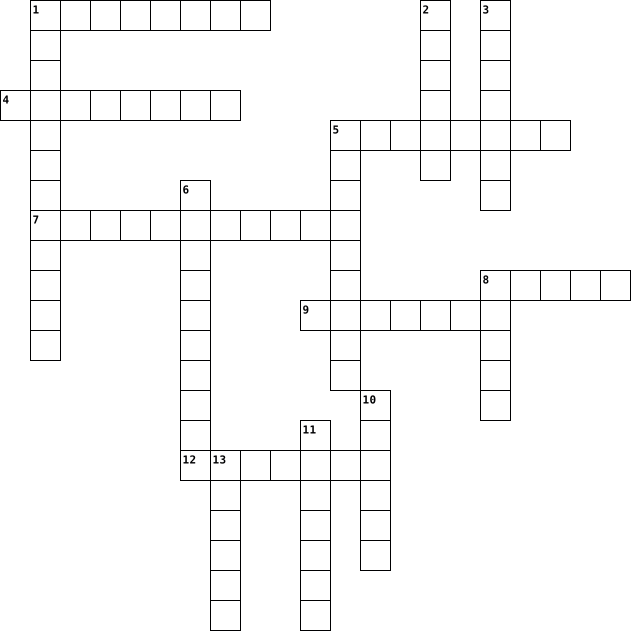
Across
- Capability Brown's real birth name
- Garden World presenter
- Fertiliser
- Air Layering is a form of what?
- Spanish word for Figs
- National flower of Indonesia
- What spice is from the stigmas of a Crocuses?
Down
- Jorge Loring Oyarzabal & Amalia Heredic Livermore created what gardens?
- What are 'Nyon', 'Liguria' & 'Gaeta' types of?
- What flower family does the Lantana belong to?
- TV Presenter Geoff Hamilton's garden?
- Commonly know as 'Lily of the Nile'
- Chervil, Fenugreek and Hissop are all types of?
- What type of disease is Leaf curl?
- What city can the Generalife gardens found in?
- Blackflies & Whiteflies are types of?
16 Clues: Fertiliser • Spanish word for Figs • Garden World presenter • National flower of Indonesia • Air Layering is a form of what? • Capability Brown's real birth name • What type of disease is Leaf curl? • Commonly know as 'Lily of the Nile' • TV Presenter Geoff Hamilton's garden? • Blackflies & Whiteflies are types of? • What spice is from the stigmas of a Crocuses? • ...
IT 2020-11-12

Across
- Central processing unit
- Any program that performs a specific function.
- A name used in conjunction with a password to gain access to a computer system or a network service.
- Software programs designed to damage or do other unwanted actions on a computer.
- A device used for connecting two Local Area Networks.
- A term that has commonly come to mean "connected to the Internet".
- A functional unit that provides shared services to workstations or to other functional units over a data network.
Down
- A collection of information organized so that a computer application can quickly access selected information; it can be thought of as an electronic filing system.
- A wireless networking technology that allows users to send voice and data from one electronic device to another via radio waves.
- A collection of data that has a name.
- A small piece of information you may be asked to accept when connecting to certain servers via a web browser.
- Stands for one picture element.
- A secret combination of characters used to access a secured resource such as a computer, a program, a directory, or a file.
- The process of transferring one or more files from your local computer to a remote computer.
- The physical components of a computer including the keyboard, monitor, disk drive, and internal chips and wiring.
- Any software that covertly gathers user information, usually for advertising purposes.
- Random Access Memory.
- A program or computer that connects to and requests information from a server.
- A group of interconnected computers capable of exchanging information.
19 Clues: Random Access Memory. • Central processing unit • Stands for one picture element. • A collection of data that has a name. • Any program that performs a specific function. • A device used for connecting two Local Area Networks. • A term that has commonly come to mean "connected to the Internet". • A group of interconnected computers capable of exchanging information. • ...
IT 2020-11-12

Across
- A collection of information organized so that a computer application can quickly access selected information; it can be thought of as an electronic filing system.
- Any software that covertly gathers user information, usually for advertising purposes.
- A group of interconnected computers capable of exchanging information.
- A program or computer that connects to and requests information from a server.
- A device used for connecting two Local Area Networks.
- The physical components of a computer including the keyboard, monitor, disk drive, and internal chips and wiring.
- A small piece of information you may be asked to accept when connecting to certain servers via a web browser.
- Software programs designed to damage or do other unwanted actions on a computer.
- A collection of data that has a name.
Down
- A wireless networking technology that allows users to send voice and data from one electronic device to another via radio waves.
- A secret combination of characters used to access a secured resource such as a computer, a program, a directory, or a file.
- A functional unit that provides shared services to workstations or to other functional units over a data network.
- Any program that performs a specific function.
- The process of transferring one or more files from your local computer to a remote computer.
- Stands for one picture element.
- Central processing unit
- A name used in conjunction with a password to gain access to a computer system or a network service.
- A term that has commonly come to mean "connected to the Internet".
- Random Access Memory.
19 Clues: Random Access Memory. • Central processing unit • Stands for one picture element. • A collection of data that has a name. • Any program that performs a specific function. • A device used for connecting two Local Area Networks. • A term that has commonly come to mean "connected to the Internet". • A group of interconnected computers capable of exchanging information. • ...
Input/Output Hardware 2012-09-20

Across
- An electronic device that transmits data
- Similar to a printer but uses writing tools to make a design
- A kind of ink-jet printer
- Systems that project sounds from the computer
- A hand operated electronic device that controls the computer
- This printer works by spraying fine drops of ink on a sheet of paper
- Similar to a mouse, but it's built in on a laptop
- A hand-held computer pen, also known as a selector pen
Down
- A camera that records and stores digital images
- A device that displays imformation, another word is screen
- A printer linked to a computer producing printing material with a laser
- An electronic equiptment connected to a computer and transfers data out of the computer in specific form
- A device that allows the user to move the mouse pointing
- A device that is used to provide data and control signals to a processing system
- A device that allows the user interact with the screen by touching it
- A dvice that scans documents such as photos and text
- A cursor computer device to control video games
- Same purpose as a mouse but it's designed with a movable ball on the top that can move in any direction
- Anything that can be printed on paper
- Keys that operate computers
20 Clues: A kind of ink-jet printer • Keys that operate computers • Anything that can be printed on paper • An electronic device that transmits data • Systems that project sounds from the computer • A camera that records and stores digital images • A cursor computer device to control video games • Similar to a mouse, but it's built in on a laptop • ...
INPUT DEVICES 2023-10-03

Across
- Input device for music production and instrument control.
- is an input device capable of reading barcodes.
- you can input voice commands or dictate text
- Scans radio frequency identification tags for data input.
- is a pen shaped input device used to write or draw on the screen of a graphic tablet or device.
- you can paste text with this combination.
- you can take and store pictures and then download them to a computer
- used to send live video images via the internet.
- is an input device that allows users to interact with a computer using their fingers.
Down
- receives signals from satellites to determine location input.
- you can play computer games with it
- hand held device that lets you move the cursor
- you can enter sketches or drawings into a computer.
- you can copy images from paper to a computer with it
- may resemble an upside down mouse.
- a panel of keys that operate a computer or typewriter.
- found on laptops, it works by pressing the sensitive pad with a finger.
- you can copy text with this combination.
- They read or write data from a certain type of disk into a computer.
- you can draw pictures or select menu optionsdirectly on the screen.
20 Clues: may resemble an upside down mouse. • you can play computer games with it • you can copy text with this combination. • you can paste text with this combination. • you can input voice commands or dictate text • hand held device that lets you move the cursor • is an input device capable of reading barcodes. • used to send live video images via the internet. • ...
unit 1 2024-07-17

Across
- Persistent data retention, such as on hard drives or SSDs.
- Remote data storage accessed via the internet.
- Copy of data kept in case the original is lost or damaged.
- Output device that displays information from the computer.
- Portable storage device that connects via USB port.
- Drive Storage device that stores data magnetically on spinning disks.
- Compact Disc Read-Only Memory; optical storage medium.
- Output device that produces hard copies of documents.
- Device that enables a computer to transmit data over telephone or cable lines.
- Unit of data stored on a computer.
Down
- Input device used to convert physical documents into digital format.
- Input device used for controlling video games or other applications.
- Information presented to the user, such as on a monitor or through speakers.
- Input device for typing text and commands into a computer.
- Container used for organizing files on a computer.
- Devices like keyboards and mice provide data to the computer.
- Solid State Drive; storage device that uses flash memory for faster data access.
- Display that allows users to interact with a computer by touching areas of the screen.
- Wireless technology for exchanging data over short distances.
- Pointing device used to navigate and interact with graphical user interfaces.
- Pointing device used to navigate and interact with graphical user interfaces.
21 Clues: Unit of data stored on a computer. • Remote data storage accessed via the internet. • Container used for organizing files on a computer. • Portable storage device that connects via USB port. • Output device that produces hard copies of documents. • Compact Disc Read-Only Memory; optical storage medium. • Input device for typing text and commands into a computer. • ...
Bri's ICT Crossword 2020-12-17

Across
- / the global system of interconnected computer networks
- / a power tool with a shaped cutter, used in carpentry for making grooves for joints, decorative mouldings, etc
- / a set of related web pages located under a single domain name, typically produced by a single person or organization
- / a printed circuit board containing the principal components of a computer or other device, with connectors for other circuit boards to be slotted into
- / a system of words, letters, figures, or symbols used to represent others, especially for the purposes of secrecy
- / a range of frequencies within a given band, in particular that used for transmitting a signal
- (a network or system) from unauthorized access with a firewall
- / memory read at high speed but not capable of being changed by program instructions
- / characteristics or information, usually numerical, that are collected through observation
- / software that is specifically designed to disrupt, damage, or gain unauthorized access to a computer system
- / a large network of information that is not tied to a single location
Down
- / the process of converting information or data into a code, especially to prevent unauthorized access
- / a panel of keys that operate a computer or typewriter
- / a collection of devices connected together in one physical location, such as a building, office, or home
- / a system for connecting a number of computer systems to form a local area network, with protocols to control the passing of information and to avoid simultaneous transmission by two or more systems
- / the electronic circuitry within a computer that executes instructions that make up a computer program
- / the programs and other operating information used by a computer
- / the retention of retrievable data on a computer or other electronic system
- / a computer's short-term memory. None of your programs, files, or Netflix streams would work without it
- / the delay before a transfer of data begins following an instruction for its transfer
- / a wireless networking technology that allows devices such as computers (laptops and desktops), mobile devices (smart phones and wearables), and other equipment (printers and video cameras) to interface with the Internet
21 Clues: / the global system of interconnected computer networks • / a panel of keys that operate a computer or typewriter • (a network or system) from unauthorized access with a firewall • / the programs and other operating information used by a computer • / a large network of information that is not tied to a single location • ...
Crossword Puzzle 2022-03-22

Across
- Is a line of desktop and laptop computers developed by Apple
- A process that copies all your files, data and information to effectively create two versions.
- Comprises the entire set of programs, procedures, and routines associated with the operation of a computer system.
- Is hardware or software that is used to store something, usually data, temporarily in a computing environment.
- A malicious piece of computer code designed to spread from device to device.
- Is described by its boundaries, structure and purpose and expressed in its functioning.
- Is a non-volatile memory type.
- A small graphical representation of a program or file.
- Sometimes referred to as a screencap or screengrab, is an image that shows the contents of a computer display.
- An object-oriented programming language that produces software for multiple platforms.
- A collection of linked web pages that share a unique domain name
- Is a function performed to reverse the action of an earlier action.
- Is an unexpected problem with software or hardware.
Down
- A data structure consisting of a collection of elements values or variables.
- Data that a computer sends
- A cross-platform open-source computer programming language used widely in the commercial and private computing sectors.
- A general-purpose, compiled imperative programming language that is especially suited to numeric computation and scientific computing.
- Is an English word that means “ network ,” “cobweb,” or “mesh.”
- A panel of keys that operate a computer or typewriter.
- An electronic device for storing and processing data, typically in binary form.
- Is a modifier key on a keyboard, used to type capital letters and other alternate "upper" characters.
- Detailed plan or procedure for solving a problem with a computer.
- The clarity of the text and images displayed on your screen.
- The component of your computer that allows you to store and access data on a long-term basis.
- Are the virtual components or codes, which divides the physical core of a CPU into virtual multiple cores.
- Process of detecting and removing of existing and potential errors in a software code that can cause it to behave unexpectedly or crash.
26 Clues: Data that a computer sends • Is a non-volatile memory type. • Is an unexpected problem with software or hardware. • A panel of keys that operate a computer or typewriter. • A small graphical representation of a program or file. • Is a line of desktop and laptop computers developed by Apple • The clarity of the text and images displayed on your screen. • ...
Information Technology 2015-09-06

Across
- The name of the arrow that tracks across the screen as you move the mouse around.
- Cut, copy, ______
- Internet explorer and Google Chrome are examples of a ________.
- A group of programs that manage all activities on the computer, for example Microsoft Windows.
- Place where deleted files and folders are stored.
- Instructions that tell the computer what to do.
- A popular social networking website created by Mark Zuckerberg
- =SUM(A2+B6)
- ROM and RAM are examples of _______.
Down
- Allows users to press parts of a screen to activate different functions.
- A file or program that can be uploaded to your computer from the Internet or a disk. This file or program is uploaded without your knowledge and is intended to do damage to your computer.
- You print a letter from your computer. The output is called _____.
- When you send a letter to someone using the internet.
- A __________ will examine your document and identify spelling mistakes.
- To quit all applications and turn off the computer.
- Software best suited for typing a letter.
- Give a file a name and/or store the file in a certain place.
- A device that enables a computer to send data to, and receive data from another computer.
18 Clues: =SUM(A2+B6) • Cut, copy, ______ • ROM and RAM are examples of _______. • Software best suited for typing a letter. • Instructions that tell the computer what to do. • Place where deleted files and folders are stored. • To quit all applications and turn off the computer. • When you send a letter to someone using the internet. • ...
Ch. 12 Computers and Technology in Health Care 2025-02-18

Across
- computer-assisted surgery
- A large computer that can control the launch of a rocket to outer space
- an ECG run while the patient is exercising, usually involves walking a treadmill or radiding an exercise bike until target heart rate is reached.
- high-energy particles to decrease the size of tumors and treat cancer
- educational computer programming designed for individualized use
- programs that contain instructions to alter the operation of computer programs, scramble data on the computer, or allow access to information on the computer
- Secure online websites
- systems that link computers together
- an applied science used to promote an individual’s safety and well-being by adapting to the environment and using techniques to prevent injuries.
- uses technology to direct ultrahigh-frequency sound waves through the chest wall and into the heart
- allow for rapid dispensing of medications
- protective programs that limit the ability of other computers to access a computer
- an object that protects a computer from electrical surges and power outages
- used for patients who cannot exercise a medication that simulates the effect of exercise is given to determine how the heart responds to stress.
- information entered into certain areas
- used for patients who cannot exercise a medication that simulates the effect of exercise is given to determine how the heart responds to stress.
- group of related record
- Alters the magnetic position of hydrogen atoms to produce an image.
- involves the use of audio, and computer systems to provide medical or health care services.
Down
- basic understanding of how a computer works
- permits physicians to see clear cross sectional views of both bone and body tissues to find abnormalities
- a computerized interpretation system that produces visual pictures on a computer monitor and a printout of the electrical activity of a patient’s heart
- a small amount of radioactive substance is given intravenously; a special camera is used to identify the rays emitted from the substance while the patient is at rest and then during exercise.
- a surgical procedure in which a surgeon uses preoperative and intraoperative images to guide or direct the surgery.
- using three dimensional imaging models, individuals who make prosthetics can custom design individualized prosthetics.
- uses special software to perform high-speed math calculations
- A computer size that can sit on a desktop
- Computer size that can be as big as a handheld tablet, smartphone, or personal digital assistant.
- allows all health care agencies to readily transfer patient electronic health records between agencies in a national network.
- a computerized version of a patient's medical information that may include statistical data, diagnoses, medical history, treatments, medications taken, tests performed, and any other information that could be included in a patient’s paper record.
- A noninvasive scanning method that uses high-frequency sound waves that bounce back as an echo when they hit different tissues and organs inside the body.
- an online teaching and learning environment that uses computers and the internet to allow teachers to present information and activities.
- each collection of related information
- is the process of sending messages from one computer to another
- light beams that can be focused precisely
- the ultimate networked system
- organized collection of information
- a therapeutic device that uses high-frequency sound waves
38 Clues: Secure online websites • group of related record • computer-assisted surgery • the ultimate networked system • organized collection of information • systems that link computers together • each collection of related information • information entered into certain areas • A computer size that can sit on a desktop • allow for rapid dispensing of medications • ...
ict 131 2025-12-02

Across
- Or ScanDisk - A Windows tool used to scan and repair hard drive errors.
- The tool that deletes temporary and unnecessary files to free up disk space.
- An audio input device used for speech recognition or recording.
- ______ Drive - a storage device that uses lasers to read/write data on discs.
- _______ Checker (SFC) - a command-line tool that replaces corrupted system files.
- A tool used to retrieve parts from tight spaces.
- The display device of a computer that shows visual output.
- ______Screwdriver - a hand tool used to tighten or loosen slotted screws.
- Random ______Memory - memory that is volatile and loses data when power is turned off.
- The connector used specifically for Ethernet networking.
- ________Mat – a mat used as a grounded surface to avoid electrostatic buildup.
- _______ Pliers - a tool used to grip and hold small parts.
- The set of instructions that guides computer hardware to function.
- A software that protects a computer from viruses.
- A circuit card that allows the computer to use peripherals it normally cannot.
- A technician’s handwritten or digital log containing troubleshooting steps and outcomes.
- A pointing device that uses a ball or optical sensor to move a cursor.
- A process/tool used to prepare a hard drive for storing information.
- _____Software helps users perform tasks like word processing or graphic editing.
- ____Software supports the execution of application programs and manages hardware.
- People involved in computer operations such as administrators and users
- _____Bus A data pathway between computer hardware components inside or outside the computer.
- ________ Reference Tools - online sources such as FAQs and manuals used for troubleshooting.
- A tool used to strip and cut wires.
Down
- Or HDD - the permanent magnetic storage device inside a computer used to store data and the OS.
- ________Storage - the computer’s working storage space that uses RAM chips.
- The port commonly used for monitors and has 15 pins.
- Read ____ Memory - memory that is non-volatile and retains data even without power.
- A device used to bundle cables neatly in and around a computer.
- Software that removes unwanted spyware programs.
- A screen-based device that accepts input through touch.
- The main part of the microcomputer that contains the motherboard, CPU, memory, and other components.
- The main circuit board of a computer that holds all circuits and components.
- _______ Reader - An input device that reads bar patterns on labels.
- A universal high-speed port used for modern peripherals such as flash drives and printers.
- _______Wrist Strap – a tool worn to prevent electro-static discharge when repairing computers.
- ______Unit (PSU)- the device that converts AC to DC power for computer components.
- _______Air - a tool used to blow away dust from computer components without contact.
- The port used for wired network connections using RJ45 connectors.
- _________-based glass cleaner - chemical that must NOT be used on LCD screens
- The essential cable that connects the computer to the main power source.
- Central _______ Unit (CPU)- the “brain” of the computer
- Disk _________ or Defrag - a Windows tool that optimizes the arrangement of files on a hard drive.
- A tool used to test the integrity of circuits and electrical quality.
- Computer Hardware _______The act of supporting and maintaining computer hardware, including diagnosing, repairing and upgrading.
45 Clues: A tool used to strip and cut wires. • A tool used to retrieve parts from tight spaces. • Software that removes unwanted spyware programs. • A software that protects a computer from viruses. • The port commonly used for monitors and has 15 pins. • A screen-based device that accepts input through touch. • Central _______ Unit (CPU)- the “brain” of the computer • ...
ict 131 2025-12-02

Across
- _________-based glass cleaner - chemical that must NOT be used on LCD screens
- ________Storage - the computer’s working storage space that uses RAM chips.
- A tool used to retrieve parts from tight spaces.
- The set of instructions that guides computer hardware to function.
- Central _______ Unit (CPU)- the “brain” of the computer
- _______ Reader - An input device that reads bar patterns on labels.
- The connector used specifically for Ethernet networking.
- A tool used to strip and cut wires.
- _____Software helps users perform tasks like word processing or graphic editing.
- A tool used to test the integrity of circuits and electrical quality.
- ______ Drive - a storage device that uses lasers to read/write data on discs.
- _____Bus A data pathway between computer hardware components inside or outside the computer.
- Or HDD - the permanent magnetic storage device inside a computer used to store data and the OS.
- A screen-based device that accepts input through touch.
- The essential cable that connects the computer to the main power source.
- Software that removes unwanted spyware programs.
- Disk _________ or Defrag - a Windows tool that optimizes the arrangement of files on a hard drive.
- _______ Checker (SFC) - a command-line tool that replaces corrupted system files.
- Computer Hardware _______The act of supporting and maintaining computer hardware, including diagnosing, repairing and upgrading.
Down
- _______Air - a tool used to blow away dust from computer components without contact.
- An audio input device used for speech recognition or recording.
- People involved in computer operations such as administrators and users
- A universal high-speed port used for modern peripherals such as flash drives and printers.
- _______ Pliers - a tool used to grip and hold small parts.
- ______Unit (PSU)- the device that converts AC to DC power for computer components.
- The main part of the microcomputer that contains the motherboard, CPU, memory, and other components.
- A pointing device that uses a ball or optical sensor to move a cursor.
- _______Wrist Strap – a tool worn to prevent electro-static discharge when repairing computers.
- A process/tool used to prepare a hard drive for storing information.
- The port commonly used for monitors and has 15 pins.
- A device used to bundle cables neatly in and around a computer.
- ________ Reference Tools - online sources such as FAQs and manuals used for troubleshooting.
- The display device of a computer that shows visual output.
- A circuit card that allows the computer to use peripherals it normally cannot.
- A technician’s handwritten or digital log containing troubleshooting steps and outcomes.
- Read ____ Memory - memory that is non-volatile and retains data even without power.
- Random ______Memory - memory that is volatile and loses data when power is turned off.
- The main circuit board of a computer that holds all circuits and components.
- The tool that deletes temporary and unnecessary files to free up disk space.
- The port used for wired network connections using RJ45 connectors.
- Or ScanDisk - A Windows tool used to scan and repair hard drive errors.
- A software that protects a computer from viruses.
- ______Screwdriver - a hand tool used to tighten or loosen slotted screws.
- ________Mat – a mat used as a grounded surface to avoid electrostatic buildup.
- ____Software supports the execution of application programs and manages hardware.
45 Clues: A tool used to strip and cut wires. • A tool used to retrieve parts from tight spaces. • Software that removes unwanted spyware programs. • A software that protects a computer from viruses. • The port commonly used for monitors and has 15 pins. • Central _______ Unit (CPU)- the “brain” of the computer • A screen-based device that accepts input through touch. • ...
ict 131 2025-12-03

Across
- _________-based glass cleaner - chemical that must NOT be used on LCD screens
- ________Storage - the computer’s working storage space that uses RAM chips.
- A tool used to retrieve parts from tight spaces.
- The set of instructions that guides computer hardware to function.
- Central _______ Unit (CPU)- the “brain” of the computer
- _______ Reader - An input device that reads bar patterns on labels.
- The connector used specifically for Ethernet networking.
- A tool used to strip and cut wires.
- _____Software helps users perform tasks like word processing or graphic editing.
- A tool used to test the integrity of circuits and electrical quality.
- ______ Drive - a storage device that uses lasers to read/write data on discs.
- _____Bus A data pathway between computer hardware components inside or outside the computer.
- Or HDD - the permanent magnetic storage device inside a computer used to store data and the OS.
- A screen-based device that accepts input through touch.
- The essential cable that connects the computer to the main power source.
- Software that removes unwanted spyware programs.
- Disk _________ or Defrag - a Windows tool that optimizes the arrangement of files on a hard drive.
- _______ Checker (SFC) - a command-line tool that replaces corrupted system files.
- Computer Hardware _______The act of supporting and maintaining computer hardware, including diagnosing, repairing and upgrading.
Down
- _______Air - a tool used to blow away dust from computer components without contact.
- An audio input device used for speech recognition or recording.
- People involved in computer operations such as administrators and users
- A universal high-speed port used for modern peripherals such as flash drives and printers.
- _______ Pliers - a tool used to grip and hold small parts.
- ______Unit (PSU)- the device that converts AC to DC power for computer components.
- The main part of the microcomputer that contains the motherboard, CPU, memory, and other components.
- A pointing device that uses a ball or optical sensor to move a cursor.
- _______Wrist Strap – a tool worn to prevent electro-static discharge when repairing computers.
- A process/tool used to prepare a hard drive for storing information.
- The port commonly used for monitors and has 15 pins.
- A device used to bundle cables neatly in and around a computer.
- ________ Reference Tools - online sources such as FAQs and manuals used for troubleshooting.
- The display device of a computer that shows visual output.
- A circuit card that allows the computer to use peripherals it normally cannot.
- A technician’s handwritten or digital log containing troubleshooting steps and outcomes.
- Read ____ Memory - memory that is non-volatile and retains data even without power.
- Random ______Memory - memory that is volatile and loses data when power is turned off.
- The main circuit board of a computer that holds all circuits and components.
- The tool that deletes temporary and unnecessary files to free up disk space.
- The port used for wired network connections using RJ45 connectors.
- Or ScanDisk - A Windows tool used to scan and repair hard drive errors.
- A software that protects a computer from viruses.
- ______Screwdriver - a hand tool used to tighten or loosen slotted screws.
- ________Mat – a mat used as a grounded surface to avoid electrostatic buildup.
- ____Software supports the execution of application programs and manages hardware.
45 Clues: A tool used to strip and cut wires. • A tool used to retrieve parts from tight spaces. • Software that removes unwanted spyware programs. • A software that protects a computer from viruses. • The port commonly used for monitors and has 15 pins. • Central _______ Unit (CPU)- the “brain” of the computer • A screen-based device that accepts input through touch. • ...
COMPUTER PUZZLE 2025-06-05

Across
- A network device that connect all computers in a network
- Criminal activities that involve computer
- Certain set of rules
- A wireless technology
- Connects two different network
- A set pogroms that disrupts the normal functioning of a computer
- An illegal intrusion into a computer system
- Example of WAN
Down
- To connect computer to the available internet connection
- Layout in various components of a network
- Process of transforming data into unreadable code
- An act of sending an email to a user
- An act of harassing a person through information technology
- Unwanted bulk email
- A security system
- Each computer in a network
16 Clues: Example of WAN • A security system • Unwanted bulk email • Certain set of rules • A wireless technology • Each computer in a network • Connects two different network • An act of sending an email to a user • Layout in various components of a network • Criminal activities that involve computer • An illegal intrusion into a computer system • ...
Computer Parts for ICT Business 2021-09-29

Across
- It’s an input hardware device the user of the computer movies with their hands to control the movement of the cursor in the computer screen.
- A computer program that allows you to access the world wide web. A popular example of this would be Google Chrome & Microsoft Edge
- It is an output device that connects to the computer to generate sound
- A device that is used to photograph/record videos & pictures which are then stored digitally
- It’s an input hardware device the user of the computer uses to type letters, numbers & other symbols into the computer.
- It is another way to store a large amount of data & storage in your computer. It is similar to a hard drive, but it’s much faster when it comes to accessing the files & data stored.
- It is an electronic output device that projects/displays videos, images & text to the user
- It’s a container (most of the time a box) that stores all the components of the computer.
- A machine that prints a hard physical copy of the electronic data/file that is stored on your computer/device
- It’s similar to the hard-drive, but what separates this component from the hard drive is how it sacrifices storage for easier/instant access to your files & data.
Down
- It's the circuit board of the computer that other components connect/plug into
- A system that converts electrical energy (AC to DC) & regulates the flow of electricity in order for the other components of the computer to work properly.
- It’s where all your data is stored & kept. It has a large storage capacity but the downside is, the data that is stored is not as accessible compared to RAM.
- It’s used in rendering graphics, images & animations more efficiently & quickly. This component is especially useful for gaming & animation production
- It's the processor of the computer. It receives & executes instructions for the computer to run properly. It's essentially the "brain" of the computer.
15 Clues: It is an output device that connects to the computer to generate sound • It's the circuit board of the computer that other components connect/plug into • It’s a container (most of the time a box) that stores all the components of the computer. • It is an electronic output device that projects/displays videos, images & text to the user • ...
cyber 2021-09-30

Across
- Phreaking is a slang term for hacking into secure telecommunication networks.
- is any offensive maneuver that targets computer information systems, computer networks, infrastructures, or personal computer devices.
- Biometrics is the measurement and statistical analysis of people's unique physical and behavioral characteristics. The technology is mainly used for identification and access control or for identifying individuals who are under surveillance.
- A computer program that can copy itself and infect a computer without permission or knowledge of the user.
- A computer worm is a type of malware that spreads copies of itself from computer to computer.
- A security hacker is someone who explores methods for breaching defenses and exploiting weaknesses in a computer system or network.
- A hacker is an individual who uses computer, networking or other skills to overcome a technical problem
- Kerberos is a computer-network authentication protocol that works on the basis of tickets to allow nodes communicating over a non-secure network to prove their identity to one another in a secure manner.
- A dongle is a small piece of computer hardware that connects to a port on another device to provide it with additional functionality, or enable a pass-through to such a device that adds functionality.
Down
- a method or pathway used by a hacker to access or penetrate the target system.
- Hacktivism is the act of misusing a computer system or network for a socially or politically motivated reason
- is the protection of computer systems and networks from information disclosure, theft of or damage to their hardware, software, or electronic data, as well as from the disruption or misdirection of the services they provide.
- Authentication is the process of recognizing a user's identity. It is the mechanism of associating an incoming request with a set of identifying credentials.
- Hardening is the process by which something becomes harder or is made harder.
- The dark web refers to sites and services that aren't indexed by search engines
15 Clues: Phreaking is a slang term for hacking into secure telecommunication networks. • Hardening is the process by which something becomes harder or is made harder. • a method or pathway used by a hacker to access or penetrate the target system. • The dark web refers to sites and services that aren't indexed by search engines • ...
Digital Literacy and Responsibility 2014-10-21

Across
- storage of music on digital audio players
- something you can add to a software
- known as an app
- the use of letters and punctuation that indicates a emotion
- physical parts of a computer
- content and media that combines
- representing the thoughts of an author as your own
- receiving data, such as music, or videos
- like google and bing
- electronic mail
- system that stores enormous amounts of data
- a camera for real-time video footage
- sending data on a website
Down
- Rights given to someone who creates the original work
- a cell phone that is smart
- the location of the website
- to harm someone online
- your computer network has been broken into
- network which links smaller computer networks together
- world wide web
- area where a cell phone doesn't receive a signal
- Media like Facebook and twitter
- address of a website
- Processing Unit Brain of the computer called CPU
- software that displays advertisement.
- act of quoting providing the specific source of the material
- a device that is used for reading electronic books
- theft fraud when someone pretends to be you
- computer software designed to harm a computer
- you can get this at places to get on the internet
30 Clues: world wide web • known as an app • electronic mail • address of a website • like google and bing • to harm someone online • a cell phone that is smart • sending data on a website • the location of the website • physical parts of a computer • content and media that combines • Media like Facebook and twitter • something you can add to a software • a camera for real-time video footage • ...
Lesson 24 Vocab 2015-04-15

Across
- Series of connected personal devices
- Device on a network
- Technology that provides info at a high speed
- Computer network that covers a large area
- Network in which all computers are equal
- An ISP that provides fast speeds
- Wireless technology that delivers data quickly to devices
- Place where info comes from devices and go's to devices
- Configuration in which one or more computers is a server
- Communication hardware device that helps transfer of data
- Type of fiber-optic telephone that transmits data
- Version of LAN that is wireless
- Largest network used as a communication tool
Down
- Worlds collection of voice oriented systems
- Device that uses a coaxial cable to send information
- Computer that handles requests from other computers
- Computer that uses services of another program
- Expert computer user who invades a computer for a reason
- Security that examines a voice, eye, fingerprint, etc
- Server that is an intermediary between user and internet
- Network for exclusive use of members of an organization
- Configuration that allows certain people to access systems
- High-end programs that provide network control
- Link from one computer to another
- Device that directs the traffic of data
- Combo of hardware and software that creates a buffer
26 Clues: Device on a network • Version of LAN that is wireless • An ISP that provides fast speeds • Link from one computer to another • Series of connected personal devices • Device that directs the traffic of data • Network in which all computers are equal • Computer network that covers a large area • Worlds collection of voice oriented systems • ...
Computer Hardware 2022-11-29

Across
- the machines, wiring, and other physical components of a computer or other electronic system.
- A network interface card enables a device to connect to a network.
- a large flat component that is like the spine in your body – it connects all the other parts to each other and sends electrical signals between them.
- a device that allows a computer to read from and write to computer disks.
- Random Access Memory - Short term memory
- just like the brain controls the body, the CPU controls the other parts of the computer by getting information from them, then telling them what to do. The most important part of any modern computer system is the central processing unit, or CPU.
- A computer whose purpose is to provide shared disk storage or to perform a special service for a large number of people, such as web processing, email, or database services.
- A popular type of computer system that can be equipped with peripheral devices such as a monitor, keyboard, mouse, and speakers.
- computer software designed to help the user to perform singular or multiple related specific tasks.
Down
- A small computer that combines a display and keyboard and is designed to be easily carried.
- a high-capacity, self-contained storage device containing a read-write mechanism plus one or more hard disks, inside a sealed unit.
- a component that disperses heat from another object.
- Read Only Memory - Permanent memory
- take AC power from the wall outlet and convert it into DC power.
- Small computing devices such as tablets and smartphones that are much more portable than desktops and laptops.
- Input, Processing, Output and Storage Computer Cycle.
- Graphic Processing Unit - The CPU is the main processor in a computer, but computers require additional processing power for creating images and graphics.
- placed on top of one another or in parallel configurations (side by side), they are able to efficiently move hot air out of the system.
18 Clues: Read Only Memory - Permanent memory • Random Access Memory - Short term memory • a component that disperses heat from another object. • Input, Processing, Output and Storage Computer Cycle. • take AC power from the wall outlet and convert it into DC power. • A network interface card enables a device to connect to a network. • ...
ict 131 2025-12-02

Across
- Or ScanDisk - A Windows tool used to scan and repair hard drive errors.
- The tool that deletes temporary and unnecessary files to free up disk space.
- An audio input device used for speech recognition or recording.
- ______ Drive - a storage device that uses lasers to read/write data on discs.
- _______ Checker (SFC) - a command-line tool that replaces corrupted system files.
- A tool used to retrieve parts from tight spaces.
- The display device of a computer that shows visual output.
- ______Screwdriver - a hand tool used to tighten or loosen slotted screws.
- Random ______Memory - memory that is volatile and loses data when power is turned off.
- The connector used specifically for Ethernet networking.
- ________Mat – a mat used as a grounded surface to avoid electrostatic buildup.
- _______ Pliers - a tool used to grip and hold small parts.
- The set of instructions that guides computer hardware to function.
- A software that protects a computer from viruses.
- A circuit card that allows the computer to use peripherals it normally cannot.
- A technician’s handwritten or digital log containing troubleshooting steps and outcomes.
- A pointing device that uses a ball or optical sensor to move a cursor.
- A process/tool used to prepare a hard drive for storing information.
- _____Software helps users perform tasks like word processing or graphic editing.
- ____Software supports the execution of application programs and manages hardware.
- People involved in computer operations such as administrators and users
- _____Bus A data pathway between computer hardware components inside or outside the computer.
- ________ Reference Tools - online sources such as FAQs and manuals used for troubleshooting.
- A tool used to strip and cut wires.
Down
- Or HDD - the permanent magnetic storage device inside a computer used to store data and the OS.
- ________Storage - the computer’s working storage space that uses RAM chips.
- The port commonly used for monitors and has 15 pins.
- Read ____ Memory - memory that is non-volatile and retains data even without power.
- A device used to bundle cables neatly in and around a computer.
- Software that removes unwanted spyware programs.
- A screen-based device that accepts input through touch.
- The main part of the microcomputer that contains the motherboard, CPU, memory, and other components.
- The main circuit board of a computer that holds all circuits and components.
- _______ Reader - An input device that reads bar patterns on labels.
- A universal high-speed port used for modern peripherals such as flash drives and printers.
- _______Wrist Strap – a tool worn to prevent electro-static discharge when repairing computers.
- ______Unit (PSU)- the device that converts AC to DC power for computer components.
- _______Air - a tool used to blow away dust from computer components without contact.
- The port used for wired network connections using RJ45 connectors.
- _________-based glass cleaner - chemical that must NOT be used on LCD screens
- The essential cable that connects the computer to the main power source.
- Central _______ Unit (CPU)- the “brain” of the computer
- Disk _________ or Defrag - a Windows tool that optimizes the arrangement of files on a hard drive.
- A tool used to test the integrity of circuits and electrical quality.
- Computer Hardware _______The act of supporting and maintaining computer hardware, including diagnosing, repairing and upgrading.
45 Clues: A tool used to strip and cut wires. • A tool used to retrieve parts from tight spaces. • Software that removes unwanted spyware programs. • A software that protects a computer from viruses. • The port commonly used for monitors and has 15 pins. • A screen-based device that accepts input through touch. • Central _______ Unit (CPU)- the “brain” of the computer • ...
ict 131 2025-12-02

Across
- Or ScanDisk - A Windows tool used to scan and repair hard drive errors.
- The tool that deletes temporary and unnecessary files to free up disk space.
- An audio input device used for speech recognition or recording.
- ______ Drive - a storage device that uses lasers to read/write data on discs.
- _______ Checker (SFC) - a command-line tool that replaces corrupted system files.
- A tool used to retrieve parts from tight spaces.
- The display device of a computer that shows visual output.
- ______Screwdriver - a hand tool used to tighten or loosen slotted screws.
- Random ______Memory - memory that is volatile and loses data when power is turned off.
- The connector used specifically for Ethernet networking.
- ________Mat – a mat used as a grounded surface to avoid electrostatic buildup.
- _______ Pliers - a tool used to grip and hold small parts.
- The set of instructions that guides computer hardware to function.
- A software that protects a computer from viruses.
- A circuit card that allows the computer to use peripherals it normally cannot.
- A technician’s handwritten or digital log containing troubleshooting steps and outcomes.
- A pointing device that uses a ball or optical sensor to move a cursor.
- A process/tool used to prepare a hard drive for storing information.
- _____Software helps users perform tasks like word processing or graphic editing.
- ____Software supports the execution of application programs and manages hardware.
- People involved in computer operations such as administrators and users
- _____Bus A data pathway between computer hardware components inside or outside the computer.
- ________ Reference Tools - online sources such as FAQs and manuals used for troubleshooting.
- A tool used to strip and cut wires.
Down
- Or HDD - the permanent magnetic storage device inside a computer used to store data and the OS.
- ________Storage - the computer’s working storage space that uses RAM chips.
- The port commonly used for monitors and has 15 pins.
- Read ____ Memory - memory that is non-volatile and retains data even without power.
- A device used to bundle cables neatly in and around a computer.
- Software that removes unwanted spyware programs.
- A screen-based device that accepts input through touch.
- The main part of the microcomputer that contains the motherboard, CPU, memory, and other components.
- The main circuit board of a computer that holds all circuits and components.
- _______ Reader - An input device that reads bar patterns on labels.
- A universal high-speed port used for modern peripherals such as flash drives and printers.
- _______Wrist Strap – a tool worn to prevent electro-static discharge when repairing computers.
- ______Unit (PSU)- the device that converts AC to DC power for computer components.
- _______Air - a tool used to blow away dust from computer components without contact.
- The port used for wired network connections using RJ45 connectors.
- _________-based glass cleaner - chemical that must NOT be used on LCD screens
- The essential cable that connects the computer to the main power source.
- Central _______ Unit (CPU)- the “brain” of the computer
- Disk _________ or Defrag - a Windows tool that optimizes the arrangement of files on a hard drive.
- A tool used to test the integrity of circuits and electrical quality.
- Computer Hardware _______The act of supporting and maintaining computer hardware, including diagnosing, repairing and upgrading.
45 Clues: A tool used to strip and cut wires. • A tool used to retrieve parts from tight spaces. • Software that removes unwanted spyware programs. • A software that protects a computer from viruses. • The port commonly used for monitors and has 15 pins. • A screen-based device that accepts input through touch. • Central _______ Unit (CPU)- the “brain” of the computer • ...